

Identifying Actors and Use Cases through Plain English Prompts
One of the most foundational – and frequently mishandled—aspects of functional modeling is clearly establishing what is inside the system versus what is outside it, and then identifying who interacts with the system and what valuable goals those interactions achieve. In traditional UML practice, this step often begins with blank diagram editors, sticky-note brainstorming sessions, or lengthy debates over whether something is an actor, a use case, or merely a supporting detail. The result is frequently inconsistent boundaries, overlapping use cases, or missing stakeholders—issues that cascade through the entire project.
Visual Paradigm’s AI Chatbot eliminates this friction by letting you define the system boundary and populate it with actors and use cases using nothing more than plain English. No notation knowledge, no manual placement of ovals and stick figures—just a clear description of the system’s purpose and users. The AI does the rest: it infers actors, derives goal-oriented use cases, draws the correct system boundary, and applies proper UML relationships and notation.
How to Define Boundaries and Identify Actors/Use Cases in Seconds
- Open the AI Chatbot (chat.visual-paradigm.com or embedded in Visual Paradigm Desktop).
- Write a single, descriptive prompt that answers three simple questions:
- What is the system?
- Who uses or interacts with it (people, external systems, devices)?
- What are the main things they want to achieve?
Example prompts that work exceptionally well:
- “Create a use case diagram for an online bookstore where customers can search for books, add them to a cart, place orders, track shipments, write reviews, and manage their accounts. Include store administrators who manage inventory, process orders, and generate sales reports. ”
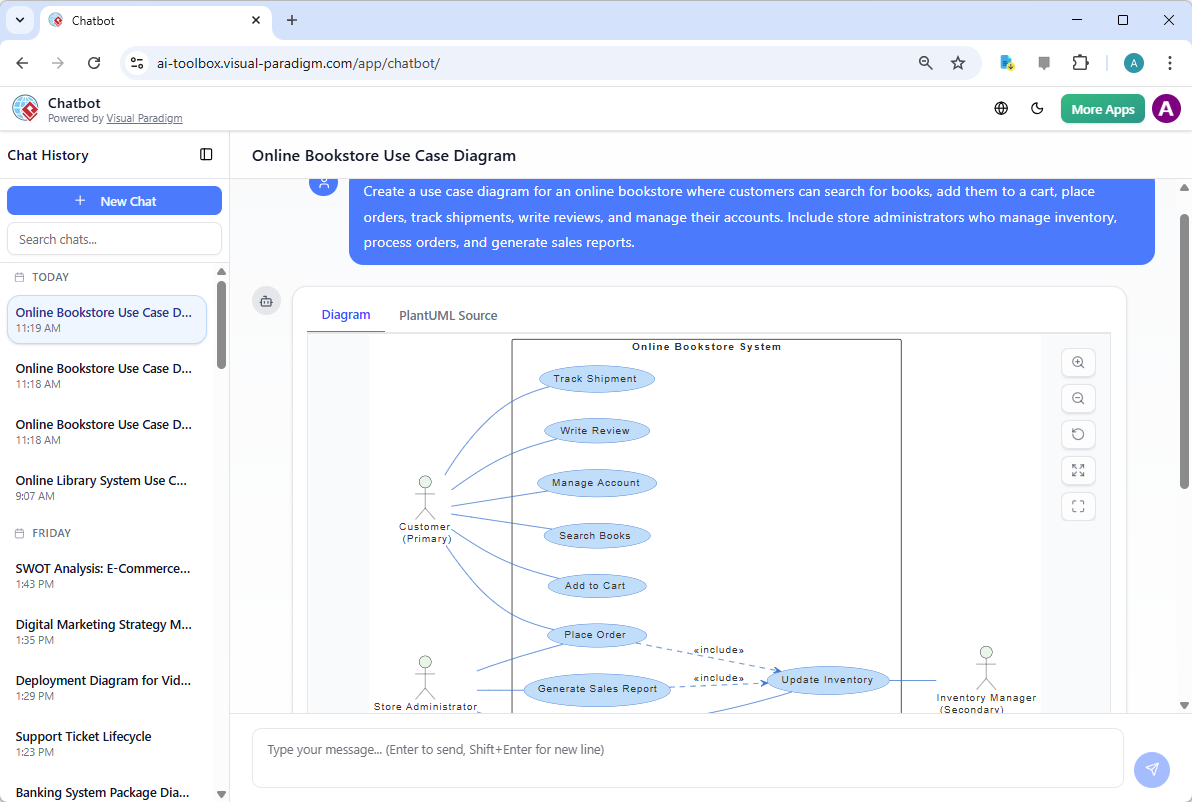
Use Case Diagram for an online bookstore system generated by Visual Paradigm’s AI Chatbot - “Build a use case diagram for a hospital appointment system. Patients should be able to book, reschedule, or cancel appointments, view their medical history, and receive reminders. Doctors view and update patient records, prescribe medications, and manage their schedules. Receptionists register new patients and confirm appointments. The system integrates with a laboratory for test results and a pharmacy for prescriptions.”
- “Generate a use case diagram for a ride-sharing mobile app like Uber. Include passengers who request rides, view drivers, rate trips, and make payments. Drivers accept rides, navigate to passengers, complete trips, and view earnings. Show external systems for maps, payments, and notifications.”
- Submit the prompt. Within seconds, the AI returns a complete Use Case Diagram featuring:
- A clearly labeled system boundary rectangle with the system name
- Actors (stick figures or system icons) positioned logically outside the boundary
- Use cases (ovals) named as user goals in verb-noun form (e.g., “Search Books”, “Request Ride”, “View Patient History”)
- Correct associations (lines connecting actors to use cases)
- Clean, professional layout with minimal crossing lines and readable spacing
- Refine conversationally — no need to redraw anything:
- “Add a Librarian actor who can manage book inventory and process loans.”
- “Make ‘Process Payment’ an included use case for ‘Place Order’ and ‘Renew Subscription’.”
- “Show that ‘Premium Member’ is a specialization of ‘Customer’.”
- “Move the Payment Gateway actor to the bottom and label the interaction ‘Authorize Transaction’.”
- “Generate this diagram in landscape orientation with a blue theme for presentation.”
The Diagram Touch-Up technology ensures every refinement preserves semantic correctness, visual clarity, and layout intent.
Why Plain English Prompts Excel for Boundary Definition
| Traditional Challenge | AI-Powered Plain English Approach |
|---|---|
| Deciding what belongs inside vs. outside the system | AI infers boundary from description; you confirm or adjust |
| Naming use cases inconsistently (e.g., functions vs. goals) | Automatically uses goal-oriented verb-noun phrasing |
| Forgetting key actors or external systems | Suggests common external systems (payment, auth, notification) |
| Poor initial layout and readability | Produces presentation-ready arrangement automatically |
| Slow iteration when stakeholders change scope | Instant updates via natural language—no manual repositioning |
| Steep learning curve for UML notation | No notation required from user—AI handles actors, ovals, lines |
Practical Tips for Strong Prompts
- Start with the system name and core purpose → “A mobile banking app that allows users to…”
- List actors explicitly when known → “customers, bank tellers, ATM machines, fraud detection service”
- Focus on goals/outcomes, not steps → Say “Transfer Money” instead of “Enter amount, select account, confirm PIN”
- Mention external integrations early → “integrates with credit card processors and email notification service”
- If the first diagram misses something, don’t start over—just add: “Include a Guest user who can browse books without logging in.”
Real-World Payoff
- Stakeholder workshops — Generate and project the diagram live during the first 10 minutes of a requirements session. Immediate visual consensus emerges.
- Scope validation — Show the boundary and ask: “Is anything important missing or incorrectly placed inside/outside?”
- Onboarding & documentation — Produce a clear, high-level use case overview in under a minute for new team members or architecture reviews.
- Foundation for elaboration — This clean starting diagram becomes the anchor for adding «include»/«extend», writing scenarios, generating Activity Diagrams, and deriving sequences.
By defining boundaries and identifying actors/use cases through plain English, you move from abstract discussion to concrete, shared understanding almost instantly. The AI handles the UML mechanics so you can focus on what truly matters: ensuring the system delivers real value to real users.
With the functional skeleton now in place, the next sections show how to enrich it – transforming high-level use cases into detailed flows (via Activity Diagrams) and intelligently applying advanced relationships for reusability and flexibility.