

Modeling Entities, Attributes, and Operations with UML 2.5 Compliance
With the domain concepts already surfaced in Module 2 and the functional goals clarified in Module 3, Module 4 begins in earnest with the creation of the Class Diagram – the single most important artifact in the static view. This diagram defines the system’s core building blocks: the classes (entities), their properties (attributes), behaviors (operations), and the rich web of relationships that govern how they collaborate.
Traditionally, building a Class Diagram involved hours of manual work: listing nouns from requirements, guessing attributes and methods, debating visibility and types, drawing lines for associations, deciding on diamonds vs. arrows, and constantly tweaking layout to keep it readable. Mistakes in multiplicity, navigability, or relationship semantics often went unnoticed until implementation revealed the flaws.
Visual Paradigm’s AI ecosystem transforms this into a fast, accurate, and standards-driven process. Through the AI Chatbot and dedicated Class Diagram Generators, you can produce complete, UML 2.5-compliant Class Diagrams directly from natural language descriptions, existing domain models, use case narratives, or textual requirements—often achieving 70–90% of a professional-grade structure in under a minute, ready for human-guided refinement.
How AI Class Diagram Generation Works
-
Start with a Descriptive Prompt In the AI Chatbot (chat.visual-paradigm.com or embedded in Visual Paradigm Desktop), provide a concise description of the domain or system slice you want to model. Effective prompts include:
- “Generate a UML Class Diagram for an online library system with entities: Book, Member, Loan, Reservation, Librarian. Include appropriate attributes, operations, and relationships.”
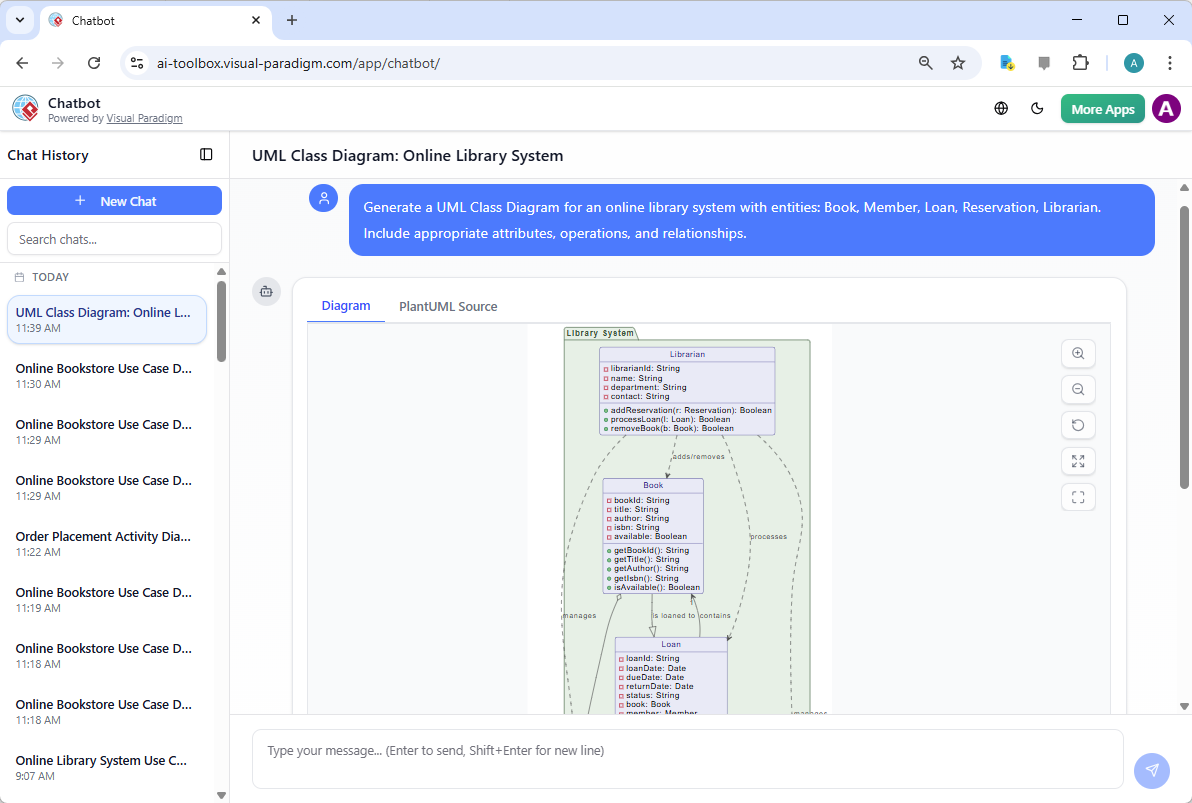
Generating a UML class diagram from Visual Paradigm’s AI Chatbot - “Create a Class Diagram for a hospital patient management system showing Patient, Doctor, Appointment, MedicalRecord, Prescription, and Billing. Show inheritance where applicable and multiplicities.”
- “Based on this domain model [paste classes/attributes from Module 2], generate a detailed Class Diagram with operations, visibility, and correct association types.”
- “Model the core classes for an e-commerce checkout process: Order, OrderItem, Customer, Product, ShoppingCart, Payment, ShippingAddress.”
- “Generate a UML Class Diagram for an online library system with entities: Book, Member, Loan, Reservation, Librarian. Include appropriate attributes, operations, and relationships.”
-
AI Produces a Standards-Compliant Diagram The AI instantly generates a fully notated UML 2.5 Class Diagram featuring:
- Classes with three compartments: name, attributes, operations
- Attributes with visibility (+ public, – private, # protected, ~ package), name, type, multiplicity, default value, and constraints (e.g., {readOnly})
- Operations with visibility, name, parameter list (name:type), return type, and qualifiers (e.g., abstract, static)
- Relationships:
- Association (simple line) with roles, multiplicities (1, , 0..1, 1..), navigability arrows
- Aggregation (hollow diamond) and Composition (filled diamond)
- Generalization (solid line with hollow triangle arrow) for inheritance
- Dependency (dashed line with open arrow)
- Realization (dashed line with hollow triangle) for interfaces
- Correct notation for abstract classes (italic names), interfaces (<<interface>> stereotype), enumerations, and utility classes
- Clean, auto-optimized layout with minimal crossing lines, logical grouping, and readable spacing
-
Iterative, Conversational Refinement Once the initial diagram appears, refine it naturally:
- “Make Member abstract and add a PremiumMember subclass that inherits from it.”
- “Add an operation to Book: borrow(Member borrower): boolean with precondition {book is available}.”
- “Change the Loan–Book relationship to composition with multiplicity 1 on Loan side and 0..* on Book side.”
- “Add a derived attribute to Order: totalPrice {sum of OrderItem.subtotal}.”
- “Apply the <<entity>> stereotype to all persistent domain classes.”
- “Compact the layout and switch to vertical orientation for documentation.”
Diagram Touch-Up technology applies each change incrementally—rerouting connectors intelligently, preserving semantic integrity, and maintaining visual quality without forcing a full redraw.
Why AI Generation Delivers UML 2.5 Compliance and Quality
| Common Manual Modeling Issue | AI-Generated Advantage |
|---|---|
| Inconsistent visibility, type, or multiplicity notation | Strictly follows UML 2.5 specification for every element |
| Misapplied relationships (e.g., aggregation used for dependency) | Trained on metamodel; suggests semantically correct types |
| Overly verbose or missing qualifiers (abstract, static, derived) | Automatically applies where context implies (e.g., italic for abstract) |
| Poor readability in complex diagrams | Intelligent auto-layout + refinement preserves clarity |
| Tedious manual addition of constraints/notes | Supports OCL-style constraints, notes, and stereotypes easily |
| Slow iteration when requirements change | Conversational updates keep model living and versioned |
Practical Tips for Best Results
- Be specific about scope: “Focus on the core domain entities, exclude UI or infrastructure classes for now.”
- Reference prior work: “Extend the domain model from Module 2 with operations and detailed relationships.”
- Ask for rationale: “Why did you choose composition here instead of aggregation?”
- Validate early: After generation, request an Object Diagram snapshot (next section) to test concrete instances.
- Combine sources: “Generate from this use case description + the extracted classes from textual analysis.”
Real-World Impact
- Rapid Prototyping — Turn stakeholder conversations into a visual class structure in minutes for immediate feedback.
- Design Reviews — Produce clean, compliant diagrams ready for architecture walkthroughs or code generation previews.
- Teaching & Onboarding — Beginners see correct UML notation and patterns from the start, accelerating learning.
- Foundation for Everything Else — A strong Class Diagram directly informs sequence diagrams, state machines, component structures, and database schemas.
This AI-driven generation capability shifts your effort from drawing boxes and lines to architectural decision-making: choosing the right abstractions, balancing responsibilities, applying patterns, and ensuring long-term evolvability.
With a compliant, high-fidelity Class Diagram now in hand, the next sections show how to deepen its integrity—mastering OO fundamentals in context, validating with Object Diagrams, and scaling organization through Package Diagrams. The static view is taking shape—precise, intentional, and ready to support the dynamic behaviors to come.