

Validating Rules with Object Diagrams: Generating Snapshots of Facts to Test the Accuracy and Integrity of Class Diagrams
A Class Diagram defines the rules of the system—the allowed types, relationships, multiplicities, constraints, and invariants that govern how objects may exist and interact. But rules on paper (or screen) are abstract; they can look perfect yet hide subtle flaws that only become visible when concrete instances are considered.
This is where Object Diagrams come in. An Object Diagram is a UML “snapshot”—an instance-level view showing specific objects (instances of classes), their attribute values, and the links (instances of associations) between them at a particular moment in time. It serves as a powerful test harness for the Class Diagram: if you can create realistic snapshots that satisfy business rules and use-case scenarios without violating the class structure, the model is likely sound. If not, the Class Diagram needs refinement.
Manually creating Object Diagrams is tedious and rarely done in practice—most teams skip this validation step entirely. Visual Paradigm’s AI changes that by making Object Diagram generation fast.
How AI-Assisted Object Diagram Generation Works
-
Start the AI Chatbot.
-
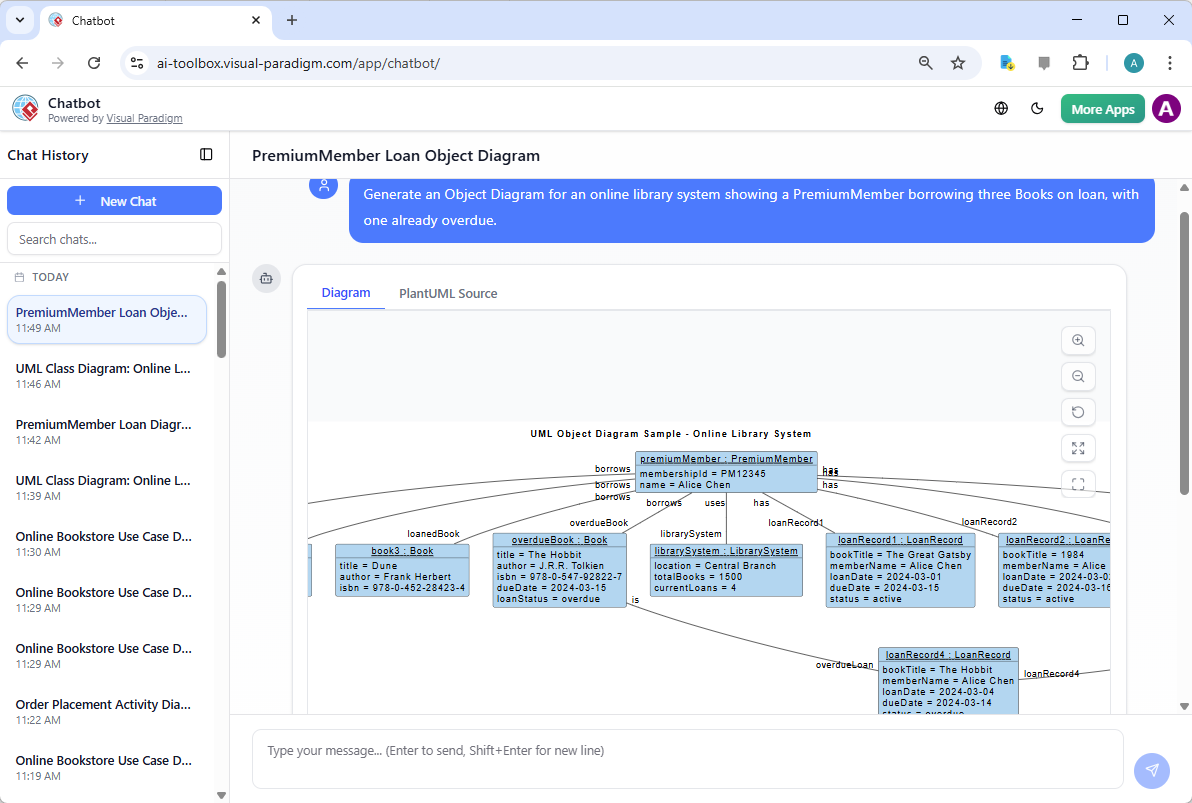
Request a Validation Snapshot via Natural Language In the AI Chatbot, describe a concrete scenario you want to test:
- “Generate an Object Diagram for an online library system showing a PremiumMember borrowing three Books on loan, with one already overdue.”
- “Create a snapshot where an Order has two OrderItems, one Product is out of stock, and payment has been authorized via CreditCard.”
- “Show a valid Hospital scenario: one Patient with two Appointments booked with different Doctors, and one MedicalRecord containing three Prescriptions.”
- “Test the multiplicity constraint: try to create a Department with 25 Employees (should violate if max is 20).”
-
AI Produces One or More Snapshots The AI creates one or more Object Diagrams that:
- Instantiate classes as objects (e.g., :Book, :PremiumMember)
- Assign realistic attribute values (e.g., book.title = “Clean Code”, loan.dueDate = “2026-01-20”)
- Create links corresponding to associations (with correct multiplicity and role names)
- Respect constraints (OCL, notes, or implied invariants) where defined
- Highlight valid vs. invalid cases when testing boundaries (e.g., red dashed lines or annotations for violations)
- Use clean layout: objects aligned, links routed without overlap, attribute compartments shown only when relevant
-
Interactive Validation & Feedback Loop Review the generated snapshot(s) and refine conversationally:
- “This is good—now show what happens if the same PremiumMember tries to borrow a fourth Book (should violate loan limit).”
- “Add a link showing that the overdue Loan triggers a Fine object.”
- “Change the Order status to ‘Shipped’ and show updated inventory levels.”
- “Why is this link invalid? Explain the multiplicity violation.”
The AI responds with:
- Updated diagram reflecting the change
- Explanation of rule adherence or breach
- Suggestions to fix the Class Diagram (e.g., “Add a {loans <= 3} constraint to Member”, “Change multiplicity to 0..3”)
-
One-Click Integration Accepted snapshots are saved as linked views in the Visual Paradigm project—traceable back to the Class Diagram for documentation, reviews, or model simulation.
Why Object Diagrams Are Essential Validation (and Why AI Makes Them Practical)
| Without Object Diagrams | With AI-Generated Object Snapshots |
|---|---|
| Class rules remain theoretical—hard to spot gaps | Concrete examples quickly reveal missing constraints or wrong multiplicities |
| Multiplicity errors (1..* vs. 0..*) often unnoticed | Instant test of upper/lower bounds with valid/invalid cases |
| Constraints (pre/post, invariants) stay untested | AI attempts to satisfy → flags violations with rationale |
| Difficult to communicate “what the model really means” to stakeholders | Visual snapshots make abstract rules tangible and discussable |
| Time-consuming to create manually | Generated in seconds, refined in natural language |
Practical Scenarios Where Snapshots Shine
- Multiplicity & Cardinality Testing — “Can a Team have zero members? Exactly one leader? More than ten players?”
- Composition Integrity — “If an Order is deleted, are its OrderItems automatically removed?”
- Inheritance/Polymorphism Validation — “Can I substitute a CreditCardPayment for any Payment without breaking the process?”
- Business Rule Enforcement — “Does the model prevent a Doctor from having Appointments with themselves?”
- Edge Cases & Exceptions — Overdue loans, out-of-stock items, concurrent reservations, etc.
Best-Practice Tips
- Generate 2–3 snapshots per critical class cluster: one happy path, one boundary, one error case.
- Use snapshots during reviews: “Here’s what the model allows—does this match reality?”
- Link snapshots to use cases: “This object configuration realizes the ‘Borrow Book’ happy path.”
- Ask the AI to “explain why this snapshot violates the model”—it becomes a teaching moment on OO integrity.
By regularly creating and testing Object Diagram snapshots, you gain confidence that your Class Diagram is not just syntactically correct but semantically accurate and fit for purpose. This step dramatically reduces downstream surprises during behavioral modeling, coding, and testing.
With the static structure now validated at the instance level, the final section of Module 4 shows how to impose order on growing complexity—using AI to generate Package Diagrams that organize the model into logical, scalable namespaces and architectural layers.