

Utilizing the AI Package Diagram Generator to Organize Complex Systems into Namespaces and Subsystems
As your Class Diagram grows to include dozens—or even hundreds—of classes, a common problem emerges: the diagram becomes overwhelming. Scrolling through a sea of interconnected boxes makes it hard to see the big picture, understand dependencies, enforce separation of concerns, or communicate the architecture to stakeholders. Without organization, even a well-designed model feels chaotic, and teams struggle to maintain clean layers (e.g., presentation, business logic, data access) or modular subsystems.
This is precisely where Package Diagrams shine. A Package Diagram provides a high-level view that groups related classes into packages (namespaces, modules, or subsystems), shows dependencies between them, and reveals the overall architectural structure. It answers critical questions: Which parts of the system depend on which others? Where are the layers? What belongs in the core domain versus infrastructure?
Manually creating and maintaining Package Diagrams is time-intensive and often skipped. Visual Paradigm’s AI Package Diagram Generator eliminates this barrier by instantly producing a clean, standards-compliant Package Diagram—complete with logical grouping, dependency arrows, and layered organization. The result is immediate architectural clarity, ready for review and refinement.
How the AI Package Diagram Generator Works
-
Start the AI Chatbot.
-
Invoke the Generator with a Simple Prompt In the AI Chatbot:
- “Generate a Package Diagram from my current Class Diagram, organizing into layers: Presentation, Business, Domain, Persistence, and Infrastructure.”
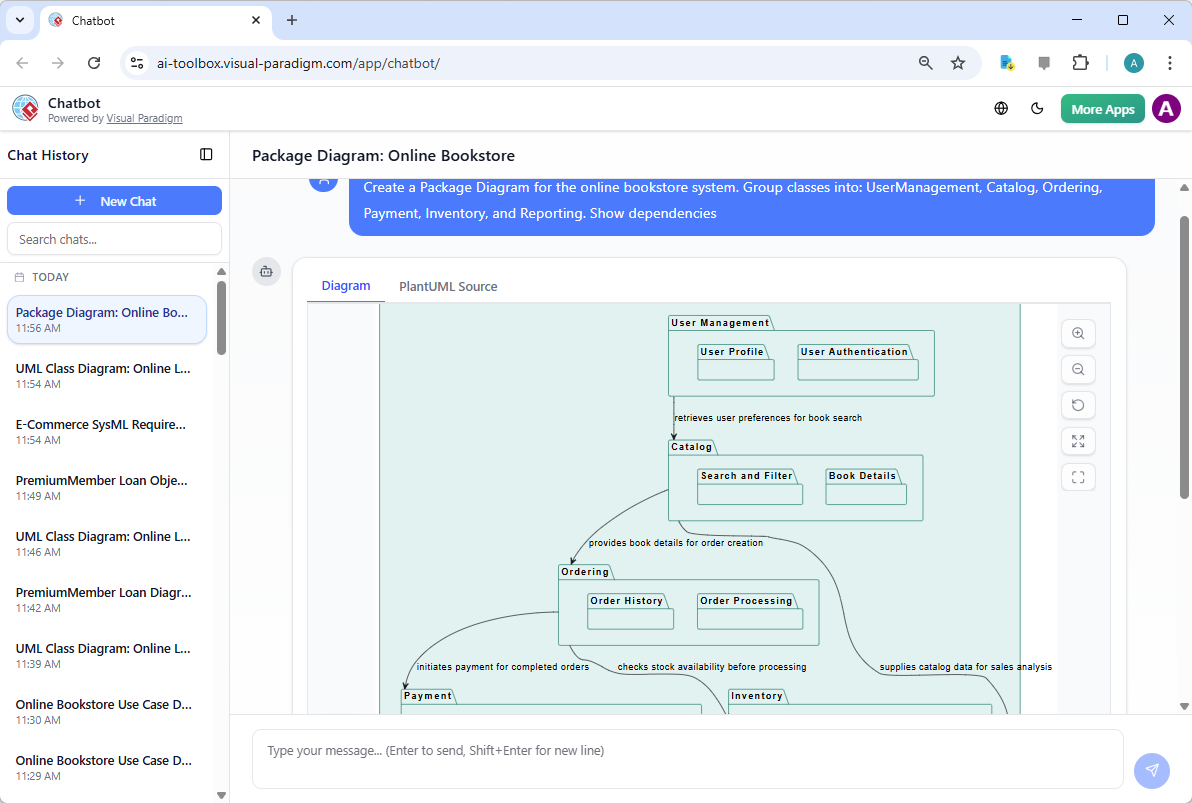
- “Create a Package Diagram for the online bookstore system. Group classes into: UserManagement, Catalog, Ordering, Payment, Inventory, and Reporting. Show dependencies.”
- “Suggest a modular package structure for the hospital system with separate subsystems for PatientManagement, Scheduling, Billing, and IntegrationServices.”
- “Organize the e-commerce classes into MVC layers and show which packages depend on others.”
-
AI Delivers an Organized, UML 2.5-Compliant Diagram The generator instantly produces a Package Diagram featuring:
- Packages as rounded rectangles (or folder icons) with clear names
- Logical grouping of related classes (hover or expand to see contents)
- Dependency arrows (dashed lines with open arrowheads) showing which packages use others
- Layered or modular layout (e.g., Presentation → Business → Domain → Persistence, with no circular dependencies)
- Optional nesting for sub-packages (e.g., Payment::CreditCard and Payment::PayPal)
- Clean, auto-arranged layout optimized for readability (horizontal layers, vertical modules, or radial as appropriate)
- Stereotypes when useful (e.g., <<layer>>, <<subsystem>>, <<framework>>)
-
Iterative Refinement via Conversation Refine naturally without manual dragging:
- “Move the Payment package into a new Infrastructure layer.”
- “Add a dependency from Ordering to Inventory and label it ‘updates stock’.”
- “Create a separate Reporting subsystem that depends only on Domain.”
- “Merge UserManagement and Authentication into a single Security package.”
- “Show nested packages for MVC: Controllers, Services, Entities, Repositories.”
- “Make the layout vertical and add a legend for dependency types.”
Diagram Touch-Up ensures every change reroutes arrows cleanly, avoids overlaps, and preserves architectural intent.
Why This Approach Delivers Instant Architectural Clarity
| Traditional Manual Packaging | AI Package Diagram Generator Advantage |
|---|---|
| Hours spent grouping classes and drawing arrows | Seconds to a complete, professional diagram |
| Arbitrary or inconsistent grouping | Intelligent suggestions based on class names, relationships, and common patterns |
| Circular or hidden dependencies unnoticed | Automatically detects and visualizes dependencies (no cycles) |
| Hard to enforce layers (e.g., UI not depending on DB) | Enforces clean layering and flags violations |
| Layout becomes messy as model grows | Smart auto-layout scales beautifully |
| Stakeholders struggle to grasp overall structure | High-level view instantly communicates architecture |
Practical Applications and Best Practices
- Layered Architecture — Prompt for “strict layers” to enforce N-tier rules (Presentation depends only on Business, etc.).
- Microservices Preview — Ask for “one package per potential service” to explore service boundaries early.
- Refactoring Aid — Use the diagram to spot tangled dependencies and drive cleanup.
- Team Communication — Export as image/PDF for architecture reviews: “Here’s how the system is organized—no more guessing.”
- Prompting Tips:
- Specify style: “layered”, “modular”, “nested”, “flat”
- Mention patterns: “MVC”, “Clean Architecture”, “Hexagonal”
- Reference existing elements: “Use the classes from my current project”
- Ask for rationale: “Why did you place Inventory in Domain and not Infrastructure?”
Real-World Impact
- Rapid Architecture Reviews — Generate and discuss the high-level structure in the first 5 minutes of a design meeting.
- Scalability from Day One — Even small projects start with organized packages, preventing future spaghetti code.
- Onboarding Acceleration — New developers instantly see “where things live” and dependency rules.
- Direct Path to Implementation — Packages map cleanly to namespaces (Java packages, C# namespaces, Python modules) and folders in your codebase.
By leveraging the AI Package Diagram Generator, you transform a potentially complex and cluttered Class Diagram into a clear, navigable architectural map. The static view is no longer just a detailed list of classes—it is a structured, layered blueprint that guides development, enforces discipline, and scales gracefully.
This completes Module 4’s exploration of the static view. You now possess a validated, principle-driven, and architecturally organized structural model—ready to support the dynamic behavioral interactions in Module 5. With AI handling grouping, dependencies, and layout, your energy stays focused on high-value architectural decisions that make systems robust and maintainable. The foundation is solid; let’s build behavior on top of it next.