

Mapping Conceptual Flows to MVC (Model-View-Controller) Layers and Detailed Message Signatures
High-level use cases and Activity Diagrams (from Module 3) describe what the system does from an external, user-centric perspective. They focus on goals, main flows, and exceptions without revealing how the internal objects collaborate to deliver that behavior. Sequence Diagrams bridge this gap by showing the detailed, time-ordered message exchanges among concrete objects—making the abstract conceptual flow executable in design.
A critical step in professional modeling is refining a use-case-level flow into a detailed, architecturally layered Sequence Diagram. This refinement typically introduces:
- Architectural layering — separating concerns (e.g., MVC: View → Controller → Model, or hexagonal/clean architecture variants)
- Detailed message signatures — precise operation calls with parameters, return types, and qualifiers
- Internal object lifelines — revealing which classes from the static model (Module 4) participate and how
- Implementation-aware decisions — error handling, caching, transactions, logging, etc.
Visual Paradigm’s AI Chatbot excels at this refinement step. It takes your conceptual use-case description or existing Activity/Use Case Diagram and—through guided or fully automated prompts—produces a refined Sequence Diagram that maps the high-level flow onto a chosen architectural pattern (most commonly MVC), complete with realistic method signatures drawn from the underlying Class Diagram.
How to Perform Sequence Refinement from Use Cases
-
Start with a Use Case or Activity Context Reference an existing use case (or paste its main/alternative flows) or point to a previously generated Activity Diagram.
-
Issue a Refinement Prompt In the AI Chatbot, use prompts that explicitly request layering and detail:
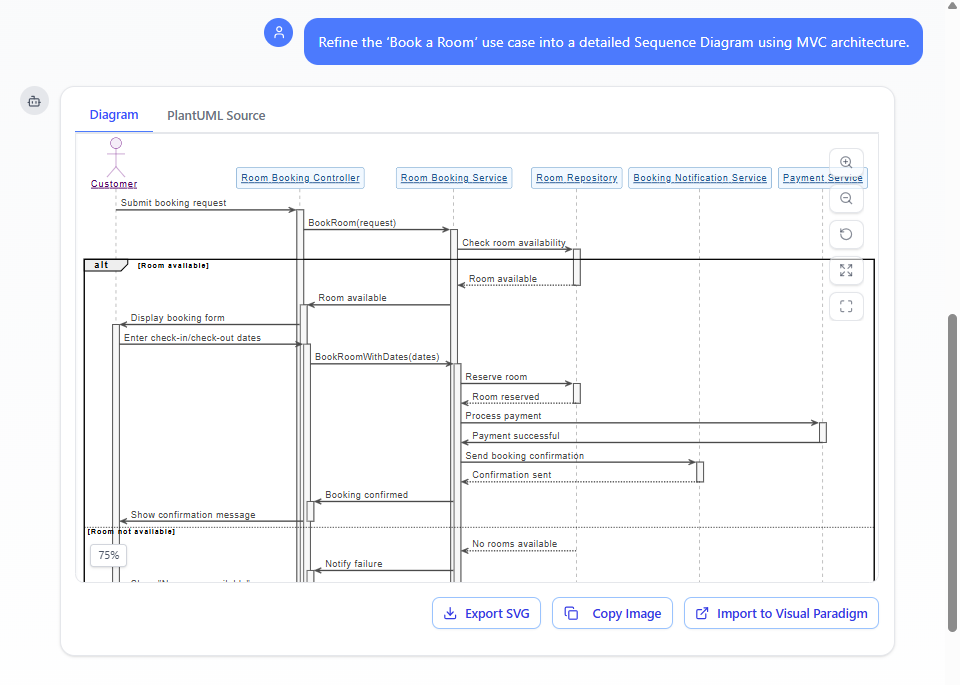
- “Refine the ‘Place Order’ use case into a detailed Sequence Diagram using MVC architecture. Show interactions from Customer (View), OrderController, OrderService (Model), PaymentGateway, and InventoryRepository. Include detailed message signatures with parameters and return types.”
- “Map the checkout flow from the Activity Diagram to a Sequence Diagram in layered MVC style: Browser (View) → CheckoutController → OrderService → PaymentService → InventoryService. Show parameter passing, return values, and exception handling for payment failure.”
- “Take the ‘Login with 2FA’ use case and generate a refined Sequence Diagram separating Presentation (LoginView), Application (AuthController), Domain (AuthService, UserRepository), and Infrastructure (SMSProvider). Use full method signatures like authenticate(username: String, password: String): AuthResult.”
- “Refine the ‘Borrow Book’ use case showing MVC layers: LibraryUI → LoanController → LoanService → BookRepository → MemberRepository. Include preconditions, postconditions, and transaction boundaries.”
-
AI Generates the Layered, Detailed Sequence Diagram The output includes:
- Lifelines grouped by layer (often visually separated or labeled):
- View/Presentation (Browser, Mobile App, UI components)
- Controller (handling input, orchestrating flow)
- Service/Model (business logic, domain services)
- Repository/Entity (data access, persistence)
- External Infrastructure (PaymentGateway, EmailService, etc.)
- Detailed message signatures pulled from or consistent with the Class Diagram:
- e.g., placeOrder(orderRequest: OrderRequest): OrderConfirmation
- validatePayment(paymentDetails: PaymentInfo): PaymentResult
- reserveStock(items: List<Item>): boolean
- Return messages with types (dashed arrows)
- Appropriate fragments for conditions, loops, exceptions
- Activation bars showing processing time per layer
- Notes or constraints for preconditions, transactions, or invariants
- Lifelines grouped by layer (often visually separated or labeled):
-
Iterative Enhancement Refine further with natural commands:
- “Add caching: check Redis cache in OrderService before querying repository.”
- “Show transaction boundary around payment and inventory update (use critical fragment).”
- “Insert logging call after each major step in the Controller.”
- “Change to hexagonal style: show ports and adapters for Payment and Inventory.”
- “Highlight synchronous vs. asynchronous calls (e.g., email notification async).”
- “Add detailed exception propagation: throw OrderFailedException on stock failure.”
Diagram Touch-Up ensures every addition maintains clean layering, proper spacing between vertical groups, and readable message flow.
Benefits of This Refinement Approach
| Conceptual/Use-Case Level | Refined MVC Sequence Diagram |
|---|---|
| High-level steps (“Customer places order”) | Concrete calls (“orderController.placeOrder(request)”) |
| No visibility into internal structure | Clear separation of concerns (View ↔ Controller ↔ Service ↔ Repo) |
| Vague “process payment” | Explicit signatures (“paymentService.authorize(cardInfo): AuthorizationToken”) |
| No architectural decisions | Enforces layering, dependency direction, and interface contracts |
| Hard to trace to code | Directly mappable to controller methods, service interfaces, repository implementations |
Practical Tips for Effective Refinement
- Specify the architectural style early: “MVC”, “layered”, “hexagonal”, “clean architecture”
- Name layers consistently with your project (e.g., “Frontend”, “Application”, “Domain”, “Infrastructure”)
- Reference existing classes: “Use operations from the OrderService and PaymentGateway classes in my Class Diagram”
- Ask for alternatives: “Show both synchronous and event-driven (async) variants for inventory reservation”
- Validate realism: “Does this sequence respect the multiplicity and constraints from the Class Diagram?”
Real-World Value
- Detailed Design Specifications — Teams hand these diagrams to developers as implementation blueprints.
- Architecture Compliance Checks — Quickly verify layering rules (e.g., no direct View-to-Repository calls)
- Code Generation Preview — Many patterns (controller methods, service calls) map almost 1:1 to code skeletons
- Review & Testing — Paths through the sequence become integration test scenarios
This refinement step transforms a conceptual “what should happen” into a concrete “how it will be implemented”—bridging analysis and design seamlessly. With AI handling layering, signature detail, and layout intelligence, you focus on architectural choices, responsibility allocation, and error-handling strategy.
Next, we’ll extend this behavioral precision to the lifecycle dimension—modeling how individual objects change state over time in response to these interactions through State Machine Diagrams. The dynamic picture is becoming complete.