


Designing AWS architecture diagrams manually is a complex task. You have to juggle hundreds of services like EC2, S3, and Lambda, ensure connections follow security best practices, and keep the layout organized. If you are looking to visualize AWS infrastructure with AI, you need a professional AI AWS architecture diagram generator that understands cloud logic and high-availability patterns.
Visual Paradigm stands out as the premier AI-powered cloud design platform. While our ecosystem supports over 100 diagram types, our specialized AI Cloud Architecture Studio is the best AI cloud architecture tool for building professional blueprints. Whether you need an automated AWS diagram maker for an MVP or a complex multi-region enterprise setup, our AI handles the heavy lifting.
AI Cloud Architecture Studio: The Future of Cloud Design
Our browser-based AI Cloud Architecture Studio is specifically tailored for modern cloud architects. As a leading AI diagram generator, it allows you to describe your requirements in plain English and receive a standards-compliant AWS diagram in minutes.
How to Generate an AWS Diagram with AI
- Describe Your System: Start in the Discovery tab. Input a prompt like: “I want to build a real-time food delivery app with live order tracking, payments, and ratings.”
- Select Your Provider: Choose AWS and select a deployment strategy—such as Low Cost/MVP or High Availability.
- Technical Deep Dive: The AI will ask clarifying questions to refine the stack (e.g., choosing between Relational or NoSQL databases).
- Generate Architecture: Click Generate Cloud Architecture. The AI instantly builds a clean, interactive diagram using official AWS icons.
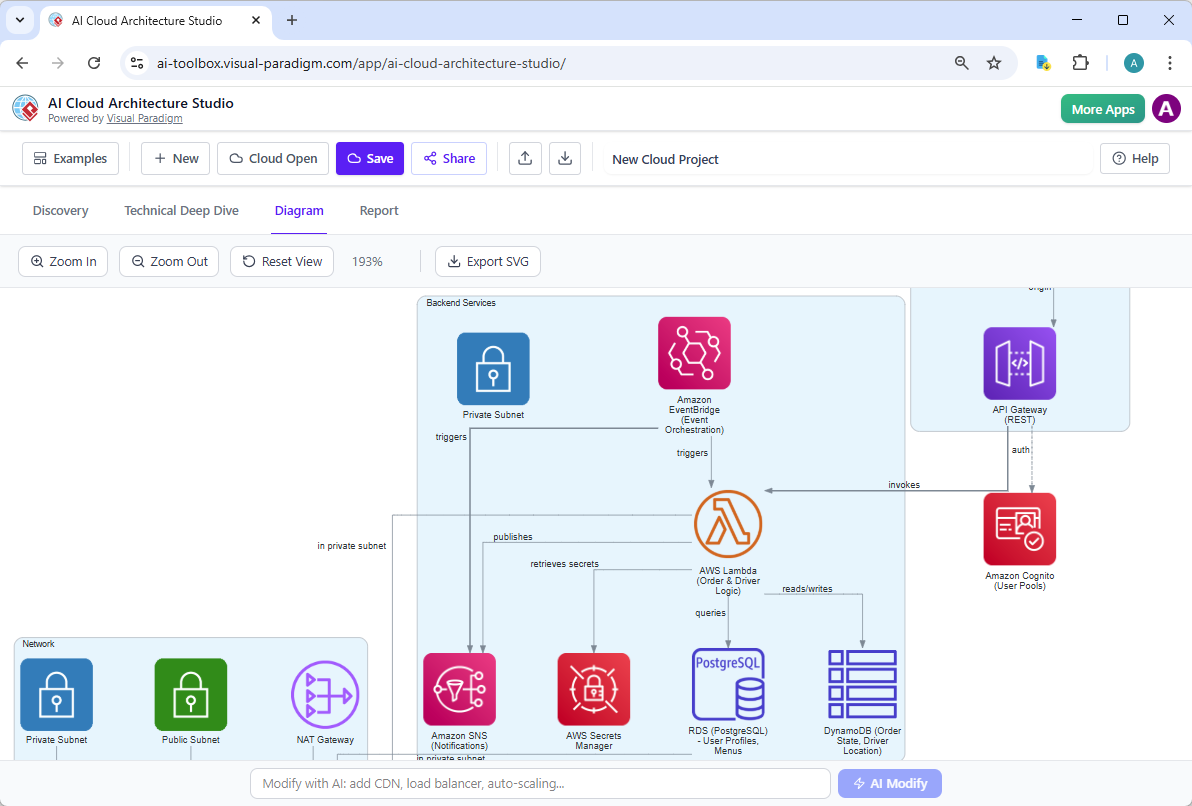
- AI-Powered Modification: Use the AI Modify tool to refine the design. Simply type “Add WAF and CloudWatch monitoring,” and the diagram updates automatically.
Key Benefits for Cloud Engineers
- Natural Language Input: No manual dragging required—just describe your infrastructure.
- Well-Architected Alignment: Use AI strategies to ensure your design prioritizes cost-efficiency or uptime.
- Interactive Editor: Once generated, you have full control to move components or add custom metadata.
- Export & Share: Export your cloud blueprint automation as high-res SVGs for stakeholder presentations or technical documentation.
The Visual Paradigm AI Ecosystem
While AWS architecture diagrams are best managed in the Studio, they are part of a broader AI diagram platform. Since 2002, Visual Paradigm has provided professional modeling for UML, BPMN, and ERD, ensuring your cloud designs are never isolated.
Integrated Workflows Across Platforms:
- VP Desktop: Use the desktop powerhouse for deep, offline modeling. You can import your AWS reference architecture into larger enterprise projects.
- OpenDocs: Embed your AWS diagrams into living technical wikis. When your architecture evolves in the Studio, you can update your AI-powered diagram within your documentation to keep teams aligned.
- AI Chatbot: Use our conversational assistant for rapid prototyping of related logic, such as Sequence or Use Case diagrams that support your AWS backend.
Why Visual Paradigm is the Best AI Tool for AWS Diagrams
| Feature | Visual Paradigm AI | Standard Drawing Tools |
|---|---|---|
| Logical Generation | Asks technical questions to build a real stack | Randomly places icons |
| Official Iconography | Uses current AWS, Azure, and GCP sets | Inconsistent or outdated shapes |
| Scalability | Supports High Availability & Multi-Region strategies | Static, single-view only |
Transform Your Cloud Design Workflow Today
Stop wrestling with manual icon placement. Visual Paradigm’s AI Cloud Architecture Studio is the ultimate AI AWS architecture diagram generator, designed to scale with your team’s needs. Whether you are building serverless apps or enterprise data warehouses, our AI ensures your designs are fast, accurate, and professional.