

Module 3: Functional Modeling and Use Case Elaboration
Welcome to Module 3 of Mastering UML Visual Modeling in the Visual Paradigm AI Ecosystem. With a solid domain foundation established in Module 2—through high-level context diagrams, AI-extracted classes, attributes, relationships, and guided structural discovery—we now shift focus to the functional heart of the system: what the system actually does from the perspective of its users and external actors.
This module is all about functional modeling—capturing user goals, system responsibilities, and behavioral flows in a way that is clear, stakeholder-friendly, and directly traceable to implementation. At the center of this work stands the Use Case Diagram, supported by detailed Use Case Descriptions, Activity Diagrams for workflows, and early behavioral refinements that bridge requirements to detailed interaction modeling (explored more deeply in later modules).
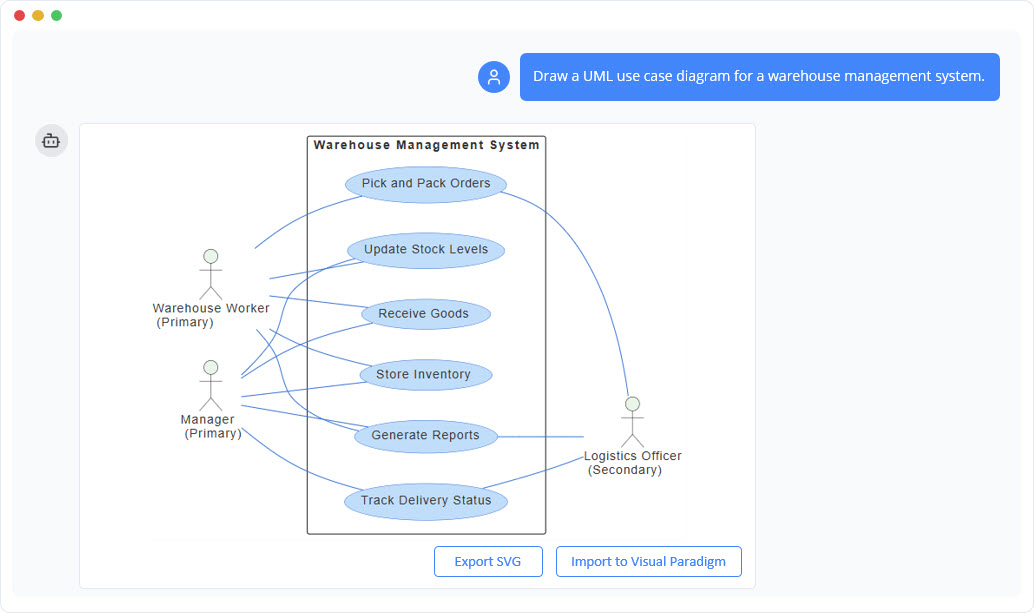
Traditional use case modeling often suffers from several persistent challenges:
- Actors and use cases are identified inconsistently or incompletely.
- High-level goals get buried under overly granular steps or technical jargon.
- Textual scenarios remain disconnected from visual diagrams.
- Relationships such as «include», «extend», and generalization are applied haphazardly or ignored.
- Teams struggle to keep use cases concise yet expressive enough to guide design and testing.
Visual Paradigm’s AI ecosystem directly addresses these pain points, transforming use case elaboration from a slow, documentation-heavy task into a fast, iterative, and visually rich conversation. By leveraging natural language input, intelligent refinement tools, and automated diagram generation, you can quickly define system boundaries, discover user goals, elaborate flows, and produce presentation-ready artifacts that stakeholders immediately understand and validate.
Overview
The primary objectives of Module 3 are to:
- Clearly define the system boundary and identify all relevant actors (human users, external systems, devices).
- Discover and organize use cases that represent meaningful, goal-oriented interactions between actors and the system.
- Elaborate use cases with precise scenarios, preconditions, postconditions, main flows, alternative flows, and exception paths.
- Visualize these elements in Use Case Diagrams that correctly apply UML relationships («include», «extend», generalization, association).
- Automatically derive Activity Diagrams from textual narratives or use case flows to show detailed procedural logic.
- Iteratively refine the functional model using AI suggestions that follow UML best practices and common patterns.
Key AI-Powered Techniques You Will Master
- Defining System Boundaries and Identifying Actors/Use Cases through Plain English Prompts Use the AI Chatbot to describe the system’s purpose and users in everyday language. Instantly generate a complete Use Case Diagram with actors positioned correctly, use cases named as goals (“Search Books”, “Place Order”, “Process Refund”), and system boundary clearly drawn.
- Narrative to Activity Diagram Transformation Write or paste user stories, main success scenarios, or detailed flows in plain text. The AI automatically converts them into structured Activity Diagrams—complete with actions, decisions, forks/joins, swimlanes (when actors are involved), and exception paths—providing an executable-like view of behavior early in the process.
- Iterative Use Case Refinement with Intelligent Relationship Suggestions Leverage dedicated AI Step-Based Apps such as the Use Case Diagram Refinement Tool and Use Case to Activity/Sequence Converter. These tools analyze your initial use cases and intelligently propose:
- «include» relationships for reusable sub-goals (e.g., “Authenticate User” included by multiple use cases)
- «extend» relationships for optional or conditional behavior (e.g., “Apply Coupon” extends “Checkout”)
- Generalization for inheritance among similar use cases
- Actor specialization and system boundary adjustments Every suggestion is accompanied by rationale, UML compliance checks, and one-click application—ensuring relationships are meaningful, not mechanical.
By the end of this module, you will be able to:
- Produce clean, stakeholder-approved Use Case Diagrams in minutes rather than hours.
- Elaborate use cases with rich, traceable scenarios that directly inform testing, UI design, and detailed behavioral modeling.
- Generate corresponding Activity Diagrams that visualize workflows and decision logic without manual flowcharting.
- Apply «include» and «extend» relationships confidently and correctly, avoiding common anti-patterns.
- Maintain a living functional model that evolves through natural-language refinements rather than tedious redraws.
This functional view serves as the critical bridge between the static domain model (Module 2) and the dynamic behavioral models (Module 5). It answers the essential question every stakeholder asks: “What value does this system deliver to its users, and how?”
With AI handling notation, layout, consistency checks, and initial flow generation, your attention can stay focused on understanding user intent, prioritizing features, and ensuring the system solves real problems—exactly where human insight matters most.
Let’s begin capturing what the system does—conversationally, visually, and with precision.