

Iterative Use Case Refinement: Using AI to Intelligently Add “extend” and “include” Relationships Based on UML Best Practices
With a clean Use Case Diagram and detailed Activity flows in place, the functional model is already far more mature than most projects achieve in the early stages. However, real-world systems rarely consist of completely independent use cases. Many behaviors are shared, conditional, or variations of a base flow—exactly the scenarios where UML’s «include» and «extend» relationships provide powerful modularity, reusability, and clarity.
Manually deciding where and how to apply these relationships is notoriously error-prone:
- Teams overuse «include» for every common step, creating overly fragmented models.
- «extend» is frequently confused with generalization or alternative flows.
- Relationships are added inconsistently across diagrams.
- Adding or changing one relationship often requires tedious manual repositioning of ovals, rerouting of dashed lines, and layout cleanup.
Visual Paradigm’s AI ecosystem solves this through iterative, intelligence-driven refinement. Using the AI Chatbot in conversational mode or dedicated Step-Based Apps (such as the Use Case Diagram Refinement Tool or Use Case Relationship Suggester), the AI analyzes your existing use cases, scenarios, and domain context—then proposes precise, UML 2.5-compliant «include» and «extend» relationships following established best practices.
How Iterative Refinement Works
-
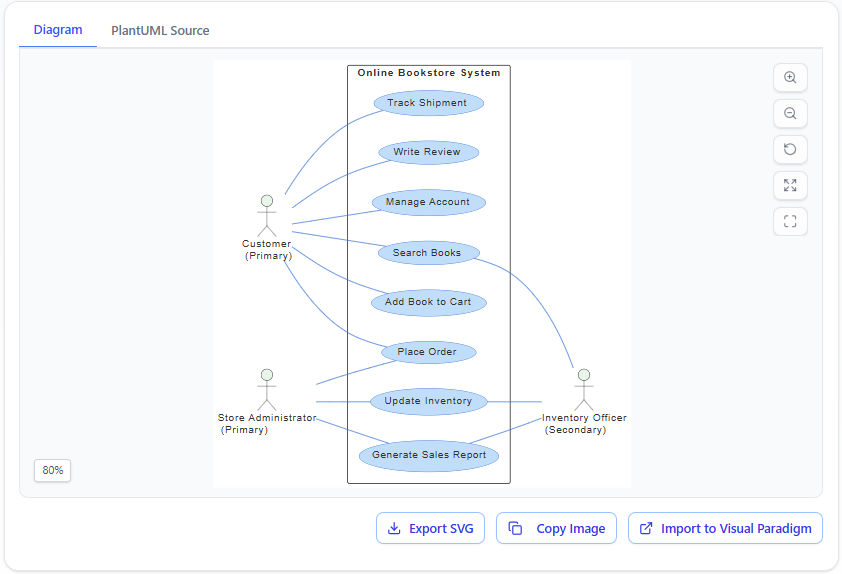
Start with Your Base Diagram Assume you already have a generated Use Case Diagram (from plain English prompts or textual analysis) showing primary use cases and actors.
-
Invoke Refinement in Natural Language In the AI Chatbot, simply describe the desired behavior or ask for suggestions:
- “Refine this use case diagram by adding appropriate include and extend relationships.”
- “Show that ‘Authenticate User’ is included by ‘Place Order’, ‘Track Shipment’, and ‘Write Review’.”
- “Suggest extend relationships: for example, ‘Apply Coupon’ should extend ‘Checkout’ only for eligible orders.”
- “Make ‘Handle International Shipping’ an optional extension of ‘Process Order’ when the destination is outside the country.”
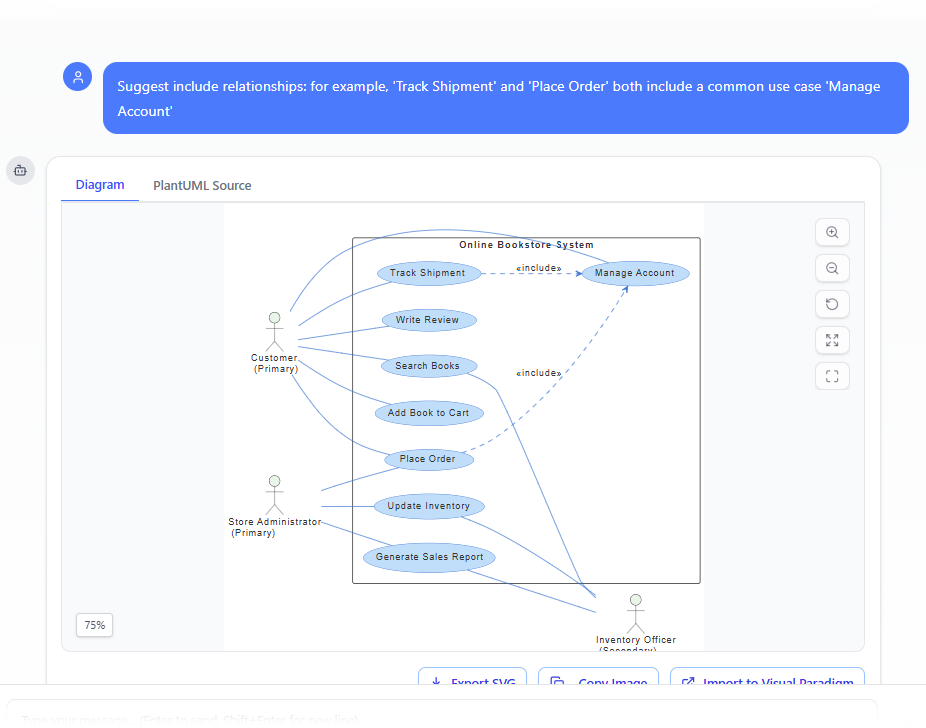
- “Suggest include relationships: for example, ‘Track Shipment’ and ‘Place Order’ both include a common use case ‘Manage Account’”
-
AI Analyzes and Proposes The AI evaluates:
- Reusability — Common sub-goals that appear in multiple use cases → strong candidate for «include».
- Conditional/optional behavior — Variations or add-ons that occur only under certain conditions → candidate for «extend».
- Semantic fit — Uses linguistic patterns, scenario text, and UML metamodel rules to avoid misuse (e.g., no «include» for optional steps).
- Best practices — Follows guidelines such as:
- «include» for mandatory, reusable fragments (base use case is incomplete without it).
- «extend» for optional or conditional extensions (base use case is complete on its own).
- Clear extension points named when appropriate.
- Avoidance of over-fragmentation or circular dependencies.
It then suggests additions with rationale, e.g.:
- «include» → “Authenticate User” included by “Place Order”, “Track Shipment”, “Manage Account” Rationale: Authentication is a mandatory prerequisite shared across multiple user goals.
- «extend» → “Apply Loyalty Discount” extends “Checkout” at extension point “Before Payment Summary” Rationale: Discount is optional and only applies if the customer has loyalty points.
-
One-Click or Conversational Application
- Accept all suggestions → AI adds dashed arrows with «include» / «extend» keywords, correctly orients extension points (if named), and auto-adjusts layout.
- Selective application → “Add only the authentication include relationships for now.”
- Further refinement → “Rename the extension point to ‘During Order Summary’ and move the ‘Apply Coupon’ oval closer to ‘Checkout’.”
Diagram Touch-Up technology ensures:
- No overlapping lines
- Consistent arrow styles (dashed with open arrowhead for «extend», dashed with «include» label)
- Logical grouping of related use cases
- Preserved readability even after multiple iterations
UML Best-Practice Guidance Built In
The AI embeds key rules to prevent common mistakes:
- Use «include» when the included behavior is always required and represents a reusable fragment (not optional).
- Use «extend» when the extending behavior is conditional, optional, or adds variation without altering the base flow’s completion.
- Name extension points explicitly for clarity in complex cases.
- Avoid chaining too many includes/extends—keep use cases high-level and goal-focused.
- Prefer generalization over «extend» when use cases represent true subtypes (e.g., “Process Credit Card Payment” generalizes “Process Payment”).
Practical Benefits in Real Projects
- Modularity & Maintainability — Shared behaviors (login, validation, notification) modeled once and reused.
- Reduced Diagram Clutter — Base use cases remain concise; details factored out cleanly.
- Improved Traceability — Stakeholders see exactly where optional or shared logic lives.
- Faster Evolution — New requirements (e.g., “Add gift wrapping option”) become simple extensions instead of rewriting core flows.
- Team Consistency — AI enforces the same best-practice heuristics across all modelers.
Example Before & After Refinement (Conceptual)
Before (flat list of use cases): Place Order – Checkout – Apply Coupon – Process Payment – Track Shipment – Authenticate User
After AI Refinement:
- Authenticate User «include» by Place Order, Track Shipment, Manage Account
- Apply Coupon «extend» Checkout (extension point: Before Payment Summary)
- Process International Shipping «extend» Process Order (condition: destination ≠ domestic)
This refinement turns a simple list into a modular, expressive functional model—automatically and correctly.
By mastering iterative refinement, you ensure your use case model is not just complete but elegant, reusable, and maintainable—qualities that pay dividends when the model informs detailed sequence diagrams, test planning, UI flows, and implementation.
With boundaries defined, flows visualized, and relationships intelligently applied, the functional view is now robust and ready to serve as the foundation for dynamic behavioral modeling in Module 5.