


One of the most persistent bottlenecks in agile software development is bridging the gap between high-level business requirements and detailed system architecture. Textual user stories and Product Requirement Documents (PRDs) often contain hidden edge cases, ambiguous branch conditions, and missing error-handling steps. By leveraging AI-driven prompt engineering, product managers and systems analysts can automatically convert raw requirements into structured, compliant UML Activity Diagrams in seconds.
1. Why Automate Requirement-to-Diagram Conversion?
Translating textual specifications into visual process flows manually is time-consuming and prone to human oversight. When requirements change, manually updating complex diagrams across Confluence pages or design repositories introduces documentation drift.
Key Benefits of AI Automation:
- Uncover Hidden Edge Cases: AI parsers evaluate conditional statements (if/then/else) within requirement text, highlighting missing fallback logic or dead-end paths.
- Instant Visual Validation: Stakeholders and developers can visually verify workflow logic during sprint planning without reading dense multi-page PRDs.
- Automated Diagram-as-Code Maintenance: Generating standardized PlantUML code directly from text allows teams to store diagram scripts in version control alongside product code.
2. Parsing Agile User Stories & Acceptance Criteria
User stories following standard formats (e.g., “As a [User], I want to [Action], so that [Benefit]”) along with Gherkin Acceptance Criteria (Given-When-Then) provide ideal structural inputs for AI diagram generation models.
Example User Story Input:
User Story: As a registered customer, I want to apply a promotional discount code during checkout so that I can reduce my total purchase price.
Acceptance Criteria (Gherkin):
– Given the user is on the payment screen with items in their cart.
– When they enter a valid promo code and click “Apply”, the system calculates the discount, updates the subtotal, and displays a success badge.
– When they enter an expired or invalid code, the system displays an error message (“Invalid Code”) and retains the original subtotal.
– When the promo code causes the total to reach $0, the system bypasses the credit card prompt and moves directly to order confirmation.
Generated PlantUML Activity Diagram:
@startuml
|Customer|
start
:Navigate to Payment Screen;
:Enter Promo Code;
:Click "Apply Promo Code";

|Checkout API|
:Validate Promo Code Format & Expiration;
if (Code Valid?) then ([Yes])
  :Calculate Discount Amount;
  :Update Order Subtotal;

  if (New Subtotal == $0?) then ([Yes])
    |Checkout API|
    :Bypass Payment Gateway;
    :Mark Order as Paid;
    |Customer|
    :Display Order Confirmation;
    stop
  else ([No])
    |Customer|
    :Display Success Badge & Discount;
    :Prompt for Payment Details;
    stop
  endif

else ([No / Expired])
  |Customer|
  :Display "Invalid Code" Error Message;
  :Retain Original Subtotal;
  stop
endif
@enduml3. Transforming Complex PRDs into Swimlane Activity Diagrams
Product Requirement Documents often describe end-to-end operational processes across multiple system actors, microservices, and human users. Extracting swimlanes (activity partitions) from multi-paragraph PRDs ensures clear boundary assignment.
PRD Paragraph Input:
“When an enterprise client submits a bulk user onboarding CSV file through the Admin Portal, the Ingestion Service validates the CSV header and row formatting. If syntax errors exist, an error report is emailed to the Admin, and ingestion halts. If the file is valid, the User Management Engine provisions user accounts while the Notification Service simultaneously dispatches welcome emails with temporary passwords. Once all accounts are processed, the system writes an audit event to the Security Log and updates the batch status to Completed.”
AI Extraction Prompt Strategy:
The AI parser identifies the distinct actors (Admin User, Ingestion Service, User Management Engine, Notification Service, Security Log), converts sequential operations into sequential action states, maps branching logic for syntax validation, and uses parallel forks for account provisioning and email delivery.
4. Step-by-Step AI Diagramming Workflow
Step 1: Extract Textual Requirements
Copy your raw user stories, acceptance criteria, or PRD section directly from Jira, Confluence, or Notion.
Step 2: Submit to the AI Diagramming Chatbot
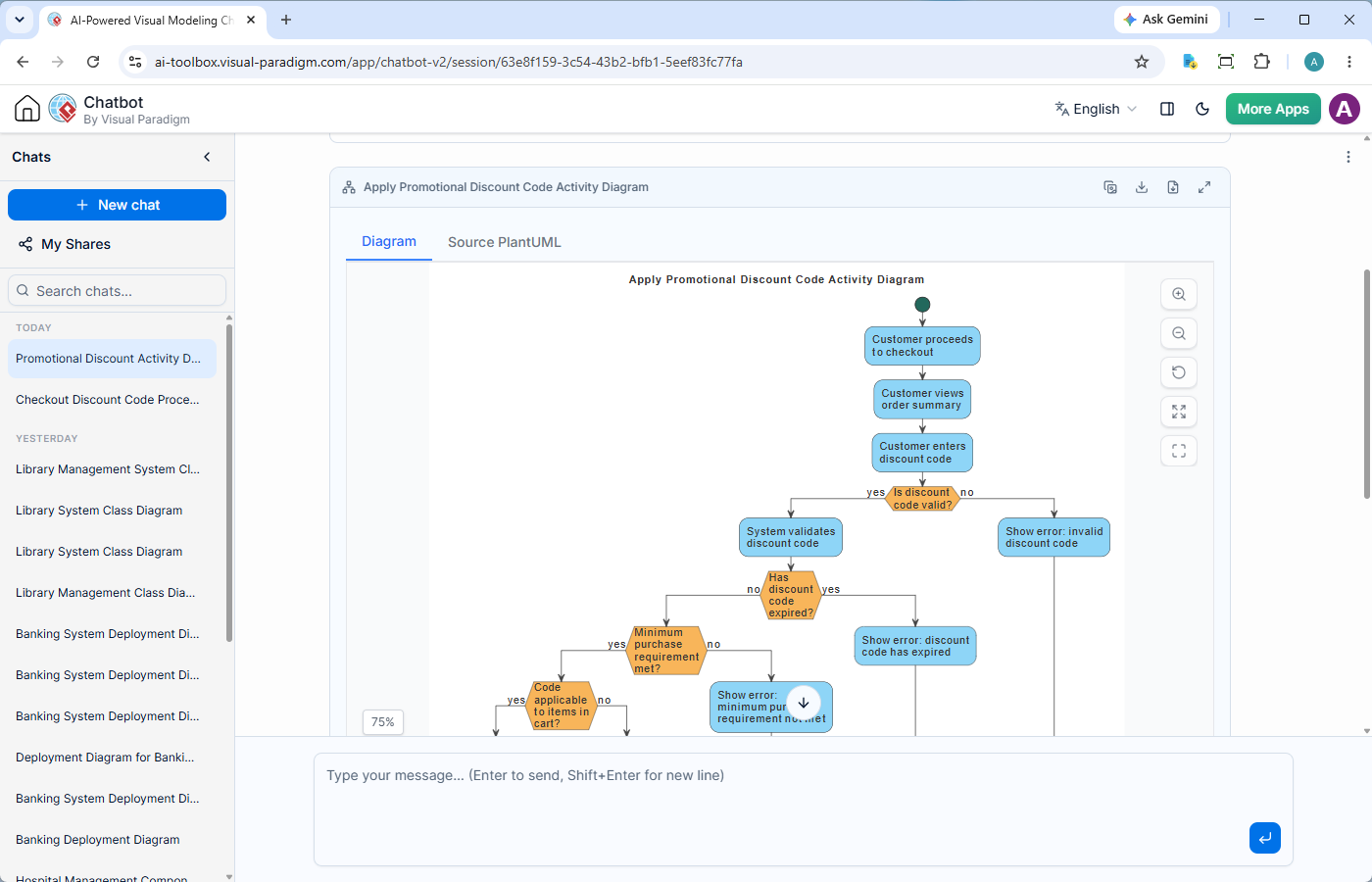
Pass your text snippet into the Visual Paradigm AI Activity Diagram Chatbot using a structured transformation prompt.
Step 3: Review and Refine
The AI engine instantly generates both the interactive visual diagram and the underlying PlantUML code. If an edge case is identified, instruct the chatbot: “Add an error handling branch if the Notification Service times out.”
Step 4: Export to Documentation
Publish the finalized diagram directly to your product specification pages or export it as high-resolution vector graphics (SVG/PNG).
5. Copy-and-Paste Prompt Templates for Jira & Confluence
Template 1: User Story to Activity Diagram Transformation
Act as a Lead Systems Analyst. Convert the following Agile User Story and Acceptance Criteria into a PlantUML UML Activity Diagram.

User Story:
[Paste User Story Here]

Acceptance Criteria:
[Paste Given-When-Then / Bullet Points Here]

Formatting Rules:
1. Use explicit swimlanes for User and System components.
2. Include decision nodes with labeled branch guards (e.g., [Valid], [Invalid]).
3. Ensure every error scenario leads to a clear end state or retry loop.
4. Output valid PlantUML code within code blocks.
Template 2: Unstructured PRD Section to Activity Diagram
Act as an Enterprise Architect. Parse the following Product Requirement Document (PRD) section and generate a complete UML Activity Diagram.

PRD Text:
[Paste PRD Text Here]

Requirements:
- Automatically identify and partition actions into swimlanes based on system boundaries.
- Map parallel execution threads using 'fork' and 'join' constructs where tasks happen concurrently.
- Include audit logging and error notification steps if mentioned.
6. Streamlining Agile Workflows with Visual Paradigm AI
Connecting requirements management directly to visual modeling tools eliminates manual documentation overhead and aligns product teams with development engineers.
- AI UML Activity Diagram Chatbot: Convert user stories into interactive UML models via a simple chat interface. Tweak workflows conversationally in real-time during refinement sessions.
- OpenDocs Documentation Suite: Embed live AI-generated activity diagrams directly into living technical specifications, PRDs, and software architecture documents without manual image re-uploads.
- VPasCode (Diagram-as-Code): Edit PlantUML diagram code with VPasCode diagram-as-code editor.
- Visual Paradigm AI UML Tool: Seamlessly switch between automated text-based diagram generation and precise manual drag-and-drop visual editing.
Accelerate your requirement-to-diagram workflows on the web with VP Online Deluxe Edition or on your workstation with VP Desktop Professional Edition.
Related Links
- Visual Paradigm VPasCode interactive playground: Try out Visual Paradigm VPasCode in the VPasCode interactive playground
- VPasCode overview: Learn more about VPasCode
- Try out Visual Paradigm AI Diagramming Chatbot: Generate diagrams with AI
- AI Diagramming Chatbot Overview: Learn more about AI Diagramming Chatbot: AI Diagramming Chatbot