


Mapping out complex business processes can be a daunting task. You need to identify every activity, decision point, and participant, all while ensuring the diagram adheres to strict BPMN 2.0 standards. Manual drawing is often time-consuming, and many tools lack the intelligence to help you get started quickly.
That is where Visual Paradigm stands out as the premier AI diagram generator. We offer a comprehensive ecosystem for Business Process Model and Notation (BPMN), combining instant AI-driven creation with professional-grade editing and collaboration tools. Whether you are looking for an AI BPMN diagram generator to kickstart a project or an AI BPMN tool for detailed optimization, Visual Paradigm provides an end-to-end solution that bridges the gap between conceptual ideas and implementation-ready models.
VP Desktop: The Ultimate AI BPMN Tool for Precise Process Engineering
VP Desktop is Visual Paradigm’s flagship application, designed for serious business analysts and architects. Our desktop suite now features a powerful AI business process diagram generator that understands your operational needs. By simply describing a process in plain language—such as “A customer support ticketing system involving customers, support agents, and engineering”—the AI constructs a complete diagram instantly.
Unlike basic tools, our AI BPD generator supports advanced structural elements. You can choose to automatically include pools and lanes to clearly define responsibilities across different departments. Once the AI generates the initial layout, you have full access to our professional modeling suite to refine gateways, add intermediate events, or link processes to data objects and requirements.
Creating Business Process Diagrams Using AI in Visual Paradigm Desktop
Transform your process descriptions into visual workflows by following these steps:
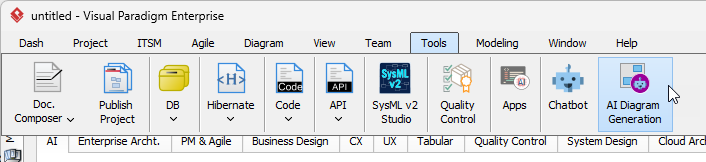
- Access the AI Tool: Go to the top menu bar, click on Tools, and select AI Diagram Generation.
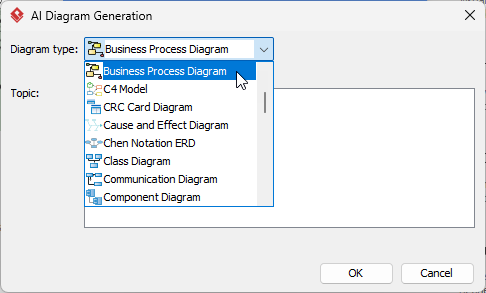
- Select Diagram Type: In the dialog box that appears, locate the dropdown and choose Business Process Diagram.
- Define Participants (Optional): If you want the flow to be organized by roles or departments, check the Include Pools and Lanes option.
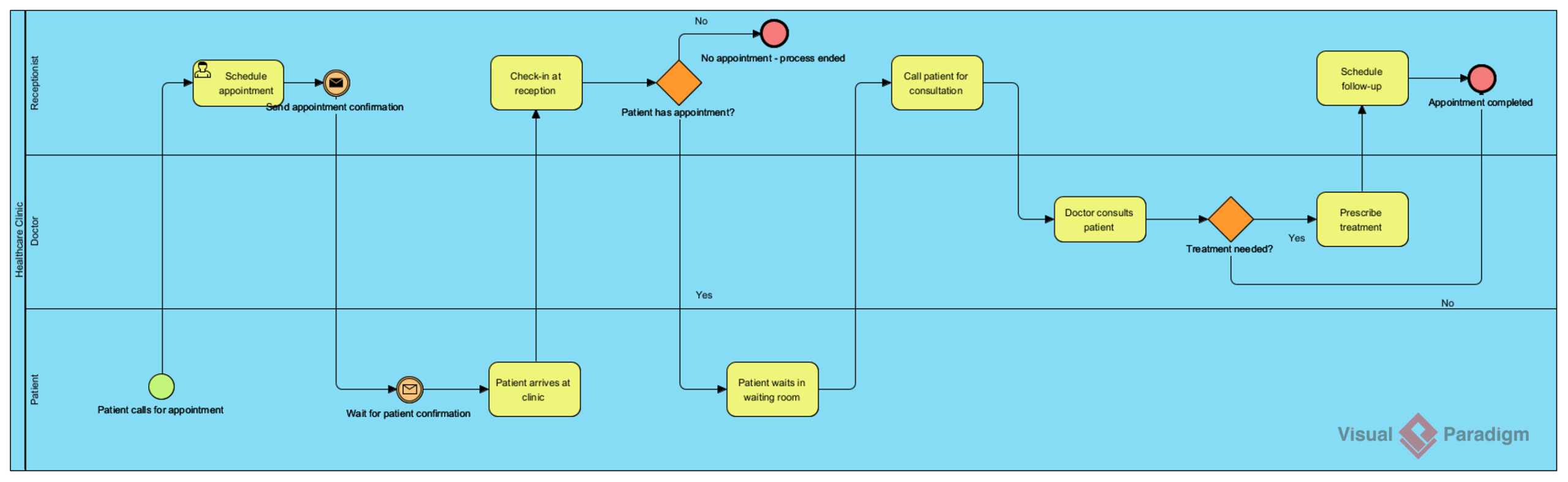
- Provide Your Topic: Enter a detailed description of your process (e.g., “A patient appointment scheduling and treatment process in a healthcare clinic.”).
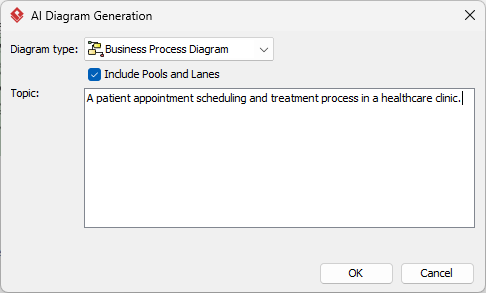
- Generate: Click OK to start the automated modeling.
The AI will immediately build the diagram within your project, providing a professional foundation that you can continue to build upon.
Key Benefits of the AI BPMN Generator
- Instant Drafting: Move from a blank canvas to a structured BPMN model in seconds using our AI BPMN diagram generator.
- Standard Compliance: Ensure your diagrams follow BPMN 2.0 notation, including proper task types, gateways, and events.
- Seamless Refinement: Because the output is a native Visual Paradigm diagram, you can modify any element using our drag-and-drop editor.
- Organizational Clarity: Use the AI BPD generator to automatically categorize tasks into pools and lanes, making complex cross-functional processes easy to read.
Why Choose Visual Paradigm as Your AI BPMN Tool?
Many tools offer simple AI drawing, but Visual Paradigm provides a complete modeling lifecycle. Our AI business process diagram generator is part of a larger ecosystem that supports team collaboration, version control, and traceability. You can generate a process with AI, refine it with professional tools, and then share it with your team for feedback—all within a single, unified environment.
Ready to modernize your workflow? Visit our AI Diagram Generation feature page to see how we are redefining visual modeling.
Experience the Power of AI-Driven Modeling
Download Visual Paradigm today and start using the industry’s most advanced AI BPMN diagram generator.