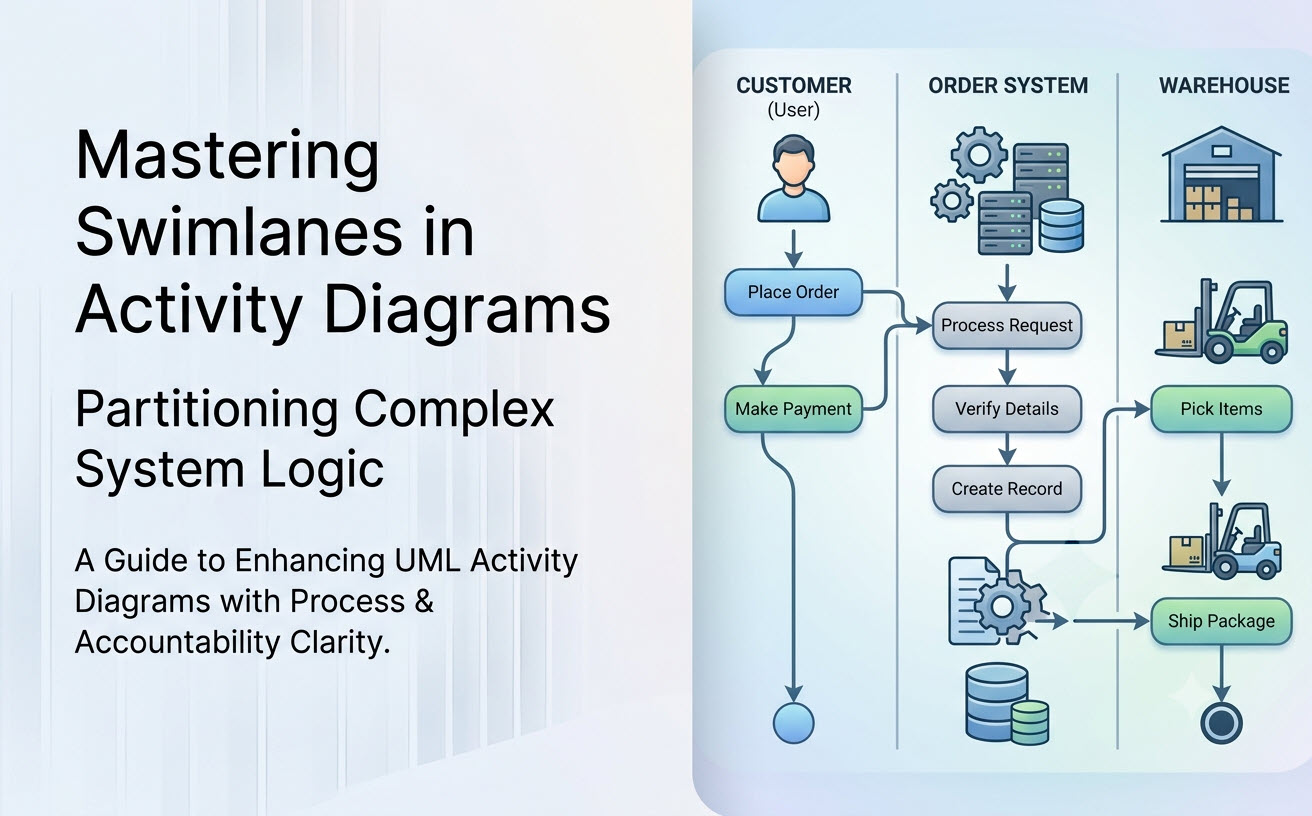
In complex enterprise business processes and multi-tier software architectures, simply mapping action steps is only half the battle. To understand who or what executes each action, you need Swimlanes (Activity Partitions). This guide breaks down how to structure single-dimensional and multi-dimensional swimlanes to bring accountability, clarity, and precision to your UML Activity Diagrams.
What are Swimlanes in Activity Diagrams?
In the Unified Modeling Language (UML) specification, swimlanes are officially known as Activity Partitions. They visually group related action nodes based on organizational roles, business departments, microservices, or system components.
Without swimlanes, a workflow diagram is merely a sequence of actions. With swimlanes, every action state is explicitly assigned to an owner, instantly clarifying handoffs, responsibilities, and system boundaries across the entire process. Creating cross-functional swimlanes manually can be tedious, but leveraging a modern AI activity diagram tool allows analysts to describe roles and actions in plain English and automatically receive a cleanly partitioned layout.
Types of Swimlanes: Organizational vs. System Partitions
Depending on whether you are designing a business workflow or a software architecture, swimlanes represent different logical entities:
| Partition Type | Typical Swimlane Header Examples | Primary Use Case |
|---|---|---|
| Organizational / Role-Based | Customer, Sales Representative, Inventory Manager, Finance Dept |
Standard Operating Procedures (SOPs), cross-departmental business processes, customer journey mapping. |
| System / Architectural | Web Client (UI), API Gateway, Authentication Service, Database |
Software design, microservices interaction logic, distributed system API call orchestration. |
| Hybrid / Cross-Domain | User (Human), Frontend Application, Third-Party Payment Provider |
End-to-end integration mapping showing human-to-computer interactions. |
Horizontal vs. Vertical Swimlanes
Activity partitions can be laid out either vertically or horizontally based on display constraints and process length:
- Vertical Swimlanes (Top-to-Bottom Flow): The default layout for most UML software tools. The process moves downward over time, making it ideal for web pages and PDF documentation with standard vertical scrolling.
- Horizontal Swimlanes (Left-to-Right Flow): Mirrors classic business process swimlane diagrams (like BPMN). Time progresses from left to right, making it easier to read across departments on wide computer monitors.
Advanced Technique: Multidimensional Partitions (Grid Swimlanes)
For highly complex systems, a single set of swimlanes is not enough. UML supports Two-Dimensional Activity Partitions, creating a grid where rows represent one dimension and columns represent another.
Example Scenario: Global E-Commerce Order Fulfillment
- Vertical Columns (Department): Sales vs. Logistics vs. Finance
- Horizontal Rows (Location/Region): US Division vs. EU Division
An action like “Process Customs Declaration” sits precisely at the intersection of Logistics and EU Division. Using an advanced AI UML tool helps parse these complex multi-variable relationships in text and render them accurately into text-based UML syntax.
6 Key Best Practices for Swimlane Partitioning
- Limit the Number of Swimlanes: Aim for 3 to 6 swimlanes per diagram. Beyond 7 swimlanes, the diagram becomes congested and hard to trace.
- Place High-Frequency Interactors on the Outer Edges: Keep primary actors (e.g., Customer) on the leftmost/topmost lane to establish a natural entry point for the process flow.
- Minimize Line Crossings: Arrange adjacent swimlanes based on interaction frequency to keep control flow lines short and clear.
- Keep Action States Strictly Inside Partition Boundaries: Avoid placing nodes on the border lines between swimlanes unless you are explicitly using joint transitions.
- Use Active Verbs Paired with Nouns: Ensure action state labels clearly state the task (e.g., “Validate Payment” inside the Payment Gateway swimlane).
- Standardize Swimlane Naming Conventions: Use singular nouns for roles (
Accountant) or clear component names (Auth Controller).
Generating Swimlane Diagrams with AI Tools
Constructing swimlanes manually often requires tedious resizing, re-aligning shapes, and re-routing connectors every time a process step changes. The AI Diagramming Chatbot in the Visual Paradigm AI ecosystem automates this entire layout process.
How Visual Paradigm AI Accelerates Swimlane Modeling:
- Natural Language Role Assignment: Simply prompt the chatbot with your process description (e.g., “Create an order process with Customer, Order System, and Warehouse Manager swimlanes…”), and the AI activity diagram tool automatically groups the nodes into correct partitions.
- High-Precision Syntax Generation: Trained specifically on modeling standards, the AI chatbot generates syntactically correct text-based code (like PlantUML or Mermaid) with zero manual alignment work required.
- Direct Code Tweaking in VPasCode: Export your generated swimlane code into VPasCode to perform granular textual updates.
- Convert Swimlanes into SOP Documents: Embed your partitioned activity diagrams directly into OpenDocs to build clear Standard Operating Procedures (SOPs) that specify exact duties for each department.
- Flexible Multi-Platform Access: Access the AI Chatbot on the cloud via VP Online Deluxe Edition or within the native modeling workspace using VP Desktop Professional Edition.
Frequently Asked Questions
Can a single action belong to two swimlanes simultaneously?
In standard UML, an action node resides within a single partition. If an action represents a joint responsibility, it is best modeled using two concurrent actions split by a Fork Node, placing one action in each respective swimlane, and synchronizing them later with a Join Node.
What is the difference between Swimlanes in Activity Diagrams and Pools in BPMN?
In UML Activity Diagrams, swimlanes (partitions) exist within a single activity space and share control flows. In BPMN, separate Pools represent completely independent processes or organizations that can only communicate across boundaries via Message Flows.
Can I export my AI-generated swimlane diagram as high-resolution graphics?
Yes. Visual Paradigm allows you to export your generated activity diagrams in vector SVG, high-res PNG, or copy the visual diagram directly to your clipboard for training manuals and presentations.
Related Links
- Visual Paradigm VPasCode interactive playground: Try out Visual Paradigm VPasCode in the VPasCode interactive playground
- VPasCode overview: Learn more about VPasCode
- Try out Visual Paradigm AI Diagramming Chatbot: Generate diagrams with AI
- AI Diagramming Chatbot Overview: Learn more about AI Diagramming Chatbot: AI Diagramming Chatbot