


Why Developers are Switching to a Diagram as Code Tool
In modern software engineering, documentation must move at the speed of code. Traditional visual editors are slow, version control-unfriendly, and difficult to maintain. That is why engineering teams are shifting to diagram as code. Using a text-to-diagram tool allows you to treat system architectures, database schemas, and workflows like source code—committable, trackable, and easily editable.
However, the current landscape is fragmented. If you want to use a text-based UML tool, you might find yourself bouncing between different platforms depending on whether your team prefers PlantUML, Mermaid, or Graphviz.
Enter VPasCode by Visual Paradigm: the unified diagram as code platform designed to eliminate tool sprawl.
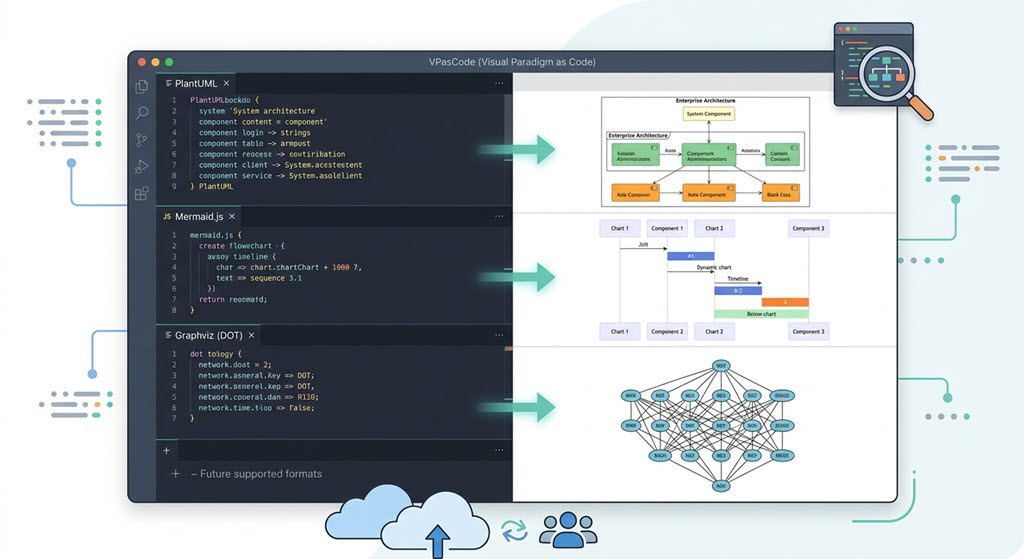
VPasCode unifies major text-to-diagram formats into one robust developer workspace.
Unifying Your Favorite Code-Based Diagramming Software
Instead of forcing you to choose a single syntax, VPasCode works as a highly versatile multi-format text-to-diagram editor. It enables you to easily create any diagrams using the standard formats you already know:
- PlantUML: The industry standard for complex, enterprise-ready text-based UML diagram editing.
- Mermaid: The markdown-friendly syntax native to platforms like GitHub and GitLab.
- Graphviz (DOT): Perfect for complex network topologies and automated structural graph layouts.
By supporting all three major engines, VPasCode functions as the ultimate diagram as code software workspace. Whether you are generating a quick flowchart or mapping out complex systems, you can work entirely in plaintext.
Create Every UML Diagram with Zero Drag-and-Drop
VPasCode covers the entire spectrum of UML modeling. You can easily author and render:
| Diagram Category | Supported Diagrams |
|---|---|
| Structural Diagrams | Class diagram, Object diagram, Component diagram, Deployment diagram |
| Behavioral & Interaction | Sequence diagram, Use case diagram, Activity diagram, State diagram, Timing diagram |
| Data & Charts | SQL schemas, ECharts, JSON visualizations |
Supercharged by the Visual Paradigm AI Ecosystem
What sets VPasCode apart from standalone text editors is its deep integration with the Visual Paradigm AI Ecosystem. It bridges the gap between pure manual coding and intelligent generation.
AI-Powered Assistance & Smart Editing
Writing syntax errors in PlantUML or Mermaid can be frustrating. VPasCode introduces direct AI tools to keep your development fluid:
- AI Code Error Fixing: Instantly diagnose and fix syntax errors in your code blocks with one click.
- AI Code Content Translation: Translate your architectural labels inline to support international teams (e.g., automatically translating
Carto汽車).
Fluid AI Workspace Integration
You do not have to write diagram code from scratch. With the Visual Paradigm AI Diagramming Chatbot, you can describe your system architecture in plain English. The chatbot generates the clean code. From there, simply click the “Edit in VPasCode” button to immediately open the code in the workspace and touch up your layout manually.
Collaborative Documentation with OpenDocs
Diagrams are only useful if your team can access them. Once you finish editing your diagram as code tool files, you can instantly export and send them straight to Visual Paradigm OpenDocs. This creates a seamless workflow where code-driven architecture meets beautifully structured, collaborative documentation and knowledge sharing.
Related Links
- Visual Paradigm VPasCode interactive playground: Try out Visual Paradigm VPasCode in the VPasCode interactive playground
- VPasCode overview: Learn more about VPasCode
- Try out Visual Paradigm AI Diagramming Chatbot: Generate diagrams with AI
- AI Diagramming Chatbot Overview: Learn more about AI Diagramming Chatbot: AI Diagramming Chatbot