


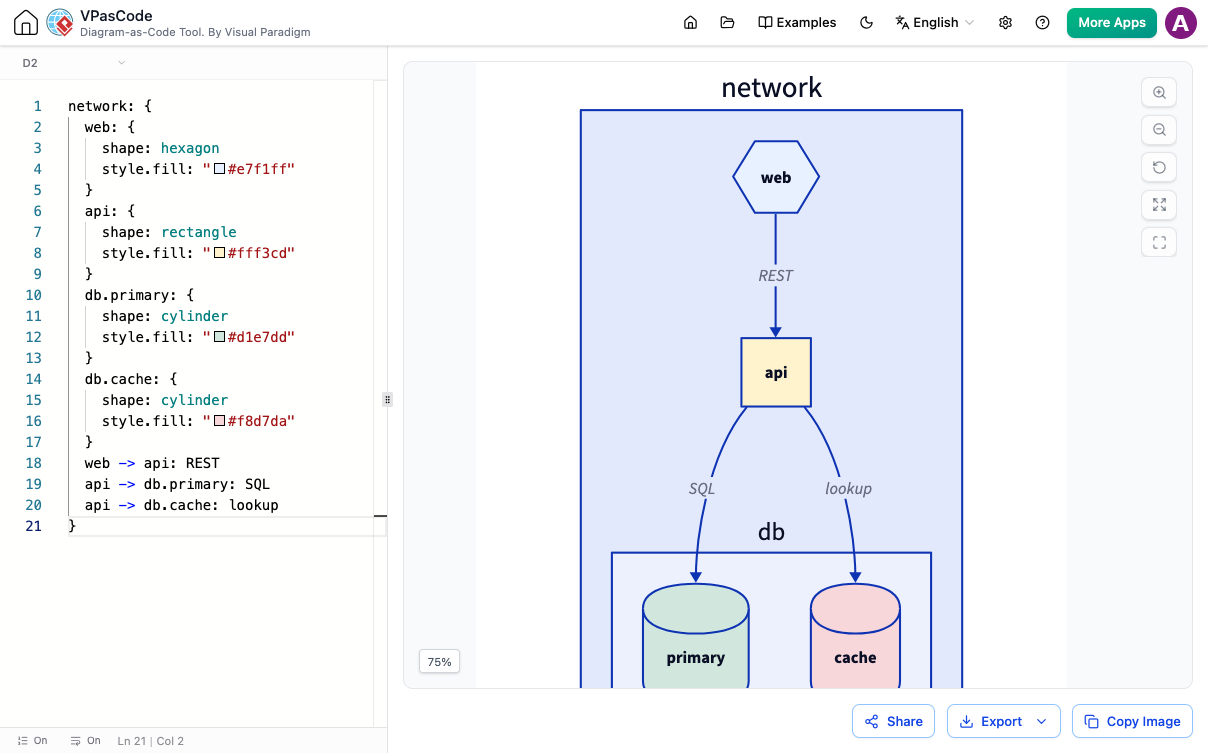
Declarative diagramming is rapidly replacing manual drag-and-drop tools for software architects, developers, and technical writers. Among diagram-as-code formats, the D2 language stands out for its human-readable syntax and flexible layout capabilities. However, getting instant visual feedback while writing D2 code can often be a cumbersome process.
What is a D2 Diagram Editor?
A D2 diagram editor is an authoring environment designed to translate D2 declarative code into visual architecture diagrams, flowcharts, and system maps in real time. Visual Paradigm’s free D2 Diagram Editor provides a zero-setup, web-based environment featuring real-time side-by-side rendering, export capabilities, and documentation integration.
Why Diagram-as-Code with D2?
D2 (Declarative Diagramming) allows teams to maintain architecture documentation alongside source code in version control systems like Git. Instead of manually adjusting box positions and connector lines, developers describe relationships programmatically:
x -> y: HTTP GET /api/v1/users
y -> database: Query User Record
database -> y: Return JSON
y -> x: 200 OK
While the syntax is simple, visualizing the result traditionally required local CLI tools or multi-step preview configurations.
Key Features of the VPasCode D2 Online Editor
- Instant Real-Time Preview: Render updates on every keystroke without lag, ensuring immediate feedback on design changes.
- Multiple Layout Engine Support: Switch seamlessly between layout engines like Dagre and ELK to fine-tune network, sequence, and system diagrams.
- High-Resolution Exports: Export finished diagrams directly into scalable vector graphics (SVG) or crisp PNG images for presentations and reports.
- Frictionless Sharing: Share live, editable preview links or generate scannable QR codes instantly for quick collaboration.
- OpenDocs Documentation Pipeline: Send completed D2 visualizations straight into Visual Paradigm OpenDocs to maintain auto-updated technical wikis and knowledge bases.
Comparing Diagram-as-Code Workflows
| Feature | Traditional CLI Rendering | VPasCode D2 Editor |
|---|---|---|
| Setup Required | Local environment installation | Zero setup (Browser-based) |
| Feedback Speed | Manual re-compilation | Sub-second real-time preview |
| Format Flexibility | D2 only | Unified (D2, PlantUML, Mermaid, Graphviz, ECharts) |
| Doc Integration | Manual file embedding | Direct publish to Visual Paradigm OpenDocs |
A Unified Platform for All Diagramming Languages
Beyond supporting the D2 language, the VPasCode environment provides a multi-syntax engine. Developers who work across legacy and modern toolchains can write and render PlantUML, Mermaid, ECharts, SQL schemas, JSON, and YAML within the same web editor, eliminating tool fatigue across engineering teams.
Frequently Asked Questions
Is the VPasCode D2 diagram editor completely free?
Yes, the VPasCode D2 diagram editor offers completely free browser-based editing, instant real-time previews, and SVG/PNG exports without requiring installation or paid subscriptions.
Which layout engines are supported in the online D2 tool?
The online D2 tool supports popular layout engines such as Dagre and ELK, allowing users to customize diagram orientation and node placement automatically.
Can I embed D2 diagrams into technical documentation?
Yes, diagrams created in the D2 editor can be exported as SVG/PNG images or sent directly to Visual Paradigm OpenDocs for seamless embedding into knowledge bases and technical docs.