



Documenting software architecture is a vital part of the software development lifecycle, yet manually creating Unified Modeling Language (UML) diagrams remains one of the most time-consuming tasks for developers, software architects, and product managers. Drafting class structures, mapping sequence interactions, and updating activity flows often takes hours away from writing code.
Fortunately, modern artificial intelligence has transformed how development teams approach system modeling. Today, engineering teams can generate accurate, standard-compliant UML diagrams directly from plain text descriptions. In this guide, we will explore how text-to-diagram AI technology works, step-by-step best practices for writing effective prompts, and how to convert simple text descriptions into professional visual models.
Why Use AI to Generate UML Diagrams from Text?
Traditional diagramming tools rely heavily on manual drag-and-drop mechanics. While flexible, drag-and-drop canvas tools suffer from several drawbacks: they require significant manual alignment, become difficult to update as requirements evolve, and often lead to non-standard notation errors.
Generating UML diagrams from text offers several key benefits:
- Rapid Prototyping: Turn software requirements, user stories, or meeting notes into visual diagrams within seconds.
- Consistency and Compliance: AI tools enforce correct UML notation, arrow relationships, and structural syntax automatically.
- Lower Barrier to Entry: Non-technical stakeholders can describe system behaviors in plain English without needing to master complex diagramming rules.
- Easier Maintenance: Instead of laboriously moving shapes around a canvas to reflect software updates, developers can simply update the text prompt or code syntax.
Step-by-Step: How to Generate UML Diagrams Using Plain Text
Step 1: Define Your System Scope and Diagram Type
Before prompting an AI tool, determine what aspect of your application you need to visualize. Different system aspects require different UML diagram types:
- Class Diagrams: Best for structural design, object-oriented concepts, and database mapping.
- Sequence Diagrams: Ideal for step-by-step message exchanges between objects, microservices, or API endpoints over time.
- Activity Diagrams: Great for business logic, operational workflows, and decision trees.
- Use Case Diagrams: Perfect for identifying user roles (actors) and high-level feature interactions.
Step 2: Write a Clear, Context-Rich Text Prompt
AI models perform best when given structured context. When writing your text description, include the actors or entities involved, the interactions or relationships between them, and any specific logical sequences.
Example Prompt for a Sequence Diagram:
“Generate a sequence diagram for an E-Commerce Checkout Process. The actors and components are Customer, Web App, Payment Gateway, and Inventory Service. 1) Customer submits payment. 2) Web App calls Payment Gateway to process transaction. 3) Payment Gateway returns success. 4) Web App requests Inventory Service to reserve items. 5) Inventory Service confirms reservation. 6) Web App displays confirmation to Customer.”
Step 3: Leverage an Interactive AI UML Tool
Once your prompt is ready, input it into an AI modeling interface. While basic chat assistants can output text-based syntax (like PlantUML or Mermaid), specialized modeling tools provide interactive visual rendering and conversational refinement.
For instance, using an AI-powered UML diagram generator allows you to paste plain text prompts, immediately preview the generated visual model, and ask conversational follow-up questions to adjust the layout or add missing edge cases.
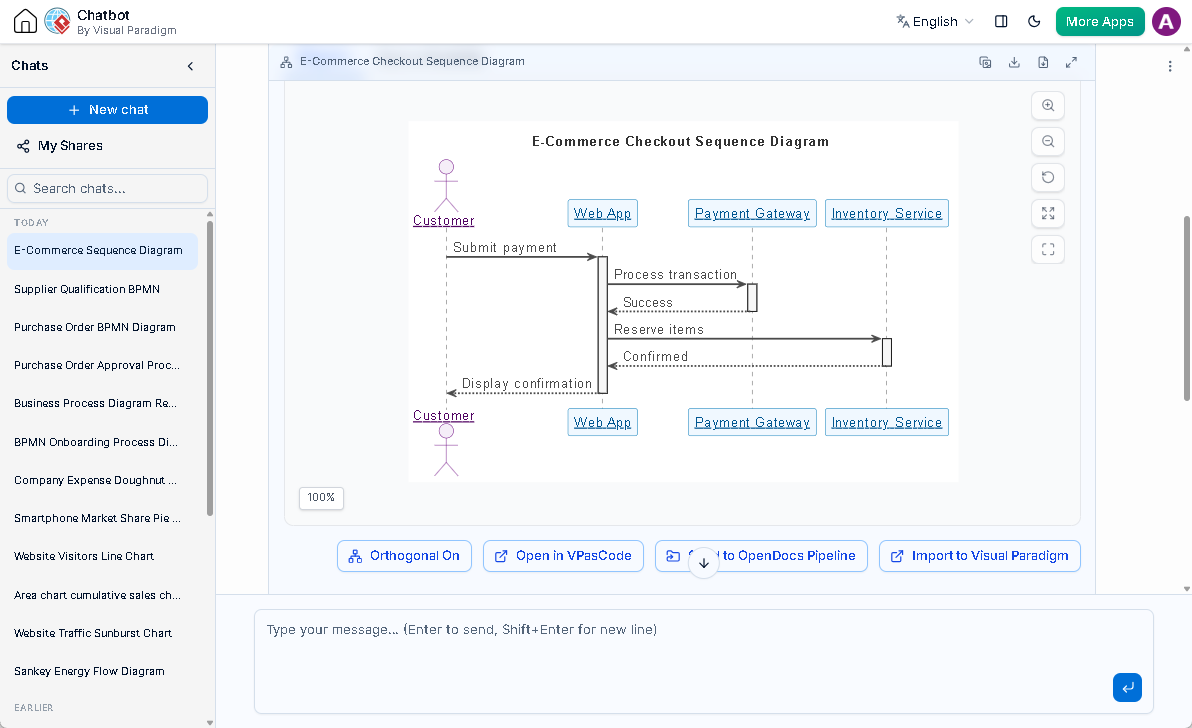
(Chat session: https://ai-toolbox.visual-paradigm.com/app/chatbot-v2/share/fef258da-f622-4289-b47b-2c2957a882a7)
Step 4: Refine and Iterate Conversationally
First-pass AI outputs are rarely complete for complex enterprise architectures. Use conversational follow-up prompts to refine your diagram. For example:
- “Add an alternative branch where the Payment Gateway declines the card.”
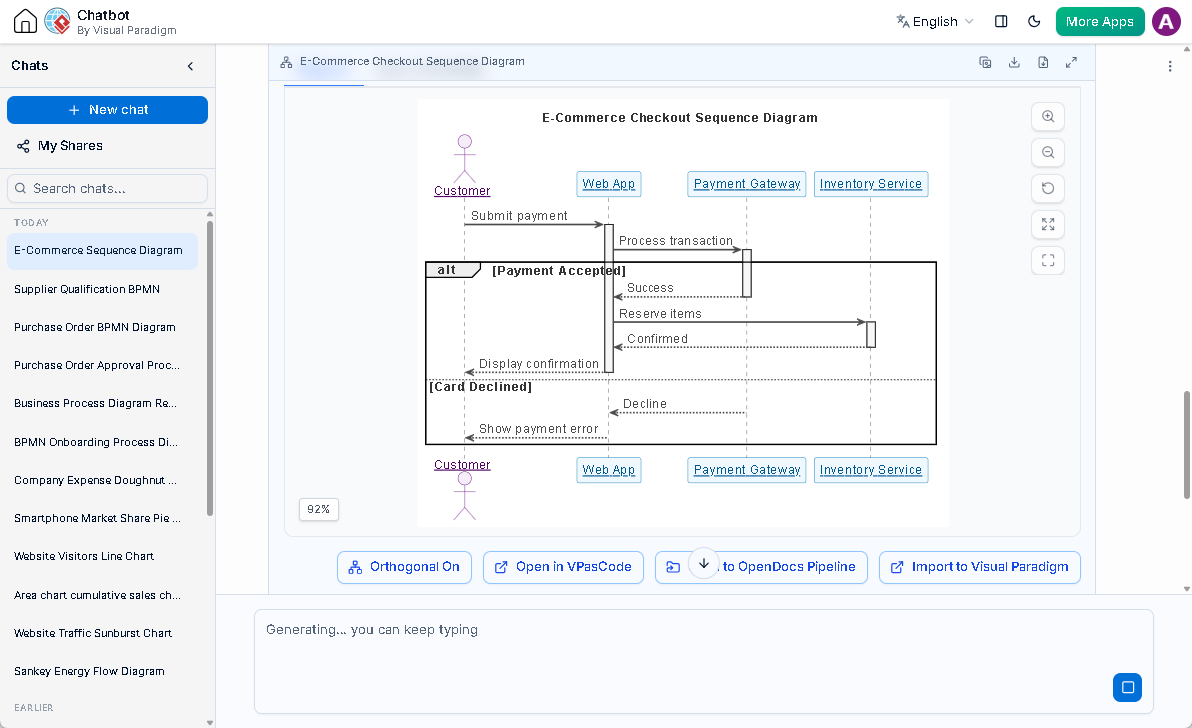
- “Include a database component to log transaction records.”
- “Convert this sequence flow into a detailed Class Diagram showing class properties and methods.”
Best Practices for Prompting AI UML Generators
To get the most accurate visual outputs from text-to-diagram AI engines, keep these best practices in mind:
- Specify Relationships Explicitly: Use precise terminology when describing structural models (e.g., state whether a relationship is inheritance, composition, or aggregation).
- Keep Scopes Focused: Avoid asking AI to generate an entire enterprise architecture in a single prompt. Break complex systems down into modular sub-diagrams.
- Validate Output Against Standards: Always review generated models to ensure entity names and direction arrows accurately reflect your actual code architecture.
From Text Sketches to Full Architectural Modeling
Generating a diagram from text is an excellent starting point for brainstorming and requirement analysis. However, as software projects mature, engineering teams often need to move beyond static visual sketches.
In modern software engineering, text-generated diagrams should ideally feed into a broader visual modeling platform. This allows teams to link generated UML classes to real source code, maintain model traceability across sprint backlog items, and generate comprehensive project documentation automatically.
Conclusion
Generating UML diagrams from plain text using AI dramatically reduces the effort required to produce technical documentation. By crafting clear prompts and utilizing tools designed for software design, engineering teams can focus less on drawing shapes and more on building robust software solutions.