


What is DBML and Why Visualize It?
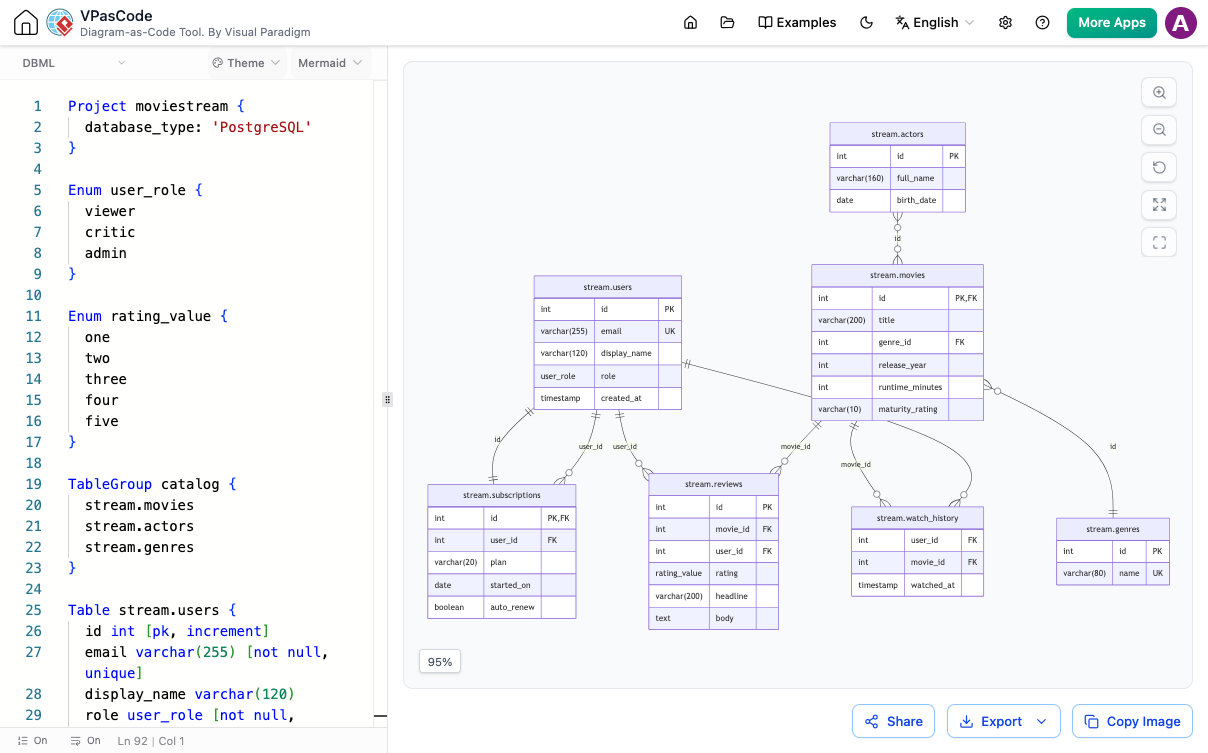
DBML (Database Markup Language) is an open-source, human-readable domain-specific language designed specifically to define database schemas. While writing DBML code is significantly faster than manually drawing diagrams, developers still need visual representations to verify foreign keys, audit table relationships, and onboard team members quickly.
Key Capabilities of Visual Paradigm DBML Diagram Editor
- Live DBML-to-ERD Rendering: View your schema diagram update in real time side-by-side with your code editor.
- Zero-Setup Online Viewer: Paste any existing DBML file to instantly generate and inspect complete ERDs without installation.
- Full DBML Spec Support: Accurately parses tables, column data types, primary and foreign keys, composite indexes, enums, and project-level metadata.
- High-Resolution Exports: Export visual schemas as scalable SVG files for documentation or PNG images for presentations.
- Instant URL & QR Code Sharing: Distribute interactive diagrams using lightweight share links instead of static image files.
- Visual Paradigm OpenDocs Integration: Connect live database diagrams directly into your project knowledge bases to ensure documentation never becomes outdated.
Part of a Unified Diagram-as-Code Platform
The DBML Editor is built into VPasCode, Visual Paradigm’s unified diagram-as-code environment. In addition to DBML, developers can maintain all project visuals in one place—supporting PlantUML class diagrams, Mermaid flowcharts, ECharts data visualizations, as well as direct SQL, JSON, and YAML parsing.
Frequently Asked Questions
How do I convert DBML code into an ERD automatically?
You can convert DBML code into an ERD by pasting your DBML syntax into an online editor like VPasCode. The tool automatically parses the code structure and renders an Entity Relationship Diagram in real time.
Can I embed DBML diagrams into project documentation?
Yes. You can export your ERD as an SVG image or embed dynamic live links directly into Visual Paradigm OpenDocs and modern documentation hubs.