


Transitioning your data models from legacy tools like SAP PowerDesigner to a modern modeling platform doesn’t have to mean starting from scratch. Visual Paradigm provides seamless built-in import capabilities, allowing you to bring your PowerDesigner DataArchitect models directly into Visual Paradigm without losing your structure, entities, attributes, or relationships.
Step-by-Step: Importing PowerDesigner DataArchitect Files
Follow these simple steps to import your PowerDesigner DataArchitect files into Visual Paradigm:
Step 1: Open Your Visual Paradigm Project
Launch Visual Paradigm on your desktop. You can either open an existing project where you want to add your data model or create a new project.
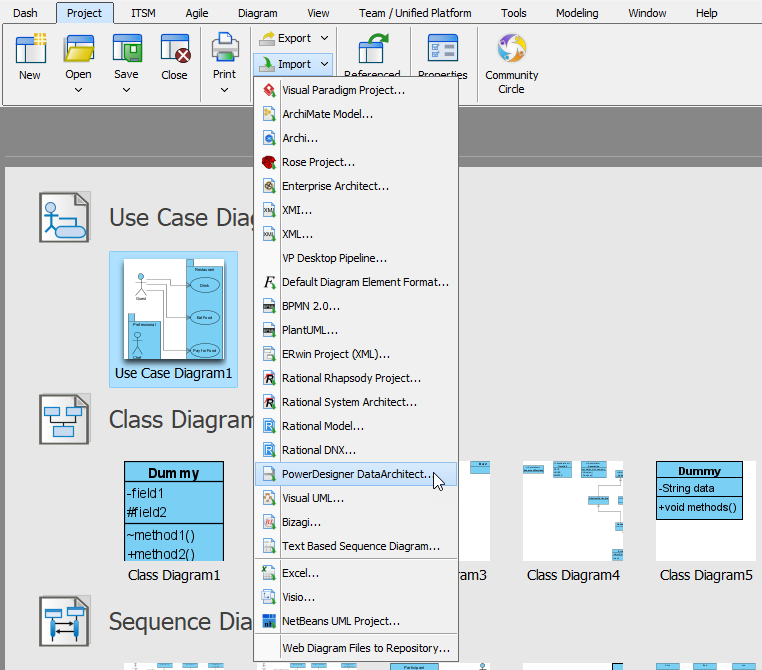
Step 2: Navigate to the Import Menu
- Select the Project tab from the top main menu bar.
- Click on Import to expand the dropdown menu of supported file formats and tools.
Step 3: Select PowerDesigner DataArchitect
From the dropdown menu under Import, scroll down and click on PowerDesigner DataArchitect….
Step 4: Choose Your File and Import
- In the file browser dialog that appears, locate and select your PowerDesigner model file (such as
.pdmor related model files).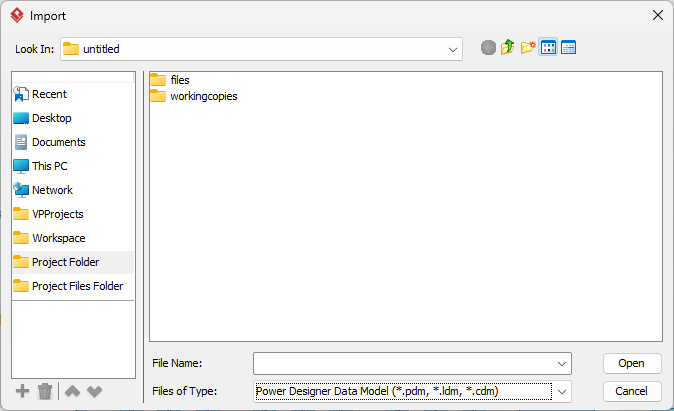
- Click Open (or OK).
- Visual Paradigm will parse the model structure, converting entities, fields, keys, foreign key constraints, and visual layout into native Visual Paradigm Entity Relationship Diagrams (ERD) and data model elements.
Why Continuing with Visual Paradigm is a Great Choice
Migrating your database designs from SAP PowerDesigner to Visual Paradigm isn’t just about preserving existing data—it unlocks a vast array of modern tools and collaborative capabilities designed for today’s software development lifecycle.
1. A Truly Unified Modeling Platform
Unlike standalone database tools, Visual Paradigm combines Database Engineering, UML Diagrams, BPMN 2.0 Business Processes, ArchiMate Enterprise Architecture, and UX Wireframing under one unified application. Your data models can link directly to business workflows, user stories, and system architecture diagrams.
2. Comprehensive Database & Code Engineering
- Multi-Database Support: Generate DDL scripts and reverse engineer databases for almost every major SQL relational database system (PostgreSQL, MySQL, Oracle, MS SQL Server, DB2, SQLite, etc.).
- ORM Code Generation: Automatically generate Object-Relational Mapping (ORM) code for popular frameworks in Java, C#, C++, and PHP directly from your ERDs.
- Schema Migration & Sync: Compare database schemas with live production databases to execute smooth, error-free database migrations.
3. Modern Cloud & Real-Time Team Collaboration
Visual Paradigm bridges desktop modeling with cloud accessibility. Your team can co-edit diagrams concurrently, track version histories, add contextual inline comments, and share interactive web links to diagrams without needing heavy legacy infrastructure or complex server setups.
4. Agile & AI-Driven Capabilities
Visual Paradigm equips your development pipeline with modern tools such as:
- Built-in Agile Process Canvases (Scrum, LeSS, SAFe).
- AI-assisted design features for rapid modeling and presentation creation.
- REST API design and code synchronization.
5. Cost-Effective and Actively Innovating
Visual Paradigm offers flexible, cost-effective licensing models with continuous feature updates and active technical support—ensuring your team always has access to the latest tools without high maintenance overhead.
Summary
By importing your PowerDesigner DataArchitect files into Visual Paradigm, you protect your existing intellectual property while elevating your software architecture with modern, integrated, and collaborative modeling tools.