


पुराने तरीके से गेन और सर्सन डेटा प्रवाह आरेख (DFD) बनाने में लंबा समय लगता है। आप एक खाली कैनवास के सामने बैठते हैं, एक-एक करके प्रतीकों को खींचते हैं, और उम्मीद करते हैं कि प्रवाह समझ में आए। अगर आप अपने प्रणाली का आसान अंग्रेजी में वर्णन कर सकते हैं और कुछ ही सेकंड में एक आदर्श गेन और सर्सन DFD प्राप्त कर सकते हैं तो क्या होगा? यही तो वह बात है जो विजुअल पैराडाइग्म अपने AI आरेख जनरेटर के साथ प्रदान करता है। 2002 से एक प्रमुख AI-समर्थित आरेख सॉफ्टवेयर के रूप में, हम 100 से अधिक आरेख प्रकारों का समर्थन करते हैं—जिसमें पूरी तरह से गेन और सर्सन नोटेशन शामिल है—वास्तविक ट्रेसेबिलिटी और पेशेवर गुणवत्ता वाले उपकरणों के साथ। चाहे आप गेन और सर्सन आरेख बनाने के लिए सबसे अच्छा AI टूल ढूंढ रहे हों, एक मुफ्त AI DFD बनाने वाला, या पेशेवरों के लिए एक ऑनलाइन AI आरेख संपादक ढूंढ रहे हों, हमारा चार-प्लेटफॉर्म पारिस्थितिकी तंत्र आपके लिए पूरा करता है।
चलिए देखते हैं कि विजुअल पैराडाइग्म निरंतर आरेखण को VP डेस्कटॉप, ओपनडॉक्स, AI विजुअल मॉडलिंग चैटबॉट और वेब एप्स के माध्यम से एक तेजी से, सटीक प्रक्रिया में कैसे बदलता है। आप यह खोजेंगे कि टीमें हर बार हमें AI-समर्थित दृश्य मॉडलिंग और आरेखण के लिए क्यों चुनती हैं।
VP डेस्कटॉप – पूर्ण शक्ति वाला गेन और सर्सन DFD निर्माण और सुधार
VP डेस्कटॉपहमारा प्रमुख उत्पाद है, और इसे गंभीर कार्य के लिए बनाया गया है। यह डेस्कटॉप एप्लिकेशन AI-चालित उत्पादन को एक विश्वसनीय मॉडलिंग वातावरण में सीधे लाता है। एक उद्यम प्रणाली के लिए एक जटिल गेन और सर्सन DFD की आवश्यकता है? बस अपनी आवश्यकताएं टाइप करें, और AI तुरंत आरेख बना देता है—बाहरी इकाइयों (दोहरे वर्ग), प्रक्रियाओं (घुमाए हुए आयत), डेटा भंडार (खुले आयत), और नामित डेटा प्रवाह (सीधी तीर) के साथ।
आपको पसंद आने वाली प्रमुख विशेषताएं
- AI तुरंत आपके प्रारंभिक DFD का निर्माण पाठ वर्णनों से करता है—अब तक ड्राइव करने की आवश्यकता नहीं है।
- उन्नत संपादन आपको प्रत्येक तत्व को सुधारने, स्तर जोड़ने और आदर्श व्यवस्था सुनिश्चित करने में सक्षम बनाता है।
- ट्रेसेबिलिटी आरेखों को आवश्यकताओं, कोड या अन्य मॉडल से जोड़ती है।
- दल की समीक्षा के लिए कोड, रिपोर्ट या छवियों में निर्यात करें।
- बड़े प्रोजेक्ट्स के लिए संस्करण नियंत्रण के साथ ऑफलाइन कार्य।
इसकी कल्पना करें: आप एक ग्राहक आदेश प्रणाली का मॉडल बना रहे हैं। आप कुछ वाक्यों में प्रक्रिया का वर्णन करते हैं। VP डेस्कटॉप का AI स्तर 0 संदर्भ आरेख बनाता है। फिर आप प्रक्रियाओं को विस्तृत उप-आरेखों में विभाजित करते हैं, जबकि संगतता बनाए रखते हैं। कोई अन्य AI आरेख उपकरण इस गहराई की पेशकश नहीं करता है। यह उन सॉफ्टवेयर वास्तुकारों के लिए आदर्श है जिन्हें उत्पादन-तैयार गेन और सर्सन DFD की आवश्यकता होती है जो विस्तार कर सकते हैं।
विजुअल पैराडाइग्म डेस्कटॉप में AI का उपयोग करके गेन-सर्सन DFD बनाना
इन चरणों का पालन करके अपने वर्णनों को संरचनात्मक मॉडल में बदलें:
- AI टूल तक पहुंचें: शीर्ष मेनू पट्टी पर जाएं, क्लिक करेंउपकरण, और चुनेंAI आरेख उत्पन्न करना.
- आरेख प्रकार चुनें: विन्यास विंडो में, ड्रॉपडाउन मेनू को स्थानांतरित करें और चुनेंगेन-सर्सन आरेख.
- इनपुट प्रदान करें: अपनी प्रणाली संरचना, प्रोजेक्ट आयाम, या विशिष्ट तकनीकी परिदृश्य को विस्तार से समझाने के लिए पाठ क्षेत्र का उपयोग करें।
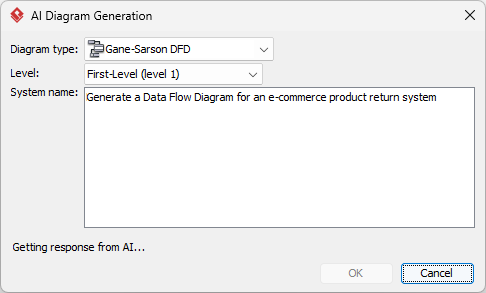
- क्रियान्वयन: दबाएंठीक हैस्वचालित मॉडलिंग प्रक्रिया शुरू करने के लिए।
- परिणामों की समीक्षा करें: AI तुरंत आपके लिए आरेख बना देगा।
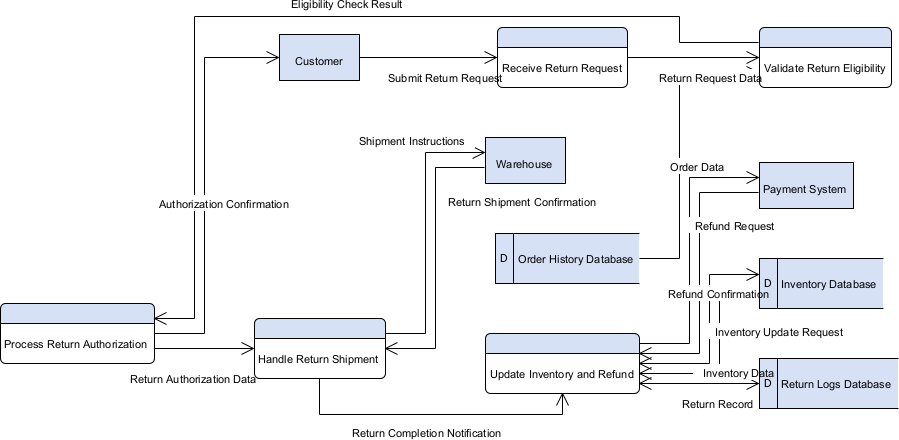
अपने नए आरेख के साथ काम करना
क्योंकि आउटपुट एक स्थिर छवि के बजाय मूल विजुअल पैराडाइग्म आरेख है, आप अंतिम उत्पाद पर पूरी तरह से नियंत्रण रखते हैं:
- मॉडल को अनुकूलित करें: मानक संपादक उपकरणों का उपयोग करके किसी भी आकृति, संबंध या लेआउट शैली को संपादित करें।
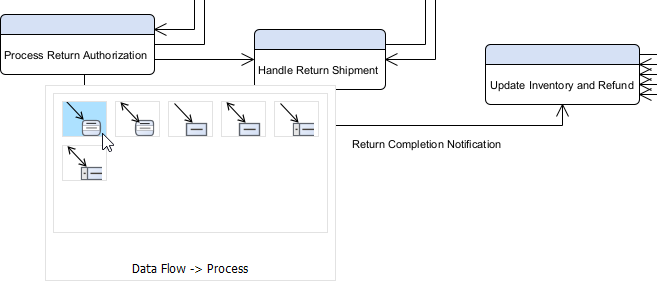
- सामग्री का विस्तार करें: आवश्यकतानुसार अतिरिक्त विवरण या पैकेज को हाथ से सम्मिलित करें।
- साझा करें और निर्यात करें: बाहरी दस्तावेज़न के लिए PNG, SVG या PDF सहित विभिन्न प्रारूपों में अपना कार्य सहेजें।
- आंकड़ों का उपयोग करें: आरंभिक कोड या व्यापक तकनीकी रिपोर्टें बनाने के लिए आरेख का उपयोग करें।
ओपनडॉक्स – जीवंत दस्तावेज़ों में गेन और सर्सन डीएफडी को एम्बेड करें
ओपनडॉक्स ज्ञान साझा करने के तरीके को बदल देता है। इसे एक स्मार्ट विकी के रूप में सोचें जहां आरेख केवल छवियाँ नहीं हैं—वे संपाद्य, जीवंत तत्व हैं। यह आरंभ से आरेख उत्पन्न नहीं करता है, लेकिन आपको अन्य प्लेटफॉर्म पर बनाए गए गेन और सर्सन डीएफडी को एम्बेड करने और उन्हें अंतरक्रियापूर्ण बनाए रखने की अनुमति देता है।
अपने ओपनडॉक्स पृष्ठ में एआई द्वारा उत्पन्न गेन-सर्सन डीएफडी को सम्मिलित करने का तरीका
- ओपनडॉक्स में एक पृष्ठ खोलें या बनाएं: अपने विजुअल पैराडाइज़ ऑनलाइन कार्यक्षेत्र में लॉगिन करें, ओपनडॉक्स पर जाएं, और या तो एक उपलब्ध पृष्ठ खोलें या एक नया बनाएं (+ नया दस्तावेज़ पृष्ठ या समान विकल्प के माध्यम से)।
- एक आरेख सम्मिलित करें: पृष्ठ संपादक में, शीर्ष टूलबार (या तैरते हुए टूलबार) को देखें और क्लिक करें सम्मिलित करें. पॉप-अप विंडो से, चुनें आरेख > गेन-सर्सन डीएफडी.
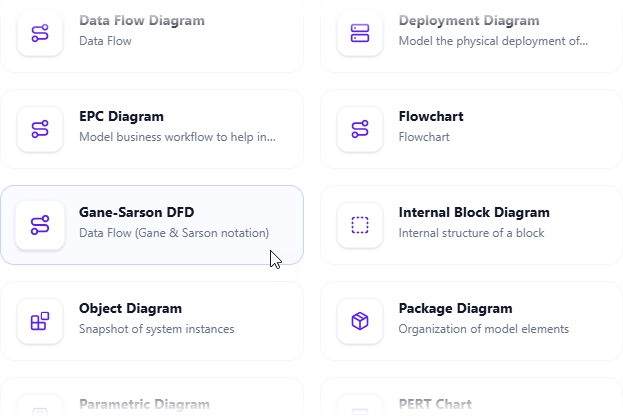
- एआई के साथ आरेख बनाना शुरू करें: यह आरेख संपादक विंडो खोलता है। यदि आप चाहें तो आप तत्वों को खींचकर डालकर इसे हाथ से बना सकते हैं। एआई का उपयोग करने के लिए: विंडो के ऊपरी दाहिने कोने में ढूंढें एआई के साथ बनाएं संपादक विंडो के ऊपरी दाहिने कोने में और इस पर क्लिक करें।
- अपनी समस्या का वर्णन करें और उत्पन्न करें: जो टेक्स्ट इनपुट क्षेत्र दिखाई देता है, अपने प्रणाली या परिदृश्य का स्पष्ट, विस्तृत वर्णन टाइप करें। क्लिक करें उत्पन्न करें.

- आरेख की समीक्षा, अनुकूलन और सम्मिलन करें: एआई तुरंत एक पेशेवर गेन-सर्सन डीएफडी उत्पन्न करता है।
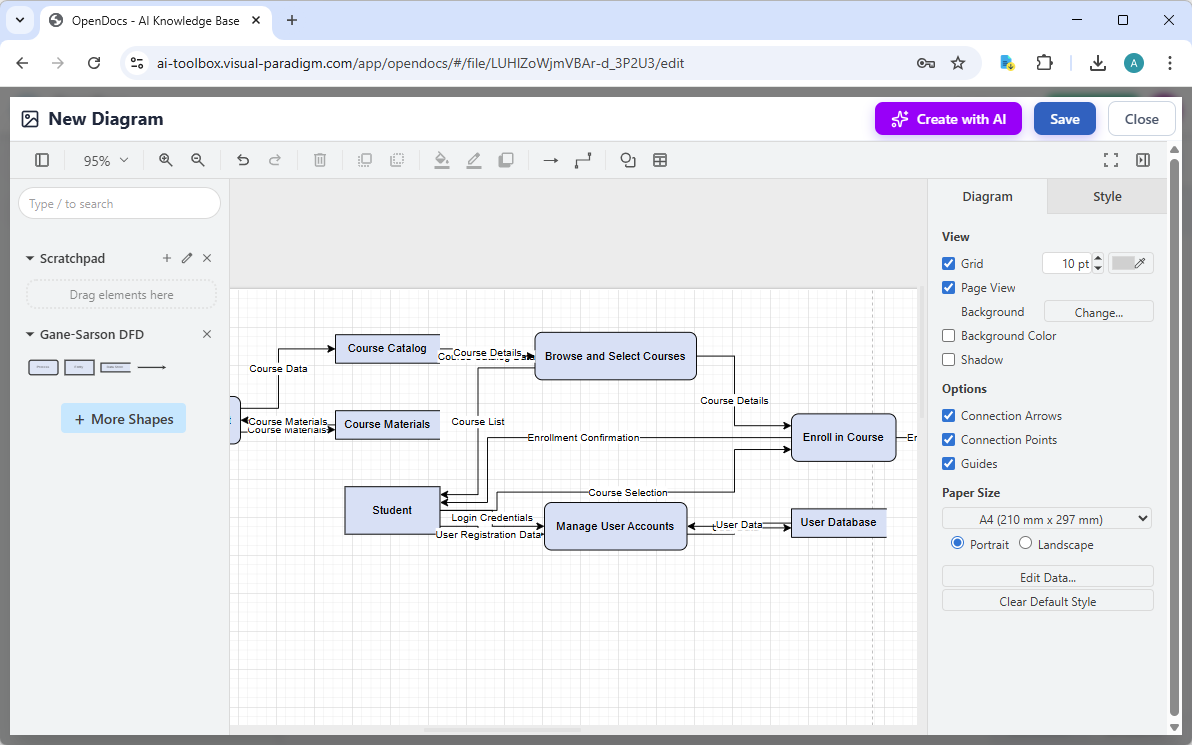
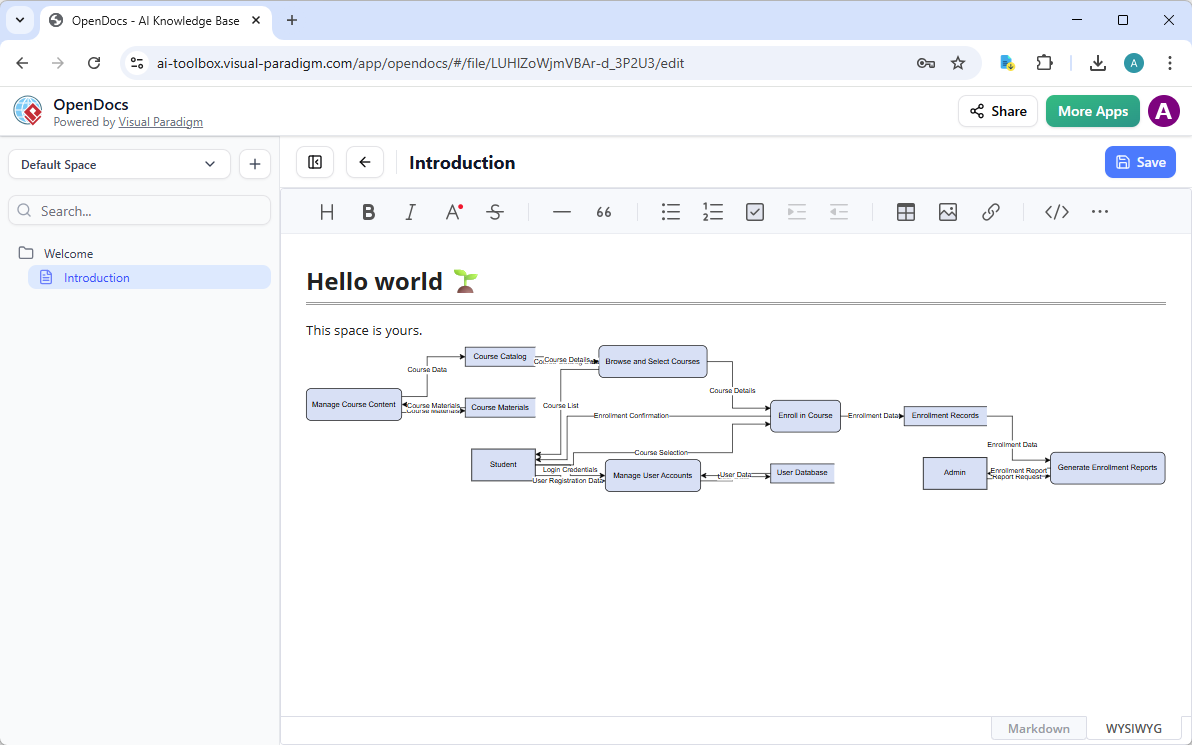
किसी भी चीज़ को सुधारने के लिए स्पष्ट ड्रैग-एंड-ड्रॉप संपादक का उपयोग करें: तत्वों को हटाएं, लेबल को समायोजित करें, टिप्पणियां जोड़ें, शैलियां बदलें, आदि। जब आप इससे संतुष्ट हों, तो क्लिक करें सहेजें. फिर क्लिक करें बंद करें. आरेख अब खुद के खुले डॉक्स पृष्ठ पर एक लाइव, संपाद्य दृश्यात्मक ब्लॉक के रूप में सीधे एम्बेड कर दिया गया है। आप इसे दस्तावेज़ छोड़े बिना एकीकृत रूप से देख सकते हैं।
विजुअल पैराडाइज्म क्यों गेन और सर्सन डीएफडी के लिए सबसे अच्छे एआई टूल के रूप में उभरता है
बहुत से उपकरण दावा करते हैं कि वे एआई आरेख उत्पन्न करने वाले हैं। अधिकांश एक बार उत्पन्न करने तक ही सीमित रहते हैं। विजुअल पैराडाइज्म आगे बढ़ता है। हमारी प्रणाली तत्काल एआई उत्पन्न करने के साथ-साथ वास्तविक संशोधन, ट्रेसबिलिटी और चार प्लेटफॉर्मों पर सहयोग को जोड़ती है। आपको मिलता है:
- सबसे व्यापक आरेख आवृत्ति, जिसमें पूर्ण गेन और सर्सन समर्थन शामिल है।
- निरंतर हस्तांतरण: चैटबॉट में उत्पन्न करें → डेस्कटॉप में संशोधित करें → ओपनडॉक्स में एम्बेड करें → वेब एप्स में मार्गदर्शन करें।
- वास्तविक ट्रेसबिलिटी—बस सुंदर छवियाँ नहीं, बल्कि कोड इंजीनियरिंग और टीम प्रोजेक्ट्स के लिए तैयार मॉडल।
- एकल उपयोगकर्ताओं या पूरी कंपनियों के लिए स्केलेबिलिटी।
सिलो के बाहर दूसरों के विपरीत, हम आपको एक स्थिर छवि छोड़कर नहीं जाते हैं। हमारा एआई-संचालित दृश्यात्मक मॉडलिंग सुनिश्चित करता है कि आपके गेन और सर्सन डीएफडी के पेशेवर, एकीकृत और कार्यान्वयन के लिए तैयार रहें। इसी कारण टीमें हमें मूल ऑनलाइन एआई आरेख संपादक या मुफ्त डीएफडी बनाने वाले टूल्स के बजाय चुनती हैं।
क्या आप अपने आरेखण को बदलने के लिए तैयार हैं?
हाथों से उपकरणों के साथ लड़ना बंद करें। विजुअल पैराडाइज्म एआई गेन और सर्सन डीएफडी उत्पन्न करने का अंतिम अनुभव प्रदान करता है—तेजी से, सटीक और पूर्ण। चाहे आप एक विकासकर्मी हों जो प्रणाली मॉडल बना रहे हों, एक विश्लेषक जो प्रक्रियाओं का विवरण दे रहा हो, या ज्ञान साझा करने वाले टीम नेता हों, हमारे प्लेटफॉर्म घंटों बचाते हैं और त्रुटियों में कमी लाते हैं।
कल विजुअल पैराडाइज्म का प्रयोग करें और एआई आरेखण के भविष्य का अनुभव करें। मुफ्त में पंजीकृत हों, कुछ ही मिनटों में अपना पहला गेन और सर्सन डीएफडी उत्पन्न करें, और यह देखने के लिए जांचें कि हम एआई-संचालित दृश्यात्मक मॉडलिंग के लिए शीर्ष चयन क्यों हैं।
अभी शुरू करें:विजुअल-पैराडाइज्म.com पर जाएं और वीपी डेस्कटॉप डाउनलोड करें या तुरंत एआई चैटबॉट में कूद जाएं। आपका अगला आरेख इंतजार कर रहा है।