


Introduction
In today’s fast-paced business environment, clear communication and efficient process documentation are critical to organizational success. Business Process Model and Notation (BPMN) has emerged as the global standard for visualizing workflows, enabling teams to map, analyze, and optimize their operations with precision. However, creating detailed BPMN diagrams manually can be time-consuming and requires specialized knowledge.
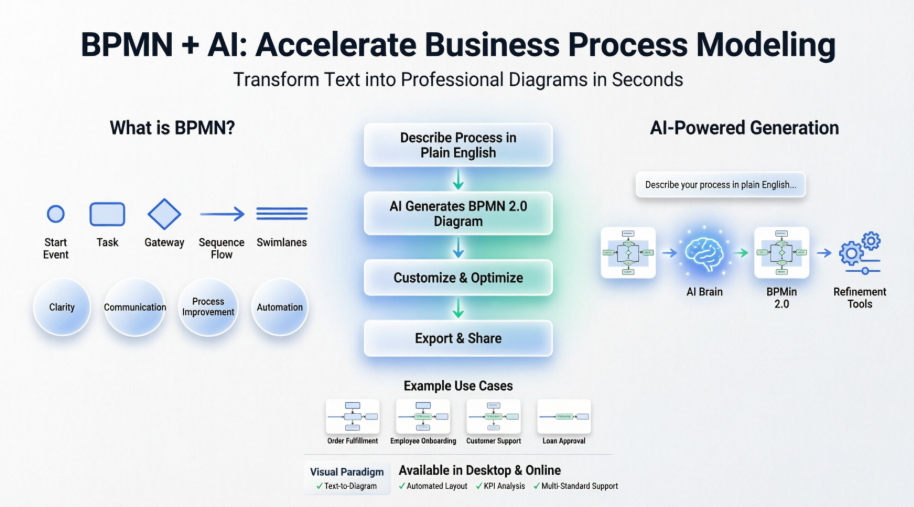
This comprehensive guide bridges the gap between foundational BPMN concepts and cutting-edge AI innovation. Whether you’re a business analyst, process architect, or technical developer, you’ll discover how to leverage Visual Paradigm’s intuitive platform—now enhanced with artificial intelligence—to transform simple text descriptions into professional, BPMN 2.0-compliant diagrams in seconds. By combining standardized notation with intelligent automation, you can accelerate process modeling, improve stakeholder alignment, and focus your expertise on strategic optimization rather than manual drafting.
1. Introduction to BPMN
What is BPMN?
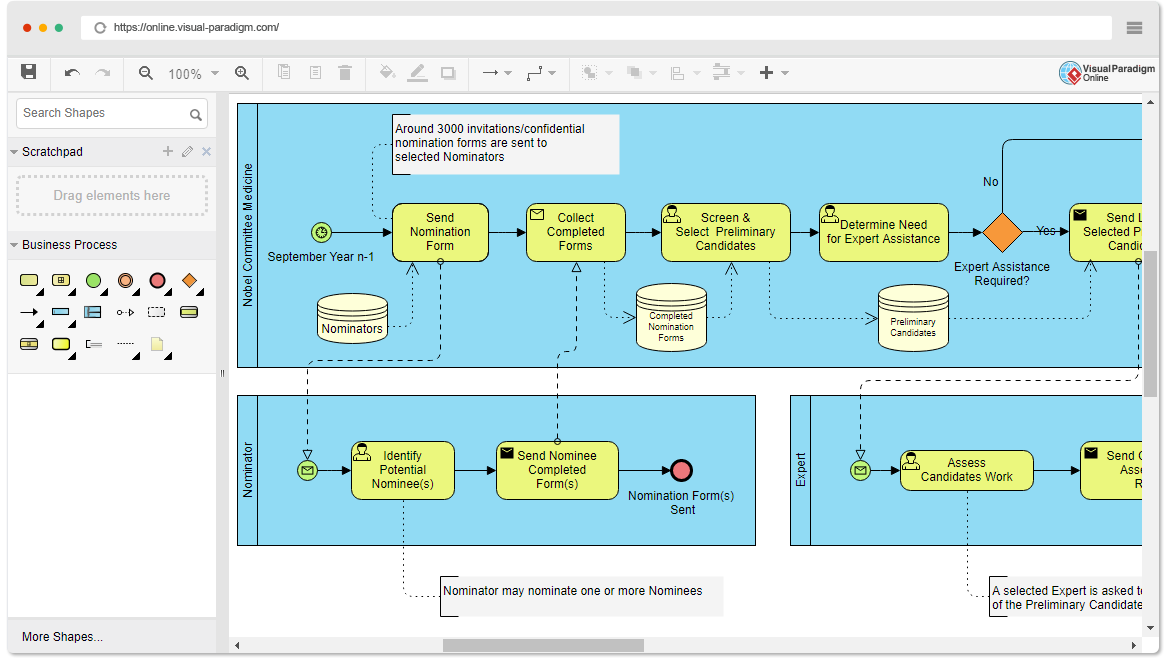
BPMN, or Business Process Model and Notation, is a visual language for representing business processes. It provides a standardized way to graphically depict processes, making them easier to understand and communicate across different teams and stakeholders. BPMN diagrams are commonly used in business process analysis, improvement, and automation.
Why Use BPMN?
-
Clarity: BPMN diagrams use standardized symbols and notation, making them easy to understand by both technical and non-technical stakeholders.
-
Communication: They facilitate effective communication between business analysts, process designers, and developers.
-
Process Improvement: BPMN helps identify bottlenecks, inefficiencies, and areas for process improvement.
-
Automation: BPMN diagrams can be used as a basis for automating business processes using BPM (Business Process Management) software.
2. Key Concepts in BPMN
Process
A BPMN diagram represents a business process. A process is a collection of related activities that transform inputs into outputs to achieve a specific business goal.
Activities
Activities are tasks or work steps within a process. They can be of two types:
-
Task: Represents an individual work item or action.
-
Sub-process: Represents a subprocess, which is a higher-level process with its own set of activities.
Flow Objects
Flow objects define the flow of a process. Key flow objects include:
-
Sequence Flow: Represents the order in which activities are performed.
-
Gateway: Decides which path to follow based on conditions.
-
Event: Represents something that happens during the process, such as the start, end, or intermediate events.
Connectors
Connectors (sequence flows) link flow objects, defining the order of execution.
Swimlanes
Swimlanes are used to organize activities and show who is responsible for each task. They can be divided into pools (for organizations) and lanes (for specific roles or departments).
3. BPMN Elements
Common BPMN Symbols
Here are some common BPMN symbols and their meanings:
-
Start Event: Indicates where a process begins.
-
End Event: Marks the end of a process or subprocess.
-
Task: Represents a manual or automated activity.
-
Gateway: Decides the flow direction based on conditions.
-
Sequence Flow: Shows the order of execution between activities.
-
Message Flow: Represents communication between processes or participants.
-
Pool: Organizes processes into separate groups (e.g., organizations).
-
Lane: Divides a pool into segments for roles or departments.
4. Creating BPMN Diagrams in Visual Paradigm Online
Visual Paradigm Online is a web-based BPMN diagram tool that simplifies the creation of BPMN diagrams. Here’s how to get started:
-
Access Visual Paradigm Online: Go to Visual Paradigm Online.
-
Create a New Project: Sign in or create a new account if you don’t have one. Then, create a new project and select “BPMN Diagram” as the diagram type.
-
Add Elements: Drag and drop BPMN elements from the toolbar to the canvas. Connect them using sequence flows.
-
Customize Elements: Double-click on elements to edit their properties, labels, or other details.
-
Organize Using Swimlanes: To use swimlanes, add pools and lanes to the diagram and assign activities to specific lanes.
-
Save and Export: Save your diagram in Visual Paradigm Online and export it as an image or PDF.
5. AI-Powered BPMN: The Future of Process Modeling
Visual Paradigm has integrated advanced AI directly into its modeling environment, allowing you to transform plain-English text descriptions into professional-grade BPMN 2.0 compliant diagrams in seconds. This AI-powered suite eliminates the manual effort of dragging and dropping individual tasks and gateways, providing a sophisticated starting point for business analysts and process architects to refine.
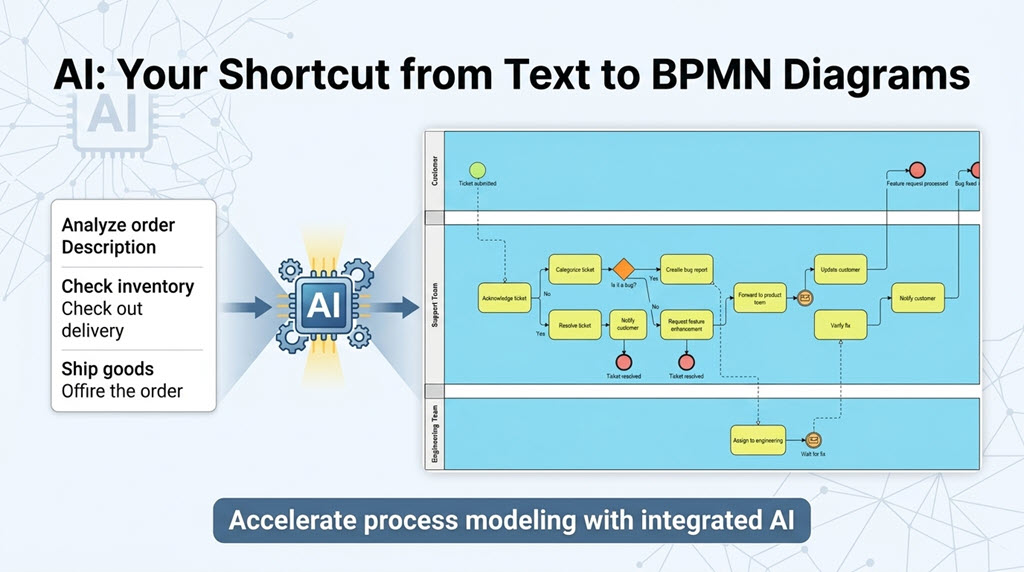
This new feature serves as a robust AI BPMN tool, eliminating the manual effort of dragging and dropping every single task and gateway when starting a new project. Whether you are mapping out internal operations or documenting client workflows, the AI BPD generator provides a sophisticated starting point that you can further refine and customize using Visual Paradigm’s industry-leading modeling suite.
6. How to Use the AI Business Process Diagram Generator
Generating your next process model is straightforward. Follow these simple steps within Visual Paradigm Desktop:
-
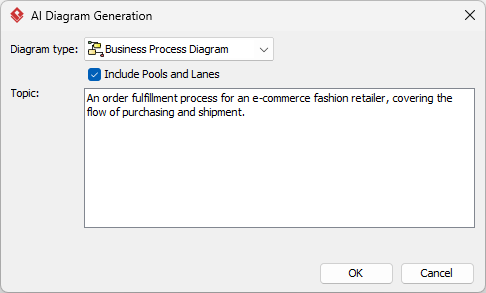
Navigate to the main menu and select Tools > AI Diagram Generation. This will open the AI Diagram Generation dialog box.
-
From the available options, select Business Process Diagram as your intended diagram type.
-
Optionally, you can check the “Include Pools and Lanes” box. This ensures the generated flow is organized into participants, representing different departments or roles within the process.
-
Enter your topic in the description field. For example: “An order fulfillment process for an e-commerce fashion retailer, covering the flow of purchasing and shipment.”
-
Click OK.
The AI BPMN diagram generator will then construct the resulting diagram. Once the initial model is generated, you have full flexibility to revise, extend, and continue modeling using our standard BPMN 2.0 tools.
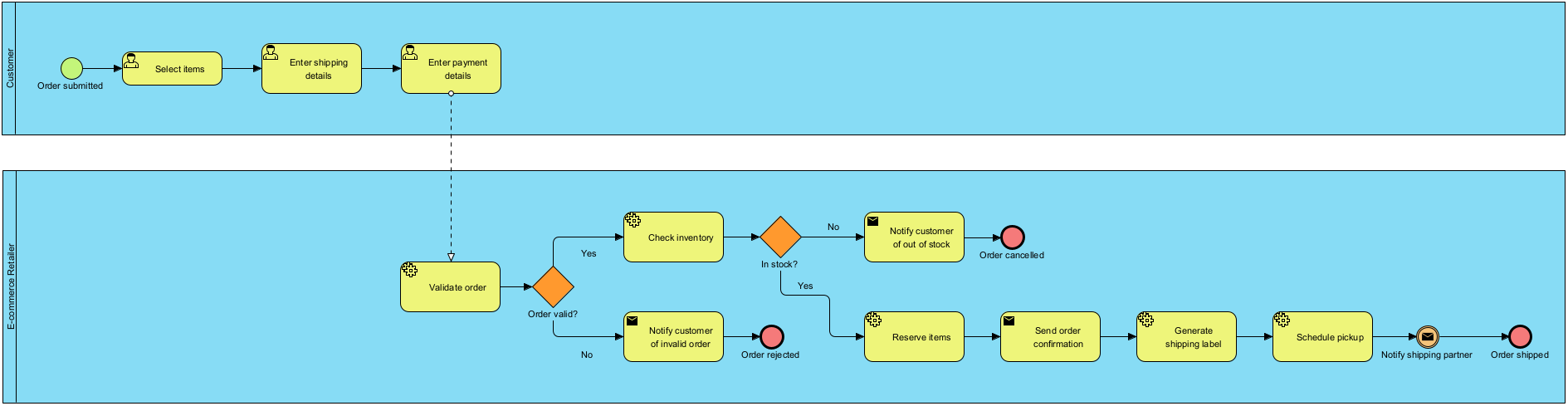
By leveraging this AI business process diagram generator, teams can significantly reduce the time spent on initial drafting, allowing more time for deep analysis and process optimization.
7. AI Business Process Diagram Examples
Listed below are more Business Process Diagram generated with AI, using Visual Paradigm Desktop.
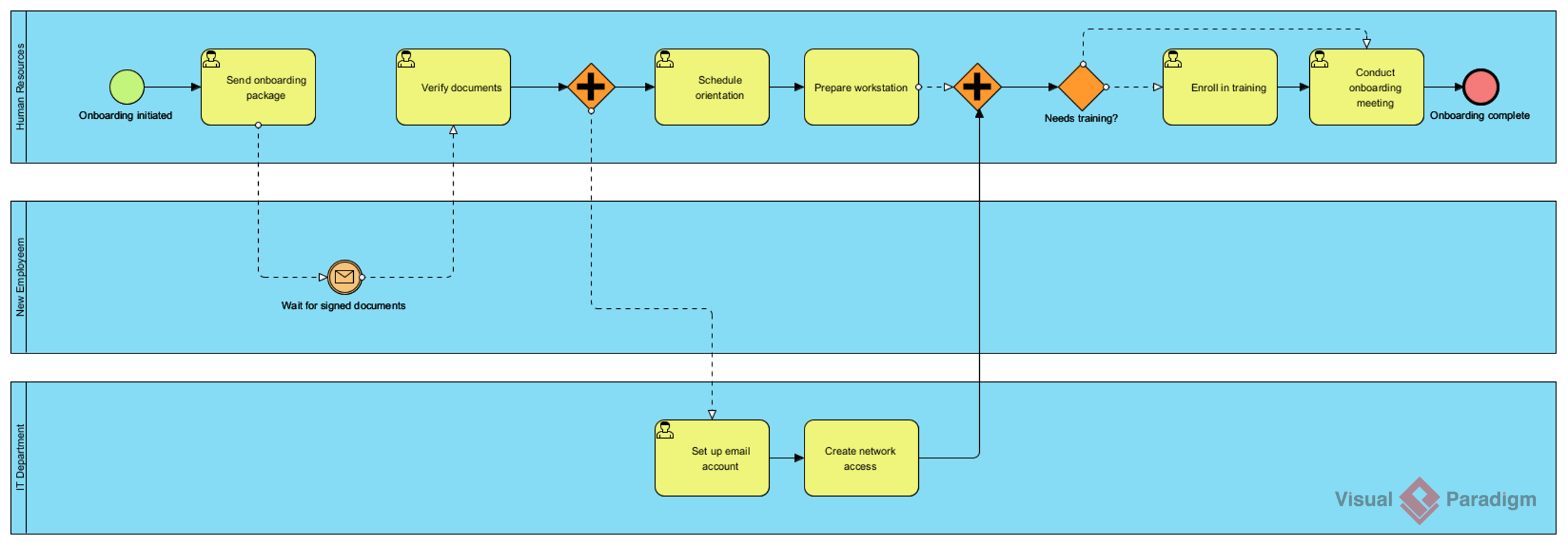
AI-Generated BPD: Employee onboarding process
Prompt: An employee onboarding process in a mid-sized company.
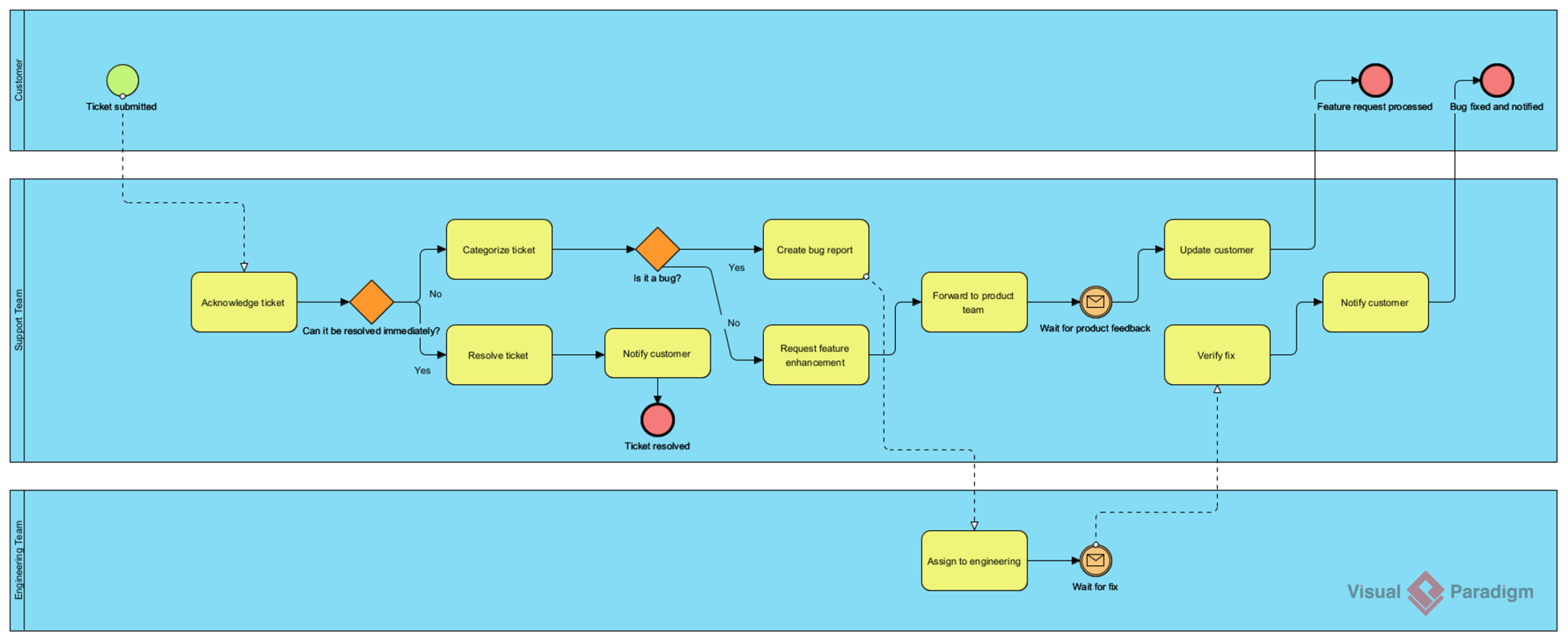
AI-Generated BPD: Customer support ticket resolution process
Prompt: A customer support ticket resolution process for a SaaS company.
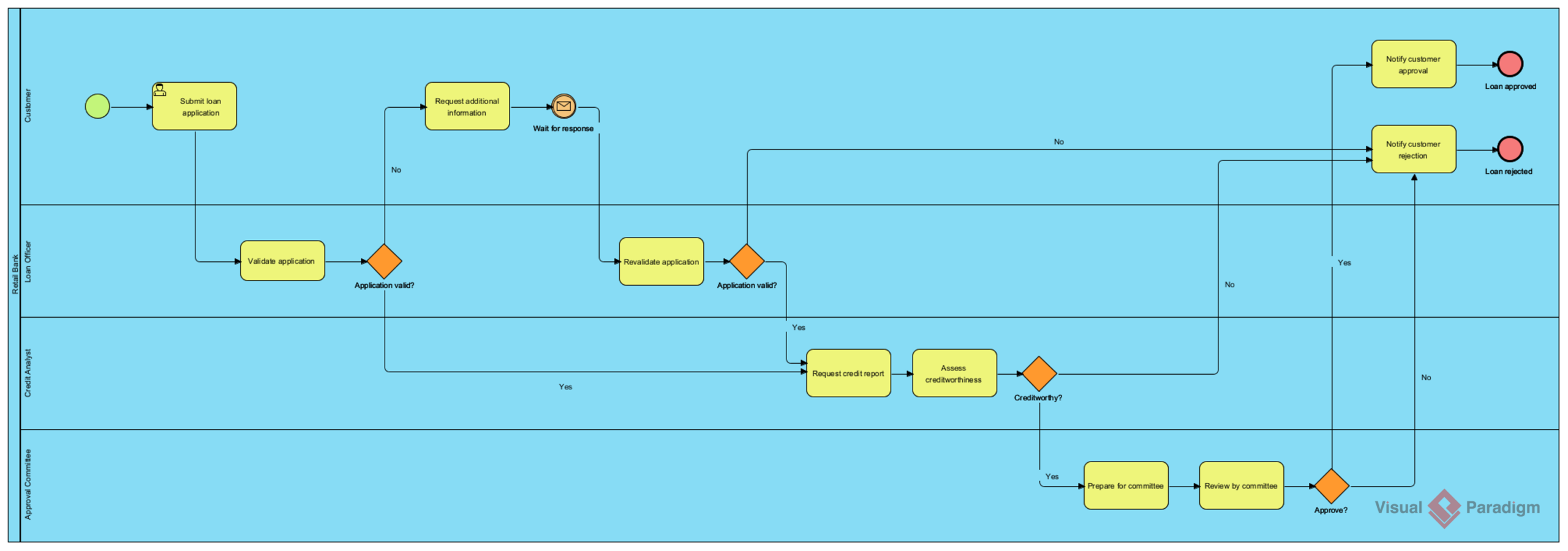
AI-Generated BPD: Loan application and approval process
Prompt: A loan application and approval process in a retail bank.
To learn more about the technical capabilities and various use cases, please visit our AI Diagram Generation landing page.
Ready to experience the future of process modeling?
Download the latest version of Visual Paradigm today and start using the most advanced AI BPMN tool on the market.
Download Visual Paradigm Now
8. Key AI BPMN Features
-
Text-to-Diagram Generation: Describe your business process in natural language, and the AI BPMN Generator automatically builds the corresponding flow.
-
Intelligent BPM and Analysis Suite: A specialized toolset that guides you through defining a problem, generating process stories, visualizing them, and even defining KPIs and reports with AI assistance.
-
Automated Layout & Logic: The AI interprets your intent, suggests relationships, and ensures diagrams are cleanly balanced and logically structured without manual rearranging.
-
Interactive Refinement: After initial generation, you can use the AI to refine diagrams, such as expanding simple flows into detailed models with complex gateways and events.
9. How to Access AI Features
To use these capabilities in the Visual Paradigm Desktop version, you must meet specific technical requirements:
-
Version: Ensure you are running the latest version of Visual Paradigm Desktop.
-
Connectivity: The desktop application must be connected to Visual Paradigm Online to access the AI service.
-
Project Hosting: Your active project must be hosted on Visual Paradigm Online.
-
License: These advanced suites typically require a Professional Edition or higher with active maintenance.
10. Comparison of AI Capabilities
| Feature | Visual Paradigm AI | Benefits |
|---|---|---|
| Input Type | Natural Language Text | No deep technical knowledge needed to start. |
| Output Type | BPMN 2.0 Diagrams | Industry-standard compliance for professional use. |
| Analysis | KPI & Report Generation | Moves beyond drawing to process optimization. |
| Ecosystem | Integrated with UML, SysML, etc. | Seamlessly transition between different modeling standards. |
Conclusion
Business Process Model and Notation remains an indispensable framework for documenting, analyzing, and optimizing organizational workflows. With Visual Paradigm’s intuitive platform—now supercharged by artificial intelligence—the barrier to creating professional BPMN diagrams has never been lower. By simply describing your process in plain language, you can generate accurate, standards-compliant diagrams that serve as powerful foundations for collaboration, automation, and continuous improvement.
Whether you’re mapping a simple approval workflow or orchestrating complex, multi-departmental operations, the combination of BPMN’s visual clarity and AI-driven automation empowers you to work smarter, faster, and more strategically. Embrace the future of process modeling: start with a sentence, refine with expertise, and deliver impactful results that drive business success.
References
-
BPMN Modeling Software | Visual Paradigm: Professional tools for creating BPMN 2.0 compliant diagrams with drag-and-drop interface and advanced modeling capabilities.
-
AI BPMN Business Process Diagram Generator Update: Announcement of Visual Paradigm’s new AI-powered feature for generating BPMN diagrams from text descriptions.
-
AI BPMN Diagram Generator Guide: Comprehensive documentation on using Visual Paradigm’s AI tool to create business process diagrams from natural language prompts.
-
AI Diagram Generation Features: Overview of Visual Paradigm’s artificial intelligence capabilities for automated diagram creation across multiple modeling standards.
-
AI Business Process Improvement Tool Update: Details on Visual Paradigm’s intelligent suite for process analysis, KPI definition, and optimization with AI assistance.
-
Intelligent BPM and Analysis Suite: Advanced toolset for defining problems, generating process stories, visualizing workflows, and creating reports with AI-powered insights.
-
Getting Started with AI in Visual Paradigm: Technical support documentation explaining requirements and setup for accessing AI features in Visual Paradigm Desktop.
-
Component Architecture in Visual Paradigm AI Ecosystem: Advanced guide on infrastructure and deployment modeling within Visual Paradigm’s integrated AI modeling environment.