


Designing relational database schemas is a fundamental phase in software engineering. Before writing migration scripts or creating tables in production, database architects and backend engineers must map out entities, attributes, primary keys, and foreign key relationships. Using a modern text to diagram tool enables engineering teams to define entity-relationship models directly in code. By utilizing an online browser-based PlantUML editor, teams can produce clean, versionable database documentation in minutes.
In this guide, we will explore how to build entity-relationship diagrams (ERDs) using PlantUML, why text-based schema modeling outpaces visual drawing canvas tools, and how an all-in-one diagram-as-code tool streamlines database design workflows.
Why Model Database Schemas with PlantUML?

Traditional drag-and-drop schema design tools often introduce friction during fast-paced agile development. Manually aligning table boxes, adjusting connector lines, and updating column types across multiple canvas screens drains valuable engineering time. A text to diagram tool solves this problem by generating database structures automatically from plain text definitions.
Using a dedicated PlantUML editor for database schema modeling offers key advantages:
- Git-Based Schema Tracking: Commit your ERD definitions directly alongside your database migration scripts, ORM models, and SQL code.
- Automated Layout Engine: Focus on entity relationships—the layout engine automatically arranges tables, primary key indicators, and cardinality notation.
- Rapid Refactoring: Update table fields, alter cardinality rules, or add new entities across your entire schema in seconds using simple text edits.
Adopting an intuitive text to diagram tool ensures that database documentation stays perfectly aligned with evolving backend code bases.
Building a PlantUML ERD Step-by-Step
Let’s look at how to construct a relational database schema for an e-commerce backend using ERD syntax. Here is a practical example you can copy and paste directly into an online PlantUML editor:
Database Schema Code Example (Try it Now):
@startuml
' Image Alt: PlantUML ERD code example defining Users, Orders, and Products database tables with cardinality
entity "Users" as users {
  * user_id : INT <>
  --
  * email : VARCHAR(255)
  * password_hash : VARCHAR(255)
  created_at : TIMESTAMP
}

entity "Orders" as orders {
  * order_id : INT <>
  --
  * user_id : INT <>
  * total_amount : DECIMAL(10,2)
  * status : VARCHAR(50)
  created_at : TIMESTAMP
}

entity "Order_Items" as items {
  * item_id : INT <>
  --
  * order_id : INT <>
  * product_id : INT <>
  * quantity : INT
  * price : DECIMAL(10,2)
}

entity "Products" as products {
  * product_id : INT <>
  --
  * name : VARCHAR(255)
  * sku : VARCHAR(100)
  * price : DECIMAL(10,2)
}

users ||--o{ orders : "places"
orders ||--|{ items : "contains"
products ||--o{ items : "included in"
@enduml
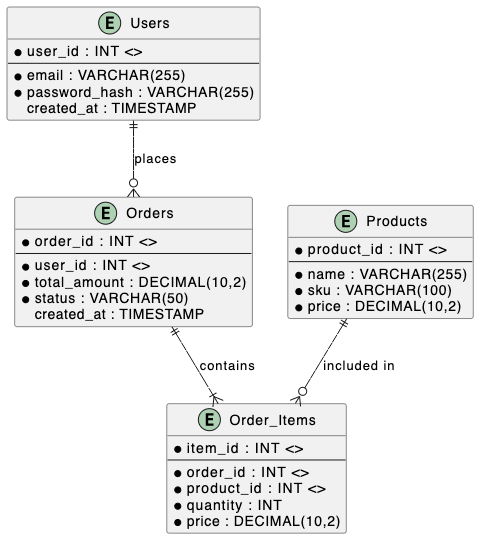
Eliminating Syntax Friction with AI in VPasCode
When modeling large enterprise database schemas containing dozens of tables and intricate foreign key relationships, minor syntax mistakes—such as missing quotation marks or malformed cardinality arrows—can halt execution. Utilizing VPasCode as your primary text to diagram tool gives your team access to 1-Click AI Code Error Fixing to resolve syntax errors instantly.
Whether you are designing software C4 models, constructing API Sequence Diagrams, or mapping complex relational ERDs, an intelligent PlantUML editor catches syntax glitches automatically so you can maintain momentum.
Best Practices for Relational Schema Documentation
To maximize clarity when publishing ERD specifications for backend developers and database administrators, follow these core practices:
- Highlight Keys Clearly: Explicitly designate primary keys (
<>) and foreign keys (<>) to provide clear structural context for developers. - Standardize Cardinality Notation: Consistently use standard crow’s foot notation (e.g.,
||--o{for one-to-many) to clearly communicate data relationships. - Export High-Resolution Visuals: Export crisp SVG or PNG assets directly from your PlantUML editor to embed in internal wikis or publish online via Visual Paradigm OpenDocs integration.
Relying on a powerful text to diagram tool inside a browser PlantUML editor empowers engineering teams to build maintainable database documentation with precision and ease.
Transform Your Database Design Workflow Today
Ready to standardize your relational database documentation and construct ERD models from text in seconds? Try VPasCode’s AI-powered PlantUML editor today and experience instant 1-Click code error fixing, multi-format rendering, and seamless diagram-as-code capabilities.