


Designing robust APIs requires clear communication across development teams, frontend engineers, and technical writers. Before writing a single line of implementation code, mapping out request-response lifecycles, authentication flows, and error handling prevents costly architectural revisions. Using a modern text to diagram tool allows developers to construct interactive, maintainable sequence models directly from text. By drafting definitions in an online browser-based PlantUML editor, teams can document API behavior with speed and clarity.
In this guide, we will explore how to build clear Sequence Diagrams using PlantUML, why text-based API mapping accelerates development sprints, and how an all-in-one diagram-as-code tool streamlines technical documentation.
Why Use PlantUML for API Design?
Traditional drag-and-drop drawing utilities struggle to keep pace with agile API iteration. Every time an endpoint path, payload parameter, or status code changes, manually repositioning boxes and connectors wastes valuable engineering hours. A text to diagram tool solves this problem by driving visuals through plain text definitions.
Using a dedicated PlantUML editor for API sequence mapping delivers several core benefits:
- Versionable API Specs: Keep sequence diagrams inside your Git repositories alongside OpenAPI/Swagger definitions and pull requests.
- Instant Layout Automation: Focus purely on protocol logic—the layout engine automatically calculates spacing, participant placement, and message alignments.
- Standardized Visuals: Ensure consistent styling for synchronous requests, asynchronous messaging, and return payloads across all project modules.
Adopting an intuitive text to diagram tool ensures your technical API specs stay synchronized with actual codebase behavior.

Building an API Sequence Diagram Step-by-Step
Let’s look at how to model a common OAuth2 token authentication and API data retrieval flow using clean sequence syntax inside your browser. Here is an example script you can paste directly into an online PlantUML editor:
@startuml
autonumber
actor "Client App" as Client
participant "API Gateway" as Gateway
participant "Auth Service" as Auth
database "User DB" as DB

Client -> Gateway: POST /api/v1/auth/login
activate Gateway
Gateway -> Auth: Validate Credentials
activate Auth
Auth -> DB: Query User Record
activate DB
DB --> Auth: Return User Profile
deactivate DB

alt Valid Credentials
    Auth --> Gateway: Generate JWT Token
    Gateway --> Client: 200 OK (Token Payload)
else Invalid Credentials
    Auth --> Gateway: Authentication Failed
    deactivate Auth
    Gateway --> Client: 401 Unauthorized
    deactivate Gateway
end
@enduml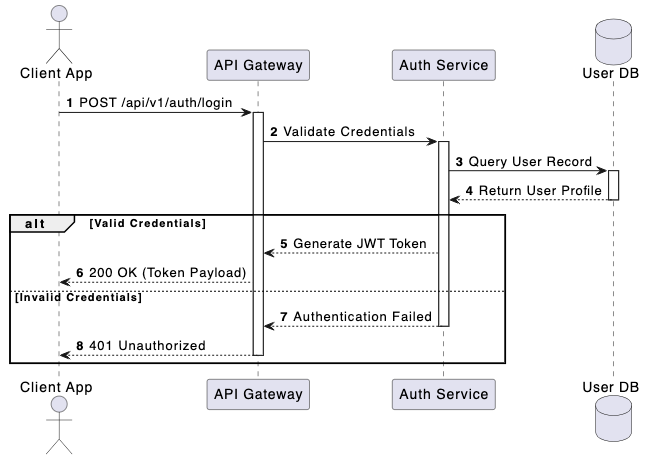
Eliminating Syntax Friction with AI in VPasCode
Complex API workflows involving multi-party authentication, webhook callbacks, or conditional branching can easily lead to syntax mistakes like unclosed loops or mismatched arrows. Utilizing VPasCode as your primary text to diagram tool gives your team access to 1-Click AI Code Error Fixing to eliminate formatting bugs instantly.
Whether you are creating software C4 architecture models, mapping database ERDs, or detailing complex REST interaction flows, an intelligent PlantUML editor catches unclosed conditional blocks and missing participant declarations automatically so you never lose momentum.
Best Practices for API Sequence Documentation
To maximize readability for engineering teams consuming your API documentation, keep these three guidelines in mind:
- Use Autonumbering: Enabling the
autonumberdirective makes it easy for developers to reference specific message steps during technical discussions. - Group Logic with Blocks: Leverage
alt,opt, andloopgroupings to explicitly document success paths, fallback error handling, and rate-limiting limits. - Export and Embed Effortlessly: Export high-resolution SVG or PNG visual assets directly from your PlantUML editor to publish interactive documentation using Visual Paradigm OpenDocs.
Relying on a robust text to diagram tool inside an online PlantUML editor empowers both junior developers and staff architects to produce production-ready API documentation in seconds.
Transform Your API Design Workflow Today
Ready to standardize your API documentation and build maintainable sequence models from text in seconds? Try VPasCode’s feature-rich PlantUML editor today and experience instant AI code error fixing, multi-format exports, and effortless diagram-as-code capabilities.