


In case you’re a software developer starting a new project: an online shopping platform. You need to sketch out the system’s structure before writing any code. That’s where AI-powered modeling software comes in.

Instead of manually drawing a UML Class Diagram, you can describe the system in plain language. The tool listens, understands, and generates a clear, accurate diagram with all the necessary classes, attributes, and relationships. This process isn’t magic—it’s built on real-time understanding of domain logic and structured modeling principles.
Below is a step-by-step walkthrough of how a developer used AI-powered modeling software to build a complete UML Class Diagram for an online shopping system. The journey starts with a simple prompt and ends with a fully fleshed-out model that captures the core interactions.
Learn More About UML Use Case Diagram
User Background and Objective
The user is a mid-level software developer working on a startup project involving e-commerce functionality. They need to create a clear blueprint of the system’s structure to share with a product manager and a backend team.
They don’t want to spend hours setting up classes, defining attributes, or manually drawing connections. Their goal is to get a ready-made, accurate, and readable UML Class Diagram software output that reflects real-world interactions—like customers placing orders, managing cart items, and processing payments.
Step-by-Step Journey with AI-Powered Modeling Software
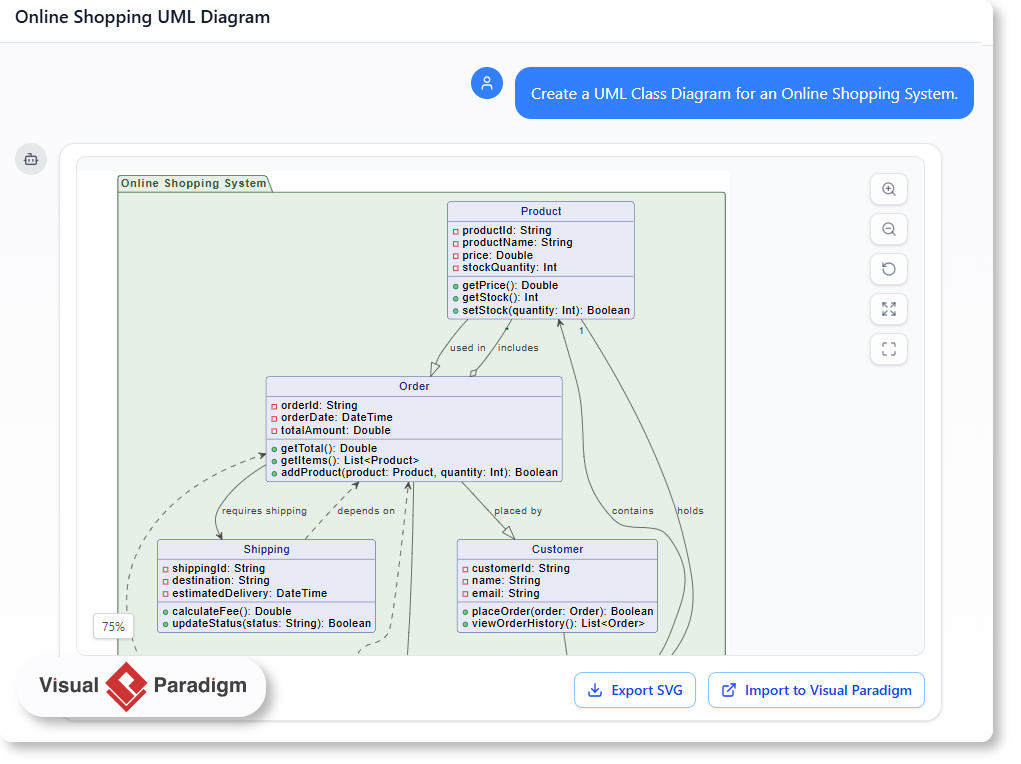
- Prompt: ‘Create a UML Class Diagram for an Online Shopping System.’
- The AI-powered modeling software interprets the request and identifies key entities: customers, products, orders, cart, payments, and shipping.
- It automatically defines attributes and operations for each class—such as product price, order date, customer email, and payment status.
- The system establishes relationships between classes using standard UML notation, including dependencies, aggregations, and compositions.
- Prompt: ‘Please prepare a detailed document describing the classes, their attributes, and how they are related.’
- The tool generates a comprehensive explanation, showing how each class functions in the system and how they interact.
This interaction shows the power of AI-powered modeling software—not just generating diagrams, but delivering context-rich insights that support team discussions and code design.
The Result: A Clear and Functional UML Class Diagram
The generated diagram includes the following core classes:
- Product: Contains details like product name, price, and stock quantity.
- Order: Tracks order date, total amount, and includes multiple products.
- Customer: Holds personal details and manages order history.
- Cart: Stores selected items and calculates totals.
- Payment: Manages transaction details and status
- Shipping: Handles delivery schedules and fees.
Relationships are clearly defined:
- Orders contain multiple products (aggregation).
- Cart holds its items (composition).
- Payment and shipping are tied to an order (dependencies).
- Customers place orders and use a cart to build them.
Why This Matters for Real-World Development
Creating a UML Class Diagram by hand can be time-consuming and error-prone. With AI-powered modeling software, developers get instant clarity on how systems work at a structural level. This isn’t just about diagrams—it’s about grounding conversations in shared understanding.
For teams working on complex systems like online shopping, where many components interact, this clarity reduces confusion and speeds up design reviews. The AI doesn’t just guess—it builds on patterns and real-world logic to deliver accurate, usable models.
Is This the Right Tool for Your Project?
If you’re working on a system that involves:
- Customer interactions
- Product inventory
- Order management
- Payment and shipping workflows
Then an AI-powered modeling tool like Visual Paradigm offers a smarter way to start.
Instead of starting with a blank document, you begin with a clear, real-world description. The AI builds the structure, and you review it—ready to move forward with coding or stakeholder alignment.

FAQ
How does AI-powered modeling software understand system requirements?
It analyzes natural language prompts to identify core entities, their attributes, and interactions. Based on common patterns in system design, it constructs a coherent UML Class Diagram that reflects real-world business logic.
Can this tool help with other types of UML diagrams?
Yes. While this example focuses on a class diagram for an online shopping system, the same AI-powered approach can be used for use case, sequence, or activity diagrams—depending on your project’s needs.
Is the generated UML Class Diagram useful for team discussions?
Absolutely. The diagram clearly shows how classes relate, which helps non-technical stakeholders understand the system and enables developers to quickly identify design gaps or missing components.
What makes Visual Paradigm different from other modeling tools?
Visual Paradigm combines deep AI understanding with professional UI and modeling standards. It doesn’t just generate diagrams—it helps users build a mental model of their system through conversation, making modeling accessible and fast.
Ready to map out your system’s interactions? Give our AI-powered modeling software a try at Visual Paradigm’s AI Chatbot today!
Where to Find Your AI Chatbot: Desktop vs. Online
We’re thrilled about the new AI Chatbot, but we know our product structure can sometimes cause confusion. The AI Chatbot is technically a feature of Visual Paradigm Online (VP Online).
The Integrated Advantage
When you own a Visual Paradigm Desktop license with active maintenance, you’re granted access to several powerful VP Online features. In particular, if you have the Professional or Enterprise Edition license, you can use the AI Chatbot inside the desktop environment.
- Unified Account: You maintain one account, and your workspace is shared across both platforms. No data transfer is needed.
- Dual Access: Use the chatbot directly inside your Desktop application or from any web browser via Visual Paradigm Online.
Ready to Experience the AI Chatbot?
Try It Now (No Sign-Up Required)
Want a quick demo? Click the link below to start using the AI Chatbot instantly with limited functionality. Experience the power of diagram generation and analysis immediately.
Get Full Access & Seamless Integration
Full access includes persistent chat history and the ability to import generated diagrams directly into VP Desktop for advanced modeling.
For Existing Visual Paradigm Desktop (Professional/Enterprise) Users:
Since you already hold a qualifying license, you do not need to purchase Visual Paradigm Online.
- Sign up for a FREE Visual Paradigm Online account.
- Log in with your new VP Online credentials from within your Desktop application.
For Users Who Don’t Yet Own a Desktop License:
To unlock the full integration features (including diagram import), you will first need a Visual Paradigm Desktop Professional Edition license (or Enterprise for ArchiMate).
Once you purchase your Desktop license, simply follow the steps above for existing users: Sign up for your FREE VP Online account and log in through the Desktop application.
Note on Desktop Import: The import feature for generated diagrams (UML, ArchiMate, etc.) requires a Professional Edition license or higher. Importing ArchiMate diagrams specifically requires the Enterprise Edition license.
Related Resources
- AI Chatbot Feature – Intelligent Assistance for Visual Paradigm Users: Leverage AI-powered chatbot functionality to get instant guidance, automate tasks, and enhance productivity within Visual Paradigm.
- Visual Paradigm AI Chatbot Enhances Multi-Language Support …: Discover the latest updates to Visual Paradigm ‘s AI -Powered visual modeling software, including multi-language UI and improved chat content localization. Experience seamless AI diagram generation in languages like Spanish, French, Chinese, and more with our AI chatbot for UML and other diagrams.
- AI Chatbot for Diagramming: How It Works with Visual Paradigm: The Visual Paradigm AI chatbot is an AI -powered modeling assistant that turns natural language into diagrams. It doesn’t require users to learn specific modeling standards or syntax.
- Case Study: Enhancing System Modeling Efficiency with Visual Paradigm’s AI-Powered Chatbot: This case study demonstrates how Visual Paradigm’s AI chatbot improves productivity and accuracy in system modeling by enabling conversational diagram creation.
- Visual Paradigm AI Chatbot: The World’s First Purpose-Built AI Assistant for Visual Modeling: Visual Paradigm launches its groundbreaking AI chatbot, designed specifically to assist users in visual modeling tasks with natural language interactions and intelligent guidance.
- Introducing Visual Paradigm AI Chatbot: Intelligent Design Assistance: Discover how Visual Paradigm’s AI chatbot enhances design workflows by offering real-time suggestions and automating repetitive tasks.
- Mastering Sequence Diagrams with Visual Paradigm: AI Chatbot Tutorial: A beginner-friendly tutorial using Visual Paradigm to create sequence diagrams, illustrated through a real-world e-commerce chatbot use case.
- Integrating AI Activity Diagrams into Your Visual Paradigm …: Learn how to use AI -powered modeling software to generate and refine activity diagrams with natural language. Discover the benefits of AI chatbot diagram generation in UML workflows.
- Beginner’s Tutorial: Create Your First Professional Sequence Diagram in Minutes: A beginner-friendly guide to generating professional sequence diagrams quickly using Visual Paradigm’s AI chatbot feature.
- Comprehensive Tutorial: Generating and Modifying C4 Component …: This tutorial is based on the official Visual Paradigm product demo video, demonstrating how to use the AI-powered Chatbot to create and iteratively refine a C4 Component Diagram for a car park booking system. The C4 model (Context, Containers, Components, and Code) is a popular approach for visualizing software architecture, and the Component level focuses on the internal structure of a …
- SWOT Analysis via AI Chat in Visual Paradigm: This interactive page allows users to generate SWOT analyses through an AI-powered chat interface within the Visual Paradigm environment.
- Meet the AI SWOT Assistant: How Visual Paradigm’s Chatbot …: Discover how the visual paradigm chatbot provides natural language diagram generation for business frameworks like SWOT , PEST, and more—turning ideas into clear strategic models with AI -powered analysis .
Related posts:
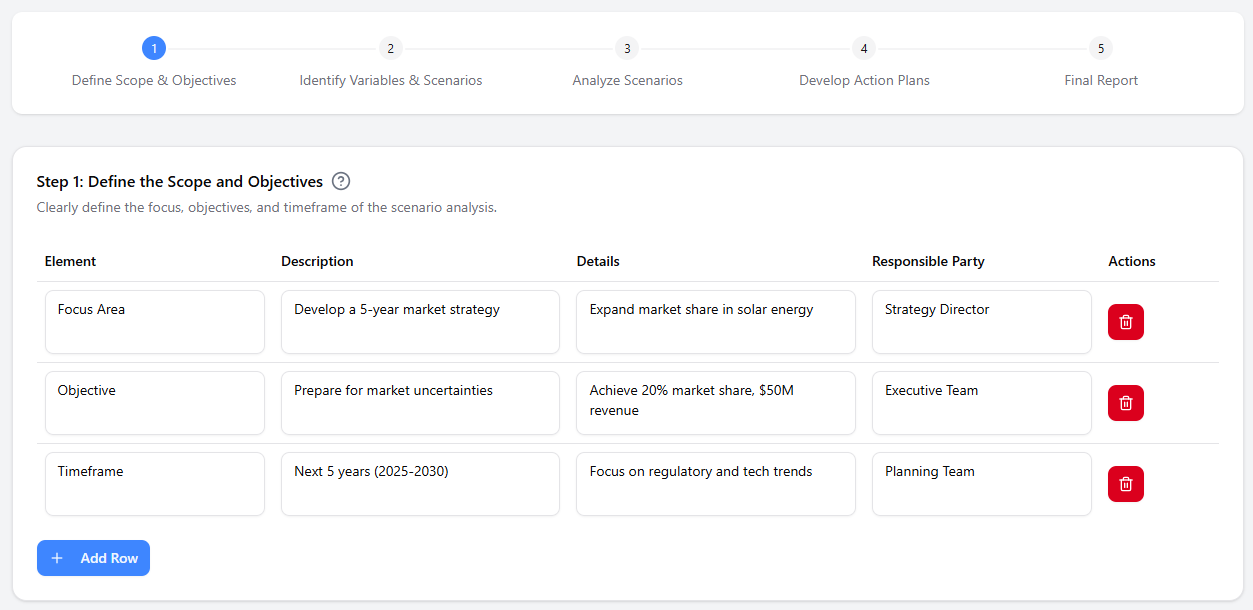 AI-Powered Scenario Analysis Software for Strategic Business Planning
 Streamlining GourmetReserve App Design: Why Use Case Modeling Studio Beats Traditional UML Tools
 AI Yourdon & Coad DFD Generator: Powerful Data Flow Modeling
 AI Timeline Generator: Visualizing Project Milestones with Visual Paradigm