


Creating C4 Container diagrams can feel overwhelming. You need to break down your software system into major building blocks—like applications, services, databases—and show how they interact. Doing this manually takes time, and getting the hierarchy right is tricky. That’s where an AI diagram generator changes everything.
Visual Paradigm stands out as a leading AI diagram tool for C4 modeling. Since 2002, we’ve built robust support for visual modeling, including over 100 diagram types. Now, with AI integrated across our ecosystem, we offer the most complete way to create, refine, and manage C4 Container diagrams. Our four platforms work together: VP Desktop for deep editing, OpenDocs for embedding (though limited for C4), the AI Visual Modeling Chatbot for quick chats, and Web Apps with our AI-Powered C4 PlantUML Studio.
Let’s explore how each one helps you build professional C4 Container diagrams—and why together they form the ultimate end-to-end solution.
VP Desktop: Your Powerhouse for Professional C4 Container Diagrams
VP Desktop is our flagship tool. It’s built for serious work—offline, precise, scalable. When you need full control over a C4 Container diagram, this is where you end up.
Visual Paradigm Desktop now fully supports the entire C4 model, including all six diagram types: System Context, Containers, Components, System Landscape, Dynamic, and Deployment. For Container diagrams specifically, you get dedicated shapes, connectors, and layouts that follow C4 standards. AI helps kick things off by generating initial structures, then you dive in with advanced editing: traceability links, model consistency checks, team collaboration features, and even code generation or reverse engineering.
Imagine you’re modeling a microservices-based e-commerce platform. AI generates a draft Container diagram showing the web app, API gateway, payment service, and database. In VP Desktop, you refine relationships, add technology tags, ensure hierarchical drill-down from Context to Components, and export to reports or code. No other tool combines this level of AI assistance with enterprise-grade depth. It’s perfect for architects who want models that are accurate, traceable, and ready for implementation.
Key Benefits in VP Desktop
- Full offline access and version control for complex projects
- AI-driven starting points plus manual precision editing
- Traceability across C4 levels—Container diagrams link seamlessly to Components and Deployment
- Integration with larger UML/SysML projects if needed
How to Generate a C4 Container Diagram with AI in VP Desktop
- From the main menu, select Tools > AI Diagram Generation. This opens the AI Diagram Generation window.
- In the window, choose your desired diagram type from the dropdown list. In this case, C4 Model.
- Select Containers for Diagram.
- In the text area, describe your project, problem, system, or scenario.
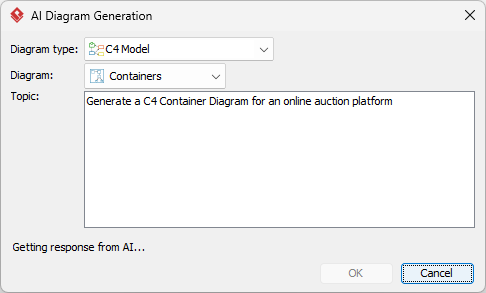
- Click OK to start the generation.
- The AI will create the diagram automatically.
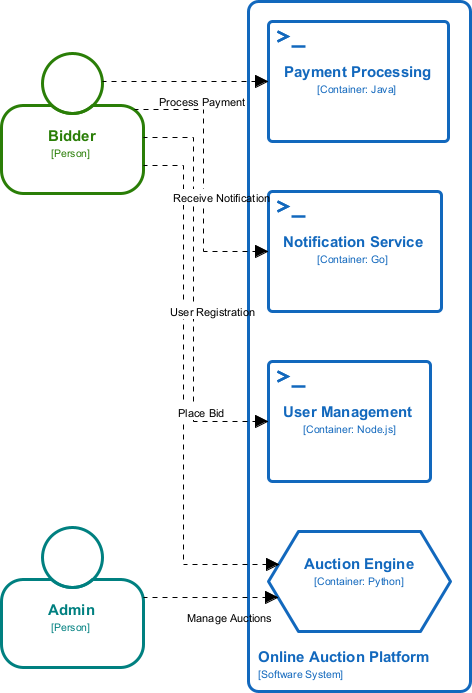
It appears as a fully editable, native Visual Paradigm diagram (not just an image). You can now:
- Edit elements, relationships, layout, or properties
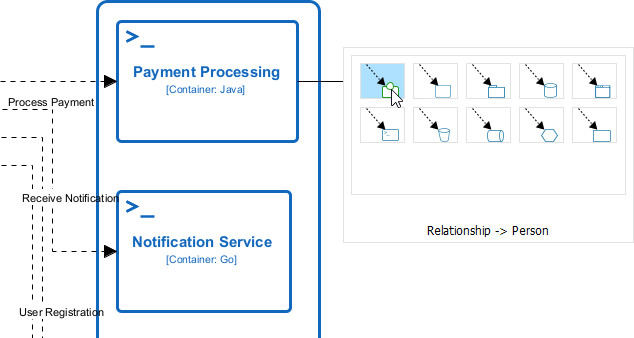
- Add more details manually
- Export as image (PNG, SVG, etc.), PDF, or use in reports
- Generate code or documentation if applicable
- Edit elements, relationships, layout, or properties
AI Visual Modeling Chatbot: Conversational C4 Container Diagram Creation
Need a C4 Container diagram fast? Just talk to our AI Visual Modeling Chatbot. It’s like having an expert co-pilot.
Describe your system in plain language—”Build a Container diagram for an online banking app with mobile client, web frontend, backend services, and SQL database”—and the Chatbot generates it instantly. It handles refinements too: “Add an authentication service,” “Show async communication via message queue,” or “Explain the responsibilities of each container.”
This platform shines for brainstorming or agile teams. You iterate quickly through chat, get explanations, generate reports, or export to other tools. It’s accessible for beginners yet powerful enough for pros. Many users start here to overcome blank-page syndrome, then move the result to VP Desktop for polishing.
Real example: A developer prototypes a new feature’s architecture via chat, generates the Container view, asks for analysis, and shares it with the team—all in minutes.
How to Generate a C4 Container Diagram with AI Chatbot
-
Open the AI Chatbot:
- Web access: Go to https://chat.visual-paradigm.com/ (or https://ai-toolbox.visual-paradigm.com/app/chatbot-v2/ as an alternative entry point).
- VP Desktop access: In Visual Paradigm Desktop, select Tools > Chatbot from the main menu. (This opens the same AI assistant integrated within your desktop environment.)
-
Start a new chat session: Click New Chat (on the left sidebar or as a prominent button) to begin a fresh conversation.
-
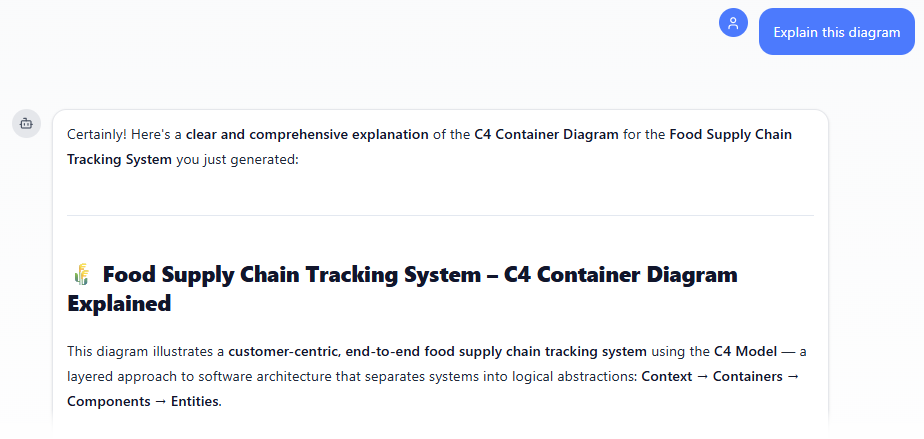
Describe what you want: In the text input area at the bottom, type a clear description of your project, system, or scenario (e.g. “Create a C4 Container Diagram for a food supply chain tracking system”). Press Enter (or click the send icon) to submit your message.
-
View and refine the diagram: The AI generates the diagram almost instantly.
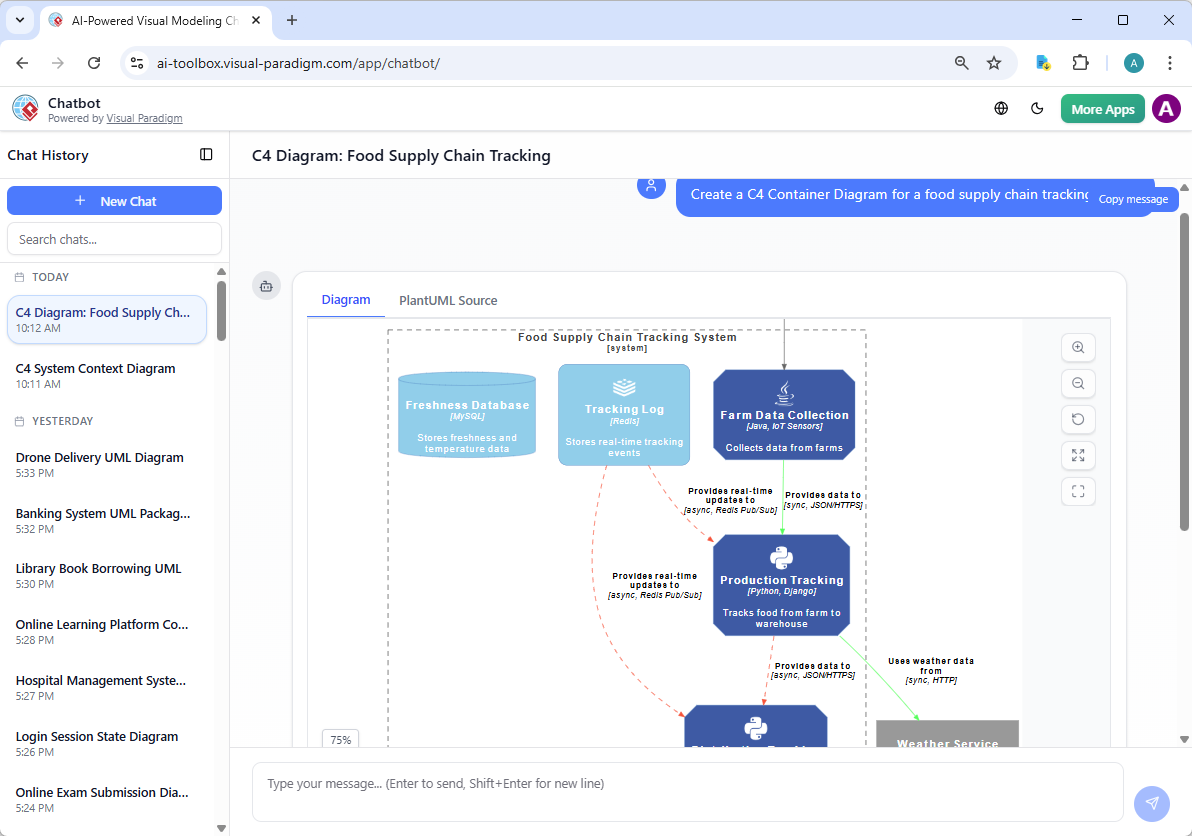
This is where the chatbot shines: keep the conversation going! Follow-up examples:
- “Add an element…”
- “Explain the diagram…. “
- “Generate a brief report summarizing ….”
Why the Chatbot Wins for Speed
- Natural language input—no drawing skills required
- Interactive refinement and explanations
- Quick exports to refine elsewhere
- Great for fast iteration in meetings or solo work
Web Apps: AI-Powered C4 PlantUML Studio for Guided Generation
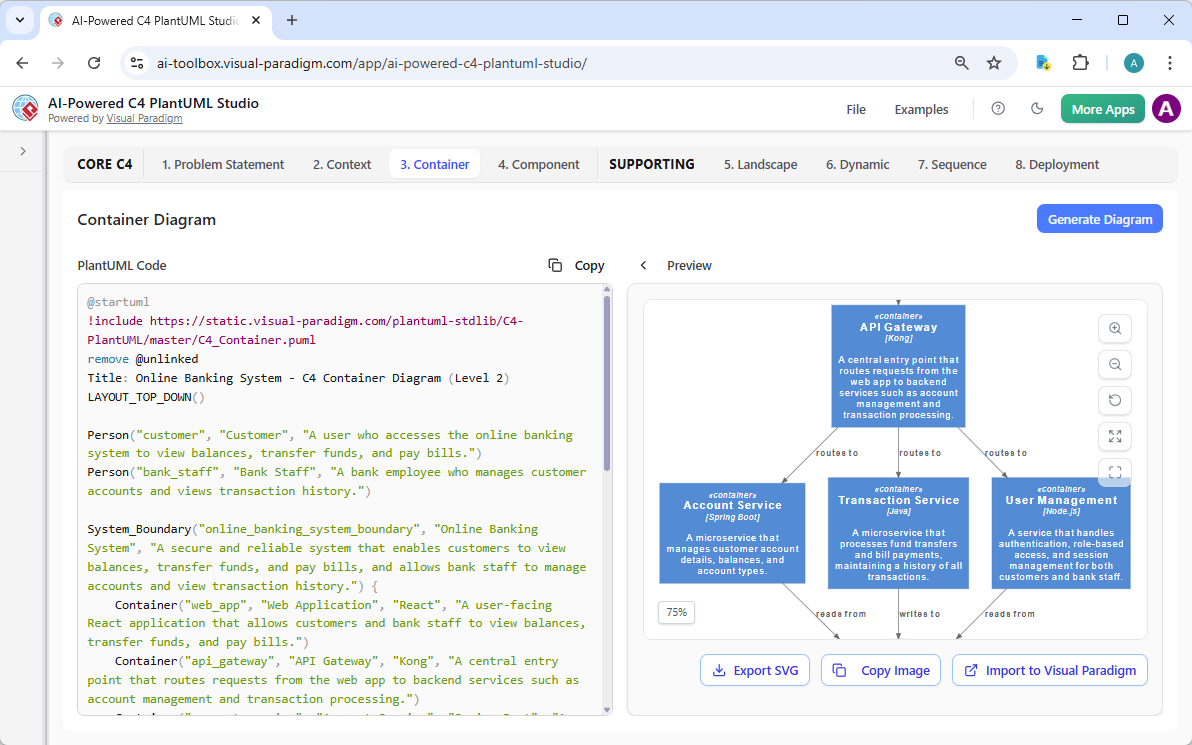
Our Web Apps deliver specialized, browser-based tools with structured guidance. The standout for C4 work is the AI-Powered C4 PlantUML Studio – an online AI diagram generator tailored for software architecture. It uses AI to generate complete, hierarchical C4 diagrams (Context, Container, Component) plus supporting views like Sequence and Deployment directly from a plain-language problem statement or project description, producing valid PlantUML code with live previews for instant refinement and iteration.
Learn more about AI-Powered C4 PlantUML Studio
Why Visual Paradigm Stands Out as the Best AI Tool for C4 Diagrams
Plenty of tools generate diagrams. Few offer a true ecosystem. Competitors might give you one-shot generation or basic drawing, but they lack depth, traceability, or cross-platform flow.
Visual Paradigm delivers:
- Widest coverage for C4 and beyond
- Multiple entry points: chat for speed, desktop for precision, web for guidance
- Real refinement—not just pretty pictures
- Seamless handoff between platforms
- Professional outputs ready for code, reports, teams
Whether you’re a solo architect sketching ideas or a large team maintaining enterprise models, this setup saves time, cuts errors, and scales. No silos. Just connected, AI-powered modeling.
Other C4 Diagrams
Want to see Visual Paradigm’s AI in action for C4 modeling? Check out the pages below to learn more about how our AI-Powered tools let you generate professional C4 diagrams instantly from plain text descriptions:
- C4 System Context Diagram
- C4 Container Diagram
- C4 Component Diagram
- C4 Landscape Diagram
- C4 Dynamic Diagram
- C4 Deployment Diagram
Start creating full C4 model suites in minutes – no manual drawing required!
Ready to Transform Your C4 Container Diagrams?
Visual Paradigm gives you every angle for creating C4 Container diagrams with AI. From quick chatbot drafts to polished desktop models and guided web generation, it’s the complete package.
Stop struggling with fragmented tools. Experience the difference today—try Visual Paradigm free and see how our AI diagram generator and ecosystem speed up your architecture work. Head to our site, start a project, and build your first AI-powered C4 Container diagram now.
Your software architecture deserves better. Let’s make it happen.