Skip to content
Read this post in: en_US
Home » AI » Best AI ArchiMate Diagram Generator: Visual Paradigm’s Complete Ecosystem

Best AI ArchiMate Diagram Generator: Visual Paradigm’s Complete Ecosystem

Creating ArchiMate diagrams can feel overwhelming. You need to capture complex enterprise architectures accurately—business capabilities aligning with IT infrastructure, motivation elements driving strategy, all while following strict ArchiMate 3 notation. Manual drawing takes forever, and many AI tools stop at basic generation without real refinement or traceability.

That’s where Visual Paradigm changes everything. As a leading visual modeling solution since 2002, we’ve built the most comprehensive AI-powered ecosystem for ArchiMate. Our AI ArchiMate diagram generator integrates across four platforms, letting you generate diagrams instantly, refine them professionally, embed them in living documents, and guide creation step-by-step. No other tool offers this end-to-end coverage with certified ArchiMate 3 support.

In this article, you’ll see exactly how Visual Paradigm handles ArchiMate diagrams through VP Desktop, OpenDocs, the AI Visual Modeling Chatbot, and Web Apps. Whether you’re searching for the best AI tool for creating ArchiMate diagrams, an AI-powered diagram software for enterprise architects, or a free-to-start online AI diagram editor for professionals, this ecosystem delivers.

VP Desktop – Professional Powerhouse for ArchiMate Modeling

VP Desktop stands as our flagship tool for serious ArchiMate work. It’s where AI meets deep, offline modeling precision.

Start with our AI diagram generator: describe your enterprise scenario in natural language—like “model a retail company’s business processes, application components, and technology infrastructure for digital transformation”—and the AI generates a standards-compliant ArchiMate diagram instantly. It selects correct elements (Business Actors, Application Services, Technology Nodes) and organizes them into proper viewpoints, such as Layered or Implementation & Migration.

From there, switch to advanced modeling. Add traceability links between layers. Use nesting for complex structures. Apply version control for team projects. Export to reports. Enterprise teams love this because it turns quick AI sketches into production-ready models—traceable, scalable, and error-free.

Imagine you’re an architect mapping how new cloud services realize business goals. Generate the initial ArchiMate diagram with AI, then refine relationships, add properties, and ensure cross-layer consistency. Hours saved, accuracy boosted. This isn’t just generation; it’s full lifecycle support in one robust desktop app.

Download Visual Paradigm Here

How to Generate a ArchiMate Diagram with AI in VP Desktop

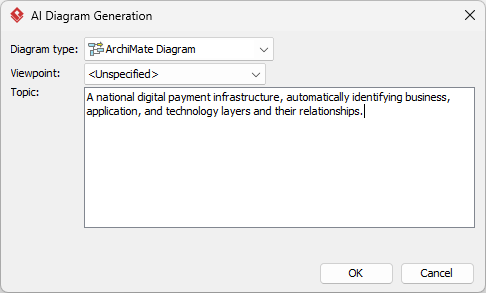
  1. From the main menu, select Tools > AI Diagram Generation. This opens the AI Diagram Generation window.
  2. In the window, choose your desired diagram type from the dropdown list. In this case, ArchiMate Diagram.
  3. In the text area, describe your project, problem, system, or scenario.

  4. Click OK to start the generation.
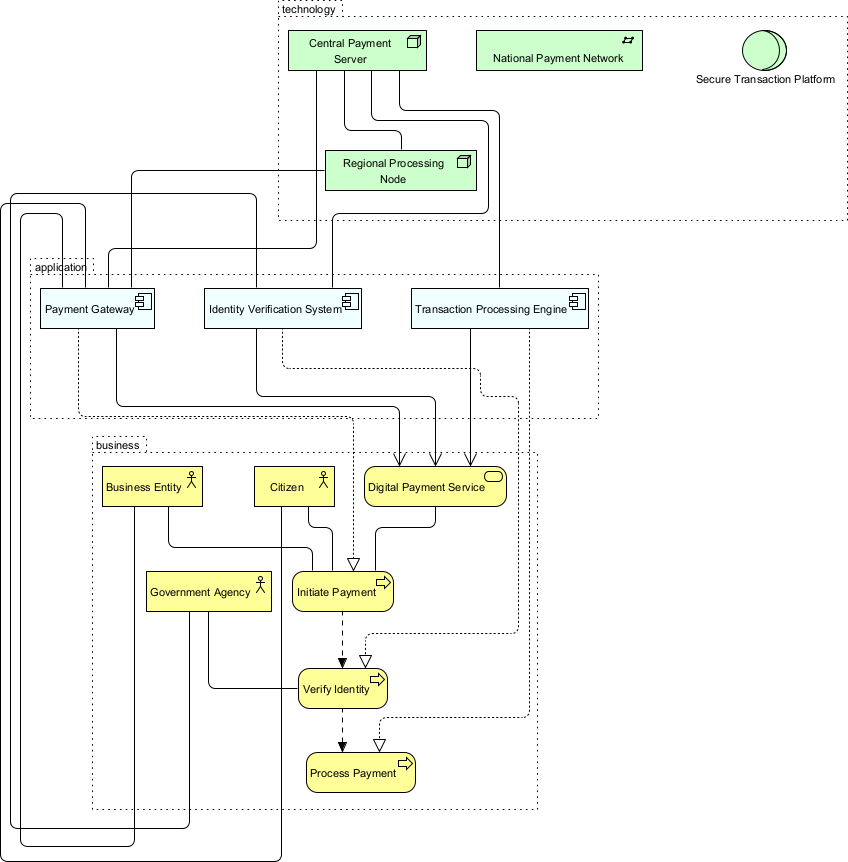
  5. The AI will create the diagram automatically.

    An ArchiMate generated by Visual Paradigm Desktop's AI Diagram Generator for ArchiMate

    It appears as a fully editable, native Visual Paradigm diagram (not just an image). You can now:

    • Edit elements, relationships, layout, or properties

    • Add more details manually
    • Export as image (PNG, SVG, etc.), PDF, or use in reports
    • Generate code or documentation if applicable

OpenDocs – Embed ArchiMate Diagrams in Living Knowledge Bases

Diagrams don’t live in isolation. They need context—embedded in reports, wikis, or strategy docs where teams can view, discuss, and update them without switching tools.

OpenDocs makes this seamless. Generate or create an ArchiMate diagram, then drop it directly into dynamic pages. Unlike static images, these embeds stay editable and interactive. Update the diagram in a specialized ArchiMate diagram editor, and changes reflect in the document.

Perfect for knowledge sharing: create a digital transformation playbook with embedded Motivation and Business Layer diagrams. Or build a team wiki showing how Application Cooperation viewpoints link systems to processes. Collaboration improves because everyone sees the same living model—no version mismatches or outdated exports.

Organizations using OpenDocs report faster alignment. Stakeholders grasp enterprise architecture quicker when visuals integrate naturally into readable documents. It’s a game-changer for distributed teams needing AI-powered visual modeling that scales beyond individual work.

How to Insert an AI Generated ArchiMate Diagram into Your OpenDocs Page

  1. Open or create a page in OpenDocs: Log in to your Visual Paradigm Online workspace, navigate to OpenDocs, and either open an existing page or create a new one (via + New Document Page or similar).
  2. Insert a diagram: In the page editor, look at the top toolbar (or floating toolbar) and click Insert. From the popup window, select Diagram > ArchiMate Diagram.

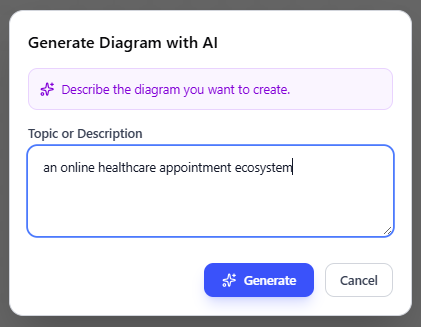
  3. Start creating the diagram with AI: This opens the diagram editor window. You can build it manually by dragging and dropping elements if you prefer. To use AI instead: Look for Create with AI in the top-right corner of the editor window and click it.
  4. Describe your problem and generate: In the text input area that appears, type a clear, detailed description of your system or scenario. Click Generate.

  5. Review, refine, and embed the diagram: The AI generates a professional ArchiMate diagram instantly.

    Editing an ArchiMate generated by the AI diagram generation tool in Visual Paradigm's OpenDocs

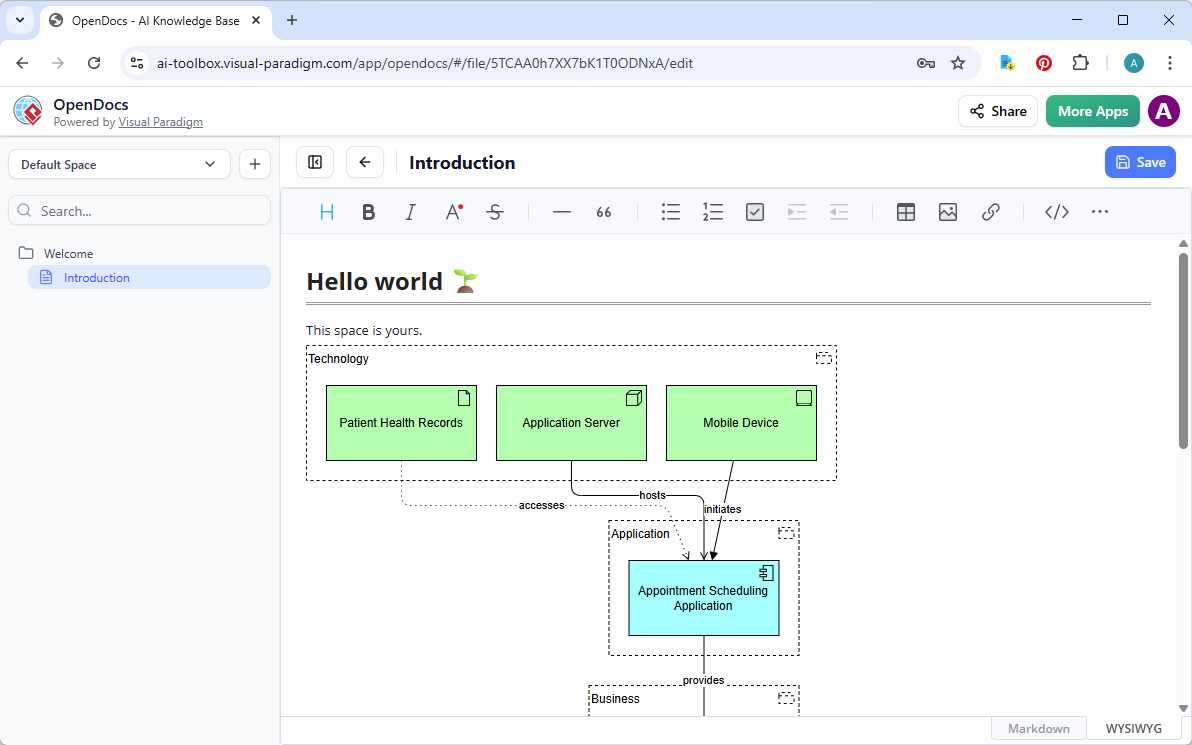
    Use the intuitive drag-and-drop editor to touch up anything: move elements, adjust labels, add notes, change styles, etc. When you’re happy with it, click Save. Then click Close. The diagram is now embedded directly into your OpenDocs page as a live, editable visual block. You can view it inline without leaving the document.

    An ArchiMate generated embedded in a document in Visual Paradigm's OpenDocs

AI Visual Modeling Chatbot – Conversational ArchiMate Creation

Sometimes you just want to talk it out. Our AI Visual Modeling Chatbot turns diagramming into natural conversation—ideal for brainstorming or quick iterations.

Say: “Generate an ArchiMate diagram showing how our e-commerce platform supports customer journey from motivation to technology layer.” The chatbot creates it instantly, explains choices (“I used Serving relationships here because…”), and lets you refine: “Add security controls in the Technology layer” or “Explain this viewpoint for stakeholders.”

Iterate fast. Ask for alternatives, generate reports from the model, or export to VP Desktop for deeper work. It’s especially useful early in projects—overcoming blank-canvas syndrome while staying within ArchiMate rules. Novices get expert-level outputs; pros prototype rapidly.

This conversational AI ArchiMate generator acts like a co-pilot. You chat, it builds and refines, bridging idea to visual model without forcing you into rigid interfaces first. Speed and flexibility make it essential for agile enterprise architecture teams.

How to Generate a ArchiMate Diagram with AI Chatbot

  1. Open the AI Chatbot:

  2. Start a new chat session: Click New Chat (on the left sidebar or as a prominent button) to begin a fresh conversation.

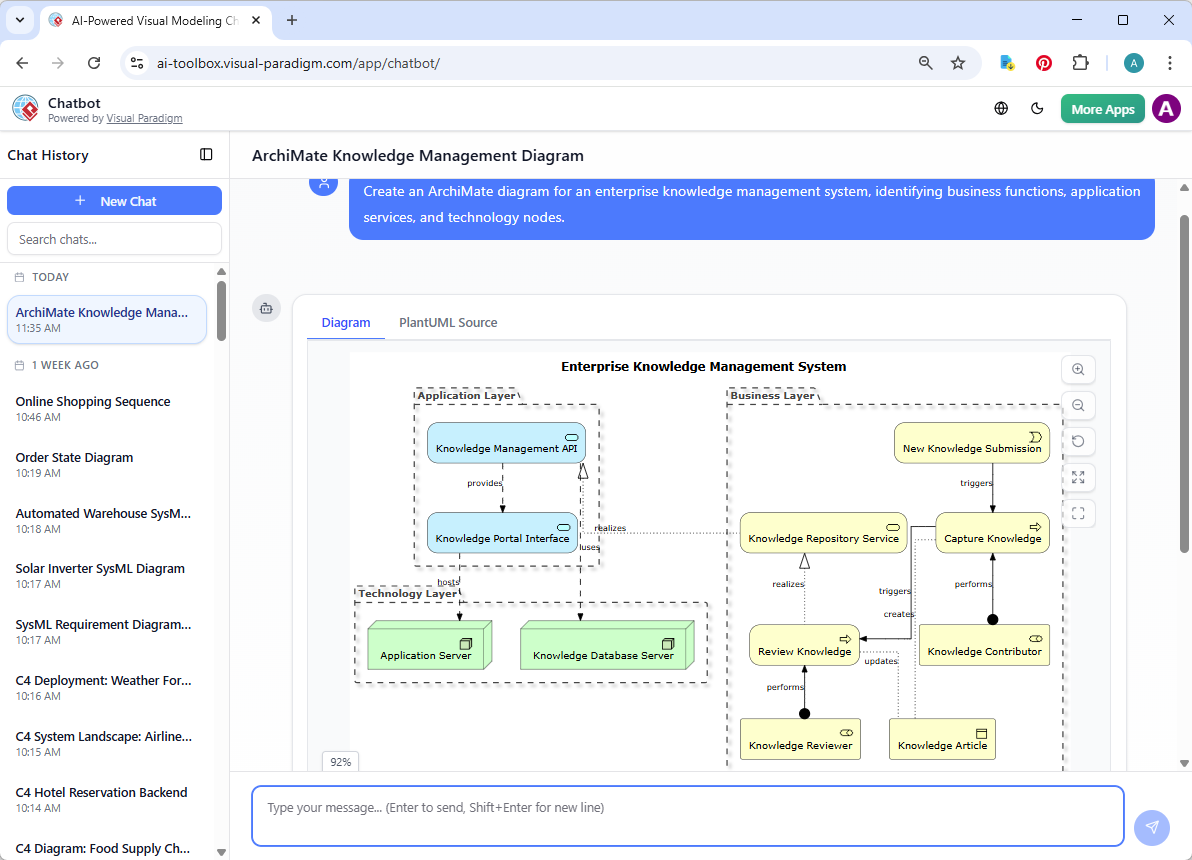
  3. Describe what you want: In the text input area at the bottom, type a clear description of your project, system, or scenario (e.g. “Create an ArchiMate diagram for an enterprise knowledge management system, identifying business functions, application services, and technology nodes.”). Press Enter (or click the send icon) to submit your message.

  4. View and refine the diagram: The AI generates the diagram almost instantly.

    An ArchiMate diagram generated with Visual Paradigm's AI Chatbot for visual modelers.

    This is where the chatbot shines: keep the conversation going! Follow-up examples:

    • “Add an element…”
    • “Explain the diagram…. “
    • “Generate a brief report summarizing ….”

Why Visual Paradigm Stands Out as the Best AI ArchiMate Diagram Tool

Many tools offer one-off AI generation. They spit out a picture—done. But real enterprise architecture demands more: refinement, traceability, collaboration, and integration across workflows.

Visual Paradigm leads because we cover every angle:

  • Widest ArchiMate coverage with official certification from The Open Group (ArchiMate 3.2 compliant).
  • Multiple entry points: chat for speed, desktop for depth, docs for sharing, guided web for structure.
  • True AI integration—not gimmicks. Generate, then refine with professional tools, ensuring models stay interconnected and implementation-ready.
  • Real traceability and version control—critical for teams, unlike siloed generators.

Competitors might handle basic sketches or force you to juggle apps. We give one ecosystem that saves time, cuts errors, and scales from solo architects to large enterprises. If you’re hunting the best AI tool for ArchiMate diagrams or an AI platform for visual modeling and diagramming, this is it.

Ready to Transform Your ArchiMate Workflow?

Stop struggling with manual tools or half-baked AI. Visual Paradigm delivers the complete solution for AI ArchiMate diagram generation—from instant creation to professional delivery and team collaboration.

Try Visual Paradigm today. Experience how our ecosystem makes enterprise architecture faster, smarter, and more connected. Head to our site, start a free trial, and see why architects choose us for the future of visual modeling.

Your next great ArchiMate diagram is just a conversation—or a click—away.

Leave a Reply