A software system’s visual architecture is only as valuable as the clarity of its underlying data specifications. While a UML Class Diagram excels at visualizing entities, attributes, and relationships, developers, business analysts, and data stewards often need detailed text specifications, field descriptions, and validation rules. This step-by-step guide demonstrates how to transform static structural models into interactive, living data dictionaries using Visual Paradigm OpenDocs, accelerated by an AI class diagram generator.
What is a Live Data Dictionary?
A Data Dictionary is a centralized repository that defines the metadata of a software system, including entity names, data types, field constraints, default values, and business descriptions.
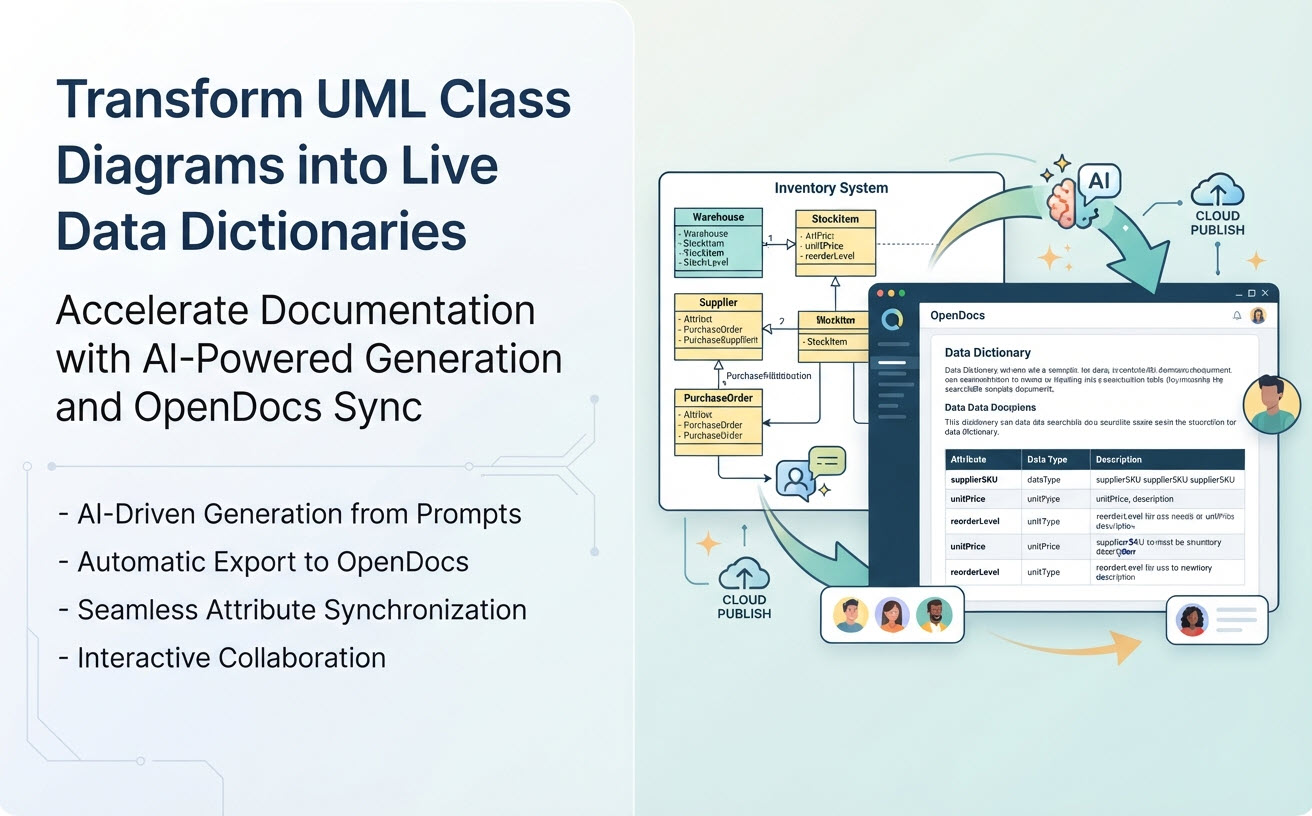
Traditional data dictionaries created in spreadsheets quickly become outdated as application requirements evolve. A Live Data Dictionary in Visual Paradigm OpenDocs bridges this gap by directly linking interactive documentation to your underlying class models. When class attributes, data types, or relationships update in your model, your technical documentation syncs seamlessly.
Step-by-Step Guide: From AI Prompt to Live Data Dictionary
Step 1: Generate your Core Class Diagram with Conversational AI
Instead of manually creating dozens of classes and attributes, start by drafting your structural domain model using natural language prompts.
Launch the Visual Paradigm AI Diagramming Chatbot and describe your target domain requirements:
Example Prompt: “Generate a detailed class diagram for an Inventory Management System including Warehouse, StockItem, Supplier, and PurchaseOrder. Include attributes with data types and visibility.”
The AI engine builds a syntactically correct UML class diagram in seconds, establishing the baseline structure for your data dictionary. Learn more about this capability on our specialized AI Class Diagram Generator Feature Page.
Step 2: Export Model Artifacts to OpenDocs
Once your class diagram is generated, click the Send to OpenDocs action within the AI Chatbot interface or Visual Paradigm platform. This automatically parses your visual entities into structured documentation elements:
- Classes are transformed into Data Entity chapters.
- Attributes are converted into detailed Data Element specification tables (field name, type, nullability).
- Relationships (Composition, Aggregation, Inheritance) are mapped to entity lineage sections.
Step 3: Enrich Metadata with Detailed Descriptions
Open your generated document inside Visual Paradigm OpenDocs. Use the rich-text editor to expand technical details beyond raw code types:
| Class Attribute | Data Type | Data Dictionary Enrichment (OpenDocs) |
|---|---|---|
supplierSKU |
String | Unique vendor stock identifier. Must match regex pattern ^[A-Z]{3}-\d{5}$. |
unitPrice |
Decimal | Base wholesale cost excluding taxes. Precision: 2 decimal places. Must be > 0. |
reorderLevel |
Integer | Minimum stock threshold triggering automated purchase order creation. Default: 50. |
Step 4: Share and Collaborate with Stakeholders
Publish your live OpenDocs page to generate a secure, web-accessible URL for your organization. Development teams, database administrators, and QA engineers can access up-to-date attribute definitions without needing specialized desktop modeling tools.
Why Use OpenDocs for Class Diagram Documentation?
- Eliminates Manual Copy-Pasting: Auto-extract class properties, methods, and relationship structures directly from diagram models.
- Single Source of Truth: Keep visual architecture diagrams and written technical specifications in absolute sync.
- Cross-Functional Access: Bridge the communication gap between technical developers and business stakeholders.
- Version Controlled Updates: Track changes to data definitions as your software evolves over iterations.
Connecting OpenDocs across the Visual Paradigm Ecosystem
OpenDocs works hand-in-hand with the complete Visual Paradigm product suite to support end-to-end software development lifecycles:
1. AI-Driven Ideation with the AI Chatbot
Draft initial class structures, domain entities, and data models in seconds using natural language prompts in the AI Diagramming Chatbot.
2. Model-as-Code editing in VPasCode
Edit text-based diagram definitions (PlantUML, Mermaid, etc) in VPasCode, allowing software architects to perform minor editing on the generated diagram.
3. Visual Editing in VP Online
Refine class boundaries and diagram layouts using an intuitive drag-and-drop web editor in VP Online before publishing final data dictionaries to OpenDocs.
4. Full Lifecycle Engineering in VP Desktop
Import class diagrams into Visual Paradigm Desktop to perform reverse-engineering on existing database schemas or auto-generate source code skeletons in Java, C#, and C++ that perfectly match your OpenDocs data dictionary.