


Designing Google Cloud architecture diagrams can be a complex technical hurdle. You must accurately map out Compute Engine instances, Cloud Storage buckets, and Google Kubernetes Engine (GKE) clusters while ensuring your GCP VPC networking follows strict security and high-availability standards. If you are looking to visualize Google Cloud infrastructure with AI, you need a professional AI Google Cloud architecture diagram generator that understands the specific iconography and architectural logic of the Google Cloud ecosystem.
Visual Paradigm is a global leader in AI-powered diagram software. While our ecosystem supports over 100 diagram types, our specialized AI Cloud Architecture Studio is the premier GCP architecture visualization tool for building professional blueprints. Whether you are a cloud architect designing for data analytics or a DevOps engineer mapping out a containerized migration, our AI transforms natural language into production-ready diagrams instantly.
AI Cloud Architecture Studio: Your Automated GCP Blueprint Tool
The AI Cloud Architecture Studio is a browser-based, AI-first platform built specifically for modern cloud professionals. It serves as an AI-powered GCP design tool that aligns your infrastructure with Google’s Cloud Adoption Framework and best practices.
How to Generate a Google Cloud Diagram with AI
- Describe Your Infrastructure: Input a prompt like: “Design a high-availability data processing pipeline on GCP using Pub/Sub, Dataflow, and BigQuery with a managed GKE cluster.”
- Select Your Strategy: Choose an architecture goal such as High Availability, Enterprise Grade, or Low Cost / MVP to guide the AI’s resource placement.
- Technical Deep Dive: The AI Google Cloud diagram maker will ask smart clarifying questions, such as: “Would you like to include Cloud Armor and Identity-Aware Proxy (IAP) for enhanced security?”
- Automated Generation: The AI renders a professional diagram featuring official Google Cloud service icons and logical connections.
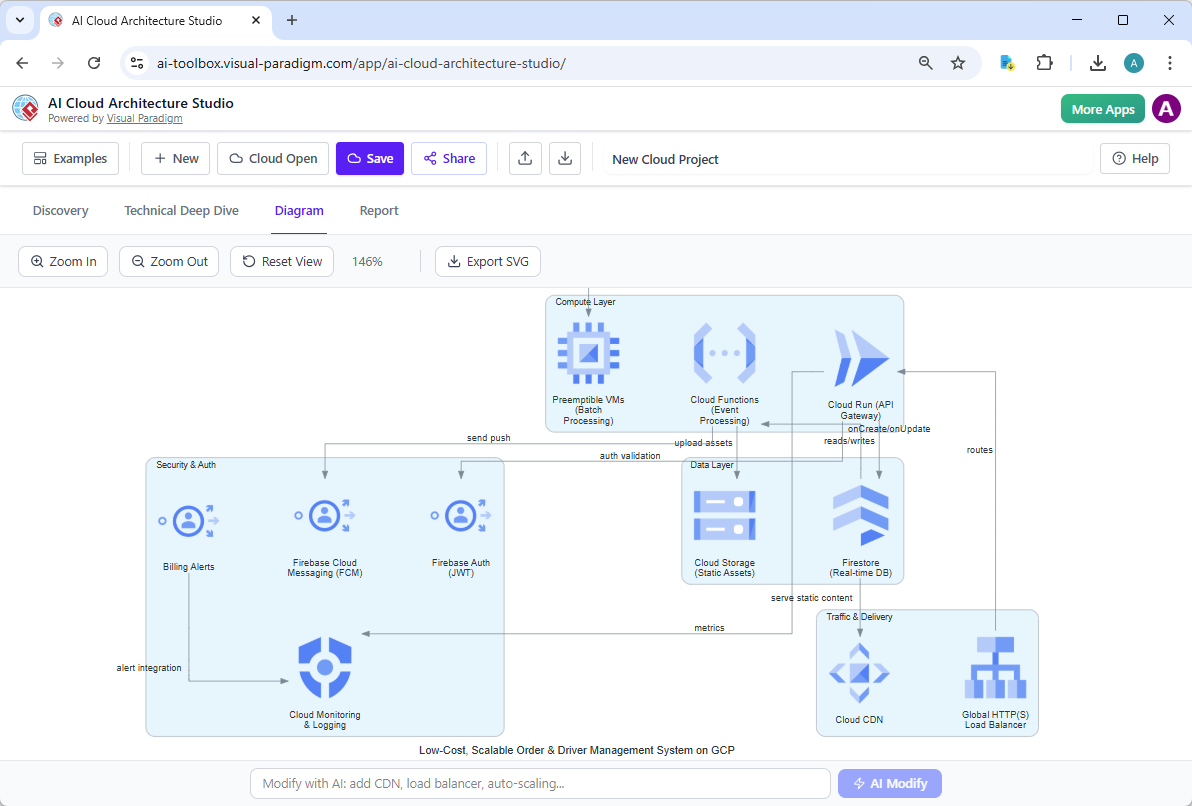
- Interactive AI Modification: Refine your model via conversation. Type: “Add a Cloud Load Balancer and integrate Cloud Logging,” and the diagram updates in real-time.
Key Benefits for Cloud Architects and Developers
- Rapid Prototyping: Compare different GCP deployment patterns in minutes using automated Google Cloud topology.
- Multi-Cloud Agnostic: Use the same AI diagram generator to see how your GCP setup compares to similar stacks on AWS or Azure for hybrid-cloud planning.
- Professional SVG Exports: Download high-quality vectors for architecture decision records (ADRs), stakeholder presentations, or technical documentation.
- Zero Manual Drag-and-Drop: Focus on the architecture logic while the AI handles the alignment, spacing, and iconography.
The Broader Visual Paradigm AI Ecosystem
While Google Cloud designs are best handled in the Cloud Studio, they are part of a unified AI platform for visual modeling. Since 2002, Visual Paradigm has provided the technical depth required for UML, BPMN, and SysML, ensuring your infrastructure is never isolated from your application architecture.
Integrated Workflows Across Platforms:
- VP Desktop: Import your Google Cloud architecture into our flagship desktop tool for advanced enterprise modeling, traceability, and integration with large-scale projects.
- OpenDocs: Embed your GCP architecture visualization into living documentation. When your cloud configuration changes in the Studio, your team wiki updates with one click.
- AI Chatbot: Use our conversational co-pilot for rapid brainstorming of the logic behind your microservices or data migration flows.
Why Choose Visual Paradigm for Google Cloud Modeling?
| GCP Requirement | Visual Paradigm AI | Basic AI Drawing Apps |
|---|---|---|
| GKE & Container Logic | Understands Pod, Service, and Ingress relationships in GKE | Generic boxes with no cloud-specific context |
| Strategy-Based Design | Applies automated high-availability and cost-efficiency patterns | Randomly placed icons with no failover logic |
| Iterative Refinement | Modify entire VPC configurations via text prompts | Manual re-drawing required for every adjustment |
Modernize Your GCP Planning Today
Stop wrestling with manual drawing tools for your complex Google Cloud environments. Visual Paradigm’s AI Cloud Architecture Studio is the ultimate AI Google Cloud architecture diagram generator, designed for the speed and precision of modern cloud engineering. Experience how an intelligent AI diagram tool can transform your infrastructure planning.