


As software systems scale, documenting complex microservice relationships becomes a critical challenge for development teams. Relying on drag-and-drop drawing tools often results in outdated, hard-to-maintain diagrams that drift away from your actual codebase. Using a modern text to diagram tool allows developers and software architects to maintain system architecture directly alongside source code. By pairing an online browser-based PlantUML editor with the structured methodology of the C4 model, teams can generate clear, version-controllable architectural documentation with ease.
In this guide, we will explore how to design microservice architectures using PlantUML and C4, why code-based modeling surpasses static drawing canvas solutions, and how an all-in-one diagram-as-code tool streamlines your engineering workflow.
Why Combine PlantUML with the C4 Model?
The C4 model breaks down complex software systems into four hierarchical levels of detail: Context, Containers, Components, and Code. When implemented inside a dedicated PlantUML editor, architects gain several distinct advantages:
- Standardized Visual Notation: Every team member follows identical styling rules for software boundaries, containers, and databases without manual alignment.
- Version Control Integration: Store your architecture definitions directly in Git alongside your microservice repositories for effortless change tracking.
- Rapid Refactoring: Rename services, adjust database references, or update API connections in seconds using plain text edits.
Adopting a text to diagram tool for architectural blueprints ensures that your technical documentation stays accurate throughout long-term project lifecycles.

Building a Microservice Architecture Step-by-Step
Let’s look at how to model a multi-container microservice system using C4 syntax in your browser. With the official C4 library included directly in your editor, defining systems requires minimal setup.
Level 1: System Context Diagram
The System Context diagram establishes high-level boundaries, showing how external users and external services interact with your microservice ecosystem.
Level 2: Container Diagram
The Container diagram zooms into the system boundary, revealing individual microservices, API gateways, background workers, and datastores. Here is an example script you can paste directly into an online PlantUML editor:
@startuml
!include https://raw.githubusercontent.com/plantuml-stdlib/C4-PlantUML/master/C4_Container.puml

Person(user, "API Consumer", "Mobile application or web client")
System_Boundary(c1, "E-Commerce Microservices Platform") {
    Container(api_gateway, "API Gateway", "Go / Envoy", "Routes client requests and handles auth")
    Container(auth_service, "Auth Service", "TypeScript", "Validates user credentials and issues tokens")
    Container(order_service, "Order Service", "Java", "Processes customer orders")
    ContainerDb(order_db, "Order DB", "PostgreSQL", "Stores order and payment records")
}

Rel(user, api_gateway, "Sends HTTP Requests", "HTTPS")
Rel(api_gateway, auth_service, "Authenticates Request", "gRPC")
Rel(api_gateway, order_service, "Forwards Order", "gRPC")
Rel(order_service, order_db, "Reads/Writes Data", "SQL")
@enduml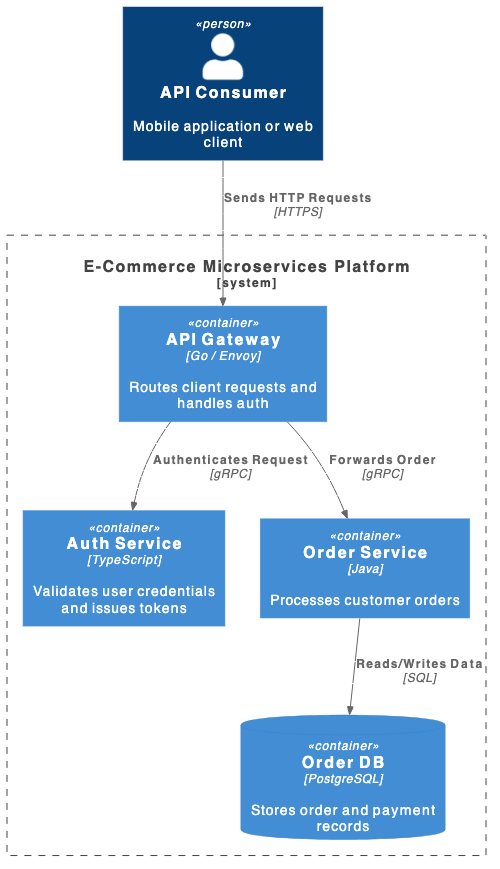
Streamlining C4 Modeling with AI and VPasCode
While C4 syntax provides clean, structured output, managing complex dependency chains across multiple microservices can still lead to syntax mistakes. Using VPasCode as your primary text to diagram tool gives your team access to 1-Click AI Code Error Fixing to resolve syntax glitches instantly.
When modeling software C4 architecture layouts or detailing complex system Architecture models, an intelligent PlantUML editor automatically catches unclosed blocks, invalid relationships, or missing library imports so you can render high-resolution views without losing velocity.
Best Practices for Documenting Microservices
To get the highest value from your code-based documentation workflow, keep these three key practices in mind:
- Keep Diagrams Modular: Avoid crowding every microservice into a single view. Split complex domains into separate PlantUML files for Context and Container views.
- Standardize Technology Labels: Clearly denote protocol names like gRPC, REST, or SQL to help developers instantly grasp service communication layers.
- Export High-Quality Assets: Utilize SVG and PNG exports directly from your PlantUML editor to embed crisp visuals into pull requests, Wiki pages, or Visual Paradigm OpenDocs publications.
Choosing an intuitive text to diagram tool empowers both junior developers and senior architects to maintain production-ready architectural models effortless in plain text.
Transform Your Architecture Workflow Today
Ready to standardize your microservice documentation and build maintainable C4 models in seconds? Try VPasCode’s feature-rich PlantUML editor today and experience instant AI code error fixing, multi-format rendering, and powerful diagram-as-code capabilities.