


In the rapidly evolving world of software engineering, the ability to quickly visualize complex object collaborations is a vital skill. The AI Communication Diagram Generator within Visual Paradigm represents a monumental shift in how architects and developers approach system design! By leveraging the power of generative artificial intelligence, professionals can now transform a simple paragraph of text into a robust, standards-compliant UML model in just seconds. This technology eliminates the “blank canvas” syndrome and allows teams to focus on high-level logic rather than manual symbol placement.
Imagine you are tasked with documenting a complex “Online Purchase Flow.” In traditional modeling, you would spend hours identifying every object, drawing links, and meticulously numbering every message. With Visual Paradigm’s professional AI visual modeling software, that entire process is automated! You simply describe the interaction scenario, and the AI handles the structural organization and message sequencing for you. This is not just a drawing tool; it is a comprehensive AI-powered UML editor that understands the semantics of your software architecture.
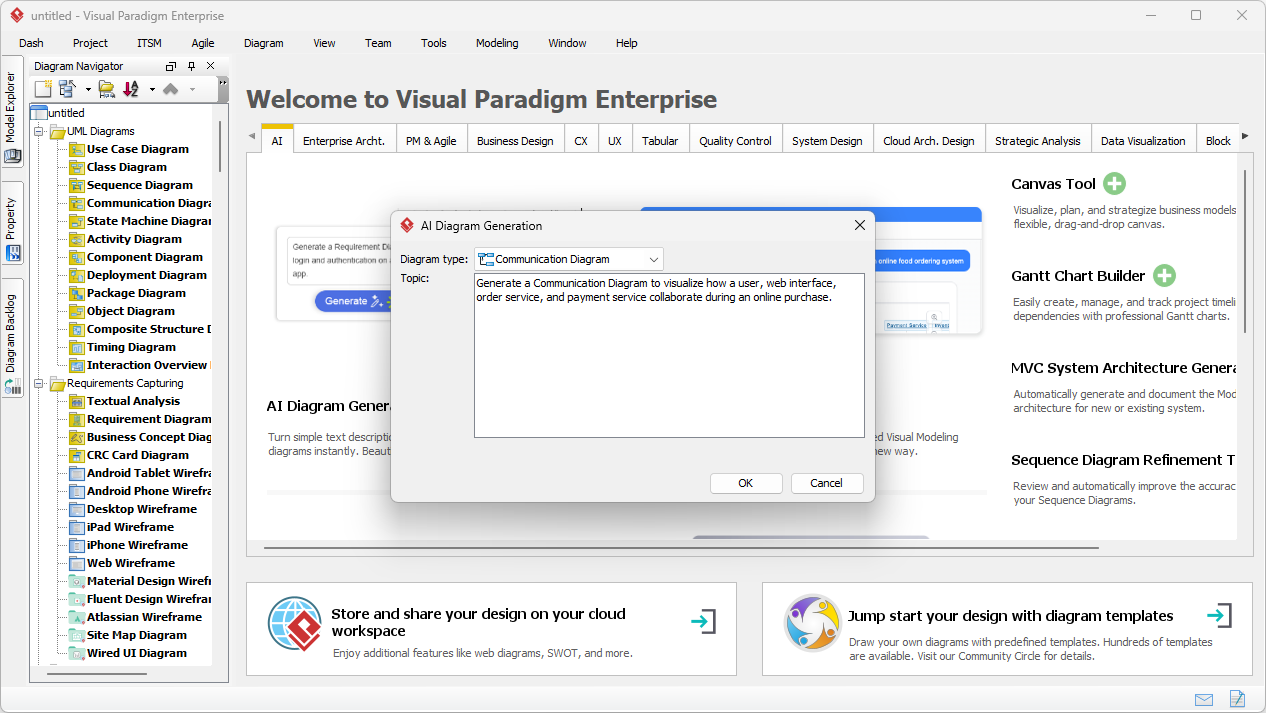
The interface is designed for maximum efficiency. When you open the AI Diagram Generation window, you are greeted with a streamlined prompt box. As seen in the initial setup of a project, the user provides a detailed description of the participants—such as the User, Web Interface, Order Service, and Payment Service—and their specific collaborative roles. This natural language input serves as the blueprint for the intelligent engine to construct a precise architectural view.
Key Takeaways for AI-Driven Modeling
- Instant Visualization: Convert natural language descriptions into professional UML communication diagrams immediately!
- Structural Accuracy: The AI automatically identifies objects (lifelines) and the necessary links (associations) between them.
- Sequential Logic: Messages are intelligently numbered (e.g., 1, 1.1, 2) to reflect the exact order of execution in a scenario.
- Full Editability: Generated diagrams are native Visual Paradigm elements, allowing for deep manual refinement and code engineering.
- Integrated Ecosystem: Seamlessly move between desktop modeling and cloud-based AI assistants for a hybrid workflow.
The Power of the Best AI Visual Modeling Software
Visual Paradigm has established itself as the best AI visual modeling software by creating a holistic ecosystem that supports over 40 different diagram types through generative AI. Whether you are working in the flagship desktop application or using the web-based AI Chatbot, the consistency of the modeling logic remains unparalleled! This easy-to-use diagram maker supports everything from standard UML and SysML to complex enterprise architecture frameworks like ArchiMate and C4 models.
Specifically, for communication diagrams (also known as collaboration diagrams), the AI focuses on two critical dimensions: structure and behavior. While sequence diagrams emphasize the chronological passing of time, communication diagrams excel at showing how objects are physically or logically connected within the system. Using an AI-powered communication diagram tool ensures that your links are logically placed and your messages follow the correct pathways between collaborating components. This dual perspective is essential for identifying bottlenecks in your system architecture or clarifying object responsibilities during the design phase!
Step-by-Step: Generating Your First Collaboration Model
To achieve the best results with the AI Communication Diagram Generator, it is important to follow a structured pedagogical approach. Students and professionals alike should focus on the clarity of their input to maximize the AI’s effectiveness. Here is how you can master this workflow:
- Define the Scenario: Start with a clear objective. For an online purchase, you must identify the primary actors and the backend services involved.
- Access the AI Tools: In Visual Paradigm Desktop, navigate to Tools > AI Diagram Generation. This is your gateway to automated modeling!
- Input the Prompt: Provide a detailed description. For example: “A user selects a product via the web interface. The interface requests an order summary from the order service. The order service then triggers the payment service to process the transaction.”
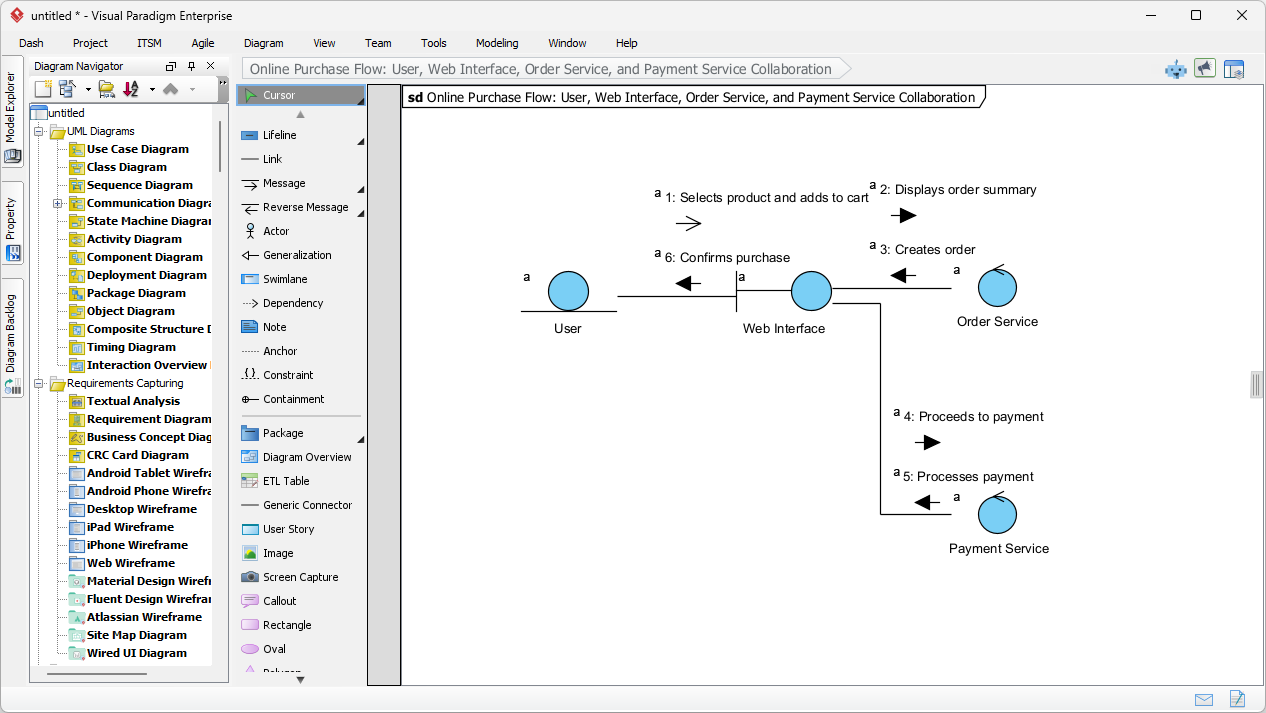
- Review the Output: Once you click OK, the AI constructs the diagram. Look at how it places the “Web Interface” as a central hub between the “User” and the “Order Service.”
As demonstrated in the generated results, the AI produces a clean, logically organized layout. Each object is represented clearly, and the message flow is annotated with precise sequence numbers. In the “Online Purchase Flow” example, the AI correctly identifies that the User interacts with the Web Interface, which then communicates with the Order Service and Payment Service. The resulting diagram provides an immediate, high-level understanding of the system’s collaborative dynamics without requiring any manual drawing!
Advanced Features of the AI-Powered UML Editor
What sets this professional UML communication diagram tool apart is its ability to handle complex nesting and hierarchical numbering. In software design, a single message often triggers a series of sub-calls. The AI Communication Diagram Generator is sophisticated enough to detect these dependencies. If your description mentions that “The Order Service validates the stock before confirming the price,” the AI will appropriately number these as sub-tasks, maintaining the integrity of the UML specification!
Optimizing Your Layout with AI
One of the most frustrating aspects of manual modeling is “line crossing” and cluttered layouts. This easy-to-use AI diagram maker includes automatic layout optimization! The AI positions objects to minimize crossing connectors, ensuring that the message labels remain readable even in complex scenarios. This attention to visual hierarchy is what makes Visual Paradigm the preferred choice for enterprise architects who need to present their designs to stakeholders and technical leads.
Refining Your AI-Generated Models
Always remember: the AI provides a powerful 80% foundation, but the final 20% of refinement comes from your expertise! Because the output is a native Visual Paradigm diagram, you can leverage the full suite of professional tools. You can bold important messages, add constraints, link objects to detailed class diagrams, or even generate source code directly from the model. This bridge between AI generation and manual engineering is the hallmark of a truly professional AI visual modeling tool.
Conclusion: Elevating Your Design Workflow
The integration of the AI Communication Diagram Generator into your daily workflow is a transformative step toward more efficient software documentation. By moving from manual sketching to AI-assisted modeling, you save countless hours and reduce the likelihood of human error in message sequencing. Visual Paradigm’s commitment to building a robust AI modeling ecosystem ensures that you have the most advanced tools at your fingertips, whether you are a student learning UML for the first time or a seasoned architect designing global-scale systems.
In summary, the best AI visual modeling software should empower you to communicate complex ideas with clarity and speed. With its ability to understand natural language, optimize layouts, and maintain strict adherence to UML standards, Visual Paradigm is the ultimate solution for modern engineering teams. Do not let manual drawing slow down your innovation! Embrace the future of design and let artificial intelligence handle the heavy lifting of your structural and behavioral modeling.
Try Visual Paradigm’s AI Tools Today!
Are you ready to experience the power of AI-powered communication diagram generation for yourself? Start transforming your system descriptions into professional models today! Follow the link below to download the latest version of Visual Paradigm and unlock the full potential of AI-driven visual modeling.
Action Step: Visit the official download page and install Visual Paradigm Desktop to access the AI Diagram Generation feature immediately!
Related Links
The following resources explore the intersection of artificial intelligence and UML modeling, specifically for the creation and refinement of communication diagrams. These articles demonstrate how the AI Chatbot allows users to turn natural language requirements and ideas into visual interaction models instantly while providing step-by-step tutorials and advanced guides to master object interaction design.
- What is a Communication Diagram? A Complete Guide to UML Modeling: This comprehensive guide explains the purpose, structure, and use cases of communication diagrams for modeling object interactions in UML.
- AI Chatbot for Diagram and Model Generation: This AI-powered interface generates diagrams and models, including UML interaction types, directly from natural language input.
- How to Draw a Communication Diagram in Visual Paradigm: This article provides technical instructions and best practices for creating communication diagrams within a professional modeling environment.
- Visual Paradigm AI Chatbot: Turn Your Ideas into Diagrams Instantly: This resource details how the chatbot acts as a modeling partner, transforming raw descriptions into structured visual models.
- How to Turn Requirements into Diagrams with an AI Chatbot: This post explains how to evolve project requirements into full system designs with minimal manual effort using AI.
- Advanced Guide to Communication Diagrams in Visual Paradigm: This is a detailed tutorial on advanced techniques for interpreting interactions in complex software systems.
- How to Draw a Communication Diagram – Step-by-Step Tutorial: This beginner-friendly guide helps users master interaction modeling and follow UML standards.
- Why Visual Paradigm’s Modeling Chatbot Outperforms Generic AI: This analysis explains why specialized AI modeling assistants provide superior accuracy for technical diagrams compared to generic AI tools.
- Understanding Communication Diagrams in Visual Paradigm: This conceptual guide is used for interpreting and applying communication diagrams for effective system modeling.
- What are Interaction Diagrams in UML?: This resource clarifies how communication diagrams fit into the broader category of interaction diagrams to visualize dynamic system behavior.
Related posts:
 Visualizing Complex System States with the AI Object Diagram Generator in Visual Paradigm
 AI Sequence Diagram Generator: How Visual Paradigm Transforms Your Modeling Workflow
 How AI UML Generators Simplify Diagram Creation for Non-Techies
 AI Profile Diagram Generator: Automate UML Extensions with Visual Paradigm