

Use Case View: Capturing system behavior from an outside user’s perspective to specify functional requirements.
The Use Case View (one of the core architectural views in UML) focuses exclusively on what the system does from the outside—from the perspective of actors (users, external systems, or devices) who interact with it. It deliberately ignores internal implementation details, data structures, algorithms, or technical architecture. Instead, it captures functional requirements in terms of user goals and observable system behavior.
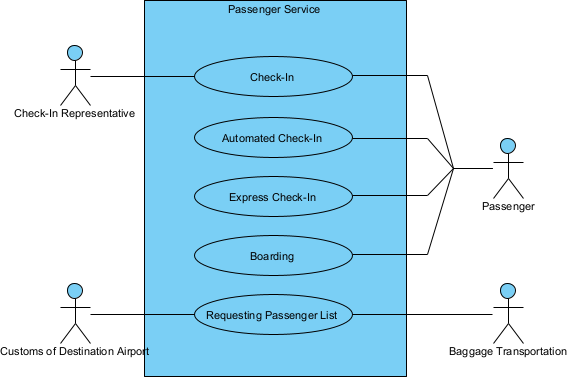
This outside-in approach is powerful because:
- It forces the team to think in terms of value delivered to users, not technical convenience.
- It provides a natural boundary for the system—what is inside vs. outside.
- It serves as a contract between stakeholders and developers: “If the system supports these use cases, it meets the functional needs.”
- It acts as the primary driver for prioritization, test case generation, user documentation, and traceability to design and code.
In UML, the Use Case View is primarily expressed through:
- Use Case Diagrams — showing actors, use cases, system boundary, and relationships (include, extend, generalization).
- Use Case Descriptions / Specifications — detailed narratives (flow of events, main success scenario, alternatives, exceptions, preconditions, postconditions).
The key principle: A use case is a complete, meaningful goal that an actor achieves with the help of the system, described at a level of abstraction where the actor can understand and validate it.
Practical Examples of Use Case View in Real Projects
Here are numerous concrete examples across different domains, showing how the use case view captures functional requirements from the user’s perspective:
- Online Food Delivery App
- Actor: Hungry Customer
- Use Case:
- Place Food Order
- Goal: Customer selects restaurant, chooses items, customizes, applies promo, pays, and receives order confirmation with estimated delivery time.
- From outside view: No mention of database, payment gateway integration code, or queue management—just observable steps and outcomes.
- Benefit: Stakeholders immediately see if “group ordering” or “scheduled delivery” is missing → added early.
- Place Food Order
- Fitness Tracking Mobile App
- Actor: Fitness Enthusiast
- Use Case: Record Workout Session
- Goal: User starts workout, app tracks duration/heart rate/steps via sensors, user pauses/resumes, ends session, sees summary stats and calories burned.
- Outside perspective: Focus on user actions (start, pause, view summary) and system responses (real-time display, save data), not sensor polling logic or cloud sync details.
- Hospital Patient Portal
- Actor: Registered Patient
- Use Case: View Upcoming Appointments
- Goal: Patient logs in, sees list of scheduled visits with doctor name, time, location, and preparation instructions; can download referral letter.
- Use Case View captures: Authentication is implied (precondition), but the focus is the patient’s ability to access and act on appointment info—not backend EHR integration.
- Corporate Expense Reporting System
- Actor: Employee
- Use Case: Submit Expense Report
- Goal: Employee adds receipts (photo upload or manual entry), categorizes expenses, attaches justification, submits for manager approval, receives status updates.
- Actor view: “I want to get reimbursed quickly” — the use case ensures all necessary info is collected without forcing internal workflow details into requirements.
- Smart Home Security System
- Actor: Homeowner
- Use Case: Arm Home Security
- Goal: Homeowner selects “Away” or “Stay” mode via app or keypad, system confirms armed status, activates sensors, notifies if door/window left open.
- External behavior only: No mention of MQTT protocol, sensor polling frequency, or cloud event bus.
- Library Self-Service Kiosk
- Actor: Library Patron
- Use Case: Borrow Book
- Goal: Patron scans library card, scans book barcode(s), system confirms borrowing, prints receipt with due date, updates account.
- Use Case View: patron sees success/failure messages and receipt — internal RFID reader calibration or database transaction rollback stays hidden.
- E-Learning Platform
- Actor: Student
- Use Case: Complete Online Quiz
- Goal: Student starts timed quiz, answers multiple-choice/short-answer questions, submits, receives immediate score and feedback, can review correct answers later.
- Outside-in: Focuses on student experience (timer, question navigation, score display) — not on question bank randomization algorithm.
- Ride-Hailing Driver App
- Actor: Driver
- Use Case: Accept and Complete Ride Request
- Goal: Driver receives ride notification, views passenger location/route, accepts, navigates to pickup, starts ride, ends ride at destination, receives payment summary.
- Use Case captures driver’s observable interactions — not GPS accuracy tuning or surge pricing logic.
- ATM Network
- Actor: Cardholder
- Use Case: Withdraw Cash
- Goal: Cardholder inserts card, enters PIN, selects account, enters amount, receives cash and receipt, card ejected.
- Classic example: Use case view ensures requirements cover “insufficient funds → polite message and no cash dispensed” without diving into inter-bank protocols.
- Inventory Management for Retail Chain
- Actor: Store Clerk
- Use Case: Receive New Stock Shipment
- Goal: Clerk scans pallet barcode, system displays expected items, clerk scans each item to confirm receipt, resolves discrepancies, stock levels update, generates put-away list.
- External focus: Clerk achieves accurate stock intake — internal ERP sync or audit trail generation is implementation detail.
- Event Ticketing System
- Actor: Event Attendee
- Use Case: Purchase Tickets
- Goal: Attendee selects event/date, chooses seats, enters payment details, receives e-ticket QR code via email and in-app wallet.
- Use Case View highlights user pain points (e.g., seat map clarity, fast checkout) that drive UX improvements.
In all cases, the use case view deliberately avoids:
- How the system stores data
- Which services call which microservices
- Performance constraints (unless they affect observable behavior)
- User interface layout details (those come later in design)
This purity makes use cases excellent for:
- Early validation with non-technical stakeholders
- Creating acceptance criteria
- Slicing work into vertical increments
- Tracing from business goals → tests → code
In Visual Paradigm, you’ll draw the use case diagram, link actors to use cases, apply «include»/«extend» relationships for reuse, and write structured flow-of-events specifications—all while the semantic backplane keeps everything consistent for later modules.
This outside-in perspective sets the stage for organizing use cases (relationships) and documenting detailed scenarios in the next sections of Module 2.