

Once actors and basic use cases are identified, use case relationships help structure the model by showing how use cases interact, reuse common behaviors, and handle variations. This keeps diagrams clean, promotes modularity, and aligns with Agile principles like “Don’t Repeat Yourself” (DRY) and incremental development. Relationships prevent bloated use cases by factoring out shared or optional logic.
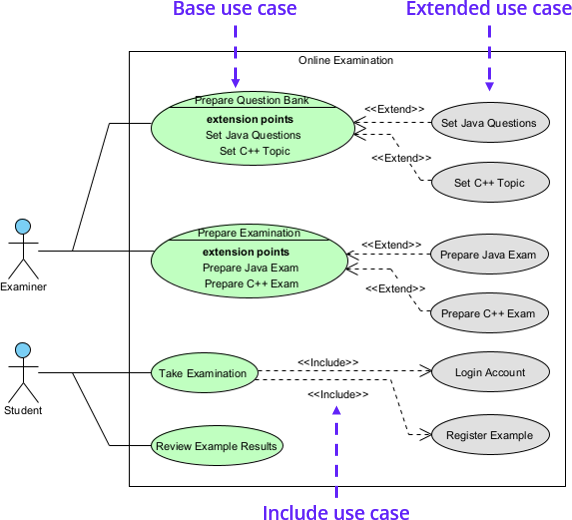
UML defines three main relationships between use cases:
- Include («include»): Mandatory reuse— one use case incorporates another’s behavior as a required step (e.g., “Login” included in “Place Order”). Use when a sub-flow is always needed and could be shared.
- Extend («extend»): Optional extension— adds behavior to a base use case under specific conditions (e.g., “Apply Discount” extends “Checkout”). Ideal for alternatives or add-ons without cluttering the main flow.
- Generalization: Inheritance— a specialized use case inherits and refines a general one’s behavior (e.g., “Pay by Credit Card” generalizes from “Make Payment”). Use for variations sharing a common structure.
Additionally, actors connect to use cases via associations, indicating who initiates or participates.
In Agile, relationships enable slicing: Model the base use case first for quick delivery, then add extensions in later iterations based on priority.
Practical Examples of Use Case Relationships in Real-World Projects
Here are detailed examples showing relationships in action across domains:
- Online Shopping System:
- Base: “Checkout”.
- Include: “Make Payment” (always required).
- Extend: “Gift Wrap” (optional at extension point “Add Extras”).
- Generalization: “Pay by Card” and “Pay by PayPal” from “Make Payment”.
- Benefit: Reusing “Make Payment” avoids duplication; extensions handle promos without complicating the happy path.
- Banking App:
- Base: “Transfer Funds”.
- Include: “Authenticate User” (mandatory security).
- Extend: “Schedule Recurring Transfer” (optional).
- Association: Account Holder to all.
- Practical: Generalization for “Internal Transfer” vs. “External Transfer” allows shared validation logic, speeding development.
- Healthcare Portal:
- Base: “Book Appointment”.
- Include: “Select Doctor” (required).
- Extend: “Upload Medical History” (if needed).
- Generalization: “Virtual Appointment” from base.
- Outcome: Relationships make it easy to add telehealth features iteratively without rewriting.
- Ride-Sharing Service:
- Base: “Request Ride”.
- Extend: “Share Ride” (pooling option).
- Include: “Locate Driver”.
- Association: Rider initiates.
- Agile: Start with base for MVP, extend for features like “Premium Ride” based on user feedback.
- Smart Home System:
- Base: “Control Lights”.
- Extend: “Set Timer” (optional).
- Generalization: “Voice Control” from base.
- Include: “Connect to Hub”.
- Benefit: Modular design supports adding IoT integrations without disrupting core use cases.
- Library System:
- Base: “Borrow Item”.
- Include: “Check Availability” (always).
- Extend: “Reserve if Unavailable”.
- Association: Patron.
- Practical: Generalization for “Borrow Book” vs. “Borrow DVD” shares renewal logic.
- Fitness App:
- Base: “Log Workout”.
- Extend: “Share on Social” (optional).
- Include: “Track Metrics”.
- Outcome: Relationships enable thin slices—core logging first, social features later.
- Event Ticketing:
- Base: “Purchase Ticket”.
- Include: “Select Seat”.
- Extend: “Add Parking Pass”.
- Generalization: “Group Purchase” from base.
- Benefit: Handles scalability for large events without monolithic use cases.
- ATM System:
- Base: “Withdraw Cash”.
- Include: “Enter PIN”.
- Extend: “Request Receipt” (optional).
- Classic: Ensures security is reused across transactions like “Deposit Check”.
- Inventory System:
- Base: “Update Stock”.
- Include: “Scan Barcode”.
- Extend: “Report Discrepancy”.
- Association: Clerk.
- Practical: Modular for integrating with suppliers later via extensions.
Avoid overusing relationships—keep them to essentials to maintain readability. In Visual Paradigm, draw arrows for «include»/«extend», use generalization notation, and ensure the semantic backplane links everything for consistency.
Now, move on to Practical 2: Hands-on Use Case Modeling, where you’ll apply these concepts.