

Organizing large models into hierarchical units for configuration management and access control.
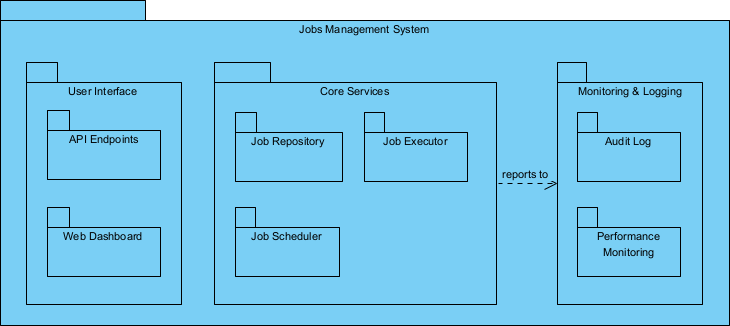
Package diagrams in UML provide a mechanism to organize and modularize large, complex models by grouping related elements (classes, use cases, components, state machines, etc.) into logical packages—similar to folders or namespaces in code. They show dependencies between these packages, helping teams manage scale, enforce architectural layering, control visibility/access, and support configuration/version management.
Key purposes in practice:
- Reduce complexity — Break a monolithic model into manageable, focused chunks.
- Support configuration management — Packages often map to version control units, releases, modules, or microservices.
- Enforce architectural rules — Show and control dependencies (e.g., UI packages depend on business logic, but not vice versa).
- Enable access control — In team environments, packages can restrict who can view/edit certain parts (e.g., domain experts own domain packages).
- Facilitate reuse & parallel work — Teams can work on independent packages concurrently without stepping on each other.
- Support incremental delivery — Organize by release, sprint, feature set, or bounded context.
Notation basics:
- Packages are rectangles with a small tab (folder-like) containing the package name.
- Dependency arrows (dashed with open arrowhead) show that one package relies on elements from another.
- Import / Access relationships control visibility.
- Nesting shows hierarchy (subpackages inside parent packages).
In Agile & use-case-driven projects, package diagrams evolve iteratively: start coarse-grained in early sprints (high-level layering), refine as the system grows, and use them to guide refactoring and microservices extraction.
Practical Examples of Package Diagrams in Real Projects
Here are numerous concrete, domain-specific examples showing how package diagrams organize models, manage configuration, and enforce structure:
- E-commerce Platform (Monolith to Microservices Transition) Top-level packages:
- «boundary» Frontend
- «control» OrderService
- «control» CatalogService
- «control» PaymentService
- «entity» DomainModel
- «infrastructure» Persistence
- «external» PaymentGatewayAdapters Dependencies: Frontend → OrderService → DomainModel; PaymentService → DomainModel; no reverse dependencies (prevents cyclic coupling). Practical benefit: Guides extraction of PaymentService into separate repo/microservice; each package versioned independently in Git.
- Mobile Banking App (Layered Architecture) Packages:
- Presentation (UI screens, view models)
- Application (use case coordinators, services)
- Domain (entities: Account, Transaction, Customer)
- Infrastructure (repositories, API clients, local storage)
- ExternalIntegrations (BankCoreAPI, FraudDetection, Notifications) Dependencies: Presentation → Application → Domain ← Infrastructure; Infrastructure depends on ExternalIntegrations. Outcome: Enforces clean architecture; domain package remains technology-agnostic and testable.
- Healthcare Patient Management System Packages by bounded context:
- PatientRegistration
- AppointmentScheduling
- ElectronicHealthRecords
- BillingAndInsurance
- ClinicalWorkflows
- ReportingAndAnalytics Cross-context dependencies: AppointmentScheduling → PatientRegistration (reads patient data); BillingAndInsurance → ElectronicHealthRecords. Practical: Each bounded context owned by a feature team; package diagram used in architecture reviews to prevent tight coupling between clinical and financial concerns.
- Task Management SaaS (Multi-Tenant Application) Packages:
- CoreDomain (Board, List, Card, User)
- Collaboration (Comments, Assignments, Real-time Sync)
- Notifications
- Integrations (Slack, Google Calendar, Microsoft Teams)
- SecurityAndAccess (Roles, Permissions, Audit)
- MultiTenancy (Workspace, TenantConfig) Dependencies: Collaboration → CoreDomain; Integrations depend only on CoreDomain APIs. Benefit: Supports parallel development—security team owns one package, integrations team another.
- Supply Chain Management System Packages organized by functional area:
- Procurement
- InventoryManagement
- WarehouseOperations
- TransportationAndLogistics
- SupplierPortal
- DemandForecasting Dependencies: WarehouseOperations → InventoryManagement → Procurement; no dependency from forecasting back to operations (read-only access via interfaces). Practical: Maps to ERP modules; used for release planning (e.g., “Inventory v2.0” package released independently).
- Legacy Monolith Refactoring Project Before refactoring: One giant “LegacyMonolith” package. After:
- LegacyCore (being phased out)
- NewBilling (extracted microservice)
- NewCustomerManagement
- SharedDomain
- Adapters (legacy-to-new bridges) Dependency arrows show controlled strangler pattern: new packages depend on SharedDomain, legacy depends on adapters. Outcome: Guides incremental migration; configuration management ties packages to branches/repos.
- IoT Smart Home Platform Packages:
- DeviceManagement (DeviceRegistry, Provisioning)
- SensorDataProcessing
- AutomationRulesEngine
- UserExperience (MobileApp, WebDashboard)
- CloudInfrastructure (EventBus, Storage)
- Security (Authentication, Authorization) Dependencies: AutomationRulesEngine → SensorDataProcessing → DeviceManagement; UserExperience depends only on APIs. Practical: Supports firmware updates per device type package without touching rules engine.
- Agile Team Using Visual Paradigm for Large Model Package structure by iteration/release:
- Release-1-MVP
- CoreUseCases
- DomainModel
- Release-2-Enhancements
- AdvancedReporting
- Integrations
- Cross-Cutting
- Security
- LoggingAndMonitoring
- External
- ThirdPartyAPIs Practical: Use package versioning in Visual Paradigm; team checks out only relevant packages for sprints; dependency dashboard flags violations early.
- Release-1-MVP
- Common Anti-Patterns & Fixes
- Anti-pattern: “God Package” containing everything → split into domain, application, infrastructure.
- Anti-pattern: Cyclic dependencies → introduce mediator package or interfaces.
- Anti-pattern: No dependencies shown → makes layering invisible and hard to enforce.
In Visual Paradigm:
- Create packages via Model Explorer or drag from toolbox.
- Use dependency arrows to visualize and analyze coupling.
- Apply stereotypes like «layer», «subsystem», «framework» for clarity.
- Leverage semantic backplane: move a class between packages → dependencies auto-update.
Package diagrams are the organizational nervous system of large models—keeping chaos at bay, enabling parallel work, supporting configuration/version control, and enforcing architectural integrity as the system grows incrementally.
This sets the foundation for visualizing physical implementation with Component Diagrams next.