

Creating custom extensions (stereotypes, tagged values, constraints) to tailor UML for specific domains or Agile methodologies
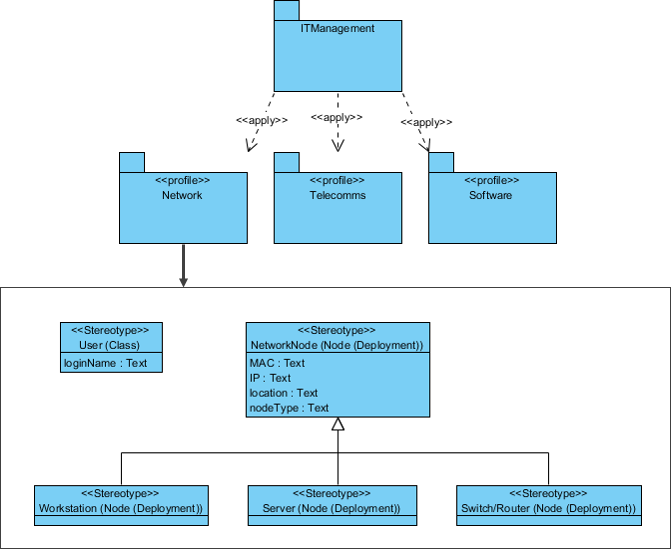
Profile diagrams in UML 2.5 are a lightweight metamodeling mechanism that lets you extend and customize standard UML to better fit a particular domain, methodology, platform, or project style—without changing the core UML language. A profile is essentially a set of custom extensions applied on top of UML, making diagrams more expressive, precise, and meaningful for your context.
Key extension mechanisms in a profile:
- Stereotype — A new “flavor” applied to existing UML elements (classes, use cases, components, etc.) via «guillemets». It adds domain-specific semantics.
- Tagged Value — Additional properties (key-value pairs) attached to stereotyped elements (e.g., {priority=high}, {storyPoints=5}).
- Constraint — Rules or OCL expressions that must be satisfied by stereotyped elements (e.g., “a Sprint must contain at least one User Story”).
- Metaclass extension — Stereotypes extend specific metaclasses (e.g., Class, UseCase, Component).
- Icon — Optional custom graphical icon for the stereotype (in tools like Visual Paradigm).
Profiles are defined in a profile diagram (a special structural diagram showing stereotypes, their extensions, tagged definitions, and constraints). Once created, the profile can be applied to a model or package, making the custom stereotypes available.
In Agile & use-case-driven projects, profiles are especially valuable for:
- Embedding Agile concepts (user stories, epics, sprints, acceptance criteria) directly into UML
- Domain-specific tailoring (healthcare, finance, IoT, embedded systems)
- Enforcing conventions and guidelines visually
- Improving traceability and communication in large teams
- Supporting code generation with domain-specific annotations
Practical Examples of Profile Diagrams and Their Usage
Here are numerous real-world-inspired examples showing how profiles customize UML effectively:
- Agile Software Development Profile (most common in this course context) Stereotypes:
- «UserStory» extends UseCase {tagged values: asA:String, iWant:String, soThat:String, storyPoints:Integer, priority:Enum{High,Medium,Low}}
- «Epic» extends Package or UseCase {tagged value: theme:String}
- «Sprint» extends Package {tagged values: sprintNumber:Integer, startDate:Date, endDate:Date, velocity:Float}
- «AcceptanceCriteria» extends Note or Constraint {tagged value: givenWhenThen:String}
- «BacklogItem» extends Class or UseCase Constraints: “A «Sprint» package must contain at least one «UserStory».” Practical: In Visual Paradigm, apply this profile → drag «UserStory» onto a use case → fill story card fields → generate user story reports or link to task management tools.
- Healthcare / Clinical Domain Profile (HL7 FHIR-inspired) Stereotypes:
- «FHIR_Resource» extends Class {tagged values: resourceType:Enum{Patient,Observation,Encounter,…}, fhirVersion:String}
- «PHI» extends Class or Attribute {tagged value: sensitivity:Enum{Confidential,Restricted,High}}
- «ClinicalWorkflow» extends Activity {constraint: “Must comply with HIPAA access rules”} Practical: Team uses «PHI» stereotype on Patient.name and MedicalRecord fields → tool highlights sensitive elements in red → enforces data protection reviews.
- IoT / Embedded Systems Profile Stereotypes:
- «IoTDevice» extends Node or Component {tagged values: powerSource:Enum{Battery,Mains}, connectivity:Enum{WiFi,LoRa,Bluetooth,Zigbee}, firmwareVersion:String}
- «Sensor» extends Class {tagged values: measurementUnit:String, samplingRate:Float}
- «Actuator» extends Class
- «EdgeGateway» extends Node Constraints: “A «Sensor» must be contained within a «IoTDevice».” Practical: Deployment diagrams show «IoTDevice» nodes with tagged battery levels → helps architects evaluate power consumption early.
- Financial Services / Regulatory Compliance Profile Stereotypes:
- «RegulatedProcess» extends Activity or UseCase {tagged values: regulation:Enum{SOX,PCI-DSS,GDPR,CCPA}, auditLevel:Enum{Full,Sample}}
- «FinancialTransaction» extends Class {tagged value: transactionType:Enum{Payment,Transfer,Refund}}
- «KYC» extends UseCase Practical: «RegulatedProcess» on “Process Loan Application” use case → tagged values drive automated compliance checklist generation.
- Microservices Architecture Profile Stereotypes:
- «Microservice» extends Component {tagged values: boundedContext:String, databaseType:Enum{SQL,NoSQL}, apiStyle:Enum{REST,gRPC,GraphQL}}
- «EventDriven» extends Component or Dependency
- «CircuitBreaker» extends Component Practical: Component diagrams use «Microservice» with tagged boundedContext → dependency analysis tools flag cross-context calls that violate domain-driven design.
- Game Development Profile Stereotypes:
- «GameEntity» extends Class {tagged values: healthPoints:Integer, damage:Float}
- «PlayerCharacter» extends «GameEntity»
- «Level» extends Package {tagged value: difficulty:Enum{Easy,Medium,Hard}} Practical: Class diagrams show game domain vocabulary clearly; tagged values feed into balancing spreadsheets or automated tests.
- Automotive / Safety-Critical Systems Profile (ISO 26262 inspired) Stereotypes:
- «ASIL» extends Class or Component {tagged value: level:Enum{A,B,C,D}}
- «SafetyRequirement» extends Constraint Practical: High ASIL-D components highlighted in red → enforces stricter verification processes on critical modules (e.g., braking system).
- Visual Paradigm Workflow Example
- Create a new Profile Diagram named “AgileModelingProfile”.
- Define «UserStory» stereotype extending metaclass UseCase.
- Add tagged value definitions (asA, iWant, soThat, storyPoints).
- Add icon (small story-card symbol) and color hint (e.g., yellow).
- Apply the profile to the project or specific packages.
- Now «UserStory» appears in toolbox → drag onto diagram → properties pane shows Agile fields → generate formatted user story cards or export to Jira/Confluence.
Profiles keep UML flexible and relevant without inventing a new language. They make diagrams speak the team’s dialect—whether Agile ceremonies, regulatory concerns, or domain jargon—while preserving standard UML semantics for tool support, interoperability, and training.
This concludes the 7 structural diagrams. With a strong static skeleton in place, you’re ready to explore the dynamic heartbeat of the system in module 4.