

Modeling workflows and computational steps using control flows, data flows, and swimlanes for responsibility
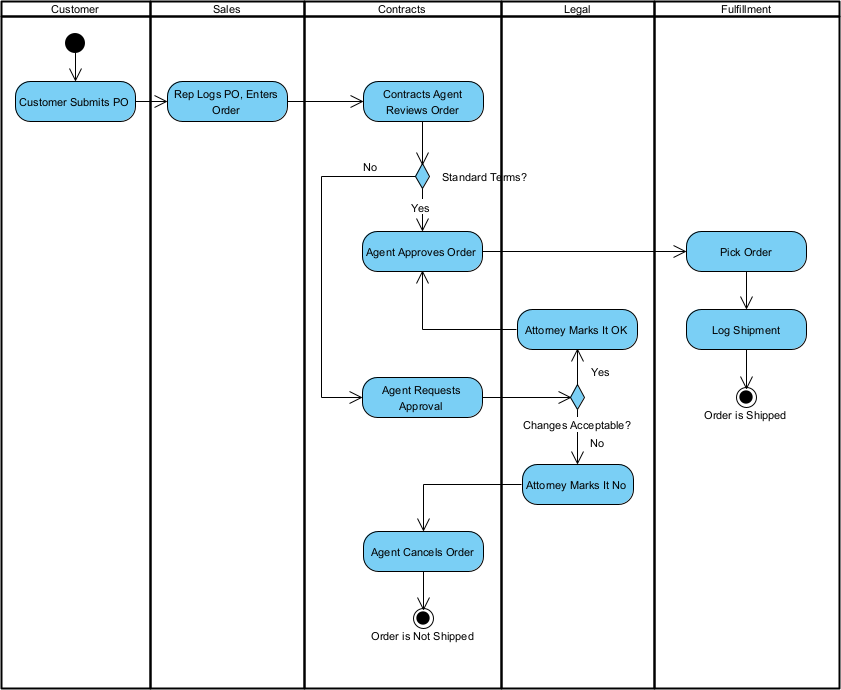
Activity diagrams in UML 2.5 are the go-to diagram for modeling dynamic workflows, business processes, use case flows, algorithms, and system computations at various levels of abstraction. They resemble enhanced flowcharts but add powerful features for concurrency, object flows, responsibility partitioning, and exception handling—making them ideal for capturing how things get done in a system.
Key elements of activity diagrams:
- Action — A rounded rectangle representing a step or computation (e.g., “Validate Payment”).
- Control Flow — Solid arrow showing sequence of execution.
- Decision Node (diamond) — Branching based on conditions (guards on outgoing flows).
- Merge Node — Rejoins alternative paths.
- Fork Node (thick bar) — Splits into concurrent/parallel flows.
- Join Node (thick bar) — Synchronizes concurrent flows (waits for all incoming).
- Object Node / Data Pin — Rectangular boxes or pins on actions showing input/output data/objects passed between steps.
- Activity Partition / Swimlane — Vertical or horizontal lanes grouping actions by responsibility (actor, role, department, component, thread).
- Exception Handler — Dashed line with lightning bolt for error handling.
- Interruptible Region — Dashed rounded rectangle for cancellable activities.
- Call Behavior Action — Invokes another activity or operation (reusable sub-flows).
In Agile & use-case-driven development, activity diagrams are used:
- To elaborate the main success scenario and alternative/exception flows of use cases
- To model end-to-end business processes during discovery and refinement
- To visualize concurrency, parallelism, and synchronization risks early
- To serve as a basis for acceptance tests, process documentation, and simulation
- To communicate workflows clearly to non-technical stakeholders (especially with swimlanes)
- To evolve incrementally: high-level overview first, detailed steps later
Practical Examples of Activity Diagrams in Real Projects
Here are numerous concrete examples across domains, showing different uses of activity diagrams:
- E-commerce Checkout Workflow Swimlanes: Customer, Shopping Cart, Payment Service, Order Service, Shipping Provider Flow:
- Customer → “Add Items to Cart” → “Proceed to Checkout”
- Fork: Parallel “Calculate Taxes” and “Apply Discounts”
- Join → “Enter Shipping Address”
- Decision: “Payment Method = Credit Card?” → Yes: “Enter Card Details” → “Authorize Payment”
- Exception handler: “Payment Failed” → back to “Select Payment Method”
- Final: “Create Order” → “Send Confirmation Email” Practical benefit: Reveals parallel tax/discount calculation opportunity; highlights payment retry logic missing in initial requirements.
- Mobile Banking – Transfer Funds Between Accounts Swimlanes: User, Mobile App, Authentication Service, Core Banking Service, Notification Service Flow:
- User → “Select Transfer” → App → “Enter Amount & Destination”
- App → “Validate Sufficient Balance” (decision node)
- Fork: Concurrent “Debit Source Account” and “Credit Destination Account”
- Join → “Log Transaction”
- “Send SMS/Email Confirmation” (asynchronous via Notification Service) Exception: “Insufficient Funds” → interrupt region cancels transfer. Outcome: Exposes need for atomicity (both debit & credit must succeed); guides transaction rollback design.
- Healthcare – Patient Appointment Scheduling Process Swimlanes: Patient, Patient Portal, Receptionist, Doctor Calendar System, Notification Service Flow:
- Patient → “Search Available Slots” → Portal calls “Query Calendar”
- Decision: “Slot Available?” → No: “Show Alternatives”
- Yes: “Select Slot” → “Confirm Booking”
- Fork: “Update Calendar” and “Send Reminder SMS” (parallel)
- Join → End Exception handler: “Slot Taken by Another Patient” → retry or cancel. Practical: Clearly shows responsibility split; used in stakeholder workshops to confirm workflow compliance.
- Ride-Sharing – Driver Accepting & Completing a Ride Swimlanes: Rider App, Driver App, Matching Service, GPS Service, Payment Service Flow:
- Matching Service → “Notify Nearby Drivers”
- Driver → “View Ride Request” → Decision: “Accept?”
- Yes: “Start Navigation to Pickup”
- Fork: “Update Rider ETA” (real-time) and “Monitor Driver Location”
- Join (rider in car) → “Start Ride” → “End Ride at Destination”
- “Process Payment” → “Rate Experience” Practical: Visualizes real-time concurrent updates; identifies latency risks in ETA calculations.
- Library Book Borrowing Process Swimlanes: Patron, Self-Service Kiosk, Library System, Notification Service Flow:
- Patron → “Scan Card” → “Scan Book(s)”
- “Check Borrowing Limits & Overdues” (decision)
- Fork: “Update Loan Record” and “Print Receipt”
- Join → “Send Due Date Reminder” (scheduled later) Exception: “Book Not Available” → suggest reservation. Benefit: Simple yet effective for training kiosk UI flows.
- Supply Chain – Order Fulfillment & Shipping Swimlanes: Warehouse Worker, WMS (Warehouse Management System), Carrier API, Customer Flow:
- “Receive Order” → “Pick Items” (loop for multiple items)
- “Pack Order” → Decision: “Requires Special Handling?”
- Fork: “Generate Shipping Label” and “Update Inventory”
- Join → “Hand Over to Carrier” → “Track Shipment” (ongoing activity) Practical: Shows loop and parallelism; used to integrate with barcode scanners and carrier APIs.
- Software Build & Deployment Pipeline (CI/CD Workflow) Swimlanes: Developer, CI Server, Build Agent, Test Environment, Production Flow:
- Developer → “Commit Code” → CI Server → “Trigger Build”
- Fork: “Unit Tests” and “Static Code Analysis” (parallel)
- Join → Decision: “All Green?” → Yes: “Deploy to Staging”
- “Integration Tests” → “Deploy to Production” (manual approval gate) Exception: “Build Fails” → “Notify Developer”. Outcome: Guides pipeline automation; highlights approval bottlenecks.
- Real-Time Trading Order Execution Swimlanes: Trader, Trading Platform, Matching Engine, Market Data Feed Flow:
- Trader → “Submit Order” → “Validate Order”
- Fork: “Check Risk Limits” and “Fetch Latest Price”
- Join → Decision: “Within Limits?” → “Route to Matching Engine”
- “Match & Execute” → “Confirm Execution” → “Update Position” Practical: Captures concurrency and strict sequencing critical for low-latency trading.
In Visual Paradigm:
- Use swimlanes to partition by actor/role/system.
- Add object flows/pins for data passing (e.g., Order object from “Create Order” to “Process Payment”).
- Simulate/animate diagrams to walk through scenarios.
- Link activity actions to operations in class diagrams or messages in sequence diagrams via semantic backplane.
- Generate process documentation or BPMN-like exports for non-UML stakeholders.
Activity diagrams excel at making complex workflows understandable, responsibilities explicit, and concurrency visible—serving as a bridge between high-level use cases and detailed interaction/state modeling that follows.
This sets the stage for State Machine Diagrams next, where we focus on the lifecycle behavior of individual objects and subsystems.