


Creating C4 Deployment diagrams can feel overwhelming. You need to map containers to real infrastructure—servers, cloud instances, load balancers—across environments like production or staging. Doing it manually takes forever, and basic tools often leave you with static images that don’t connect back to your broader architecture. That’s where an AI diagram generator changes everything.
Visual Paradigm stands out as the leading AI-powered diagram software for this. Since 2002, we’ve built robust support for UML, SysML, and now full C4 model coverage—including deployment views. Our ecosystem combines instant AI generation with professional editing, traceability, and team features. No other tool gives you this seamless flow from quick sketches to enterprise-ready models.
In this guide, you’ll see how our four platforms handle C4 Deployment diagrams. Together, they form an end-to-end solution that saves time, cuts errors, and scales for any project.
VP Desktop: Full-Power AI C4 Deployment Diagram Creation and Editing
VP Desktop is our flagship tool. It’s where serious modeling happens—offline, precise, and packed with features.
The AI Diagram Generator in VP Desktop lets you create a C4 Deployment diagram in seconds. Just describe your system: “A microservices app with frontend on Kubernetes, backend services on AWS EC2, database on RDS, and load balancer in production.” The AI builds the diagram, placing containers on deployment nodes like virtual machines or cloud environments. Nested nodes handle complexity—think firewalls, DNS, or clustered servers.
From there, switch to advanced editing. Add traceability links to containers or components. Generate code stubs if needed. Export reports or integrate with version control for teams. Unlike one-shot generators, VP Desktop keeps everything interconnected. Update one view, and related diagrams stay consistent.
Use cases shine here. Enterprise architects map production deployments with real traceability. DevOps teams visualize staging vs. live environments. Developers export to implementation docs. It’s not just drawing—it’s building maintainable architecture models.
How to Generate a C4 Deployment Diagram with AI in VP Desktop
- From the main menu, select Tools > AI Diagram Generation. This opens the AI Diagram Generation window.
- In the window, choose your desired diagram type from the dropdown list. In this case, C4 Model.
- Select Deployment for Diagram.
- In the text area, describe your project, problem, system, or scenario.
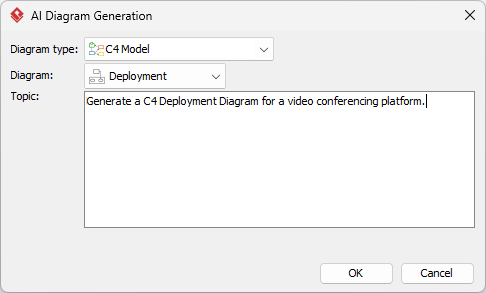
- Click OK to start the generation.
- The AI will create the diagram automatically.
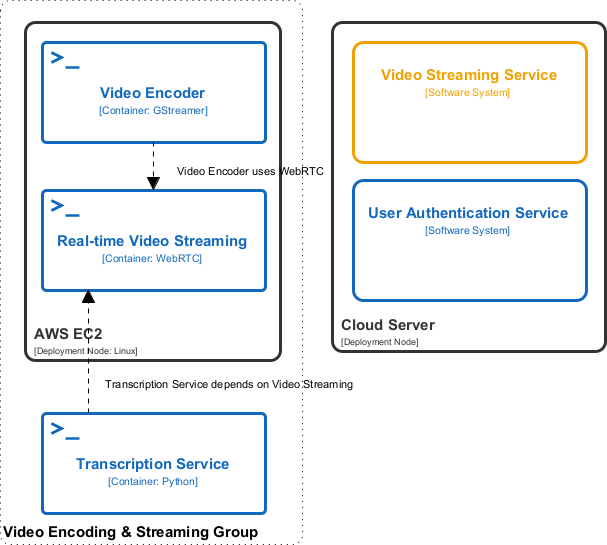
It appears as a fully editable, native Visual Paradigm diagram (not just an image). You can now:
- Edit elements, relationships, layout, or properties
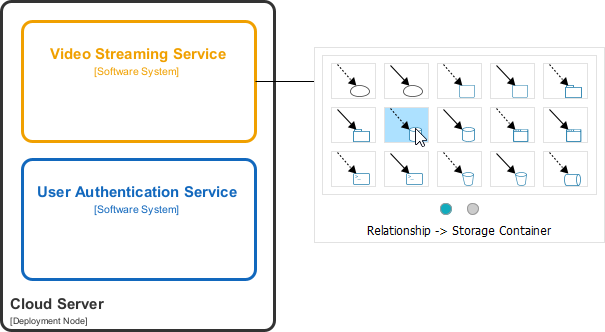
- Add more details manually
- Export as image (PNG, SVG, etc.), PDF, or use in reports
- Generate code or documentation if applicable
- Edit elements, relationships, layout, or properties
AI Visual Modeling Chatbot: Conversational C4 Deployment Diagram Generation
Need a fast prototype? Our AI Visual Modeling Chatbot turns chat into diagrams. It’s like having an expert co-pilot.
Start a conversation: “Generate a C4 Deployment diagram for an e-commerce platform. Frontend in containers on Kubernetes cluster, API services on multiple EC2 instances, PostgreSQL primary and replica, behind an ELB, in production environment.” The chatbot creates it instantly, explains elements, and lets you refine: “Add a staging environment node,” or “Show monitoring with Prometheus.”
Iteration is effortless. Ask for explanations (“Why this nested node?”), generate variants, or export to PlantUML or VP Desktop. It’s ideal for brainstorming or agile sprints—overcome blank-page syndrome in minutes.
Unlike rigid tools, the chatbot handles natural language variations. It bridges beginners to pros, producing professional outputs with traceability when you move to desktop editing.
How to Generate a C4 Deployment Diagram with AI Chatbot
-
Open the AI Chatbot:
- Web access: Go to https://chat.visual-paradigm.com/ (or https://ai-toolbox.visual-paradigm.com/app/chatbot/ as an alternative entry point).
- VP Desktop access: In Visual Paradigm Desktop, select Tools > Chatbot from the main menu. (This opens the same AI assistant integrated within your desktop environment.)
-
Start a new chat session: Click New Chat (on the left sidebar or as a prominent button) to begin a fresh conversation.
-
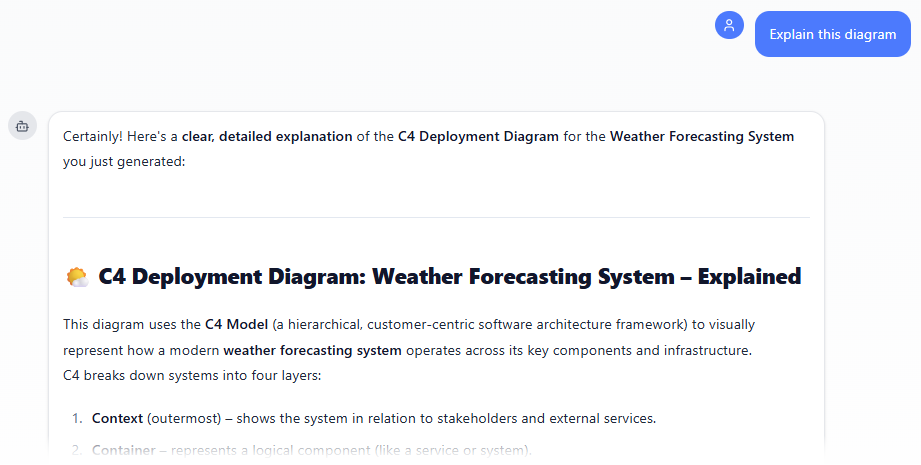
Describe what you want: In the text input area at the bottom, type a clear description of your project, system, or scenario (e.g. “Create a C4 Deployment Diagram for a weather forecasting system, identifying satellite data sources, processing clusters, databases, and user portals”). Press Enter (or click the send icon) to submit your message.
-
View and refine the diagram: The AI generates the diagram almost instantly.
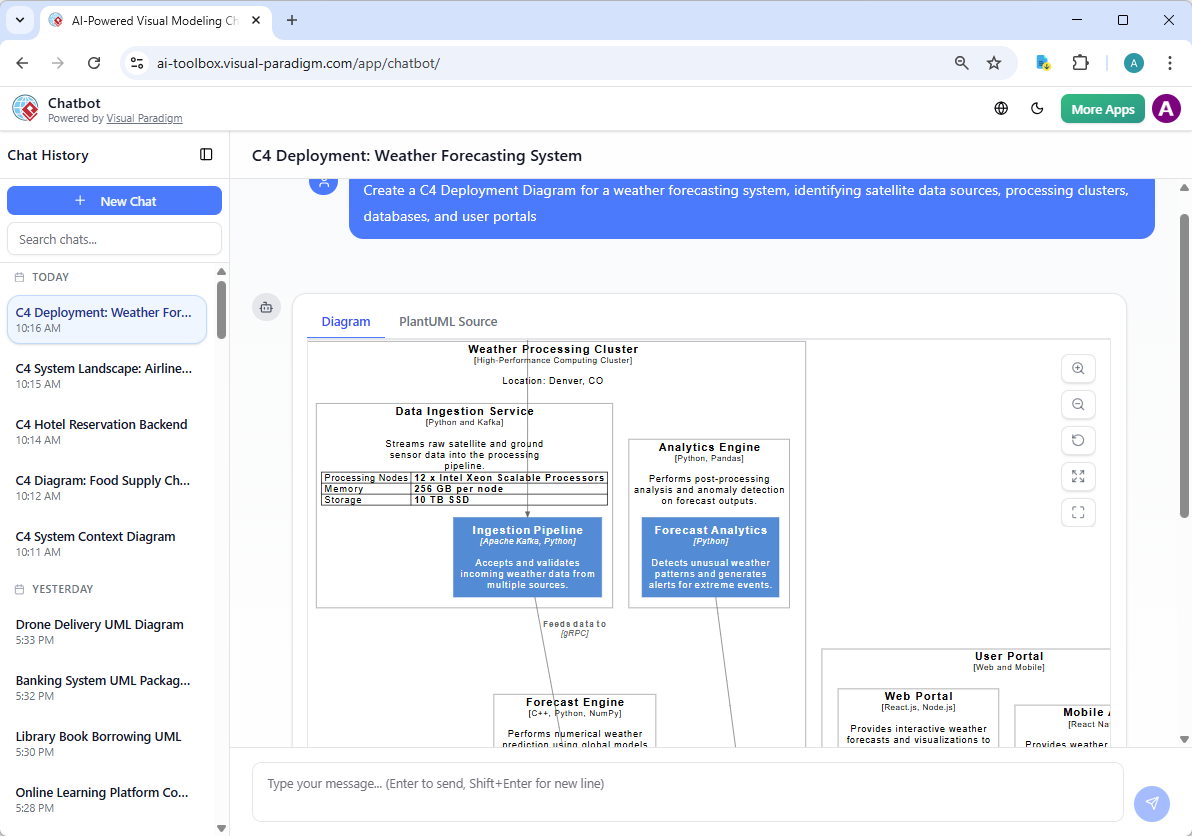
This is where the chatbot shines: keep the conversation going! Follow-up examples:
- “Add an element…”
- “Explain the diagram…. “
- “Generate a brief report summarizing ….”
Web Apps: AI-Powered C4 PlantUML Studio for Guided Deployment Modeling
Our Web Apps deliver specialized, browser-based tools with structured guidance. The standout for C4 work is the AI-Powered C4 PlantUML Studio – an online AI diagram generator tailored for software architecture. It uses AI to generate complete, hierarchical C4 diagrams (Context, Container, Component) plus supporting views like Sequence and Deployment directly from a plain-language problem statement or project description, producing valid PlantUML code with live previews for instant refinement and iteration.
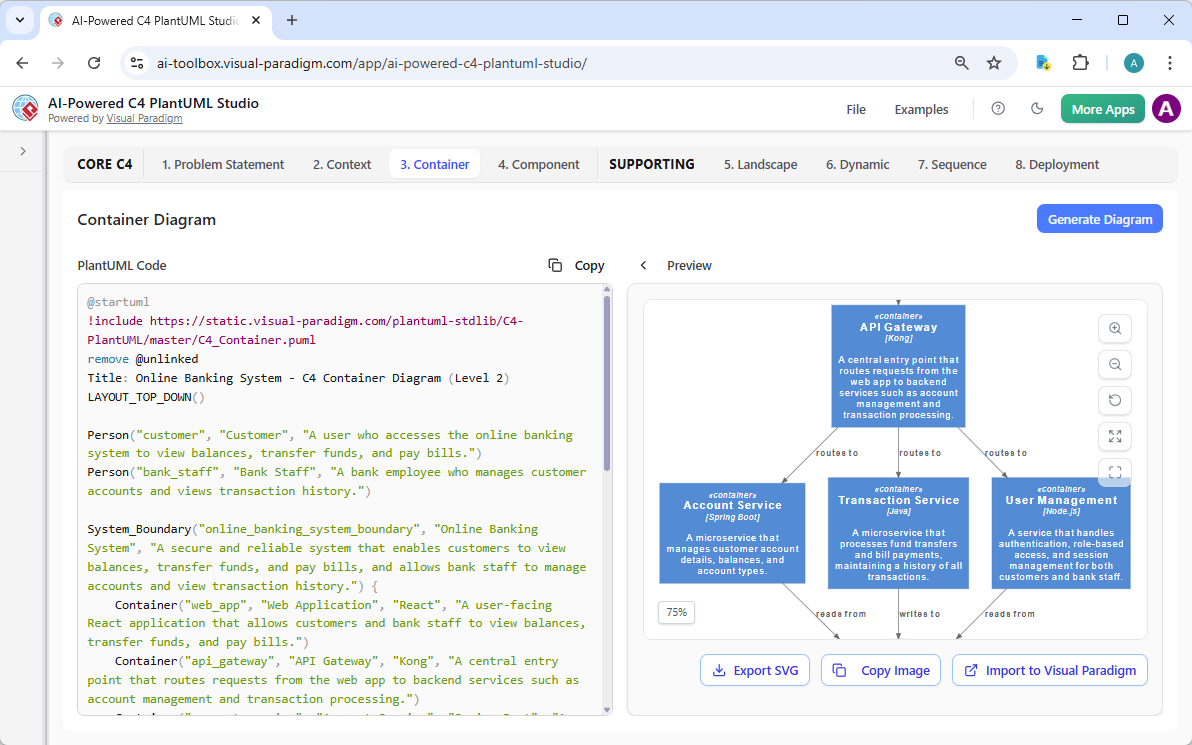
Learn more about AI-Powered C4 PlantUML Studio
Why Visual Paradigm Stands Out as the Best AI Diagram Tool for C4 Deployment Diagrams
Many tools offer AI generation. Few deliver a true ecosystem.
- Widest coverage: Full C4 support, including deployment, plus UML and more.
- Real traceability: Changes propagate across platforms—not isolated images.
- Multiple workflows: Chat for speed, desktop for depth, docs for sharing, web for guidance.
- Professional outputs: Traceable models ready for code gen, reports, collaboration.
Competitors often stop at generation. We go further—refine, embed, maintain. You save hours, reduce rework, and get diagrams that actually help teams build better software.
Other C4 Diagrams
Want to see Visual Paradigm’s AI in action for C4 modeling? Check out the pages below to learn more about how our AI-Powered tools let you generate professional C4 diagrams instantly from plain text descriptions:
- C4 System Context Diagram
- C4 Container Diagram
- C4 Component Diagram
- C4 Landscape Diagram
- C4 Dynamic Diagram
- C4 Deployment Diagram
Start creating full C4 model suites in minutes – no manual drawing required!
Ready to Try the Ultimate AI C4 Deployment Diagram Generator?
Visual Paradigm gives you everything needed for powerful, AI-assisted visual modeling. From instant creation to enterprise-scale management, our platforms cover every angle.
Stop struggling with manual tools or fragmented apps. Experience seamless AI diagram generation today.
Try Visual Paradigm now—download VP Desktop, chat with our AI assistant, or jump into C4 PlantUML Studio. See why we’re the top choice for AI-powered C4 Deployment diagram generators and beyond.
Related posts:
 AI C4 System Context Diagram Generator: Unlock Effortless Architecture Visualization with Visual Paradigm
 AI C4 Container Diagram Generator: How Visual Paradigm Makes Architecture Modeling Effortless
 AI C4 Component Diagram Generator: How Visual Paradigm Makes It Easy and Powerful
 AI C4 Dynamic Diagram Generator: How Visual Paradigm Makes It Easy and Powerful