


Drawing accurate OpenStack architecture diagrams by hand is a time-consuming challenge. You need to represent complex interdependencies between Nova compute clusters, Neutron networking, Cinder storage, and Keystone identity services. If you are looking to visualize OpenStack infrastructure with AI, you need a professional AI OpenStack diagram generator that understands private cloud topology and orchestration logic.
Visual Paradigm offers the premier AI cloud architecture diagram maker through its specialized AI Cloud Architecture Studio. This web-based platform is designed specifically for complex infrastructure visualization, allowing you to automate OpenStack topology and maintain high-quality documentation without manual drag-and-drop effort.
The Power of AI Cloud Architecture Studio for OpenStack
The AI Cloud Architecture Studio is a professional-grade AI-powered private cloud design tool. It enables architects and DevOps engineers to describe their OpenStack environments in plain English and receive a standards-aligned diagram in minutes.
How to Generate an OpenStack Diagram with AI
- Describe Your Infrastructure: Input a prompt like: “Design an OpenStack environment for a high-traffic web application with redundant Nova controllers and Ceph storage.”
- Select Your Strategy: Choose an architecture goal, such as High Availability, Edge Optimized, or Low Cost / MVP.
- Technical Deep Dive: Our OpenStack architecture tool asks clarifying questions to refine the stack, such as: “Should the control plane use separate networks for management and API traffic?”
- Generate the Diagram: The AI renders a professional diagram featuring official OpenStack component icons and logical connections.
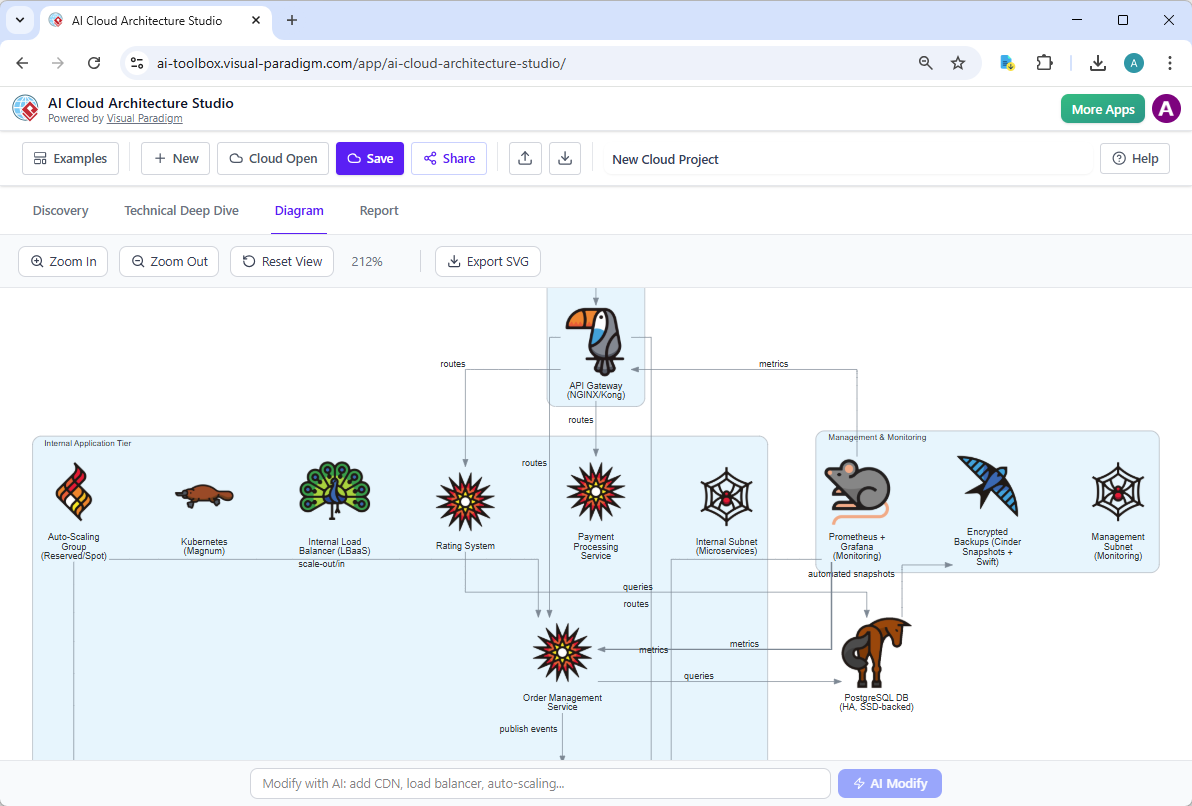
- Iterative AI Refinement: Use natural language to modify the design. Simply type “Add an Octavia load balancer in front of the Horizon dashboard,” and the diagram updates instantly.
Key Benefits for DevOps and Platform Engineers
- Natural Language Input: Describe your automated cloud orchestration diagrams instead of drawing them.
- Strategy-Driven Design: Ensure your OpenStack deployment follows enterprise-grade best practices for availability and security.
- Hybrid Cloud Ready: Model OpenStack side-by-side with public cloud providers like AWS or Azure for true hybrid-cloud visualization.
- High-Quality Exports: Download your diagrams as SVGs for inclusion in Confluence, technical wikis, or RFP proposals.
Part of a Comprehensive AI Modeling Ecosystem
While OpenStack designs are best handled in the Cloud Studio, they are integrated into the wider Visual Paradigm AI diagram platform. Since 2002, we have provided professional tools for UML, SysML, and BPMN, ensuring your infrastructure models connect to your application logic.
Multi-Platform Synergy:
- VP Desktop: Bring your OpenStack conceptual views into our flagship desktop tool for advanced enterprise architecture and traceability.
- OpenDocs: Embed your AI OpenStack diagrams into live documentation. When your private cloud configuration changes, update your team wikis instantly.
- AI Chatbot: Use our conversational assistant to brainstorm related flows, such as Sequence Diagrams for API interactions or Use Case diagrams for tenant management.
Why Choose Visual Paradigm for OpenStack Visualization?
| Architecture Need | Visual Paradigm AI | Standard Drawing Tools |
|---|---|---|
| Component Awareness | Recognizes Nova, Neutron, Swift, and Cinder logic | Generic icons with no service logic |
| Design Speed | Generates complete clusters from one prompt | Manual placement of every service node |
| Documentation Consistency | Embedded visuals stay live and editable | Static screenshots that go out of date |
Modernize Your OpenStack Modeling Today
Stop wrestling with manual diagrams for your private cloud. Visual Paradigm’s AI Cloud Architecture Studio is the ultimate AI OpenStack Architecture Diagram generator, built for the complexity of modern cloud engineering. Experience how an intelligent AI diagram tool can transform your infrastructure planning.
Try AI Cloud Architecture Studio Now
Related posts:
 Architecting Social Media Databases: How the Best AI ERD Generator Accelerates Modeling
 AI-Powered Class Diagrams with Visual Paradigm: The Ultimate Guide
 AI SysML Requirement Diagram Generator: Traceable Modeling with Visual Paradigm
 AI Profile Diagram Generator: Automate UML Extensions with Visual Paradigm