In global software development teams, clear documentation across regional offices is essential for maintaining engineering momentum. However, technical diagrams are frequently created in a single language, creating communication barriers for cross-border contributors, localized client deliverables, or global support teams. Leveraging an online browser-based PlantUML editor with built-in AI Diagram Translation allows engineering leads to localize technical models instantly. Using a modern text to diagram tool eliminates manual redrawing while keeping documentation accessible to everyone.
In this guide, we will explore how AI diagram translation works, why automating localization saves hundreds of documentation hours, and how an all-in-one diagram-as-code tool streamlines global team collaboration.
The Challenge of Manual Diagram Localization

Traditional diagramming workflows force technical writers and engineers to manually duplicate files, translate every node label, and adjust visual box sizes to fit different word lengths. This manual process introduces several friction points:
- Version Drift: Updating an architecture layout in the primary language often leaves localized versions outdated and inaccurate.
- Text Overflow Errors: Translated text in fixed-width drawing tools often overflows container boxes, requiring tedious visual adjustments.
- High Translation Overhead: Translating diagrams manually drains engineering cycles away from building feature capabilities.
Adopting an intelligent text to diagram tool inside an online PlantUML editor eliminates these roadblocks by automatically recalculating visual layouts based on translated text strings.
How AI Diagram Translation Works in PlantUML
Because PlantUML uses plain text to define nodes, arrows, and stereotype labels, AI engines can easily isolate readable text strings without disturbing the underlying syntax layout.
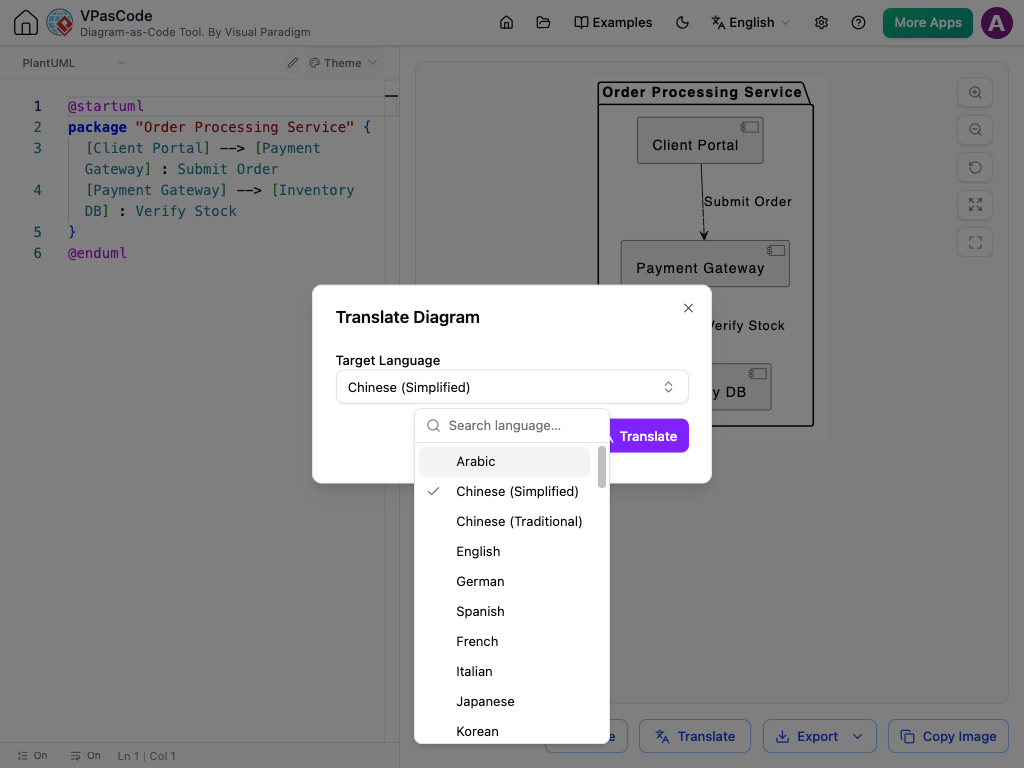
Consider this standard microservice definition written in English:
Original English Diagram Code:
@startuml
package "Order Processing Service" {
  [Client Portal] --> [Payment Gateway] : Submit Order
  [Payment Gateway] --> [Inventory DB] : Verify Stock
}
@enduml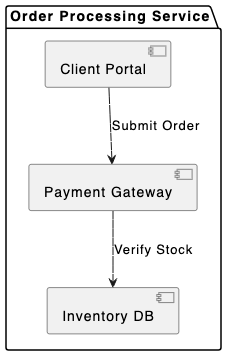
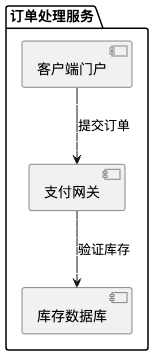
When passed through AI translation, the text strings, package names, and relationship annotations are converted automatically into the target language while preserving the exact layout structure:
Translated Diagram Code Example (Simplified Chinese Output):
@startuml
package "订单处理服务" {
  [客户端门户] --> [支付网关] : 提交订单
  [支付网关] --> [库存数据库] : 验证库存
}
@enduml
Streamlining Global Workflows with VPasCode
VPasCode provides a unified text to diagram tool that combines instant AI Diagram Translation with automated syntax correction. Global teams can translate entire system specifications into multiple target languages with a single click inside the workspace browser.
Whether your team is designing software C4 models, mapping out database ERDs, or defining complex Sequence Diagrams, an AI-powered PlantUML editor eliminates manual localization bottlenecks completely.
Step-by-Step AI Translation Workflow
- Open Your Script: Load your PlantUML diagram code inside the browser canvas.
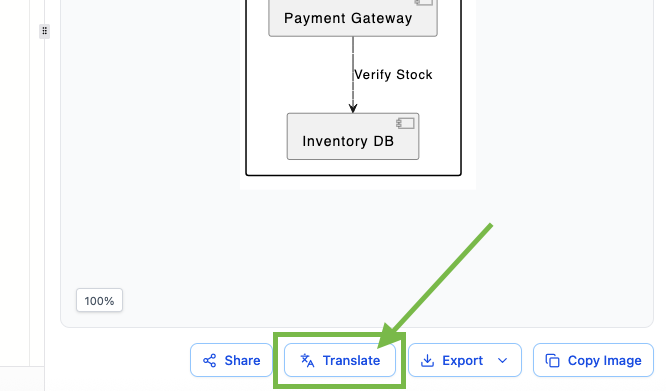
- Select Target Language: Choose your desired output language from the AI Translate menu options.
- Render and Export: The AI updates the label text instantly, and the layout engine resizes boxes automatically. Export high-resolution SVG or PNG assets for global team documentation.
Best Practices for Multilingual Technical Documentation
To maximize efficiency when publishing multilingual diagrams across distributed teams, keep these guidelines in mind:
- Single Source of Truth: Maintain your master architecture definition in a central Git repository and generate localized assets using your text to diagram tool on demand.
- Leverage Automated Layouts: Avoid hardcoding fixed node widths so that translated strings fit naturally within container shapes inside your PlantUML editor.
- Publish Seamlessly: Embed translated vector graphics directly into online team portals or publish via Visual Paradigm OpenDocs integration.
Using a versatile text to diagram tool inside an advanced PlantUML editor empowers engineering organizations to collaborate across languages without sacrificing speed or accuracy.
Transform Your Global Documentation Today
Ready to break down language barriers and automate your technical diagram localization in seconds? Try VPasCode’s AI-powered PlantUML editor today and experience effortless AI translation, instant 1-Click code error fixing, and seamless diagram-as-code capabilities.