Software engineers, system architects, and product designers frequently need to rapidly organize complex ideas, feature taxonomies, or technical concepts during the ideation phase. Traditional whiteboard sessions or digital drawing tools often create friction, as manually adding, removing, and rearranging nested nodes disrupts the creative flow. Using a modern all-in-one diagram-as-code tool allows teams to facilitate dynamic brainstorming and system brain-mapping directly through text. By utilizing Mermaid inside a dedicated browser-based Mermaid editor, developers can visualize intricate logical hierarchies and technical dependencies instantly.
In this guide, we will explore how to build clear Mind Maps using Mermaid, why text-driven ideation sessions improve technical clarity, and how a comprehensive all-in-one diagram-as-code tool streamlines system documentation.
Why Use Mermaid for Brainstorming and System Mapping?
Traditional mind mapping applications—while visually appealing—separate the act of ideation from actual developer documentation repositories. When new concepts emerge or technical structures are refactored, updating static graphics requires manual editing cycles and visual realignment. A text-to-diagram workflow solves this by treating the brain map definition as versionable code.
Using a dedicated browser-based Mermaid editor for brainstorming and system brain-mapping offers key advantages:
- Fluid Ideation Flow: Add, nest, and reorder ideas and complex system components using simple indentations—the layout engine automatically re-calculates the entire hierarchy.
- Git-Integrated Brainstorming: Store your system mind maps alongside application specs, Architecture models, and codebases to maintain a complete audit trail of design decisions.
- Universal Searchability: Plain-text node labels can be indexed directly by team wiki search engines, making design concepts discoverable long after the brainstorming session.
Adopting an all-in-one diagram-as-code tool ensures that strategic ideation stays synchronized across engineering, product, and leadership stakeholders.
Building a System Brain-Map Step-by-Step
Let’s look at how to facilitate brainstorming for a new technical initiative—modeling a cloud monitoring system—including core features, data sources, integrations, and deployment strategies using mind map syntax. Here is a practical example you can copy and paste directly into your browser-based Mermaid editor:
System Mind Map Code Example (Try it Now):
mindmap
  root((Cloud Monitoring System))
    Core_Features
      Real-time Dashboard
      Automated Alerting
      Distributed Tracing
    Data_Sources
      Application Logs
      Infrastructure Metrics
      System Events
    Integrations
      Webhook Notifications
      Slack/OpsGenie Alerts
      Grafana Visualization
    Deployment
      Containerized (Docker)
      K8s Cluster
      Prometheus/Grafana Stack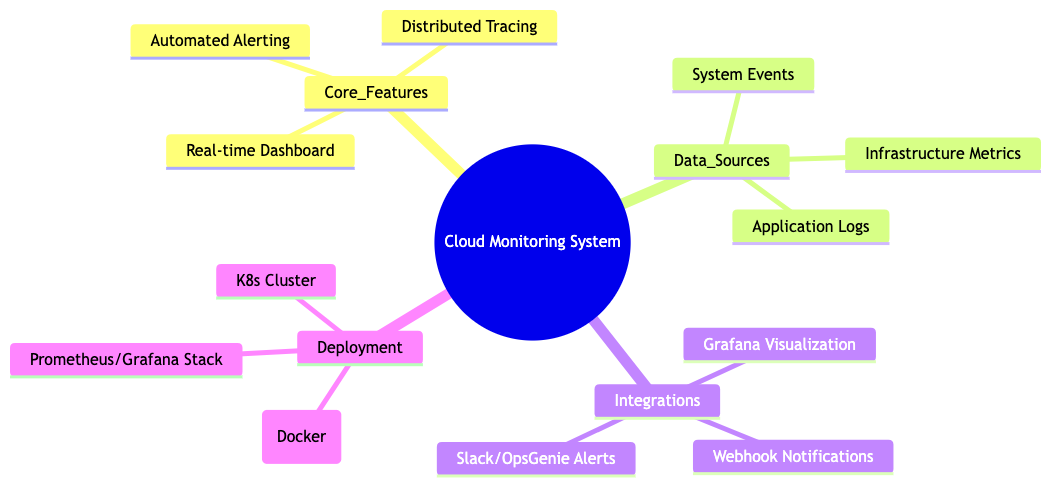
Eliminating Syntax Friction with AI in VPasCode
When conducting rapid brainstorming sessions with multiple stakeholders or brain-mapping large enterprise system hierarchies with deep nesting, minor syntax hiccups—such as mismatched parenthesis or improper indentation—can disrupt the meeting flow. Utilizing VPasCode as your primary all-in-one diagram-as-code tool gives your team access to 1-Click AI Code Error Fixing to resolve syntax errors instantly.</ p>
Whether you are defining software Architecture models, mapping operational Flowcharts, or building timeline Gantt charts, an intelligent browser-based Mermaid editor catches formatting issues automatically so your team stays focused on ideation.
Best Practices for Code-Driven Brainstorming
To ensure high clarity and dynamic collaboration when sharing mind maps during technical sessions, follow these core guidelines:
- Use Consistent Indentation: Rely solely on indentation to define logical relationships and hierarchies—never try to manually position nodes or alter connection lines.
- Keep Node Labels Concise: Use clear, impact-focused labels of 1–3 words to ensure the overall mind map structure remains readable at a glance during fast brainstorming.
- Export High-Resolution Vector Assets: Export crisp SVG or PNG visual assets directly from your browser-based Mermaid editor to embed in architectural specs or publish online via Visual Paradigm OpenDocs integration.
Relying on a versatile browser-based Mermaid editor backed by a complete diagram-as-code tool empowers system architects and product engineers to build clear, maintainable ideation specifications with precision and speed.
Transform Your Brainstorming Sessions Today
Ready to standardize your brainstorming and build version-controlled mind maps from text in seconds? Try VPasCode’s feature-rich browser-based Mermaid editor today and experience instant 1-Click code error fixing, multi-format rendering, and effortless diagram-as-code capabilities.