
AI Object Diagram Generator: Unlock Instant UML Snapshots with Visual Paradigm
Creating object diagrams can feel tedious. You know the drill: instantiate classes, set attribute values, draw links between objects, arrange everything neatly to show a system’s state at a specific moment. It’s precise work, but starting from scratch eats up hours. What if you could describe your scenario in plain English and get a clean, professional object diagram instantly? That’s where the best AI object diagram generator comes in—and Visual Paradigm delivers it across an unmatched ecosystem.
Since 2002, Visual Paradigm has built a reputation as a go-to UML and visual modeling tool, supporting over 100 diagram types with enterprise features like code generation, traceability, and team collaboration. Now, fully AI-powered, it stands out as the top AI diagram tool for anyone needing reliable, editable object diagrams. Whether you’re a developer verifying class designs, an architect illustrating runtime states, or a team sharing system snapshots, our four platforms cover every need—from quick generation to deep refinement and collaboration.
Let’s explore how Visual Paradigm turns object diagramming into a seamless, AI-assisted process.
VP Desktop: Your Powerhouse for AI-Driven Object Diagram Creation and Editing
VP Desktop is the core of serious modeling work. It’s where you go for full control over complex projects. The integrated AI diagram generator lets you create object diagrams right inside this robust environment.
Imagine typing a prompt like “Show a library system at checkout time with patron Alice borrowing book ‘UML Distilled’ from staff Anna, linked to catalog entry.” The AI generates the diagram instantly—objects like :Alice, :Book, :StaffAnna appear with attributes set (e.g., book.status = “borrowed”), links drawn correctly (e.g., association roles). No manual dragging to start. From there, switch to advanced editing: adjust layouts, add notes, ensure traceability back to your class diagram, or export to code if needed.
- Offline access for secure, high-precision work
- Seamless integration with other UML diagrams—your object diagram stays linked to classes
- Enterprise-grade features: version control, team repositories, report generation
This isn’t just generation. It’s AI kickstarting professional models you refine for production use. Developers love it for validating designs quickly; architects use it to explore runtime scenarios without losing accuracy.
How to Generate a Object Diagram with AI in VP Desktop
- From the main menu, select Tools > AI Diagram Generation. This opens the AI Diagram Generation window.
- In the window, choose your desired diagram type from the dropdown list. In this case, Object Diagram.
- In the text area, describe your project, problem, system, or scenario.
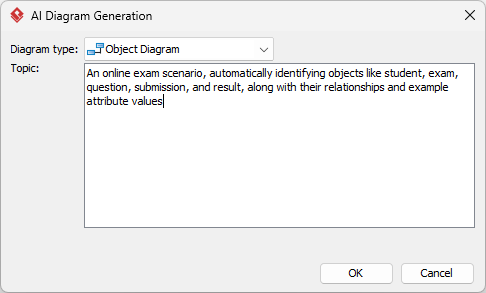
- Click OK to start the generation.
- The AI will create the diagram automatically.
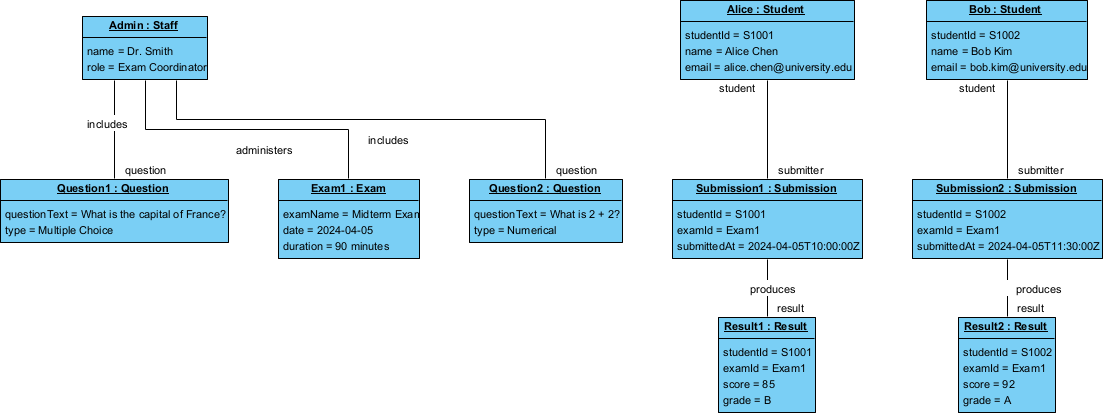
It appears as a fully editable, native Visual Paradigm diagram (not just an image). You can now:
- Edit elements, relationships, layout, or properties
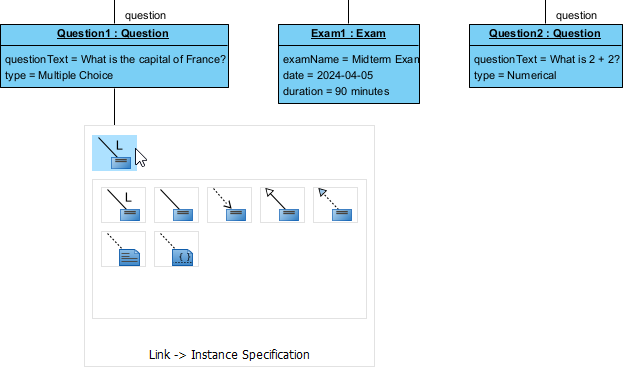
- Add more details manually
- Export as image (PNG, SVG, etc.), PDF, or use in reports
- Generate code or documentation if applicable
- Edit elements, relationships, layout, or properties
OpenDocs: Embed and Collaborate on Dynamic Object Diagrams
Need to share your object diagram in context? OpenDocs turns static docs into living knowledge bases. Think Notion meets powerful diagramming.
Generate or import an object diagram (from VP Desktop or chatbot), then embed it directly into pages. The diagram stays editable inline—team members click, tweak attributes, update links, all while reading surrounding explanations. Perfect for design docs, onboarding guides, or architecture overviews where you explain “Here’s the state after user login” with a visual that evolves.
- Interactive embeds keep diagrams current—no more outdated PNGs
- Real-time collaboration so teams align faster
- Great for mixing text, diagrams, and other visuals in one place
Teams building wikis or reports find this invaluable. Your object diagram becomes part of the narrative, not an afterthought attachment.
AI Visual Modeling Chatbot: Conversational Power for Fast Object Diagram Prototyping
Sometimes you just want to brainstorm. Our AI Visual Modeling Chatbot makes that effortless. Chat naturally: “Create an object diagram for an online store checkout: customer John places order #123 with items laptop and mouse, delivered by driver Mike.”
In seconds, you get a fully formed object diagram—objects instantiated, links established, attributes filled. Not happy? Say “Add overdue status to the order” or “Explain why this link is bidirectional.” The AI refines it instantly, answers questions, or even generates related reports.
This platform shines for agile teams or early ideation. Overcome blank-page syndrome fast. It’s a true co-pilot—great for novices learning UML or experts iterating designs quickly.
- Natural language input for rapid generation
- Iterative refinement through conversation
- Export options to desktop for deeper work
Why Visual Paradigm Stands Out as the Best AI Diagram Tool
Plenty of tools generate diagrams from text. Few match Visual Paradigm’s depth. Competitors often stop at one-shot images or basic editors. We deliver an end-to-end ecosystem:
- Widest UML coverage with true AI integration—not just pretty pictures, but editable, traceable models
- Multiple workflows: chat for speed, desktop for precision, docs for sharing, guided apps for consistency
- Real refinement and traceability—generate once, then connect, analyze, export to code or docs
- Scales for individuals, teams, enterprises—offline, online, collaborative
Unlike siloed AI tools, our platforms work together. Start in chat, refine in desktop, embed in OpenDocs—your object diagram stays consistent and professional throughout.
Ready to Try the Ultimate AI Object Diagram Generator?
Visual Paradigm makes object diagramming faster, smarter, and more reliable. Whether you need quick snapshots or enterprise-grade models, our AI-powered platforms have you covered. Save time, cut errors, and focus on what matters—building great systems.
Try Visual Paradigm today. Sign up, open the AI tools, and see how easy professional object diagrams can be. Experience the future of visual modeling—right now.