

Modeling the vocabulary of the system and capturing static snapshots of instances at a point in time
Class diagrams and object diagrams form the core of UML’s structural modeling, providing a clear, visual representation of the system’s static structure.
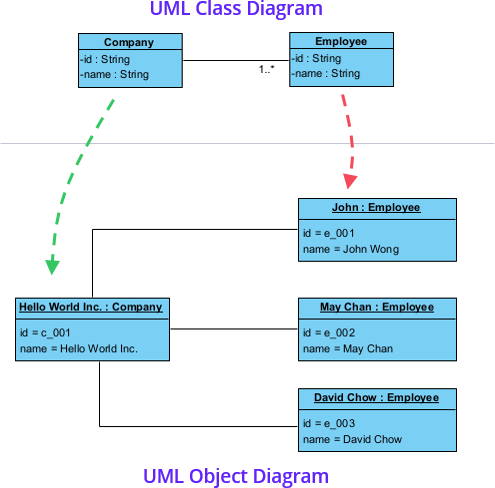
- Class Diagram Models the vocabulary (domain concepts) of the system: classes (templates for objects), their attributes (data), operations (behavior), and relationships (how classes connect). It focuses on types — abstract, timeless definitions used for design, code generation, database schemas, and communication. Common elements:
- Class boxes (name, attributes, operations)
- Relationships: association (links), generalization (inheritance/is-a), aggregation (has-a, whole-part loose), composition (has-a strong ownership), dependency, realization (implements interface)
- Object Diagram A snapshot of the system at a specific moment: shows concrete instances (objects) of classes, their attribute values, and links (instance-level associations). Used to illustrate examples, debug runtime states, validate class designs with real data, or explain scenarios. Key: Object names are underlined (e.g., order1:Order), showing runtime instances.
In Agile & use-case-driven projects, class diagrams evolve from conceptual (domain-focused, derived from use cases) to detailed design (with operations, visibility, types). They stay lightweight—focus on key entities first, refine iteratively. Object diagrams provide quick “proof-of-concept” examples without over-modeling.
Practical Examples of Class and Object Diagrams in Real Projects
Here are numerous concrete examples across domains, showing how these diagrams model vocabulary and snapshots:
- E-commerce / Online Shopping SystemClass Diagram:
- Classes: Customer, Product, ShoppingCart, Order, OrderItem, Payment, ShippingAddress, Discount
- Attributes: Customer (customerID, name, email), Product (productID, name, price, stock), Order (orderID, date, total, status)
- Operations: Order.place(), ShoppingCart.addItem(Product), Payment.process()
- Relationships: Customer places Order (1-to-many association), Order aggregates OrderItem (composition), OrderItem references Product (association with multiplicity 1..*) Benefit: Reveals domain vocabulary early; spots missing Discount applied to Order → prevents inconsistent pricing logic.
- Banking System (Online/Mobile Banking)Class Diagram:
- Classes: Account, SavingsAccount, CheckingAccount, Transaction, Customer, Branch
- Generalization: SavingsAccount and CheckingAccount inherit from Account (shared balance, withdraw(), deposit())
- Attributes: Account (accountNumber, balance, openDate), Transaction (transID, amount, date, type)
- Relationships: Customer owns multiple Account (1-to-many), Account has-many Transaction (association) Object Diagram Snapshot:
- cust1:Customer {name=”Curtis”, customerID=”C123″}
- sav1:SavingsAccount {accountNumber=”SA-456″, balance=2500.00} linked to cust1
- trans1:Transaction {transID=”T789″, amount=500.00, type=”Deposit”} linked to sav1 Practical: Illustrates inheritance and runtime state for “transfer funds” use case validation.
- Healthcare / Hospital Management SystemClass Diagram:
- Classes: Patient, Doctor, Appointment, MedicalRecord, Prescription, Billing
- Attributes: Patient (patientID, name, DOB, insuranceID), Appointment (date, time, status)
- Relationships: Patient has-many Appointment (association), Appointment links Doctor and Patient, Patient has-one MedicalRecord (composition)
- Operations: Appointment.schedule(), Prescription.issue() Benefit: Models sensitive domain vocabulary; ensures traceability to use cases like “Book Appointment” or “View Records.”
- Library Management SystemClass Diagram:
- Classes: Book, Member, Librarian, Loan, Reservation, Fine
- Attributes: Book (ISBN, title, author, copiesAvailable), Member (memberID, name, membershipDate)
- Relationships: Member borrows Loan (1-to-many), Loan references Book (association), Librarian manages Loan
- Operations: Loan.renew(), Fine.calculate() Object Diagram Example:
- book1:Book {ISBN=”978-3-16-148410-0″, title=”UML Distilled”, copiesAvailable=3}
- mem1:Member {memberID=”M101″, name=”Curtis”}
- loan1:Loan {loanID=”L2025″, borrowDate=”2026-01-10″, dueDate=”2026-02-10″} linking mem1 and book1 Practical: Quick snapshot verifies “Borrow Book” flow with real instance data.
- Task Management SaaS (e.g., Trello/Asana-like)Class Diagram:
- Classes: Board, List, Card, User, Label, Comment, Checklist
- Attributes: Card (cardID, title, description, dueDate, priority)
- Relationships: Board contains List (composition), List contains Card (composition), User assigned-to Card (many-to-many association via Assignment class) Benefit: Captures collaborative domain; prevents cycles in containment hierarchy.
- Inventory Management for Retail ChainClass Diagram:
- Classes: Item, Supplier, Warehouse, StockEntry, PurchaseOrder, Category
- Relationships: Item supplied-by Supplier (association), Warehouse stores Item (with quantity attribute on link), PurchaseOrder requests Item Practical: Multi-location support via Warehouse class; early model avoids stock sync issues across stores.
- Smart Home Automation SystemClass Diagram:
- Classes: SmartDevice, Sensor, Actuator, User, AutomationRule, SmartHub
- Generalization: TemperatureSensor and MotionSensor inherit from Sensor
- Relationships: SmartHub controls multiple SmartDevice (aggregation) Benefit: Models device vocabulary; supports extensibility for new sensor types.
- Restaurant Food Ordering SystemClass Diagram:
- Classes: Restaurant, MenuItem, Order, Table, Customer, Waiter, Kitchen
- Relationships: Order placed-by Customer, contains MenuItem (with quantity), assigned-to Table Practical: Clarifies order flow entities before UI/sequence design.
In Visual Paradigm:
- Start with conceptual class diagram from use case nouns (e.g., Order, Customer from “Place Order” use case).
- Add details iteratively: visibility (+public, -private), types, multiplicities.
- Generate object diagrams from class diagram instances for validation.
- Use semantic backplane: change a class attribute → auto-reflects in related diagrams.
Class diagrams define the what (structure/vocabulary); object diagrams show the how it looks at runtime (concrete examples). Together, they provide a solid static foundation, directly realizing use cases and guiding implementation in Agile sprints.
This prepares you for organizing large models with Package Diagrams next.