

Showing the internal runtime structure of complex classes, components, or subsystems — parts, ports, and internal connectors
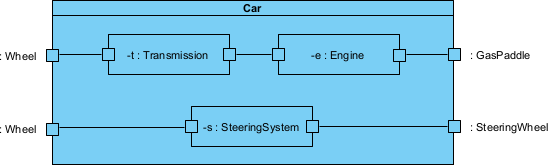
Composite Structure Diagrams in UML 2.5 provide a detailed, runtime-oriented view inside a single structured classifier (typically a complex class, component, subsystem, or collaboration). They show how the classifier is decomposed into parts (internal instances/roles), connected via connectors, and exposed to the outside world through ports.
While class diagrams define types and vocabulary, and component diagrams show modular assembly at the architectural level, composite structure diagrams “open the box” to reveal how internal elements collaborate at runtime to realize behavior. They are particularly powerful for modeling complex objects with intricate internal structure (e.g., embedded systems, frameworks, engines, UI widgets, or domain aggregates) without showing external deployment concerns.
Key elements:
- Structured Classifier — The containing element (class or component) shown with a dashed border or rectangle; its name at the top.
- Part — Rectangle inside the classifier representing a role or set of instances (multiplicity shown, e.g., 1..*, 4); typed by a class.
- Port — Small square on the boundary (or on parts); typed by interface(s); defines interaction points to environment or internals.
- Provided/Required Interfaces — Ball (provided) and socket (required) on ports; ball-and-socket notation for contracts.
- Connector — Solid line linking parts/ports; shows runtime communication paths (can be assembly or delegation).
- Role — Named part or port indicating behavioral responsibility.
In Agile & use-case-driven projects, composite structure diagrams are used to:
- Detail complex domain objects or components derived from use cases (e.g., “Order” with internal line items, pricing engine, validation rules).
- Clarify internal collaborations for tricky scenarios (alternatives/exceptions in flows).
- Support refactoring of god-classes or monolithic components by exposing internal parts.
- Model embedded/real-time systems where internal structure drives behavior.
- Bridge analysis (class diagrams) to detailed design without jumping to code.
- Remain lightweight — use only for classifiers that benefit from “inside view”; avoid over-modeling simple classes.
Practical Examples of Composite Structure Diagrams in Real Projects
Here are many concrete examples across domains, showing internal decomposition, ports, and runtime connectors:
- Automotive Engine Control Unit (ECU) in Embedded System:
- Structured Classifier: EngineController
- Parts: FuelInjector (4), SparkPlugController (4), SensorHub, ThrottleActuator, ECUCore (processor)
- Ports: SensorPort (required interfaces for temperature/pressure), ActuatorPort (provided for control signals), DiagnosticPort (OBD-II)
- Connectors: ECUCore → SensorHub (delegation), ECUCore → FuelInjector (assembly via control signals)
- Practical benefit: Reveals how sensor data flows to actuators; helps validate real-time constraints for “Accelerate Vehicle” use case; supports hardware-in-loop testing.
- E-commerce Order Aggregate (Domain-Driven Design):
- Structured Classifier: Order
- Parts: OrderHeader, LineItem (1..*), PricingEngine, DiscountCalculator, ValidationRules, PaymentStatus
- Ports: ExternalOrderPort (provided OrderAPI), PaymentPort (required PaymentGateway)
- Connectors: OrderHeader → LineItem (composition links), PricingEngine → DiscountCalculator (delegation), ValidationRules → OrderHeader
- Outcome: Shows internal consistency rules (e.g., total recalculation); clarifies “Apply Coupon” extension without bloating class diagram.
- Healthcare Patient Record System (Complex Entity):
- Structured Classifier: PatientRecord
- Parts: Demographics, MedicalHistory, CurrentMedications (1..*), Allergies, VisitHistory, ConsentManager
- Ports: AccessPort (provided FHIR API), AuditPort (required LoggingService)
- Connectors: Demographics → ConsentManager (checks access), VisitHistory → CurrentMedications
- Practical: Models privacy-by-design internals; ports enforce controlled access; useful for compliance reviews and “View Patient Record” use case validation.
- Smart Home Thermostat Device:
- Structured Classifier: Thermostat
- Parts: TemperatureSensor, UserInterface (display/buttons), ControlLogic, RelayActuator, WiFiModule
- Ports: EnvironmentPort (required temp/humidity), CloudPort (provided status API), LocalControlPort
- Connectors: ControlLogic → TemperatureSensor → RelayActuator; WiFiModule → ControlLogic
- Benefit: Details internal decision-making for “Maintain Temperature” use case; ports allow swapping sensors; supports firmware updates.
- Task Management Card (Trello-like Component):
- Structured Classifier: Card
- Parts: Description, Checklist (0..*), Attachments, Comments (0..*), Labels, DueDateTracker, Assignee
- Ports: CollaborationPort (provided real-time updates), NotificationPort (required)
- Connectors: Checklist → DueDateTracker (progress affects date), Comments → Assignee
- Practical: Shows runtime composition for “Update Card” flow; helps optimize sync logic in collaborative SaaS.
- Inventory Management Warehouse Robot:
- Structured Classifier: PickingRobot
- Parts: NavigationModule, ArmController, Scanner, BatteryManager, CentralBrain
- Ports: FleetPort (required commands from warehouse system), SensorPort
- Connectors: CentralBrain → NavigationModule → Scanner; ArmController → CentralBrain
- Outcome: Clarifies internal coordination for “Pick Item” use case; ports isolate robot from fleet changes.
- Banking Transaction Processor (Internal View):
- Structured Classifier: TransactionProcessor
- Parts: ValidationEngine, FraudDetector, LedgerUpdater, NotificationSender
- Ports: IncomingTxPort (provided), ExternalFraudPort (required)
- Connectors: ValidationEngine → FraudDetector → LedgerUpdater
- Practical: Models sequential/internal checks for “Transfer Funds”; easy to insert new fraud rules as parts.
- Restaurant Kitchen Order Flow Subsystem:
- Structured Classifier: KitchenStation
- Parts: OrderQueue, PrepArea, CookingStation, Expediter, DisplayScreen
- Connectors: OrderQueue → PrepArea → CookingStation → Expediter
- Benefit: Visualizes internal handoffs; supports “Prepare Order” use case optimization.
In Visual Paradigm:
- Create via Diagram > New > Composite Structure Diagram.
- Drag structured classifier; add parts/ports from Resource Catalog or toolbox.
- Connect parts with connectors; add ball/socket for interfaces on ports.
- Use semantic backplane: link parts to classes/objects from class diagrams; trace to use cases.
- Generate from complex classes or collaborate with team on internal details iteratively.
Composite structure diagrams answer: “What’s inside this complex element, and how do its parts collaborate at runtime?” — offering a precise, focused “x-ray” view that complements component diagrams (external modularity) and class diagrams (types). They excel at modeling intricate internals while staying Agile: detail only where runtime structure matters.
This leads naturally to Deployment Diagrams for mapping software to hardware nodes.