

Emphasizing the structural organization of objects that send and receive messages
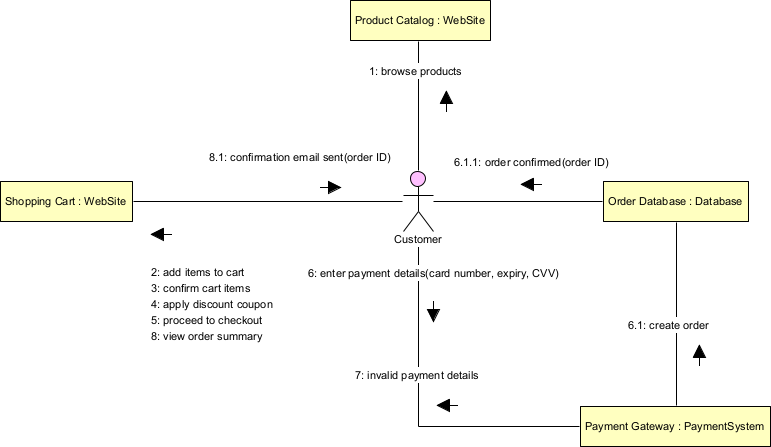
Communication diagrams (formerly called collaboration diagrams in UML 1.x) provide a different lens on interactions compared to sequence diagrams. While sequence diagrams prioritize time ordering (vertical progression), communication diagrams emphasize the structural organization—the links and relationships between participating objects—and show message flow via numbered sequence labels.
Key characteristics and elements:
- Participants (objects or roles) are shown as rectangles (often :ClassName or instanceName:ClassName).
- Links (solid lines) represent structural associations or navigable paths (reflecting associations from class diagrams).
- Messages are numbered arrows along the links (1, 1.1, 1.2, 2, etc.), with the numbering indicating sequence and nesting (e.g., 1.2 is a nested call within 1).
- No explicit lifelines or time axis—time is implied only by message numbers.
- Can use guards [condition], iteration *, asynchronous ^, and return values.
- Often more compact than sequence diagrams when the focus is on who talks to whom rather than strict chronology.
In Agile & use-case-driven projects, communication diagrams are particularly useful when:
- The topology or object relationships are more important than precise timing (e.g., understanding coupling, dependencies, or message paths).
- You want a compact view of an interaction that fits on one page.
- You are exploring alternative designs or refactoring opportunities (e.g., reducing coupling by changing links).
- You need to show complex nested calls or branching without long vertical sprawl.
- You are reverse-engineering legacy code or documenting existing object interactions.
They complement sequence diagrams: use communication when structure matters most, sequence when timing or duration is critical.
Practical Examples of Communication Diagrams in Real Projects
Here are numerous concrete examples showing how communication diagrams highlight structural organization:
- E-commerce – Place Order with Payment Authorization
- Objects:
- :Customer, :ShoppingCart, :OrderService, :PaymentGateway, :BankAdapter
- Links:
- Customer — ShoppingCart (association)
- ShoppingCart — OrderService
- OrderService — PaymentGateway
- Messages
- PaymentGateway — BankAdapter Messages:
- 1: proceedToCheckout() → ShoppingCart → OrderService
- 1.1: createOrder(items) → OrderService → PaymentGateway
- 1.1.1: authorize(amount, card) → PaymentGateway → BankAdapter
- 1.1.1.1: approved → BankAdapter → PaymentGateway
- 1.1.2: confirmOrder() → OrderService → ShoppingCart
- alt [1.1.1 declined]
- 1.1.1.2: declined → BankAdapter → PaymentGateway
- 1.2: showError(“Payment failed”) → OrderService → Customer end
- PaymentGateway — BankAdapter Messages:
- Practical benefit: Quickly reveals the structural chain from UI to external bank—useful for spotting tight coupling to PaymentGateway.
- Objects:
- Mobile Banking – Authenticate & Transfer Funds
- Objects:
- :User, :MobileApp, :AuthService, :TokenStore, :CoreBanking, :NotificationService
- Links:
- MobileApp connected to AuthService, TokenStore, CoreBanking, NotificationService
- Messages:
- 1: initiateTransfer() → User → MobileApp
- 2: requestOTP() → MobileApp → AuthService
- 2.1: generateOTP() → AuthService → TokenStore
- 3: sendOTP() → AuthService → NotificationService
- 4: enterOTP(code) → User → MobileApp
- 5: validate(code) → MobileApp → AuthService
- 5.1: valid → AuthService → MobileApp
- 6: executeTransfer() → MobileApp → CoreBanking
- Practical: Shows MobileApp as central hub (high fan-in/fan-out)- flags potential god-object risk for refactoring.
- Objects:
- Ride-Sharing – Ride Request & Acceptance
- Objects:
- :RiderApp, :MatchingService, :DriverApp, :Ride, :GPSService
- Links:
- RiderApp — MatchingService — DriverApp
- MatchingService — Ride DriverApp — GPSService
- Messages:
- 1: requestRide(pickup, dest) → RiderApp → MatchingService
- 2: findNearbyDrivers() → MatchingService → MatchingService (self)
- 3: notifyRequest(ride) → MatchingService → DriverApp
- 4: accept() → DriverApp → MatchingService
- 4.1: assignDriver() → MatchingService → Ride
- 5: startTracking() → MatchingService → GPSService
- Practical: Emphasizes MatchingService as mediator—makes it obvious why it’s a good candidate for scaling independently.
- Objects:
- Healthcare – Schedule Appointment with Availability Check
- Objects:
- :PatientPortal, :AppointmentService, :Calendar, :EHRAdapter, :Doctor
- Links:
- PatientPortal — AppointmentService — Calendar AppointmentService — EHRAdapter — Doctor Messages:
- 1: findSlots(doctor, date) → PatientPortal → AppointmentService
- 1.1: queryAvailability() → AppointmentService → Calendar
- 1.1.1: slots → Calendar → AppointmentService
- 1.2: verifyInsurance() → AppointmentService → EHRAdapter
- 1.2.1: checkCoverage() → EHRAdapter → Doctor
- 1.2.1.1: covered → Doctor → EHRAdapter
- 2: reserveSlot(slot) → PatientPortal → AppointmentService
- Practical: Highlights structural dependency on external EHR—useful for integration planning and mock strategy.
- Objects:
- Library – Self-Checkout Book Loan
- Objects:
- :Patron, :Kiosk, :LibrarySystem, :BookInventory, :LoanRecord
- Links:
- Patron — Kiosk — LibrarySystem LibrarySystem — BookInventory LibrarySystem — LoanRecord
- Messages:
- 1: scanCard() → Patron → Kiosk
- 2: authenticate() → Kiosk → LibrarySystem
- 3: scanBook(isbn) → Patron → Kiosk
- 4: requestLoan(isbn) → Kiosk → LibrarySystem
- 4.1: checkAvailability() → LibrarySystem → BookInventory
- 4.2: createLoan() → LibrarySystem → LoanRecord
- Practical: Compact view shows Kiosk delegating most work—easy to see where business logic lives.
- Objects:
- Task Management – Move Card Between Lists
- Objects:
- :User, :WebFrontend, :TaskService, :Board, :ListA, :ListB, :NotificationService
- Links: WebFrontend — TaskService — Board
- Board — ListA, ListB TaskService — NotificationService
- Messages:
- 1: dragCard(cardId, newListId) → User → WebFrontend
- 2: updateCardPosition(cardId, newListId) → WebFrontend → TaskService
- 2.1: moveCard() → TaskService → Board
- 2.1.1: removeFromList() → Board → ListA
- 2.1.2: addToList() → Board → ListB
- 3: notifySubscribers() → TaskService → NotificationService
- Practical: Shows structural hierarchy (Board owns Lists) and notification side-effect—helps when optimizing event propagation.
- Objects:
In Visual Paradigm:
- Lifelines and links can be auto-generated from class associations.
- Numbering is automatic; drag messages along links.
- Use as alternative/complement to sequence diagrams for the same scenario.
- Semantic backplane keeps communication messages consistent with sequence, class operations, and use case flows.
- Good for printing compact interaction overviews.
Communication diagrams shine when the “who knows whom” question is more important than “when exactly does each step happen”—making them excellent for architectural reviews, dependency analysis, and understanding object collaboration structure in Agile teams.
This prepares you for high-level orchestration with State Machine Diagrams next.