

Combining activity and sequence concepts to show the flow of control between interactions
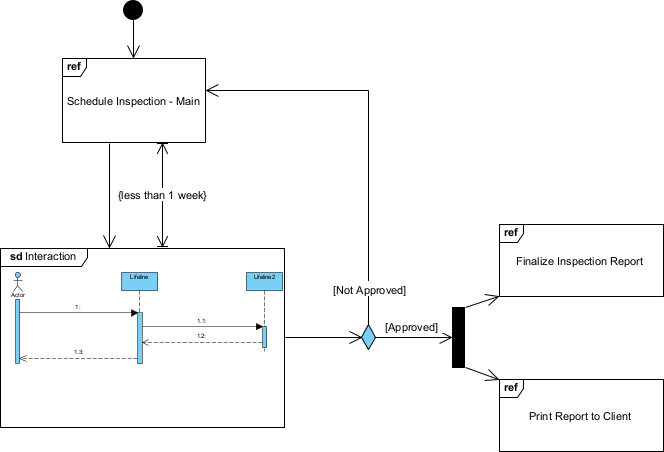
Interaction Overview Diagrams (IODs) in UML 2.5 provide a high-level orchestration view of complex behavior by blending the control flow notation of activity diagrams with references to detailed interaction diagrams (usually sequence diagrams, sometimes communication diagrams). They are particularly useful for showing the big picture of how multiple interactions (scenarios, use case slices, subsystem collaborations) fit together, including decision points, loops, parallelism, and sequencing—without drowning in the low-level message details.
Key elements of interaction overview diagrams:
- Activity-like nodes — Control flow (solid arrows), decision nodes (diamonds), merge nodes, fork/join bars for concurrency, initial/final nodes.
- Interaction Occurrence / Interaction Use — Ref rectangle labeled ref with the name of the referenced interaction (e.g., ref “Login with MFA”), representing a call to a detailed sequence or communication diagram.
- Guard conditions — On outgoing flows from decisions [condition].
- Loop / Parallel / Optional / Alternative frames — Can wrap interaction occurrences or groups of flows.
- No lifelines or detailed messages inside the ref boxes — those live in the referenced sequence/communication diagrams.
In Agile & use-case-driven projects, interaction overview diagrams are used to:
- Provide an executive / architectural summary of complex use case realizations
- Orchestrate behavior across subsystems, services, or layers
- Show end-to-end control flow for critical paths or end-to-end scenarios
- Guide refactoring by revealing unnecessary sequencing or parallelism opportunities
- Serve as a navigation map: high-level diagram links to detailed sequence diagrams
- Help stakeholders understand the overall flow without getting lost in message-level detail
IODs are most valuable when a single use case or business process spans multiple detailed interactions that need to be coordinated.
Practical Examples of Interaction Overview Diagrams in Real Projects
Here are numerous concrete examples showing how IODs combine activity-style control with references to detailed interactions:
- E-commerce – Complete Order Fulfillment (End-to-End) Flow structure:
- Initial → ref “Browse & Add to Cart”
- → Decision: “Proceed to Checkout?”
- No → loop back to “Browse & Add to Cart”
- Yes → ref “Checkout with Guest or Registered”
- → Fork ├─ ref “Calculate Taxes & Discounts” └─ ref “Validate Shipping Address”
- → Join
- → ref “Process Payment (including 3D Secure)”
- → Decision: “Payment Authorized?”
- Yes → ref “Create & Confirm Order” → ref “Notify Customer & Warehouse” → Final
- No → ref “Handle Payment Failure & Retry” → merge back Practical benefit: One-page overview linking five detailed sequence diagrams; used in sprint reviews to show complete flow without opening every sequence.
- Mobile Banking – Secure High-Value Transfer High-level flow:
- Initial → ref “Authenticate User (Biometric or PIN)”
- → ref “Select Accounts & Enter Transfer Details”
- → Decision: “Amount > $10,000?”
- Yes → Fork ├─ ref “Request Additional Approval (Manager)” (parallel) └─ ref “Perform Enhanced Fraud Check”
- Join
- No → merge
- → ref “Execute Transfer with Transaction Signing”
- → ref “Send Confirmation & Update Balances”
- → Final Practical: Shows mandatory parallel compliance steps for large transfers; guards make regulatory requirements visible at high level.
- Ride-Sharing – Full Ride Lifecycle Orchestration Flow:
- Initial → ref “Rider Requests Ride”
- → ref “Matching Engine Finds & Notifies Drivers”
- → Decision: “Driver Accepts within 30s?”
- Yes → ref “Driver Accepted – Assign & Notify Rider”
- No → loop “Matching Engine Finds & Notifies Drivers” (with timeout)
- → ref “Driver En Route to Pickup”
- → Fork ├─ ref “Real-time ETA & Location Updates” (ongoing) └─ ref “Rider Cancels Before Pickup” (interruptible)
- → Join (or interrupt)
- → ref “Ride In Progress – Monitor Completion”
- → ref “Ride Completed – Process Payment & Ratings”
- → Final Practical: Captures timeouts, cancellations, and parallel tracking; serves as master diagram linking 6–7 detailed sequences.
- Healthcare – End-to-End Patient Onboarding & First Appointment Flow:
- Initial → ref “Patient Registers & Verifies Identity”
- → ref “Insurance Eligibility Check”
- → Decision: “Insurance Valid?”
- No → ref “Handle Uninsured / Self-Pay Registration” → merge
- Yes → merge
- → ref “Schedule First Appointment”
- → Fork ├─ ref “Send Appointment Confirmation & Reminder” └─ ref “Pre-Appointment Questionnaire”
- → Join
- → ref “Patient Check-In & Vitals”
- → Final Practical: High-level compliance & workflow map; stakeholders can trace regulatory steps without diving into message details.
- Task Management SaaS – Card Movement Across Multiple Lists with Notifications Flow:
- Initial → ref “User Views Board & Card Details”
- → ref “Drag Card to New List”
- → Decision: “Requires Review?”
- Yes → ref “Move to Review List & Assign Reviewers”
- No → ref “Move Directly to Done List”
- → Fork ├─ ref “Update Board State & History” └─ ref “Notify Assigned Users & Watchers”
- → Join
- → Final Practical: Shows branching logic and side-effect notifications at architecture level.
- IoT Device Firmware Update Campaign Flow:
- Initial → ref “OTA Server Prepares New Firmware Package”
- → ref “Notify Eligible Devices”
- → loop “For each device batch” ├─ ref “Device Checks for Update & Downloads” ├─ Decision: “Download Successful?”
- Yes → ref “Device Verifies Integrity & Installs”
- No → ref “Retry Download (up to 3 attempts)” ├─ ref “Device Reports Status Back to Server”
- → Final Practical: Orchestrates batch processing and retry logic; references detailed device-server sequences.
In Visual Paradigm:
- Drag Interaction Occurrence (ref box) from toolbox.
- Name it to match an existing sequence or communication diagram.
- Link via hyperlinks or model repository for navigation.
- Use activity notation (decisions, forks, joins) around ref boxes.
- Simulate the high-level flow, jumping into referenced details when needed.
- Semantic backplane ensures ref names stay consistent with actual interaction diagrams.
Interaction overview diagrams act as the conductor of the behavioral orchestra—providing strategic, readable overviews that tie together detailed interactions into coherent end-to-end stories. They are especially powerful in large systems or when communicating architecture to non-developers.
This prepares you for the final behavioral diagram type: Timing Diagrams next, where precise time constraints and durations take center stage.