

Capturing the event-ordered behavior and lifecycle of reactive objects
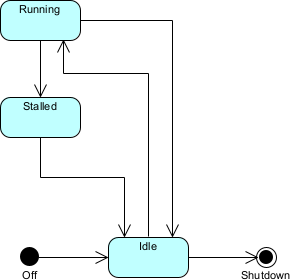
State machine diagrams (also called statechart diagrams) in UML 2.5 model the event-driven, reactive behavior of individual objects, subsystems, components, or even the entire system. They focus on the lifecycle: the different states an object can be in, the events that cause transitions between states, the conditions (guards) that must be true for a transition to fire, and the actions or activities performed during transitions, on entry/exit to states, or while in a state (do activity).
Key elements:
- State — Rounded rectangle (simple or composite). Composite states contain substates (orthogonal regions for concurrency).
- Transition — Arrow labeled event [guard] / action (e.g., paymentApproved [amount > 0] / sendConfirmation()).
- Initial Pseudostate — Black filled circle (starting point).
- Final State — Bullseye circle (end of lifecycle).
- Event — Trigger (signal, call, time, change event).
- Guard — Boolean condition in [].
- Action — Behavior executed during transition.
- Entry / Exit / Do — Activities inside a state (entry/ on entry, exit/ on exit, do/ while in state).
- Self-transition — Arrow looping back to same state.
- History pseudostate — Shallow/deep history to remember substate on re-entry.
- Choice / Junction — Pseudo-nodes for complex branching.
In Agile & use-case-driven development, state machines are used to:
- Model the lifecycle of key domain objects (Order, Account, Ride, PatientRecord, Device)
- Reveal invalid or missing state transitions early (prevents bugs like shipping unpaid orders)
- Clarify concurrency and parallelism (orthogonal regions)
- Serve as basis for code generation (state patterns, switch-based implementations)
- Validate complex business rules and edge cases with stakeholders
- Support testing (state coverage, transition coverage)
Practical Examples of State Machine Diagrams in Real Projects
Here are numerous concrete examples showing state machines modeling real-world reactive lifecycles:
- E-commerce – Order Lifecycle States: PendingPayment, PaymentAuthorized, PaymentFailed, InPreparation, Shipped, Delivered, Returned, Cancelled Transitions:
- Initial → PendingPayment
- payReceived [amount matches] / reserveStock() → PaymentAuthorized
- payFailed / notifyCustomer() → PaymentFailed
- PaymentAuthorized → InPreparation / packOrder()
- InPreparation → Shipped / handoverToCarrier()
- Shipped → Delivered (after deliveryConfirmed event)
- Delivered → Returned (returnRequested [within 30 days]) / initiateRefund()
- Any state (except Delivered/Returned) → Cancelled (cancelRequested) / releaseStock() Practical benefit: Prevents shipping before payment; used to generate acceptance tests for each transition.
- Mobile Banking – Account States States: Active, Frozen, Locked, Closed, Dormant Composite state Active contains substates: Normal, Overdrawn, PendingVerification Transitions:
- Initial → Active.Normal
- overdraftDetected → Active.Overdrawn
- suspiciousActivity [3 failed logins] → Locked / notifyUser()
- fraudConfirmed → Frozen / alertComplianceTeam()
- inactivity > 365 days → Dormant
- reactivateRequested [with MFA] → Active.Normal
- closeAccount → Closed (final) Practical: Captures security and compliance rules; orthogonal region for “Notification Status” (Unsent, Sent, Acknowledged).
- Ride-Sharing – Ride Object Lifecycle States: Requested, Accepted, DriverEnRoute, ArrivedAtPickup, InProgress, Completed, CancelledByRider, CancelledByDriver Transitions:
- Initial → Requested
- driverAccepted → Accepted / startNavigation()
- driverArrived → ArrivedAtPickup
- riderInCar → InProgress
- destinationReached → Completed / processPayment()
- cancelBeforePickup [either party] → CancelledByRider or CancelledByDriver / notifyOtherParty() Practical: Shows time-sensitive transitions; guards like [riderConfirmedPickup] prevent premature completion.
- Healthcare – Patient Appointment States States: Scheduled, Confirmed, InProgress, Completed, Cancelled, NoShow, Rescheduled Transitions:
- Initial → Scheduled
- patientConfirmed → Confirmed / sendReminder()
- doctorStarted → InProgress
- consultationEnded → Completed / generateReport()
- patientNoShow [after 15 min past start] → NoShow / chargeFee()
- rescheduleRequested → Rescheduled
- cancel [before 24h] → Cancelled Practical: Enforces business rules (e.g., no-show penalties); used in workflow simulation.
- IoT Smart Thermostat States: Off, Idle, Heating, Cooling, EmergencyOverride Composite state Idle contains substates: EcoMode, ComfortMode Transitions:
- Initial → Off
- powerOn → Idle.ComfortMode
- temperature < setpoint – 1°C → Heating / activateHeater()
- temperature > setpoint + 1°C → Cooling / activateAC()
- emergencyButtonPressed → EmergencyOverride / maxHeat()
- powerOff → Off (from any state) Practical: Models real-time reactivity; do activity in Heating: “monitor temperature every 30s”.
- Task Management – Task / Card States States: Backlog, ToDo, InProgress, Review, Done, Blocked Transitions:
- Initial → Backlog
- movedToSprint → ToDo
- startedWork → InProgress / assignDeveloper()
- needsReview → Review
- approved → Done
- blockerFound [in any state except Done] → Blocked / notifyTeam()
- blockerResolved → previous state Practical: Simple yet powerful for Kanban/Scrum tooling; orthogonal region for “Approval Status”.
- ATM – Session Lifecycle States: CardInserted, PINEntered, SelectingTransaction, Processing, DispensingCash, PrintingReceipt, CardEjected, Error Transitions:
- Initial → CardInserted
- validPIN → SelectingTransaction
- withdrawSelected → Processing / checkBalance()
- sufficientFunds → DispensingCash
- cashTaken → PrintingReceipt → CardEjected (final)
- invalidPIN [3 attempts] → Error / retainCard() Practical: Classic example; guards and counters prevent brute-force attacks.
In Visual Paradigm:
- Draw states, drag transitions, add event/guard/action labels.
- Use composite states and orthogonal regions for complex objects.
- Simulate state machines (animate transitions, trigger events).
- Link states to class attributes or use case scenarios.
- Semantic backplane ensures consistency with sequence/activity diagrams and class operations.
State machine diagrams excel at making lifecycle rules explicit, invalid sequences impossible by design, and reactive behavior predictable—critical for reliable, maintainable systems in Agile environments.
This prepares you for high-level behavioral orchestration with Interaction Overview Diagrams next.