


ईवेंट-ड्रिवन प्रोसेस चेन (EPC) डायग्राम बनाना भारी लग सकता है। आप जटिल व्यावसायिक प्रक्रियाओं का वर्णन करते हैं—घटनाएं कार्यों को ट्रिगर करती हैं, निर्णय बिंदु फ्लो को विभाजित करते हैं, समानांतर पथ संयोजित होते हैं—लेकिन खाली कैनवास के सामने बैठकर घंटों बीत जाते हैं। हाथ से लेआउट, प्रतीक स्थापना, कनेक्शन नियम… यह थकाऊ है। अगर आप बस प्रक्रिया का साधारण अंग्रेजी में वर्णन कर सकें और सेकंडों में एक साफ, पेशेवर EPC डायग्राम प्राप्त कर सकें तो कैसे? वहीं एक AI डायग्राम जनरेटर सब कुछ बदल देता है।
विजुअल पैराडाइम नेतृत्व में उभरता है AI डायग्राम टूल EPC डायग्राम और उससे आगे के लिए। 2002 से, हमने एंटरप्राइज-ग्रेड विजुअल मॉडलिंग सॉफ्टवेयर बनाया है जो 100 से अधिक डायग्राम प्रकारों का समर्थन करता है, जिसमें ईवेंट, फंक्शन, कनेक्टर, भूमिका आदि सहित पूर्ण EPC नोटेशन शामिल है। हमारे AI एकीकरण इसे और आगे ले जाता है: तुरंत उत्पादन, स्मार्ट रूपांतरण, और चार प्लेटफॉर्मों पर बिना रुकावट का प्रवाह। चाहे आप ERP कॉन्फ़िगरेशन को ऑप्टिमाइज़ कर रहे हों, वर्कफ्लो में सुधार कर रहे हों, या व्यावसायिक तर्क का दस्तावेज़ीकरण कर रहे हों, विजुअल पैराडाइम एक एंड-टू-एंड समाधान प्रदान करता है जिसका कोई एक टूल प्रतिद्वंद्वी नहीं है।
इस गाइड में, आप देखेंगे कि हमारा पारिस्थितिकी तंत्र EPC डायग्राम को कैसे संभालता है—चाट-आधारित प्रोटोटाइप से लेकर ट्रेसेबिलिटी के साथ उत्पादन-तैयार मॉडल तक।
VP डेस्कटॉप: AI-ड्रिवन EPC डायग्राम निर्माण और पेशेवर रूपांतरण के लिए आपका पावरहाउस
VP डेस्कटॉप गंभीर मॉडलिंग कार्यों का हृदय है। यह फ्लैगशिप एप्लिकेशन AI को पूर्ण-फीचर वाले, ऑफलाइन वातावरण में लाता है जो निर्दोषता के लिए बनाया गया है।
क्या आपको एक AI EPC डायग्राम जनरेटर? बस टूल खोलें, AI उत्पादन फीचर तक पहुंचें, एक वर्णन टाइप करें जैसे “आदेश पूर्ण करने की प्रक्रिया का मॉडल बनाएं: ग्राहक आदेश देता है जो इन्वेंटरी चेक को ट्रिगर करता है, अगर उपलब्ध हो तो पैक और शिप करें, वरना आपूर्तिकर्ता को सूचित करें,” और देखें कि यह डायग्राम कैसे बनाता है। घटनाएं हेक्सागोन के रूप में दिखाई देती हैं, कार्य गोलाकार आयतों के रूप में, तार्किक कनेक्टर (AND, OR, XOR) शाखाओं को आदर्श ढंग से संभालते हैं।
लेकिन उत्पादन केवल शुरुआत है। एक बार बनाने के बाद:
- उन्नत संपादन के साथ लेआउट को बेहतर बनाएं—खींचें, समानांतर बनाएं, पठनीयता के लिए ऑटो-लेआउट।
- ट्रेसेबिलिटी जोड़ें: तत्वों को आवश्यकताओं, अन्य डायग्रामों (BPMN, UML) या दस्तावेज़ीकरण से जोड़ें।
- बड़े प्रोजेक्ट में एकीकृत करें: आवश्यकता होने पर कोड स्टब निर्यात करें, रिपोर्ट बनाएं, या वर्जन नियंत्रण के साथ टीम सर्वर के माध्यम से सहयोग करें।
डेवलपर्स और बिजनेस आर्किटेक्ट्स इस मिश्रण को पसंद करते हैं। आप प्रारंभिक ड्राफ्टिंग में समय बचाते हैं लेकिन जटिल, एंटरप्राइज-लेवल EPC के लिए पूरी नियंत्रण बनाए रखते हैं। कोई भी अन्य AI-पावर्ड डायग्राम सॉफ्टवेयर इस गहराई का दावा नहीं करता—अधिकांश खूबसूरत चित्रों तक ही सीमित रहते हैं; VP डेस्कटॉप मॉडल को इम्प्लीमेंटेशन-तैयार बनाता है।
यहां विजुअल पैराडाइम डाउनलोड करें
VP डेस्कटॉप में AI के साथ EPC डायग्राम कैसे बनाएं
- मुख्य मेनू से, चुनें टूल्स > AI डायग्राम जनरेशन। इससे खुलता है AI डायग्राम जनरेशन विंडो।
- विंडो में, ड्रॉपडाउन सूची से अपना अभीष्ट डायग्राम प्रकार चुनें। इस मामले में, EPC डायग्राम.
- टेक्स्ट क्षेत्र में अपने प्रोजेक्ट, समस्या, सिस्टम या परिदृश्य का वर्णन करें।
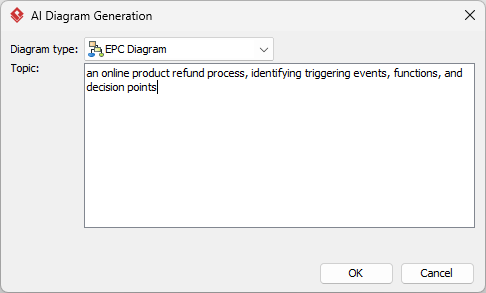
- क्लिक करें ठीक है उत्पादन शुरू करने के लिए।
- AI स्वचालित रूप से आरेख बनाएगा।
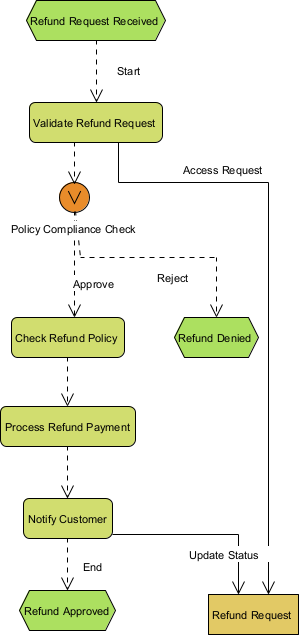
यह पूरी तरह से संपादित करने योग्य, मूल Visual Paradigm आरेख के रूप में दिखाई देता है (केवल एक छवि नहीं)। अब आप कर सकते हैं:
- तत्वों, संबंधों, लेआउट या गुणों को संपादित करें
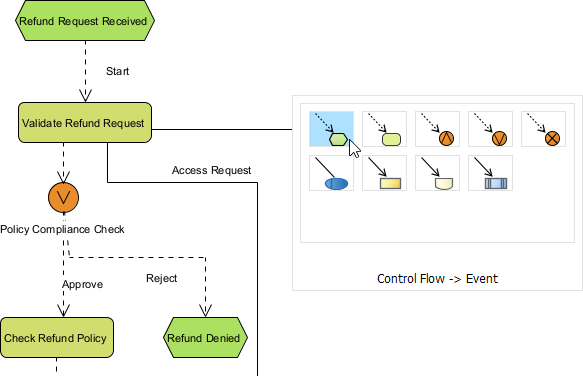
- हाथ से अधिक विवरण जोड़ें
- छवि (PNG, SVG आदि) के रूप में निर्यात करें, PDF या रिपोर्ट्स में उपयोग करें
- आवश्यकता होने पर कोड या दस्तावेज़ीकरण उत्पन्न करें
- तत्वों, संबंधों, लेआउट या गुणों को संपादित करें
OpenDocs: जीवंत दस्तावेज़ों में गतिशील EPC आरेख एम्बेड करें
आरेख अलग-अलग नहीं रहते हैं। वे रिपोर्ट्स, विकी या ज्ञान भंडार में प्रक्रियाओं की व्याख्या करते हैं। यही OpenDocs की ताकत है—हमारा Notion जैसा प्लेटफॉर्म जहां दृश्य एडिटेबल और इंटरैक्टिव बने रहते हैं।
एक खरीदारी प्रक्रिया के दस्तावेज़ीकरण की कल्पना करें। आप AI के माध्यम से EPC आरेख उत्पन्न करते हैं, फिर उसे सीधे एक पृष्ठ में एम्बेड करते हैं। टीम सदस्य तत्वों पर क्लिक करके ज़ूम कर सकते हैं, लाइन में संपादित कर सकते हैं या जुड़े डेटा को अद्यतन कर सकते हैं।
ज्ञान साझाकरण पर ध्यान केंद्रित टीमों के लिए, यह बहुत बड़ा है। एक रणनीति गाइड में “दावा प्रसंस्करण चक्र” दिखाने वाला EPC आरेख एम्बेड करें। सहकर्मी दस्तावेज़ छोड़े बिना इसे सुधार सकते हैं। यह उपकरणों के बदले के बिना व्यापार प्रक्रियाओं पर विभागों को एक साथ लाने के लिए आदर्श है।
OpenDocs EPC आरेखों को अलग-अलग वस्तुओं से सहयोगात्मक संपत्ति में बदल देता है, जिससे सभी एक ही पृष्ठ पर रहते हैं—अक्षरानुसार।
अपने OpenDocs पृष्ठ में AI द्वारा उत्पन्न EPC आरेख कैसे एम्बेड करें
- OpenDocs में एक पृष्ठ खोलें या बनाएं: अपने Visual Paradigm Online कार्यालय में लॉग इन करें, OpenDocs पर जाएं, और या तो एक मौजूदा पृष्ठ खोलें या एक नया बनाएं (+ नया दस्तावेज़ पृष्ठ या समान के माध्यम से)।
- एक आरेख एम्बेड करें: पृष्ठ संपादक में, शीर्ष टूलबार (या तैरते हुए टूलबार) को देखें और क्लिक करें एम्बेड करें। पॉपअप विंडो से चुनें आरेख > EPC आरेख.
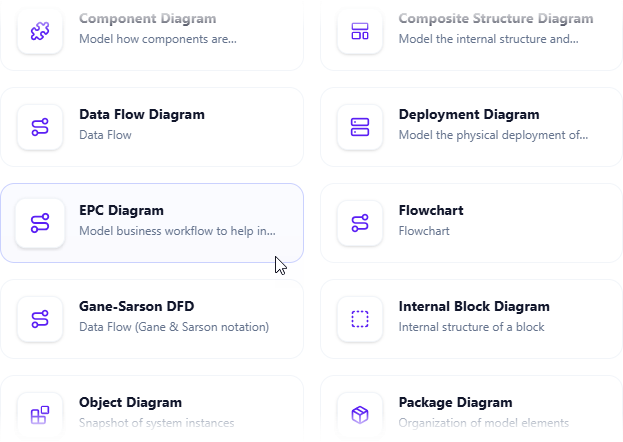
- AI के साथ आरेख बनाना शुरू करें: इससे आरेख संपादक विंडो खुलती है। आप तत्वों को खींचकर रखकर इसे हाथ से बना सकते हैं यदि आप इसका चयन करते हैं। AI का उपयोग करने के लिए: ढूंढें AI के साथ बनाएं संपादक विंडो के ऊपरी दाहिने कोने में और इसे क्लिक करें।
- अपनी समस्या का वर्णन करें और उत्पन्न करें: जो टेक्स्ट इनपुट क्षेत्र दिखाई देता है, अपने सिस्टम या परिदृश्य का स्पष्ट, विस्तृत वर्णन टाइप करें। क्लिक करेंउत्पन्न करें.
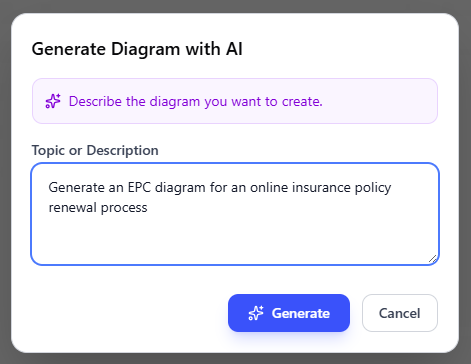
- चित्र की समीक्षा, सुधार और एम्बेड करें: AI तुरंत एक पेशेवर EPC चित्र उत्पन्न करता है।
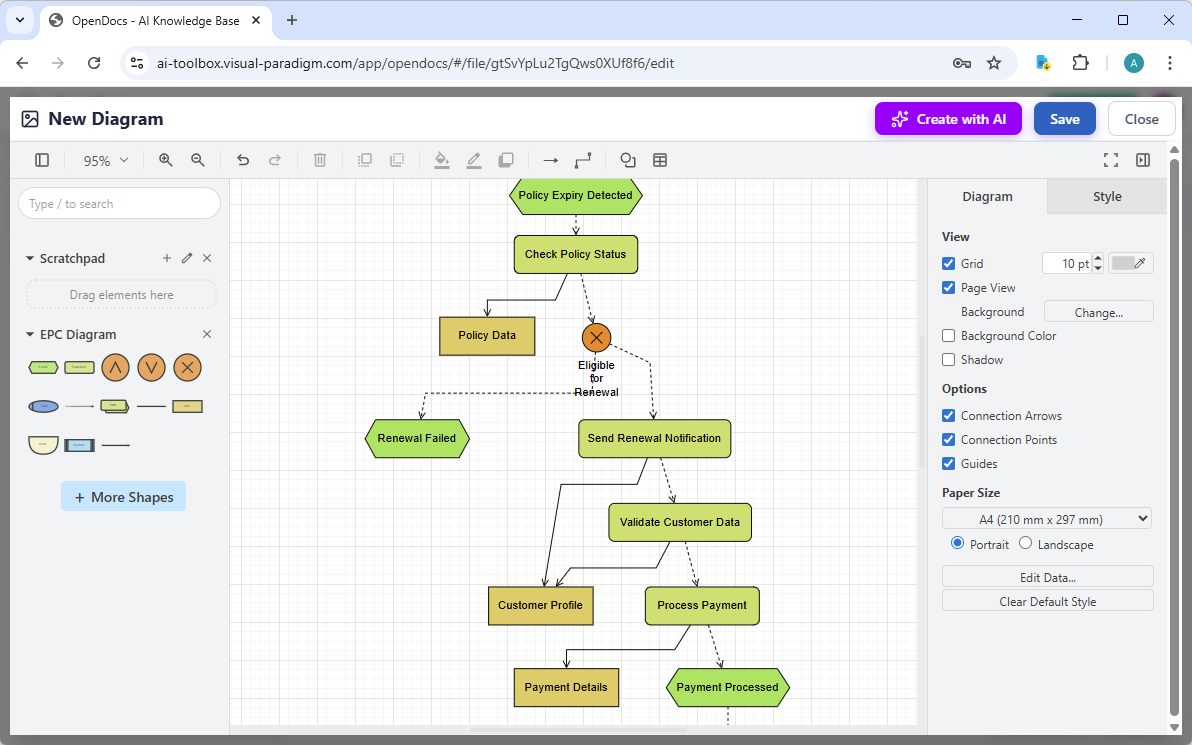
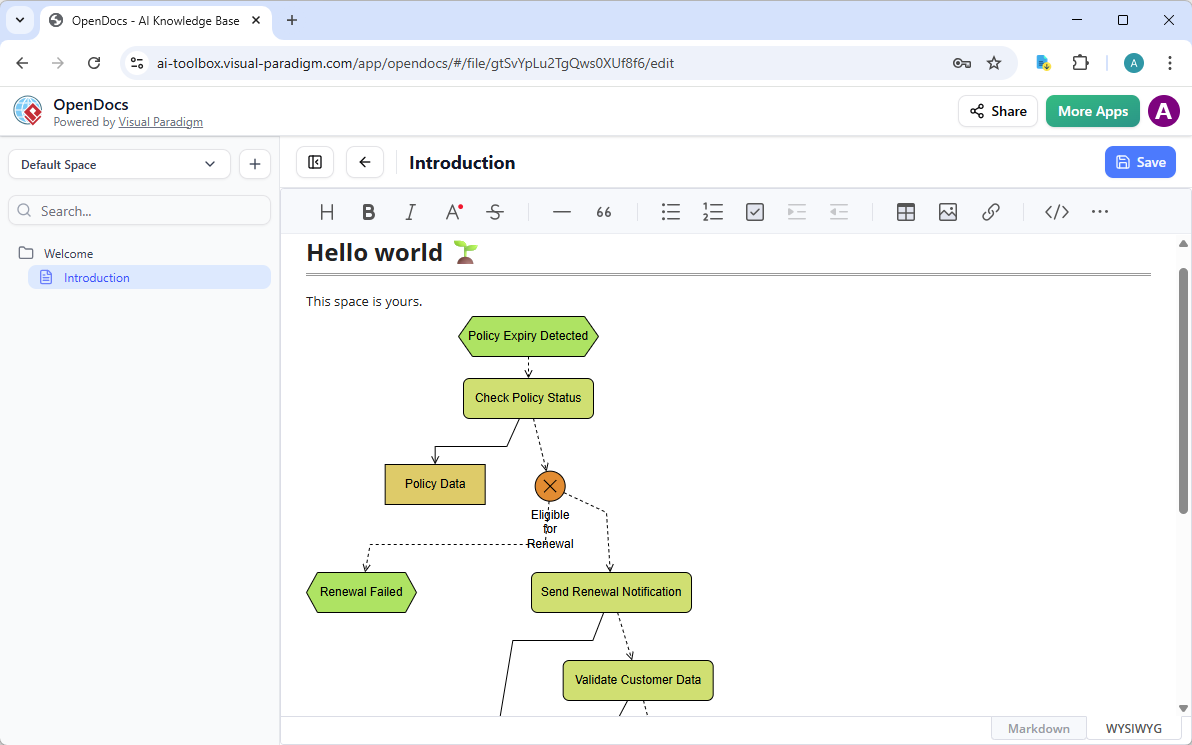
किसी भी चीज को सुधारने के लिए स्पष्ट ड्रैग-एंड-ड्रॉप संपादक का उपयोग करें: तत्वों को हटाएं, लेबल समायोजित करें, नोट जोड़ें, शैलियां बदलें, आदि। जब आप इससे संतुष्ट हों, तो क्लिक करेंसहेजें। फिर क्लिक करेंबंद करें। चित्र अब आपके OpenDocs पृष्ठ में एक लाइव, संपादनीय दृश्य ब्लॉक के रूप में सीधे एम्बेड कर दिया गया है। आप दस्तावेज को छोड़े बिना इसे लाइन में देख सकते हैं।
विजुअल पैराडाइग्म EPC चित्रों के लिए अंतिम AI चित्र उपकरण के रूप में क्यों उभरता है
बहुत सारे उपकरण “AI चित्र उत्पादन” का दावा करते हैं। अधिकांश एक बार के उत्पादन प्रदान करते हैं—प्रॉम्प्ट टाइप करें, छवि प्राप्त करें, तैयार। विजुअल पैराडाइग्म इससे आगे बढ़ता है।
हमारा पारिस्थितिकी तंत्र निम्नलिखित को मिलाता है:
- सच्चे AI एकीकरण के साथ सबसे व्यापक चित्र कवरेज (EPC और 100+ अन्य सहित)
- बहुआयामी कार्यप्रवाह: त्वरितता के लिए चैट, गहराई के लिए डेस्कटॉप, सहयोग के लिए दस्तावेज़, सुसंगतता के लिए मार्गदर्शित एप्लिकेशन
- वास्तविक ट्रेसेबिलिटी और सुधार—अस्थायी ड्राइंग्स नहीं, बल्कि एक जुड़े हुए, संपादनीय, निर्यात योग्य मॉडल
प्रतिद्वंद्वी आपको अलग करते हैं। यहां उत्पन्न करें, वहां संपादित करें, संदर्भ खो दें। हम सब कुछ जोड़ते हैं। घंटों बचाएं, त्रुटियां कम करें, टीम के लिए स्केल करें। आपके EPC चित्र प्रोफेशनल संपत्ति बन जाते हैं जो वास्तविक व्यापार प्रभाव के लिए तैयार हैं।
क्या आप अपने EPC चित्र प्रवाह को बदलने के लिए तैयार हैं?
विजुअल पैराडाइग्म बस एक और नहीं हैAI चित्र उत्पादक—यह AI-संचालित दृश्य मॉडलिंग के लिए पूर्ण प्लेटफॉर्म है। तत्काल EPC निर्माण से लेकर उद्यम स्तर के सुधार और सहयोग तक, हम हर पहलू को कवर करते हैं।
हाथ से उपकरणों के साथ लड़ना बंद करें। आज ही विजुअल पैराडाइग्म का प्रयोग करें और चित्रण के भविष्य का अनुभव करें। मुफ्त साइन अप करें, अपनी प्रक्रिया का वर्णन करें, और अपने पहले AI-उत्पादित EPC चित्र को देखें। आपके कार्यप्रवाह आपको धन्यवाद देंगे।