


Hey there, friends! Have you ever felt that tiny bit of panic when you need to explain how a complex computer system actually works? 🤯 It’s like trying to describe a dream while it’s still happening! You know all these pieces—like users, orders, and products—are moving around, but drawing them out on a blank screen feels totally overwhelming. Well, take a deep breath and relax, because we are entering a whole new world of creativity. The AI Object Diagram Generator from Visual Paradigm is here to be your best friend, turning your messy thoughts into beautiful, professional pictures in just a few heartbeats. It’s all about making your life easier and letting your big ideas shine without the stress of manual drawing.
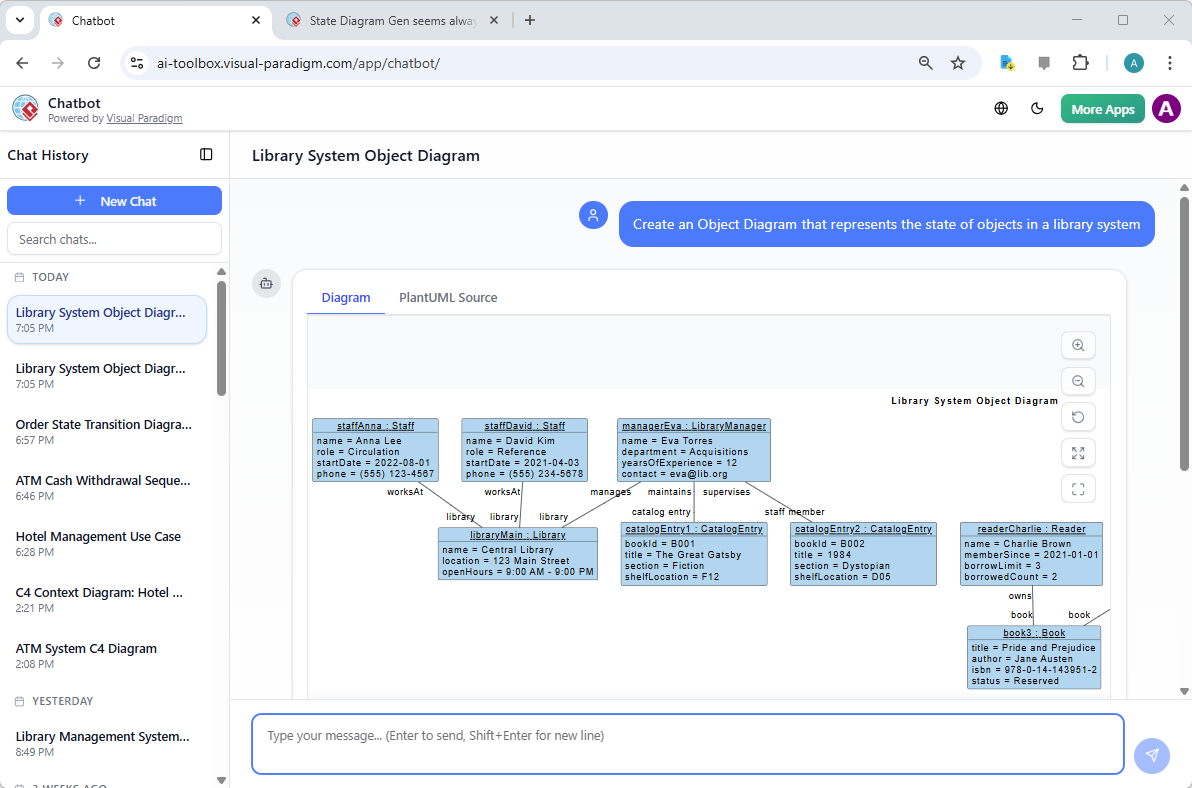
Imagine just telling a computer what’s on your mind and watching a perfect blueprint appear before your eyes. That’s the magic of an AI-powered visual modeling ecosystem. Whether you are a student just starting out or a pro designer, this tool feels like a warm hug for your workflow. It takes away the “blank canvas syndrome” and gives you a solid place to start. In the first image we’re looking at, you can see how the Visual Paradigm AI Chatbot is helping someone visualize a library system. The user simply asks for a diagram that shows how books and staff interact, and the AI does all the heavy lifting! It’s super chill and incredibly fast.
In this specific snapshot of the chatbot, the screen shows a friendly conversation where the user typed a simple request about a library. The AI didn’t just give back text; it created a full-blown UML Object Diagram! You can see little boxes representing “staffAnna,” “staffDavid,” and even a “managerEva.” It’s like a family tree for a computer system, showing who works where and how the library catalog connects to everything else. This best AI Object Diagram Generator understands the relationships between things, so you don’t have to worry about where the lines go. It just makes sense, right? ✨
Key Takeaways for Your Creative Journey
- No Stress Modeling: Turn simple English sentences into complex diagrams instantly without needing to be a tech genius.
- Huge Variety: Use the AI Object Diagram Generator or choose from over 40 other types of diagrams like Flowcharts and Mind Maps.
- Work Anywhere: Start a quick chat on your phone or browser, then bring it into the desktop app for the finishing touches.
- Professional Quality: The AI uses industry standards, so your work always looks like it was made by a top-tier expert.
- Total Flexibility: It’s a starting point that does 80% of the work, leaving you the fun 20% to customize and play with.
Chatting Your Way to Success with the AI Object Diagram Generator
You might be wondering, “Is it really that easy?” and the answer is a big, happy YES! 🌟 The easy-to-use AI diagramming app of Visual Paradigm Desktop works through a conversational interface. You don’t need to learn any weird codes or click a thousand buttons. If you can send a text message to a friend, you can use the AI Object Diagram Generator. This is so great for brainstorming when you’re in a hurry or when you just want to see if an idea actually works. It’s like having a super-smart assistant who never gets tired and always knows exactly what a “Sequence Diagram” or an “Object Diagram” should look like.
The second image shows us the more “pro” side of things inside the Visual Paradigm Desktop application. Even in this powerful software, the AI is right there to help you out. There’s a clean, simple popup window where you just pick the type of diagram you want—in this case, an “Object Diagram”—and type in your topic. The example here is an “online shopping system.” The user just wants to see a snapshot of how objects like customers and carts relate to each other. It’s so reassuring to know that you don’t have to start from scratch. You just give it a little nudge, and the professional AI-powered software takes it from there. No jargon, no headache, just pure productivity vibes!
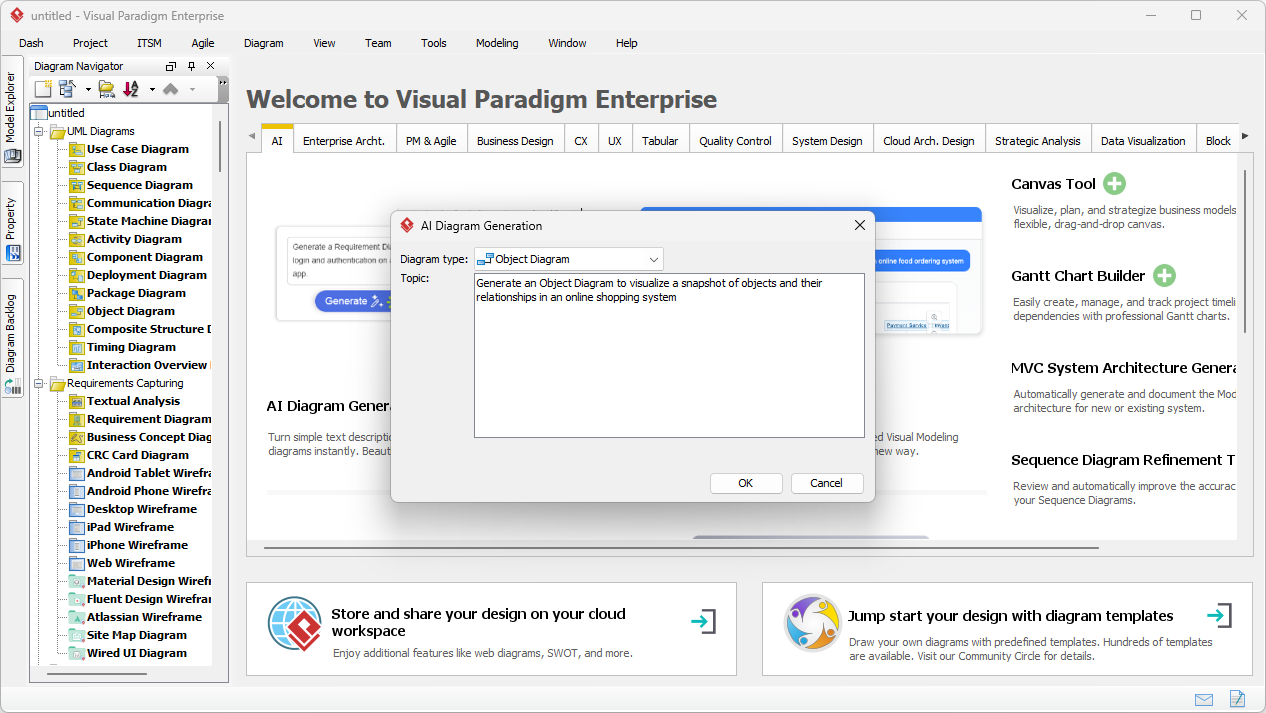
When you use the online AI Object Diagram Generator features within the desktop environment, you get the best of both worlds. You get the lightning-fast speed of artificial intelligence combined with the deep, robust tools that Visual Paradigm is famous for. Once the AI generates that initial draft, you can move things around, change colors, or add more details whenever you feel like it. It’s a very soothing process because you’re never “stuck.” The AI gives you a perfect foundation, and you get to be the architect who adds the final, beautiful details. It’s all about empowering you to do your best work without the burnout.
Turning Your Vision into a Professional Reality
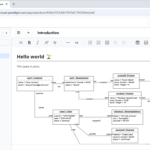
Now, let’s look at the result of all that magic! The third image shows the actual diagram that the AI created for the online shopping system. It’s honestly beautiful to look at. You see “Alice Johnson” as a customer, her “Order,” the “Wireless Headphones” she’s buying, and even the “Delivery Driver” named Mike Patel. Everything is connected with clear lines that explain the story of the purchase. This AI Object Diagram Generator isn’t just throwing boxes on a screen; it’s creating a logical map that anyone can understand. It even includes tiny details like the price of the product and the transaction ID! 🛍️
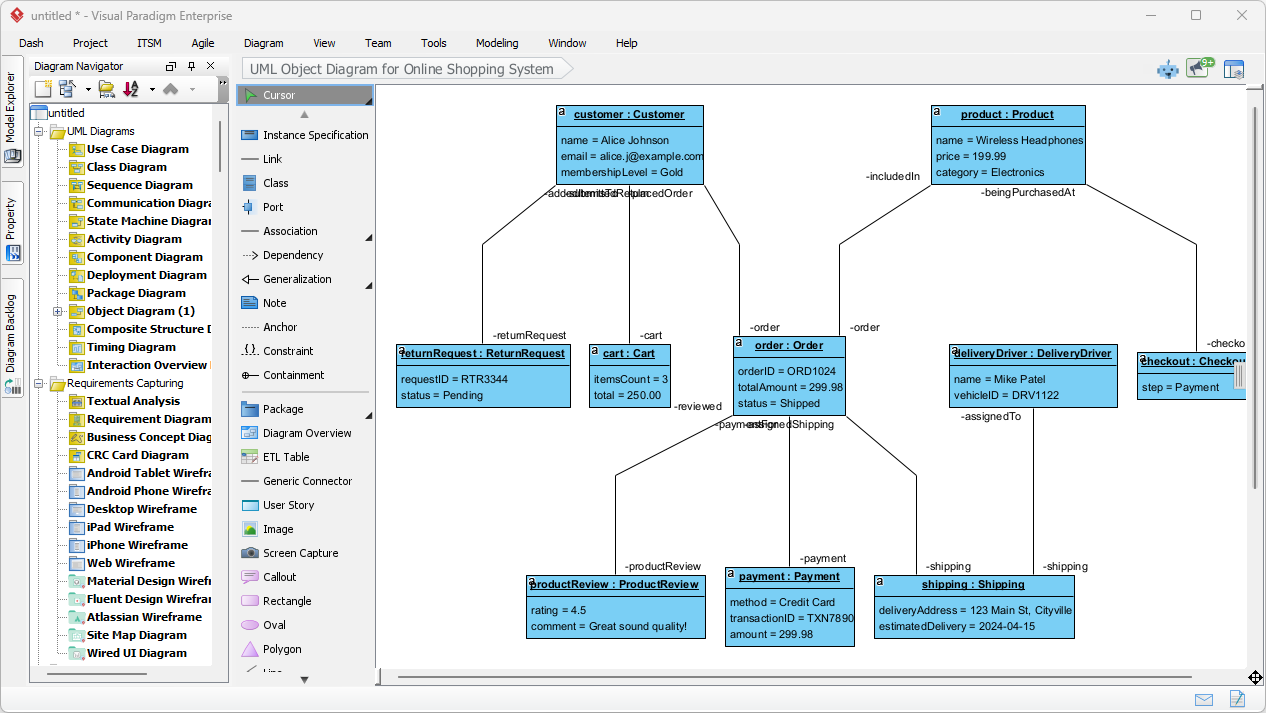
Isn’t it amazing how much information is packed into that one picture? This is what we call “visual modeling,” but you can just think of it as “storytelling for systems.” By seeing it all laid out like this, you can catch mistakes early or explain your plan to your team without any confusion. The AI Object Diagram Generator ensures that the layout is optimized and organized, so you don’t spend hours dragging boxes left and right just to make them look straight. It’s all about that “instant win” feeling that keeps you motivated and excited about your project. You’re not just making a diagram; you’re building a vision of the future.
Visual Paradigm has really thought of everything to make sure you feel supported. From the friendly chatbot to the powerful desktop tools, the best AI visual modeling software is always at your fingertips. It supports a massive range of diagrams—UML, SysML, ArchiMate, you name it! But at the heart of it all is the goal of making complex things simple. You don’t need to be afraid of technical requirements anymore. With the AI Object Diagram Generator, you have a partner that transforms your natural language into professional models in seconds. It’s a total game-changer for anyone who wants to communicate ideas clearly and beautifully.
Conclusion: Your Journey Starts Today!
We’ve seen how easy it is to go from a simple thought to a complete, professional diagram. Whether you are chatting with an AI assistant or using the desktop’s AI Object Diagram Generator, the process is designed to be calming, inspiring, and incredibly fast. You have the power to visualize anything from a library system to a global shopping empire without ever feeling lost. This is the transformation we’ve been waiting for—where technology works for us, helping us express our creativity and solve problems with a smile on our faces. 😊
So, what are you waiting for? There is a whole world of possibilities waiting for you to explore. Don’t let those big ideas stay trapped in your head. Let them out and watch them grow! You can start creating your own amazing visuals right now. It’s time to feel the joy of effortless design and see your projects come to life like never before. You’ve got this, and Visual Paradigm is here to help you every step of the way!
Ready to transform your ideas into reality? Experience the future of diagramming today! Hop over to Visual Paradigm and try the AI Object Diagram Generator for yourself. Just open the app, go to Tools > AI Diagram Generation, and let your creativity soar! 🚀
Related Links
- Learning Class Diagrams with Visual Paradigm – ArchiMetric: Class diagrams are a vital tool for modeling the structure of a system in object-oriented design. Visual Paradigm provides an easy-to-use platform for creating and managing class diagrams , making it an excellent choice for software developers …
- What is an Object Diagram in UML? A Complete Guide: This comprehensive guide explains the purpose, structure, and use cases of object diagrams in UML, illustrating how they depict instances of classes and their relationships at a specific point in time.
- Visual Paradigm User Guide: Object Diagrams: Official documentation from Visual Paradigm detailing how to create and use object diagrams within the Visual Paradigm modeling environment.
- Introduction to UML Diagrams in Visual Paradigm: An introductory overview of UML diagrams, including object diagrams, using the Visual Paradigm platform for visual modeling and system design.
- How to Draw Object Diagrams in Visual Paradigm: Step-by-step instructions on creating object diagrams in Visual Paradigm, covering tools, notation, and best practices.
- Class Diagrams vs Object Diagrams in UML: Key Differences: A clear comparison between class diagrams and object diagrams in UML, highlighting their roles, structures, and when to use each.
- What Is a Sequence Diagram? – A UML Guide: An introductory explanation of sequence diagrams in UML, covering their role in visualizing object interactions over time in software systems.
- Generate Class Diagram from ERD – Visual Paradigm Tutorial: Learn how to convert an ERD into a class diagram to support object-oriented design and development workflows.
Related posts:
 From Text to Code: How AI Generates a UML Package Diagram in Seconds
 Streamlining GourmetReserve App Design: Why Use Case Modeling Studio Beats Traditional UML Tools
 AI Component Diagram Generator: How Visual Paradigm Powers Your Modeling Workflow
 AI Object Diagram Generator: Unlock Instant UML Snapshots with Visual Paradigm