


You can instantly generate PlantUML, Mermaid, and Graphviz diagrams from natural language prompts using an online diagram-as-code tool like VPasCode. By typing a simple prompt—such as “Create a sequence diagram for a OAuth2 user login flow”—the integrated AI automatically generates the underlying DSL code and renders a live, editable diagram in seconds.

The Problem with Traditional Diagram-as-Code Tools
Text-to-diagram Domain Specific Languages (DSLs) like PlantUML and Mermaid are fantastic for developers, architects, and engineering teams. They allow you to store diagrams in Git repositories, track version changes, and avoid tedious manual shape alignment.
However, writing these scripts manually comes with a learning curve:
- Memorizing specific syntax rules across different formats (PlantUML vs. Mermaid vs. Graphviz).
- Troubleshooting cryptic syntax errors when an arrow or bracket is placed incorrectly.
- Wasting time looking up documentation just to add a simple sequence or branch.
With recent advances in generative AI, you no longer need to write these scripts line-by-line from scratch. A modern diagram-as-code editor can write the code for you while keeping the output fully editable and version-controllable.
Step-by-Step: Generating PlantUML and Mermaid Diagrams with AI
To follow along, open the free VPasCode Diagram Editor in your web browser. No installation or initial setup is required.
Step 1: Open the AI Generation Dialog
Navigate to the top toolbar of the VPasCode editor and click the AI Generate button. This will launch the prompt window.
Step 2: Choose Your Format (Or Use Auto-Detect)
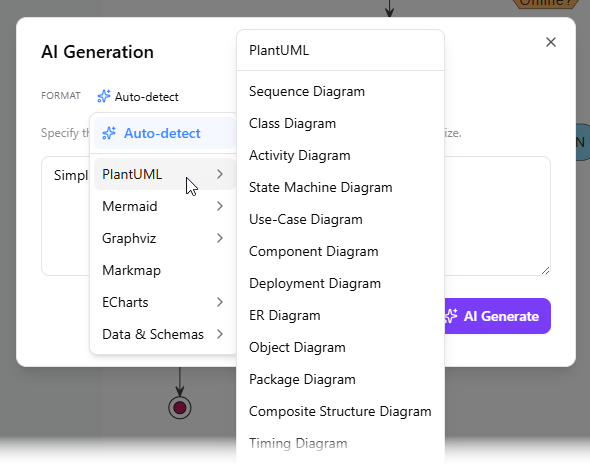
VPasCode features a smart format selection combo box at the top of the dialog. You can:
- Leave as Auto-detect (Default): Let the AI choose the best visualization format based on your prompt.
- Select Manually: Choose a specific format if your team strictly relies on one tool:
- PlantUML: Sequence, Class, Activity, Component, State, C4 Model, ERD, WBS, Gantt, etc.
- Mermaid: Flowchart, Sequence, Mind Map, ERD, State, Git Graph, User Journey, etc.
- Graphviz / Markmap / ECharts: For complex graph networks, dynamic mind maps, or data charts.
Step 3: Enter Your Plain-English Prompt
In the text box below the format selector, describe the system, process, or architectural workflow you wish to visualize. Be as general or detailed as you like.
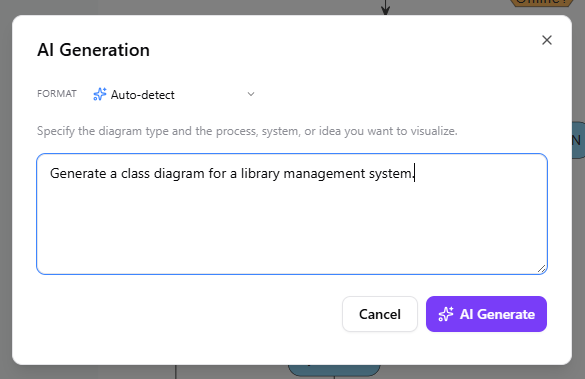
Example Prompts:
- “Generate an AI PlantUML tool sequence diagram showing a microservice user authentication flow with JWT tokens, refresh tokens, and database validation.”
- “Create a Mermaid flowchart representing an e-commerce order processing system with payment approval, inventory check, and failure rollback branches.”
- “Build a C4 container diagram for a cloud-based video streaming architecture.”
Step 4: Click ‘AI Generate’ & Review Your Live Diagram
Click the AI Generate button. VPasCode will write the exact DSL script directly into the code panel on the left and render the live visual model instantly on the right preview window.
Modifying Existing Diagrams with AI
Generating a diagram is only half the battle. When system architecture evolves, editing code manually can still be time-consuming. VPasCode solves this with built-in AI Diagram Code Modification.
- Click the AI button above the code editor panel on the left side and select Modify.
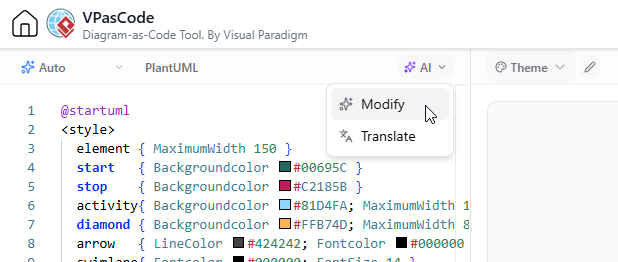
- Enter your instruction in natural language (e.g., “Add an email notification service after payment confirmation” or “Simplify this sequence diagram into high-level steps”).
- Click AI Modify. Your diagram script will update automatically.
- Optionally click View Details to launch a side-by-side code diff and visual comparison page to inspect exact changes before saving.
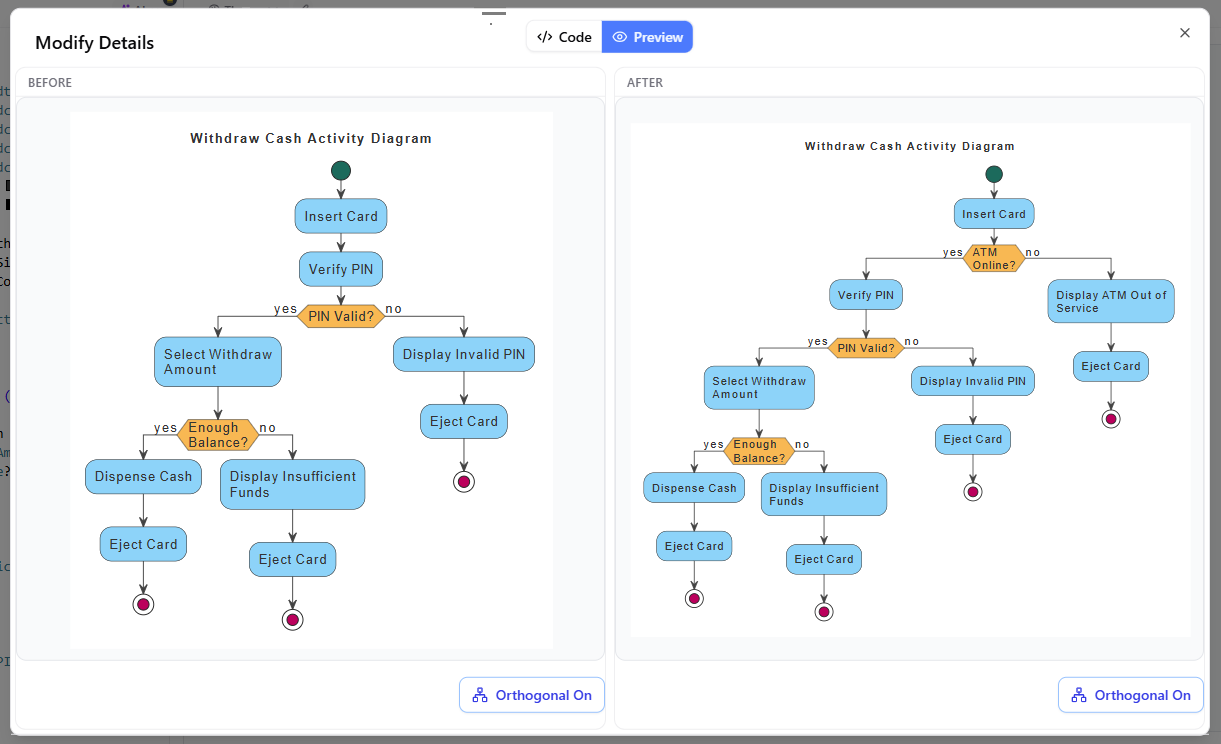
For more details on these new capabilities, read our full VPasCode AI Feature Release Announcement.
Why VPasCode is the Best Online Diagram-as-Code Tool
| Feature | Traditional Tools | VPasCode Editor |
|---|---|---|
| Creation Method | Manual drag-and-drop or manual script coding | Instant AI prompt-to-code generation |
| Format Support | Single format (Only PlantUML or only Mermaid) | Multi-DSL (PlantUML, Mermaid, Graphviz, D2, Markmap, ECharts, SQL) |
| Format Detection | Manual switching required | Automatic format detection upon paste or generation |
| Refactoring & Editing | Manual code edits | Natural language AI modifications with visual code diff |
| Export Options | Basic PNG | High-res PNG, Scalable Vector SVG, PDF, and live shareable URLs |
Frequently Asked Questions (FAQ)
1. What is an AI PlantUML tool?
An AI PlantUML tool allows you to input natural language instructions (like explaining a software architecture or sequence flow) and automatically converts that text into valid PlantUML script code, rendering the resulting diagram instantly.
2. Do I need to pay to use VPasCode as an online diagram-as-code editor?
No, the core VPasCode platform—including code editing, automatic format detection, real-time visual rendering, link sharing, and SVG/PNG exports—is free to use. Premium AI capabilities and documentation integrations are available with Visual Paradigm subscription plans.
3. Can I export the code generated by the AI to use in my own IDE or Git repository?
Yes! VPasCode generates clean, standard DSL code (PlantUML, Mermaid, Graphviz, etc.). You can copy the code directly out of the editor and commit it to your GitHub/GitLab repositories or documentation pages.
Start Generating Diagrams with AI Today
Eliminate blank-canvas friction and stop wrestling with complex DSL syntax. Visit the VPasCode Diagram Editor now to turn your ideas into clean, professional diagrams in seconds!
To explore the complete feature set, check out the VPasCode Overview Page.