
AI C4 System Landscape Diagram Generator: How Visual Paradigm Makes It Effortless
Creating a C4 system landscape diagram can feel overwhelming. You need to map out multiple software systems, their relationships, and the bigger picture across an organization—without losing clarity or spending hours on manual drawing. That’s where an AI diagram generator changes everything.
Visual Paradigm stands out as the leading AI diagram tool for C4 models. With support since 2002 for UML and all kinds of visual modeling, we’ve built a full ecosystem around AI-powered diagramming. Our four platforms work together so you can generate, refine, collaborate on, and maintain professional C4 system landscape diagrams from any angle. Whether you’re after the best AI tool for creating C4 diagrams or a free online option to get started, we’ve got you covered.
In this guide, you’ll see exactly how each platform helps with C4 system landscape diagrams—and why combining them gives you an unbeatable end-to-end workflow.
VP Desktop: Professional Power for AI-Driven C4 System Landscape Diagrams
VP Desktop is our flagship tool. It’s built for serious modeling where precision matters most.
Here, AI diagram generation kicks in right inside a robust desktop environment. Describe your systems in natural language, and the AI generates a solid starting point for your C4 system landscape diagram. Then switch to advanced editing: add traceability links, organize elements into hierarchies, enforce consistency across levels, and integrate with code engineering or team repositories.
Real-world example: You’re documenting an enterprise IT estate with banking apps, payment gateways, and external services. The AI quickly sketches the high-level landscape showing how everything connects. You refine relationships, attach notes for stakeholders, and export to reports or code—all offline with full control. No other AI-powered diagram software blends instant generation with this depth of professional features. It’s perfect when your C4 system landscape diagram needs to scale into detailed container or component views later.
Key perks include version control integration, custom stereotypes, and export options that keep your models implementation-ready. If you’re tired of tools that generate pretty pictures but fall apart under real project pressure, VP Desktop delivers.
How to Generate a C4 System Landscape Diagram with AI in VP Desktop
- From the main menu, select Tools > AI Diagram Generation. This opens the AI Diagram Generation window.
- In the window, choose your desired diagram type from the dropdown list. In this case, C4 Model.
- Select System Landscape for Diagram.
- In the text area, describe your project, problem, system, or scenario.
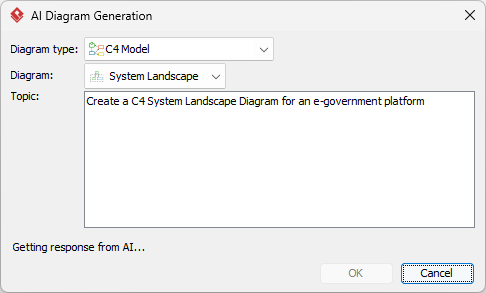
- Click OK to start the generation.
- The AI will create the diagram automatically.
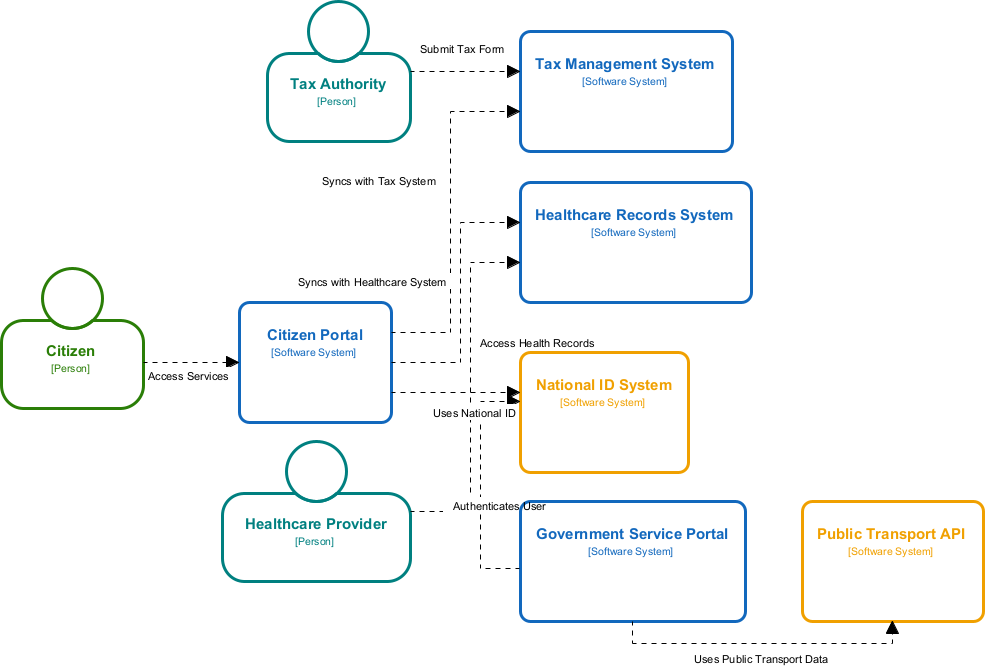
It appears as a fully editable, native Visual Paradigm diagram (not just an image). You can now:
- Edit elements, relationships, layout, or properties
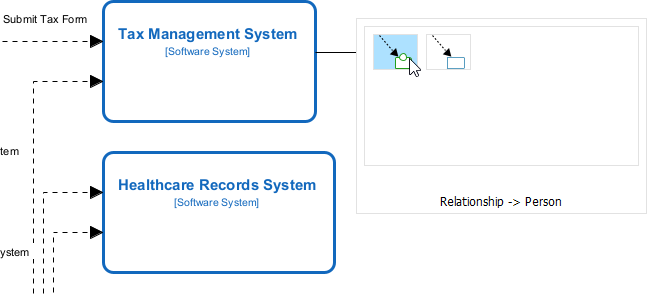
- Add more details manually
- Export as image (PNG, SVG, etc.), PDF, or use in reports
- Generate code or documentation if applicable
- Edit elements, relationships, layout, or properties
Web Apps: Guided AI-Powered C4 PlantUML Studio for Methodical Creation
Our Web Apps deliver specialized, browser-based tools with structured guidance. The standout for C4 work is the AI-Powered C4 PlantUML Studio – an online AI diagram generator tailored for software architecture. It uses AI to generate complete, hierarchical C4 diagrams (Context, Container, Component) plus supporting views like Sequence and Deployment directly from a plain-language problem statement or project description, producing valid PlantUML code with live previews for instant refinement and iteration.
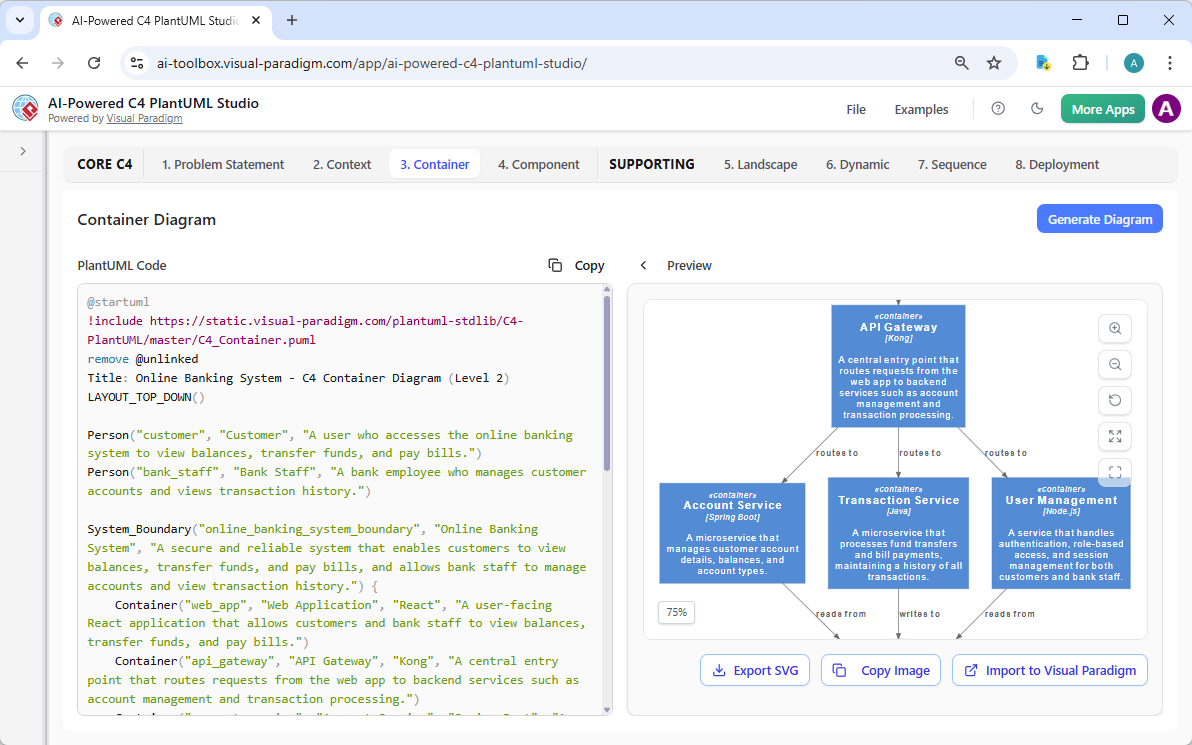
Learn more about AI-Powered C4 PlantUML Studio
Why Visual Paradigm Stands Out as the Best AI Tool for C4 Diagrams
Plenty of tools claim AI diagram magic. Most stop at one-shot generation—pretty but isolated, hard to refine, no real traceability.
Visual Paradigm is different. Our four platforms form a complete ecosystem:
- Widest coverage for C4 and beyond, with true AI integration across workflows.
- Seamless handoff: Generate in chat or web, refine in desktop, embed in OpenDocs.
- Real traceability and refinement: Models stay connected, professional, and ready for code or reports—not throwaway sketches.
- Scalability for teams: Collaboration, versioning, exports, and standards compliance built-in.
Competitors often force you into silos. We give you flexibility: quick chat for ideas, guided web for structure, desktop for depth, docs for sharing. That saves time, cuts errors, and scales from solo prototypes to enterprise architectures.
We’ve supported visual modeling for over two decades. Now with AI, we’re the ultimate choice for anyone searching for an AI platform for visual modeling and diagramming—especially C4 system landscapes.
Other C4 Diagrams
Want to see Visual Paradigm’s AI in action for C4 modeling? Check out the pages below to learn more about how our AI-Powered tools let you generate professional C4 diagrams instantly from plain text descriptions:
- C4 System Context Diagram
- C4 Container Diagram
- C4 Component Diagram
- C4 Landscape Diagram
- C4 Dynamic Diagram
- C4 Deployment Diagram
Start creating full C4 model suites in minutes – no manual drawing required!
Ready to Transform Your C4 Diagramming?
Stop wrestling with manual tools or half-baked generators. Visual Paradigm delivers the full package: fast AI creation, professional editing, collaborative sharing, and traceable models that actually help your projects succeed.
Try it today. Jump into the AI-Powered C4 PlantUML Studio, chat with our modeling assistant, or download VP Desktop for the complete experience. See for yourself why teams choose us as their best AI tool for creating C4 diagrams.
Get started with Visual Paradigm now and experience the future of AI diagramming.