


Connecting complex ideas and illustrating the relationships between different pieces of information is fundamental to effective learning and strategic planning. However, building these bridges manually can often lead to cluttered layouts and fragmented logic. Visual Paradigm’s AI concept map generator simplifies this process, allowing you to transform abstract thoughts into structured, visual knowledge maps using natural language.
As a core component of our AI diagram generator ecosystem, this tool is designed to help educators, students, and researchers visualize mental models instantly. By using our AI concept map tool, you can focus on the core logic of your subject matter while the AI handles the complex task of organizing nodes and defining linking phrases.
OpenDocs: The Leading Pillar for AI Concept Map Integration
We are thrilled to announce that OpenDocs is the primary platform within the Visual Paradigm suite to feature the AI concept map generator. OpenDocs allows you to embed these intelligence-driven maps directly into your documentation, wikis, and study guides, ensuring that your knowledge base is both interactive and easy to navigate.
While the AI concept map generator is currently highlighted within the OpenDocs environment, it represents our ongoing commitment to smarter modeling across all pillars. This integration ensures that your conceptual frameworks are not just static images, but dynamic assets that evolve alongside your project documentation.
How to Create a Concept Map with AI in OpenDocs
Visualizing relationships in OpenDocs is a streamlined experience. Follow these steps to use the AI concept map tool:
- Open the Editor: On your OpenDocs page, click the + (Plus) icon located on the top bar of the editor.
- Choose Category: Select Concept Map from the category list on the left.
- Access AI Features: Select the Concept Map option and then click the Create with AI button at the top right of the dialog.
- Describe Your Subject: Enter the central theme or a description of the relationships (e.g., “The relationship between photosynthesis, cellular respiration, and the carbon cycle”).
- Generate and Refine: Click Generate. The AI will build the map with appropriate linking words. You can then use the editor to adjust the hierarchy, change styles, or add new cross-links.
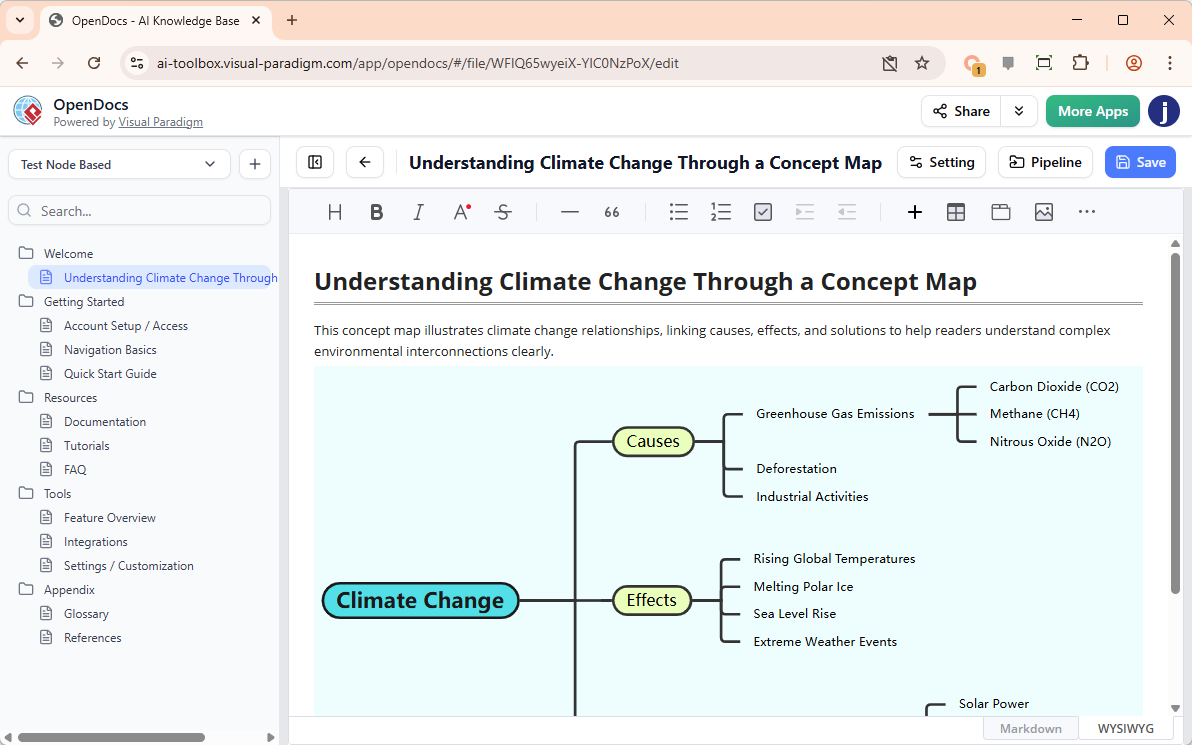
- Embed: Click Save to insert the completed concept map directly into your document.
Key Benefits of Our AI Concept Map Generator
- Rapid Knowledge Modeling: Move from a complex topic to a visual map in seconds using the AI concept map generator.
- Standardized Linking: The AI concept map tool automatically suggests linking phrases to clarify the nature of relationships between concepts.
- Improved Retention: Enhance your documentation by providing visual summaries that make difficult subjects easier for readers to grasp.
- Seamless Document Integration: Edit and update your maps directly within your OpenDocs environment without needing to switch between different applications.
The Future of AI Knowledge Mapping
Visual Paradigm is dedicated to expanding the AI diagram generator capabilities across our entire product line. While OpenDocs is currently the home for the AI concept map generator, we are working to bring this level of automated intelligence to every modeling pilar we offer. Our mission is to provide an AI concept map tool that makes the organization of ideas effortless for everyone.
To explore our full range of AI-powered modeling features, visit our AI Diagram Generation landing page.
Ready to visualize your ideas with AI?
Unlock the potential of the AI concept map generator in OpenDocs and start building smarter knowledge maps today.