


Drawing a clear, accurate Kubernetes architecture diagram by hand is painful. Nodes, control plane components, pods, services, ingress, storage classes, autoscaling rules, network policies… the list goes on, and the relationships are complex. Many teams end up with inconsistent sketches or generic icons that don’t reflect reality. What if you could describe your desired Kubernetes cluster in plain language and instantly receive a clean, standards-aligned, multi-cloud-capable diagram you can refine and share?
Visual Paradigm’s AI Cloud Architecture Studio does exactly that — and it’s currently the dedicated home for AI-powered Kubernetes architecture diagram generation in our ecosystem.
Visual Paradigm – Comprehensive AI Diagram Ecosystem
Since 2002 Visual Paradigm has been one of the most complete visual modeling platforms, supporting 100+ diagram types (UML, SysML, ArchiMate, BPMN, C4, cloud architecture, network diagrams and more). Our modern AI-powered ecosystem consists of four tightly connected platforms:
- VP Desktop – professional offline modeling with advanced editing, traceability, code engineering
- OpenDocs – dynamic documents with live, editable embedded diagrams
- AI Visual Modeling Chatbot – conversational diagram creation and refinement
- Web Apps – guided, browser-based studios including specialized AI generators
For most diagram types you can start in any of these entry points and move fluidly between them. Kubernetes architecture diagrams are currently a specialized case: generation and interactive editing are handled primarily through our dedicated AI Cloud Architecture Studio web application. This focused tool delivers best-in-class results for cloud-native infrastructure — especially Kubernetes — while still sitting inside the broader Visual Paradigm family.
AI Cloud Architecture Studio – Your Kubernetes Diagram Powerhouse
The AI Cloud Architecture Studio is a browser-based, AI-first application built specifically for designing and visualizing modern cloud infrastructure, with excellent Kubernetes support.
How it works for Kubernetes
- Natural language input
Write something like:
“I want to build a real-time food delivery app that connects customers, restaurants, and drivers, with live order tracking, payments, and ratings.” - Choose provider(s) & strategy
Select Kubernetes, then pick an architecture goal: High Availability, Low Cost / MVP, Enterprise Grade, Edge Optimized… - AI asks clarifying questions
“Which deployment strategy do you prefer for ensuring high availability across failure domains while minimizing latency and cost?”
“For real-time tracking (e.g., order status updates via WebSockets or MQTT), what is your preferred approach to handle scalability and reliability of the messaging layer?”
“What is your preferred strategy for cost optimization in the Kubernetes cluster, particularly for workloads with variable demand?” - Instant diagram generation
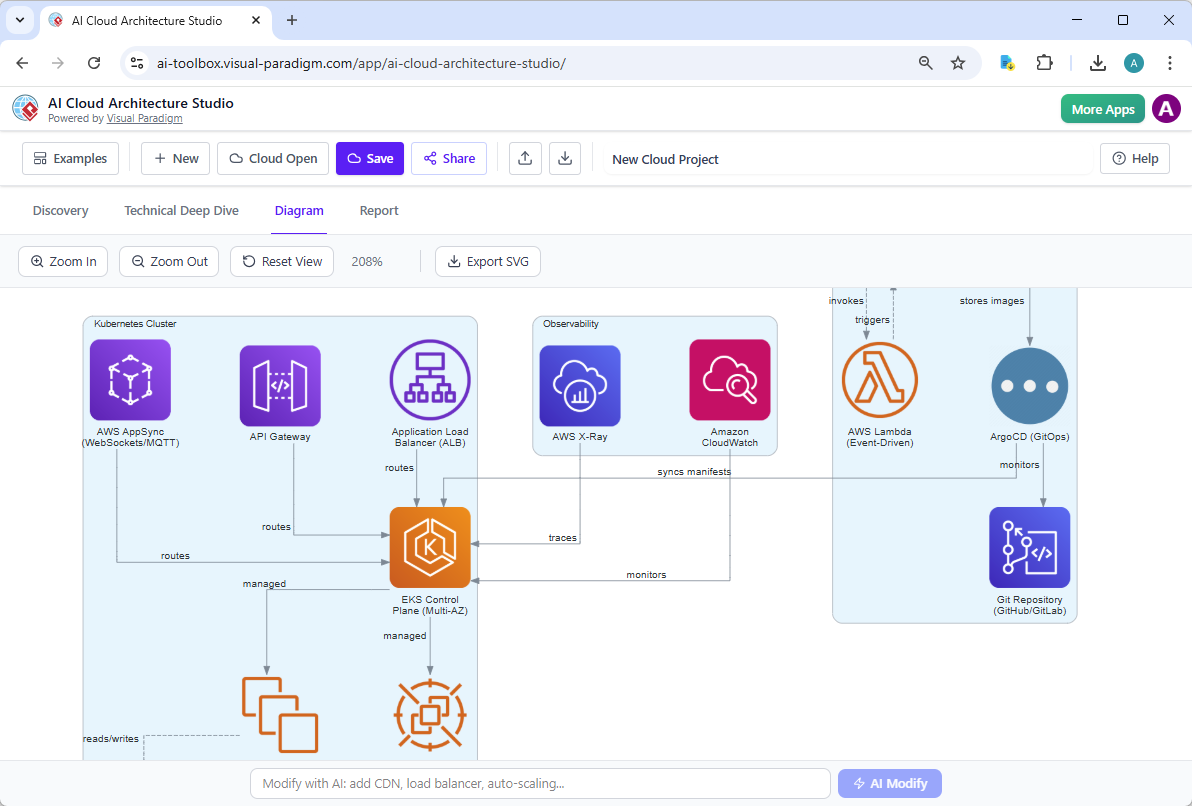
- Interactive refinement with AI
Not quite right? Just tell the AI:
• “Add a Web Application Firewall in front of the Ingress”
• “Make the Redis cluster multi-zone with 3 replicas”
• “Show network policies isolating the payment namespace”
• “Switch the monitoring to Grafana Alloy + Loki”
The diagram updates intelligently. - Save, share, export
Projects are saved in the cloud. Share links with teammates. Export clean SVG for docs, slides, Confluence, Notion, etc.
Who benefits most from this Kubernetes workflow?
- Cloud / Solution architects comparing EKS vs GKE vs AKS deployments
- Platform engineers documenting reference architectures
- DevOps leads creating golden-pattern diagrams for teams
- Consultants preparing client proposals quickly
- Developers who need to understand / communicate the infra their app runs on
Why Choose Visual Paradigm for Kubernetes Architecture Diagrams?
- Real natural-language input — no need to know exact icon names or YAML structure
- Multi-cloud & hybrid Kubernetes support (EKS, AKS, GKE, kind, k3s, on-prem…)
- Architecture strategy guidance (cost vs HA vs security-first…)
- Iterative AI modifications — change your mind without starting over
- Professional output — clean, consistent layouts ready for enterprise documentation
- Part of a mature modeling platform — not a standalone toy generator
Get Started Today
If you need high-quality Kubernetes architecture diagrams fast — without fighting drawing tools or wrestling with generic AI image generators — try the AI Cloud Architecture Studio inside Visual Paradigm.
Describe your cluster once. Get a production-grade diagram in minutes. Refine it with conversation. Export it. Embed it. Scale the practice across your team.
Open AI Cloud Architecture Studio →
(Free trial available – no credit card required to start exploring)