Focusing on time constraints and state changes over a specific timeline.
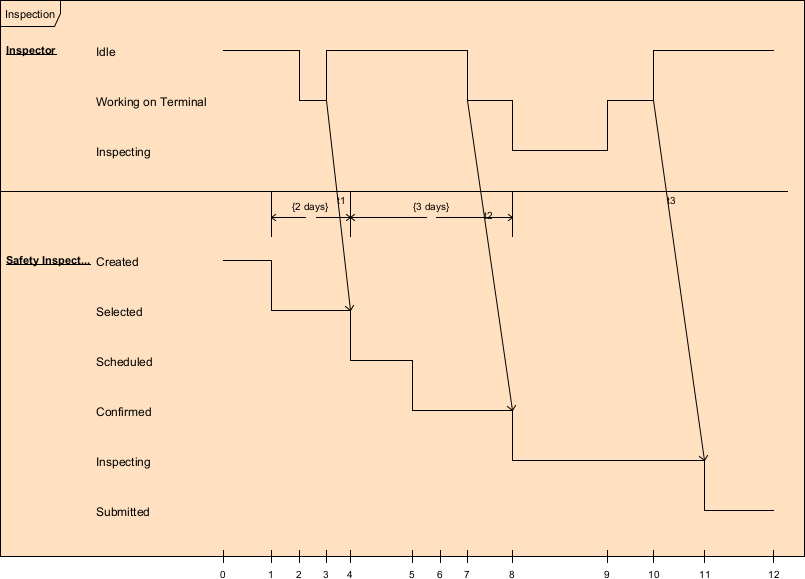
Timing diagrams in UML 2.5 are specialized behavioral diagrams designed to model precise temporal aspects of system behavior—particularly state changes, value changes, or condition durations over a continuous or discrete timeline. Unlike sequence diagrams (which show discrete message ordering) or state machines (which focus on event-triggered transitions), timing diagrams emphasize time as the primary axis: how long states persist, when transitions must occur, deadlines, periods, jitter, response times, and timing constraints.
Key elements of timing diagrams:
- Lifeline — Horizontal line for each participant (object, role, component, system, or signal).
- Timeline — Horizontal axis representing time (continuous or discrete ticks).
- State/Condition Timeline — Thick line segment showing duration of a state or value (e.g., solid for “Heating”, dashed for “Idle”).
- Transition — Vertical line or slanted arrow between state changes, labeled with event or trigger.
- Time Constraint — {duration} notation (e.g., {t ≤ 50ms}, {response < 200ms}, {period = 1s ± 10ms}).
- Duration Constraint — Between two points on timeline, e.g., {d} or {min..max}.
- Time Mark — Vertical dashed line labeled t0, t1, etc., for reference points.
- Value Change — Can show variable values over time (e.g., temperature rising from 20°C to 25°C).
- Compact vs. Robust notation — Compact (state line with changes) or robust (explicit state regions).
Timing diagrams are especially valuable in:
- Real-time and embedded systems
- Performance-critical applications
- Protocols with strict timing
- Hardware-software co-design
- Systems with QoS requirements (latency, throughput, jitter)
- Validating SLAs or regulatory timing rules
In Agile & use-case-driven projects, they are used sparingly but powerfully—typically for high-risk timing aspects identified during use case elaboration or architectural spikes.
Practical Examples of Timing Diagrams in Real Projects
Here are numerous concrete examples showing timing diagrams modeling time-sensitive behavior:
- E-commerce – Payment Gateway Response Time SLA
- Lifelines: :CustomerApp, :PaymentService, :ExternalGateway Timeline: t0 = payment request sent
- CustomerApp: Processing (t0 to t0+500ms)
- PaymentService: Authorizing (t0 to t0+200ms) → WaitingForGateway (t0+200ms to t0+800ms)
- ExternalGateway: Idle → Processing (t0+300ms to t0+700ms) → Approved Constraints: {response time ≤ 1000ms} from t0 to approval {gateway latency ≤ 500ms} Practical benefit: Visualizes end-to-end latency budget; used to set timeouts and retry policies.
- Mobile Banking – Transaction Authorization Timeout
- Lifelines: :MobileApp, :AuthService, :CoreBanking Timeline: t0 = transfer initiated
- MobileApp: AwaitingOTP (t0 to t0+120s)
- AuthService: OTPGenerated → OTPValid (t0 to t0+300s)
- CoreBanking: Pending → Executed (only if OTP validated within 60s) Constraint: {OTP validity = 120s} Transition at t0+60s: [no OTP entered] → Timeout / cancelTransaction() Practical: Ensures security window is enforced; helps test timeout edge cases.
- Ride-Sharing – ETA Calculation & Real-Time Updates
- Lifelines: :DriverApp, :MatchingService, :RiderApp Timeline: t0 = ride accepted
- DriverApp: EnRoute (t0 → t_end) with periodic location updates every 5s ± 1s
- MatchingService: CalculatingETA (t0 to t0+2s) → StableETA (t0+2s onward)
- RiderApp: ShowingETA (updates every 10s) Constraint: {ETA refresh ≤ 10s} {jitter ≤ 2s} Practical: Exposes acceptable delay for user experience; guides WebSocket heartbeat frequency.
- Healthcare – Defibrillator Response in Cardiac Arrest
- Lifelines: :MonitorDevice, :Defibrillator, :Patient Timeline: t0 = arrhythmia detected
- MonitorDevice: Monitoring → ShockAdvisory (t0 to t0+5s)
- Defibrillator: Standby → Charging (t0+5s to t0+8s) → ReadyToShock
- Patient: Fibrillating → NormalRhythm (after shock at t0+10s ± 2s) Constraint: {time to shock ≤ 10s} {charge time ≤ 3s} Practical: Critical for device certification (IEC 60601); used in safety analysis.
- IoT Smart Thermostat – Temperature Control Loop
- Lifelines: :ThermostatController, :TemperatureSensor, :Heater Timeline: t = continuous
- TemperatureSensor: Reading (oscillating 19–21°C)
- ThermostatController: Idle → Heating (when temp < 20°C – 0.5°C hysteresis)
- Heater: Off → On (duration until temp ≥ 21°C) Constraint: {overshoot ≤ 1°C} {settling time ≤ 5min} {cycle period ≈ 10min} Practical: Models PID-like control loop timing; validates energy efficiency claims.
- Real-Time Stock Trading – Order Matching Latency
- Lifelines: :TraderGateway, :MatchingEngine, :MarketDataPublisher Timeline: t0 = order arrives
- TraderGateway: Received → Forwarded (t0 to t0+2ms)
- MatchingEngine: Queued → Matching (t0+2ms to t0+5ms) → Executed
- MarketDataPublisher: UpdateSent (within t0+10ms) Constraint: {end-to-end matching ≤ 5ms} {market data update ≤ 10ms} Practical: Regulatory requirement visualization; used in performance budgeting.
- Automotive – Adaptive Cruise Control Reaction
- Lifelines: :RadarSensor, :ACCController, :ThrottleActuator, :BrakeActuator Timeline: t0 = lead vehicle slows
- RadarSensor: Detecting → RangeDecreasing
- ACCController: Maintaining → Decelerating (t0+50ms)
- ThrottleActuator: Open → Closing (t0+100ms)
- BrakeActuator: Inactive → LightBraking (t0+200ms if needed) Constraint: {reaction time ≤ 200ms} {deceleration ramp ≤ 3m/s²} Practical: ISO 26262 safety timing analysis; shows coordinated actuator response.
- Embedded Device – Watchdog Timer Reset
- Lifelines: :Application, :WatchdogTimer Timeline: t = continuous
- Application: Running → Stalled (if no kick within 500ms)
- WatchdogTimer: Armed → Timeout (after 500ms) → ResetSystem Constraint: {kick interval ≤ 400ms} {tolerance ±50ms} Practical: Ensures system recovery from hangs; critical for reliability in field devices.
In Visual Paradigm:
- Create horizontal lifelines and drag state/condition segments.
- Add time constraints with curly braces {…}.
- Use compact mode for simple state changes or robust for detailed durations.
- Annotate with time marks (t0, t1) and duration markers.
- Simulate timing to verify constraints.
- Semantic backplane links timing constraints to state machines, sequence messages, or requirements.
Timing diagrams are the precision instrument for time-critical behavior—making deadlines, latencies, periods, and jitter explicit and verifiable. They complete the set of 7 behavioral diagrams, equipping you to model both high-level orchestration and microsecond-level timing constraints.
With the heartbeat of behavior fully covered, you’re ready for Module 5: Agile Architecture and Implementation Workflows, where we connect everything to code, patterns, and iterative delivery.