


Imagine you are tasked with designing the data architecture for a next-generation social media platform. You sit before a blank screen, knowing you must account for intricate relationships between users, posts, comments, likes, and notifications. The pressure to ensure data integrity while meeting a tight development deadline is immense. Traditionally, this would require hours of manual drafting and cross-referencing requirements. However, the best AI ERD generator has fundamentally changed this narrative. By leveraging the advanced AI-powered database modeling software within Visual Paradigm, architects can now transform complex system descriptions into professional, production-ready Entity Relationship Diagrams (ERDs) in mere seconds.
This technological leap does not just draw boxes and lines; it understands the semantic relationships of your business logic. In the following sections, we will explore how Visual Paradigm’s desktop and web-based ecosystems utilize generative AI to streamline the most tedious aspects of database design, allowing engineers to focus on high-level optimization rather than manual drawing. Whether you are working offline in a robust desktop environment or utilizing a guided cloud-based wizard, the goal remains the same: accelerating database design without sacrificing technical precision.
Key Takeaways for Modern Database Architects
- Instant Visualization: Convert natural language descriptions into fully editable ERDs and UML diagrams instantly.
- End-to-End Workflow: Seamlessly transition from a conceptual problem description to a normalized SQL schema.
- Hybrid Accessibility: Access AI modeling tools via a powerful desktop application or a specialized web-based AI assistant.
- Error Reduction: Utilize AI to identify primary keys, foreign keys, and associative entities, minimizing manual rework.
- Professional Standards: Support for industry-standard notations including Chen, Crow’s Foot, and IDEF1X.
Unleashing the AI ERD Generator in Visual Paradigm Desktop
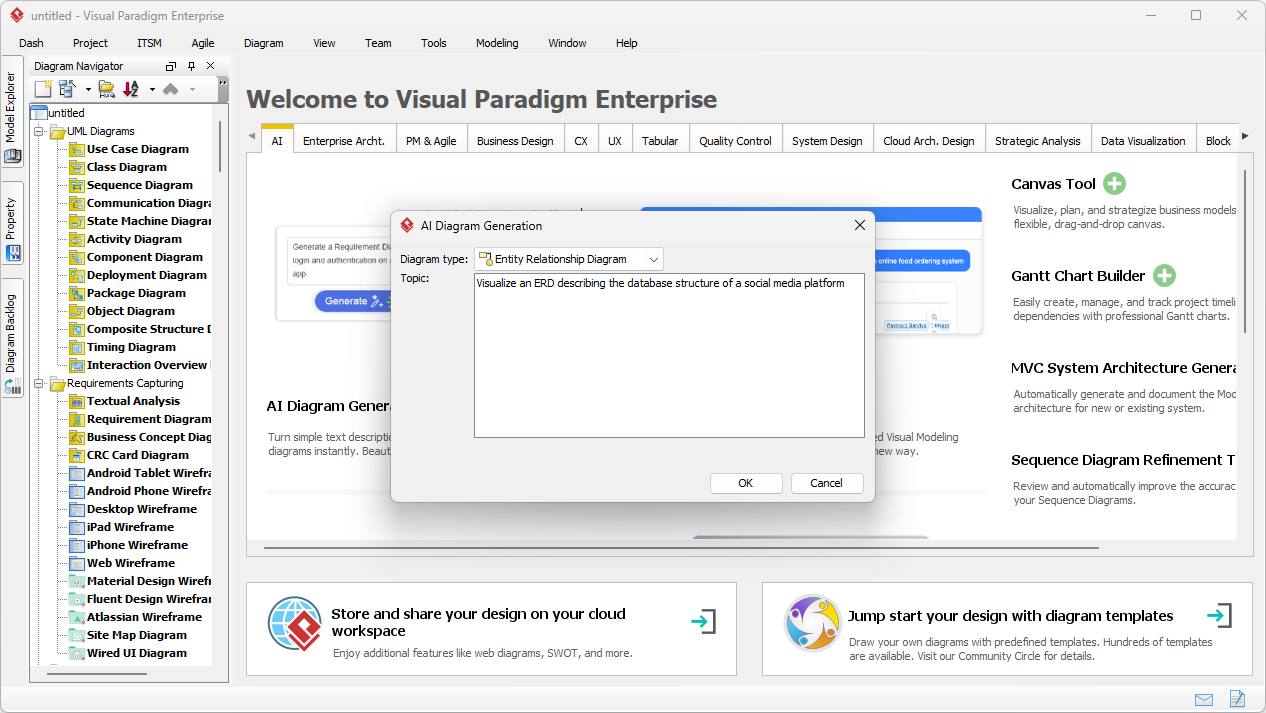
The journey toward a robust database begins with a clear vision. In Visual Paradigm Desktop, the process is initiated through a streamlined interface designed for maximum efficiency. Consider the scenario of a developer needing to visualize a social media database. Instead of manually creating tables, the user simply opens the AI Diagram Generation tool. This specialized AI-powered ERD maker prompts the user to select the diagram type and provide a topic. By entering a detailed prompt such as “Visualize an ERD describing the database structure of a social media platform,” the engine begins its analysis.
The interface is clean and authoritative, ensuring that the user remains in control of the modeling parameters. The AI analyzes the provided text to identify key entities—such as users and posts—and the cardinalities that define their interactions. This removes the “blank canvas” syndrome that often stalls the initial phases of system architecture. By providing a logical starting point, the tool ensures that the fundamental structure is sound before any manual refinement begins.
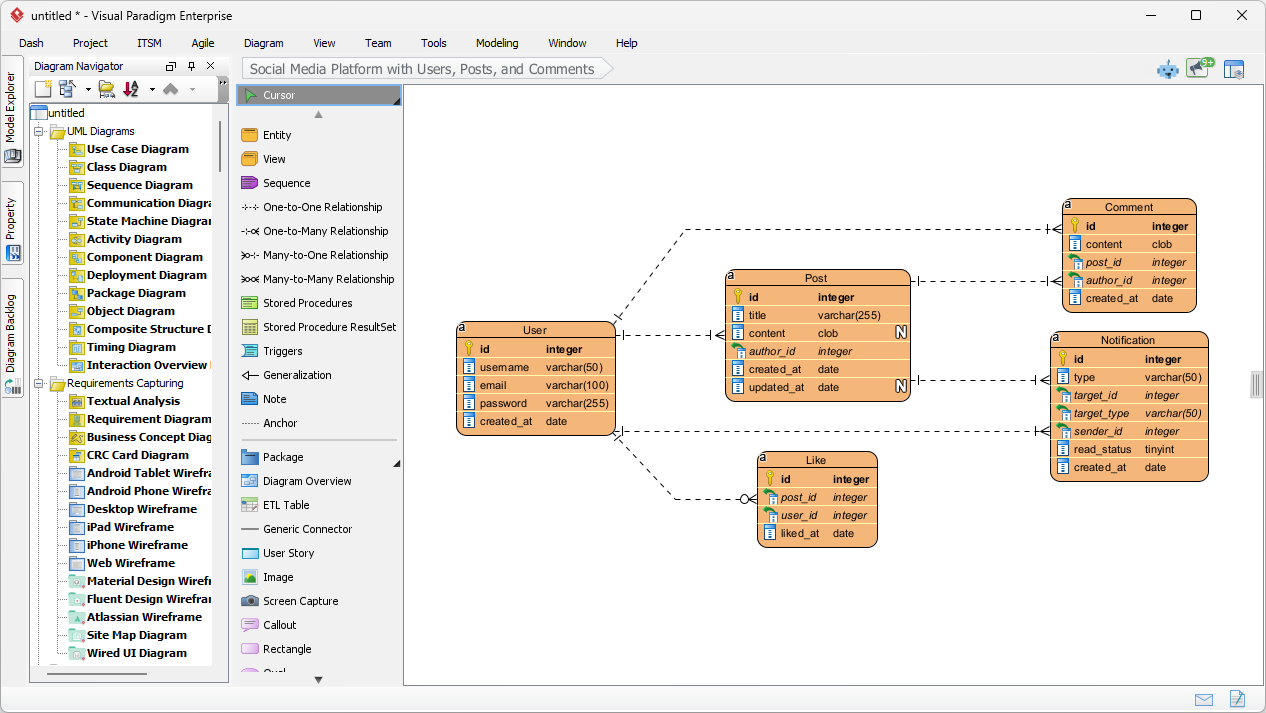
Once the “OK” button is clicked, the transformation is nearly instantaneous. The software generates a sophisticated Entity Relationship Diagram that populates a new diagram editor. In our social media example, the AI automatically constructs entities like ‘User’, ‘Post’, ‘Comment’, ‘Like’, and ‘Notification’. It identifies necessary attributes—such as user_id, email, and content—and assigns appropriate data types like integer, varchar, and clob. Most importantly, it maps the relationships: a user can have multiple posts (one-to-many), and a post can receive many likes (many-to-many through an associative entity).
This output is not a static image; it is a fully editable model. Users can immediately begin the “final 20%” of refinement—tweaking specific constraints, adding unique indexes, or expanding the schema to include specialized features. The visual style is crisp, with optimized layouts that make complex interconnections easily readable. This professional ERD software ensures that the transition from a conceptual prompt to a technical blueprint is seamless and logically consistent.
Guided Database Design with DB Modeler AI
Beyond the desktop, Visual Paradigm offers a specialized, web-based AI-powered database design app known as DB Modeler AI. This tool is specifically engineered for those who prefer a structured, step-by-step approach. It breaks down the monumental task of database creation into a manageable 7-step wizard. This process begins with a problem input and progresses through a Domain Class Diagram, eventually arriving at a detailed Entity-Relationship Diagram. It is particularly effective for ensuring design best practices like normalization and data integrity from the very beginning.
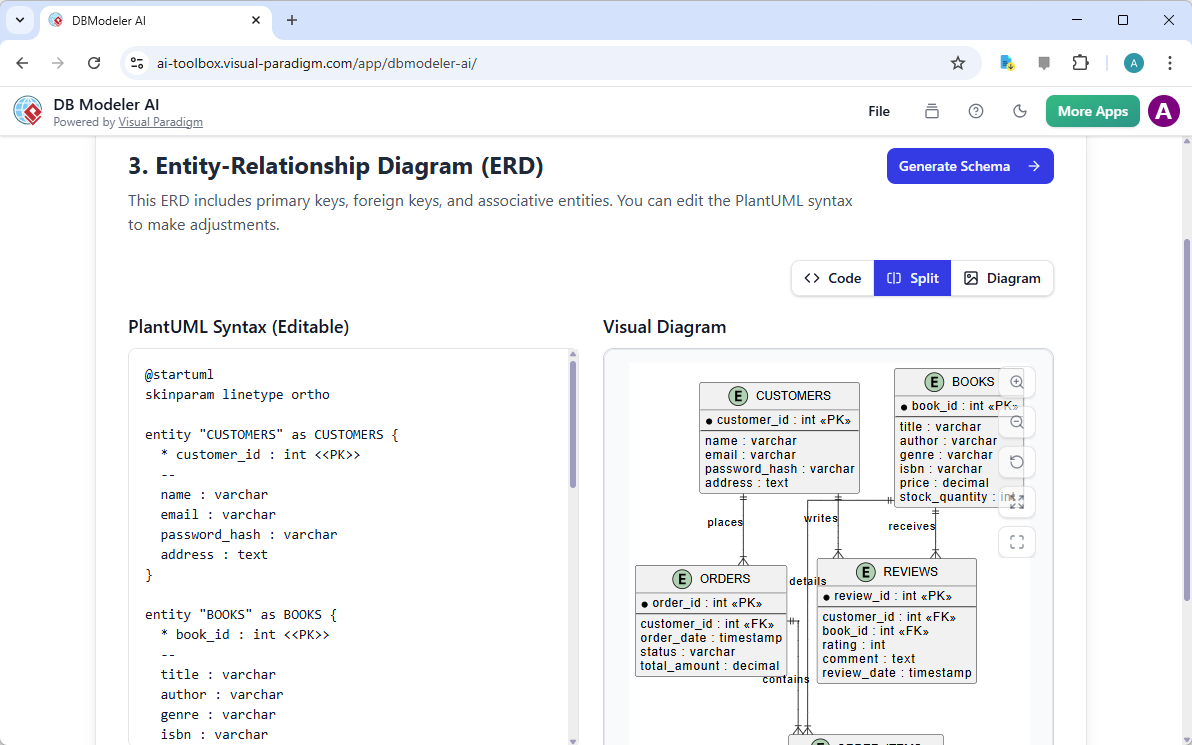
In Step 3 of this workflow, the AI takes the conceptual domain model and translates it into a technical ERD. For instance, in an “Online Bookstore” project, the tool clearly defines the relationships between ‘Customers’, ‘Books’, ‘Orders’, and ‘Reviews’. It automatically handles the complexity of primary and foreign key assignments. The interface provides a unique dual view: a PlantUML Syntax editor for those who prefer code-based adjustments and a Visual Diagram pane for traditional modeling. This flexibility makes it the best AI ERD generator for teams with varying technical preferences.
The 7-Step Evolution of a Database Schema
The DB Modeler AI environment ensures that no critical phase of the design process is overlooked. The AI-powered design workflow follows this logical progression:
- Problem Input: Define the project scope through natural language or AI-assisted descriptions.
- Domain Class Diagram: Visualize high-level business entities and their conceptual links.
- Entity-Relationship Diagram (ERD): Transition to a logical database model with defined attributes and keys.
- Initial Schema: Generate the first draft of the SQL DDL (Data Definition Language).
- Normalization: Refine the schema to eliminate redundancy and improve efficiency.
- Playground: Test the design in an interactive environment before implementation.
- Final Report: Export comprehensive documentation for stakeholders and developers.
Why Expertise and AI Synergy Matter
Using an easy-to-use AI ERD generator does not replace the need for architectural expertise; rather, it amplifies it. Visual Paradigm’s ecosystem is built on the principle that AI should handle the repetitive, structural drafting, leaving the human expert to handle the nuances of business logic and performance optimization. This synergy allows for rapid prototyping and iterative refinement. If a requirement changes midway through a project, the architect can simply update the description and let the AI assist in regenerating the affected components, ensuring that the documentation always matches the current vision.
The desktop edition’s ability to generate over 40 types of diagrams—including UML, SysML, and C4 models—makes it an indispensable AI visual modeling ecosystem. Whether you are an enterprise architect documenting a legacy system or a startup founder designing a new database from scratch, these tools provide the certainty and speed required in today’s fast-paced tech landscape. By reducing manual errors and automating the transition between different modeling standards, Visual Paradigm remains the best database modeling software for professional environments.
Conclusion: The Future of Database Modeling
The integration of generative AI into the modeling workflow represents a paradigm shift for data professionals. By utilizing an AI ERD generator, teams can drastically reduce the time spent on initial drafting, improve the accuracy of their schemas, and maintain high standards of documentation. Visual Paradigm has successfully bridged the gap between abstract business requirements and technical implementation. From the robust, offline capabilities of the desktop application to the guided, cloud-native experience of the DB Modeler AI, the tools for automated database design are more accessible and powerful than ever before. Embrace the efficiency of AI-powered database modeling software and transform how you build the foundations of your digital infrastructure.
Ready to experience the future of database architecture? You can begin your journey with our specialized web tools or download the comprehensive desktop suite. Try the AI ERD Generator today and see how quickly your ideas can become professional-grade models.
Take the Next Step in Professional Modeling
Experience the power of Visual Paradigm’s AI-Powered Visual Modeling and streamline your database design process.
- Online Database Modeling: Access the 7-step guided wizard at DB Modeler AI.
- Learn More: Discover the full capabilities of our AI tools at the DB Modeler AI Product Page.
- Desktop Power: For enterprise-grade, offline modeling, visit the main Visual Paradigm Website to explore the full desktop suite.
Related Links
- AI Textual Analysis – Transform Text into Visual Models Automatically: Use AI to analyze text documents and automatically generate diagrams such as UML, BPMN, and ERD for faster modeling and documentation.
- Visual Paradigm ERD Tool – Create Entity-Relationship Diagrams Online: A powerful, web-based ERD tool that enables users to design and visualize database schemas with ease using intuitive drag-and-drop features.
- Database Design with ERD Tools – Visual Paradigm Guide: Comprehensive guide on using ERD tools to design robust, scalable databases with best practices in data modeling and schema design.
- What is an Entity-Relationship Diagram (ERD)? – Visual Paradigm Guide: An in-depth explanation of ERDs, their components, and their importance in database design and data modeling.
- Free ERD Tool – Design Databases Online with Visual Paradigm: Access a free, no-cost ERD tool online for creating professional entity-relationship diagrams without installation or subscription.
- How to Draw Entities in Visual Paradigm ERD: Step-by-step user guide on creating and customizing entities in Visual Paradigm’s ERD tool for accurate database modeling.
- How to Model a Relational Database with ERD – Visual Paradigm Tutorial: Practical tutorial showing how to use ERDs to model relational databases from concept to implementation.
- Generating Database from ERD in Visual Paradigm: Detailed guide on automatically generating a database schema from an ERD using Visual Paradigm’s reverse engineering capabilities.
- Generate Class Diagram from ERD – Visual Paradigm Tutorial: Learn how to convert an ERD into a class diagram to support object-oriented design and development workflows.
Related posts:
 AI Entity Relationship Diagram Generator: Faster Database Design with Visual Paradigm
 AI Chen Notation ERD Generator: Professional Data Modeling with Visual Paradigm
 Visualizing Complex System States with the AI Object Diagram Generator in Visual Paradigm
 AI SysML Requirement Diagram Generator: Traceable Modeling with Visual Paradigm